OxiBonsai 0.2.0: Text-to-Image Comes to Pure Rust
A FLUX.2-Klein diffusion model. Text encoder, transformer, VAE, PNG encoder — all of it. Zero C/C++. Just oxibonsai image.
OxiBonsai 0.2.0: Text-to-Image Comes to Pure Rust
A FLUX.2-Klein diffusion model. Text encoder, transformer, VAE, PNG encoder — all of it. Zero C/C++. Just oxibonsai image.
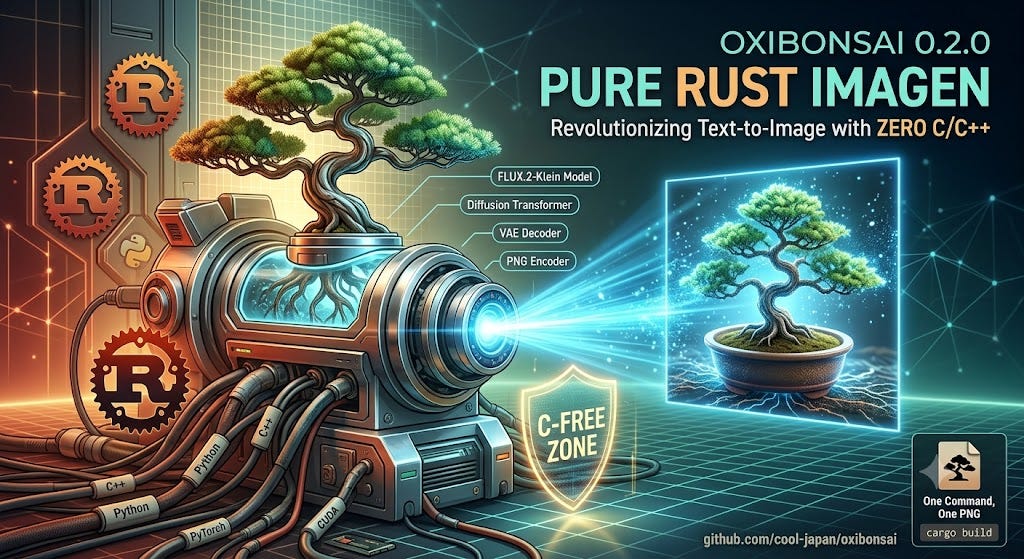
The image-generation stack has the same dirty secret the LLM stack does, only worse. To turn a prompt into a PNG today, you stand up PyTorch, link in the CUDA toolkit, pull diffusers and transformers and safetensors, pin a dozen Python versions, and then pray the wheels match your driver. The "model" is the easy part. The runtime is a tower of C, C++, and Python that breaks the moment you change machines.
When we shipped OxiBonsai v0.1.0 back in April, we asked what it would take to run an 8-billion-parameter LLM with a single cargo build. The answer was a zero-FFI, zero-C/C++ inference engine for PrismML's sub-2-bit Bonsai models — first the 1-bit line, then the ternary line.
This release asks the next question: what if the same engine could generate images, too — and still touch no C?
Today we’re releasing OxiBonsai v0.2.0 (June 2, 2026). It adds oxibonsai image: an end-to-end text-to-image pipeline built on the FLUX.2-Klein model, running entirely in Pure Rust. The whole thing — text encoder, diffusion transformer, VAE decoder, and PNG encoder — is C/C++/Fortran-free and zero-FFI, built on the COOLJAPAN ecosystem. To our knowledge, it's the first Pure Rust implementation of the Bonsai-Image FLUX.2-Klein pipeline anywhere.
Repository: github.com/cool-japan/oxibonsai
This release is ~177,000 lines of Rust, 4,667 tests passing, with a new oxibonsai-image crate sitting alongside the LLM engine. Same binary, same install, one new subcommand.
One command, one PNG
Let’s start where it matters: how hard is it to use? Here is text-to-image, start to finish, once the weights are on disk:
oxibonsai image \
    --prompt "a tiny bonsai tree in a ceramic pot" \
    --out bonsai.png \
    --seed 42 \
    --steps 4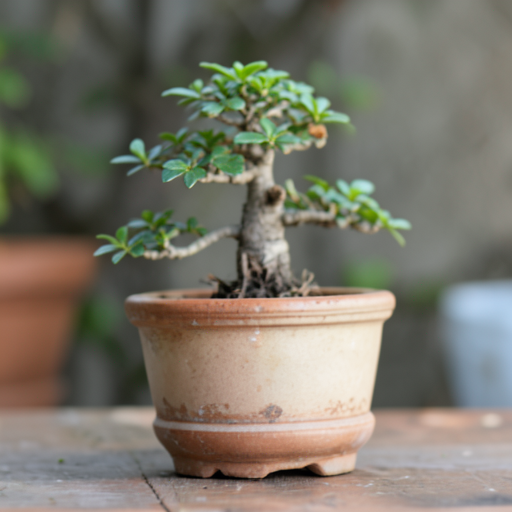
bonsai.png
That’s it. A 512×512 bonsai.png comes out the other side. No Python process, no server to babysit, no virtualenv. The four model paths can live in a .env file that oxibonsai auto-loads from the current directory (or any parent), so in day-to-day use you don't even pass them — the command above is the whole story.
oxibonsai image --prompt "A full-body 3D cartoon digital illustration of a small, elderly, friendly humanoid creature with smooth, vibrant cerulean-blue skin. He has chibi-like proportions with a large head, short limbs, and four-fingered hands. On his face is a very prominent, large, round bulbous nose, thick bushy white eyebrows, and a full, fluffy, snow-white beard covering his jawline. He is wearing a soft, bright red conical Phrygian cap that slumps slightly forward, and matching bright red, high-waisted footed trousers that completely cover his legs and feet. A tiny, stubby, round blue tail pokes out from the back of his pants. He has a warm, wise smile, standing in a whimsical forest, Pixar style, highly detailed." --seed 42 --out cartoon.png
cartoon.png
And it’s the same oxibonsai binary you already use for language models:
oxibonsai run    --model models/Ternary-Bonsai-1.7B.gguf --prompt "Explain RoPE"
oxibonsai chat   --model models/Bonsai-8B.gguf
oxibonsai serve  --model models/Ternary-Bonsai-1.7B.gguf --port 8080
oxibonsai image  --prompt "a red origami crane" --out crane.png
One CLI for sub-2-bit LLM inference and FLUX.2 text-to-image. cargo install oxibonsai-cli puts all of it on your PATH.
The pipeline, stage by stage
Under oxibonsai image is a four-stage pipeline, and every stage runs on the GPU by default (Metal on Apple Silicon, CUDA on NVIDIA) with a CPU fallback always available:
prompt ─▶ Text Encoder ─▶ DiT ─▶ VAE decoder ─▶ PNG
         (Qwen3-4B,     (ternary FLUX.2   (Autoencoder   (oxiarc-deflate)
          4-bit)         transformer,      KLFlux2)
                         TQ2_0_g128)
Stage What it is On-disk format Text Encoder Qwen3–4B, 4-bit MLX 4-bit .safetensors (~2.1 GB) DiT Ternary FLUX.2-Klein transformer GGUF, TQ2_0_g128 VAE decoder AutoencoderKLFlux2 FLUX.2 .safetensors PNG encode oxiarc-deflate PNG
Here is the detail that makes this a Bonsai model and not just “another diffusion port”: the diffusion transformer is ternary, quantized in TQ2_0_g128 — the exact same {-1, 0, +1} encoding OxiBonsai already uses for the Ternary-Bonsai language models. The image model reuses the ternary machinery we spent the entire 0.1.x cycle building. The text encoder is a 4-bit Qwen3-4B; the loader dequantizes on the fly, so the encoder is ~2.1 GB on disk rather than a 15 GB float dump.
Even the last step is ours: the PNG is encoded by oxiarc-deflate, the COOLJAPAN ecosystem's from-scratch DEFLATE implementation. There is no libpng, no zlib, no system codec anywhere in the chain.
No more Python in the loop
In earlier internal builds, getting the VAE weights ready meant a dev-time Python script that exported every tensor to .npy. That step is gone. 0.2.0 adds a native Pure-Rust safetensors loader for the VAE that reads the standard black-forest-labs/FLUX.2-dev checkpoint directly.
The loader does the unglamorous work the old Python script used to do, in-engine: it resolves every weight key the decoder asks for, performs a lossless bf16→f32 decode, transposes convolution weights from [O, I, kH, kW] to [O, kH, kW, I], and un-nests the to_out.0 ModuleList — then hands the decoder f32 values byte-identical to the old path.
So where is the only non-Rust step? Downloading the checkpoints. You fetch them once with the HuggingFace CLI:
pip install huggingface_hub # provides the `hf` CLI — used ONLY to downloadhf download prism-ml/text_encoder-mlx-4bit model.safetensors tokenizer.json --local-dir ./bonsai-te
hf download black-forest-labs/FLUX.2-dev vae/diffusion_pytorch_model.safetensors --local-dir ./flux2
hf download prism-ml/bonsai-image-ternary-4B-mlx-2bit diffusion_pytorch_model.safetensors --local-dir ./bonsai-ditThe DiT then gets converted to GGUF once — and that conversion is itself Pure Rust:
cargo run -p oxibonsai-model --example mlx_image_convert --release -- \
    ./bonsai-dit/diffusion_pytorch_model.safetensors ./bonsai-dit.gguf
Point a .env at the four resulting paths and you never think about them again. Everything after hf download — conversion, encoding, diffusion, decoding — is Rust at runtime.
Parity you can check
A common, fair objection to “we rewrote it in Rust” is: but does it produce the same thing? OxiBonsai’s answer is to make parity a hard, checkable gate rather than a vibe.
Every stage is validated against the MLX reference at cosine similarity ≥ 0.999, and the pipeline runs FP32 in / FP32 accumulate throughout — deliberately with no tensor-core (TF32 / FP16-MAC) shortcuts — precisely so that parity holds end to end. There are parity harnesses for each stage:
Harness What it checks te_parity Text-encoder output vs MLX reference (cos ≥ 0.999) dit_parity DiT forward across all 59 reference taps vae_parity VAE decode across all 11 reference taps vae_safetensors_parity Native loader vs an independent .npy reference, tensor-by-tensor, bit-identical
Reproducibility is part of the same story: --seed 42 reproduces the official reference sample, because the noise, position IDs, and schedule come from an MLX-exact Threefry RNG port. A given seed maps to the same initial latent it would under the reference — so when we say "byte-identical," we mean it, and you can run the harnesses yourself to confirm.
Performance
These are approximate, measured numbers for a 4-step generation. Remember the pipeline is intentionally FP32-throughout, trading raw speed for that ≥ 0.999 parity guarantee:
Platform Backend Steps Time / image NVIDIA A4000-class CUDA 4 ≈ 31.7 s Apple Silicon (M3-class) Metal (default-on) 4 ≈ 52–62 s
The CUDA path didn’t start there. It began at ≈ 101 s and came down to ≈ 31.7 s — about 3.2× faster — over this cycle’s GPU-offload work: a ~6× DiT GEMM speedup, a ~6.3× warp-cooperative flash-attention, and a ~59× stage-0 context-embedder ported from CPU to GPU. Every one of those optimizations landed while holding cosine ≥ 0.999. The point was never to win a benchmark by cutting corners; it was to get faster without moving off parity.
Still Pure Rust, all the way down
The image pipeline rests on the same foundation as the rest of OxiBonsai:
OxiBonsai 0.2.0 (sub-2-bit LLM inference + FLUX.2 text-to-image)
  ├── SciRS2     — tensor primitives, activation functions
  ├── OxiBLAS    — GEMM / GEMV + 1-bit / ternary compute kernels
  ├── OxiFFT     — RoPE acceleration
  ├── OxiArc     — from-scratch DEFLATE for PNG encoding
  └── NumRS2     — N-dimensional array backend
All default-feature dependencies are Pure Rust — zero C/C++/Fortran, zero FFI. The GPU backends (metal, native-cuda) are opt-in features that bring in vendor drivers; the default build is CPU-only Pure Rust. cargo build --release remains the entire deployment story, on macOS, Linux, and Windows alike.
The LLM engine hasn’t gone anywhere, either. The full Bonsai family — 1-bit Q1_0_g128 and ternary TQ2_0_g128, from 1.7B up to 8B — still runs through the same fused GPU full-forward path, the same OpenAI-compatible server, the same observability stack. 0.2.0 grows the project from ~156k to ~177k lines of Rust and from 4,553 to 4,667 passing tests, mostly on the strength of the new image crate.
Try it
Install the CLI:
# Apple Silicon
cargo install oxibonsai-cli --features metal
# NVIDIA
cargo install oxibonsai-cli --features native-cuda
Build with your GPU feature, set four paths in a .env, and generate:
# Apple Silicon
cargo build --release --features metal
# NVIDIA
cargo build --release --features native-cuda
oxibonsai image --prompt "a tiny bonsai tree in a ceramic pot" --out bonsai.png --seed 42 --steps 4The full walkthrough — from nothing on disk to a generated PNG — is in the image-generation guide, and every flag and environment variable is documented in the CLI reference:
- Image guide:
[docs/IMAGEN.md](https://github.com/cool-japan/oxibonsai/blob/master/docs/IMAGEN.md) - CLI reference:
[docs/CLI.md](https://github.com/cool-japan/oxibonsai/blob/master/docs/CLI.md)
Sponsorship
OxiBonsai is developed and maintained by COOLJAPAN OU (Team Kitasan).
The COOLJAPAN Ecosystem is one of the largest Pure Rust scientific-computing efforts in existence — 75+ projects, hundreds of crates, and millions of lines of Rust across scientific computing, machine learning, quantum computing, geospatial analysis, legal technology, and multimedia. Every line is written and maintained by a small dedicated team committed to a C/Fortran-free future for software.
If you find OxiBonsai useful — or if you simply believe the AI stack should be memory-safe and sovereign — please consider supporting continued development:
**github.com/sponsors/cool-japan**
Text to image, with no C in sight. The future of AI is safe, fast, and sovereign — and it’s written in Rust.
— KitaSan, COOLJAPAN OU
#Rust #AI #StableDiffusion #FLUX #TextToImage #MachineLearning
메타데이터
- post_id
- 354daed1500b
- slug
- oxibonsai-0-2-0-text-to-image-comes-to-pure-rust-354daed1500b
- url
- https://medium.com/@kitasanio/oxibonsai-0-2-0-text-to-image-comes-to-pure-rust-354daed1500b
- canonical_url
- https://medium.com/@kitasanio/oxibonsai-0-2-0-text-to-image-comes-to-pure-rust-354daed1500b
- author_url
- https://medium.com/@kitasanio
- status
- ok
- fetched_at
- 2026-06-10 18:44:10