Raster vs Vector: How Image Types Affect Design Quality
Raster vs vector is a foundational concept in design, yet it’s often misunderstood or oversimplified. The image type you choose directly…
Raster vs Vector: How Image Types Affect Design Quality
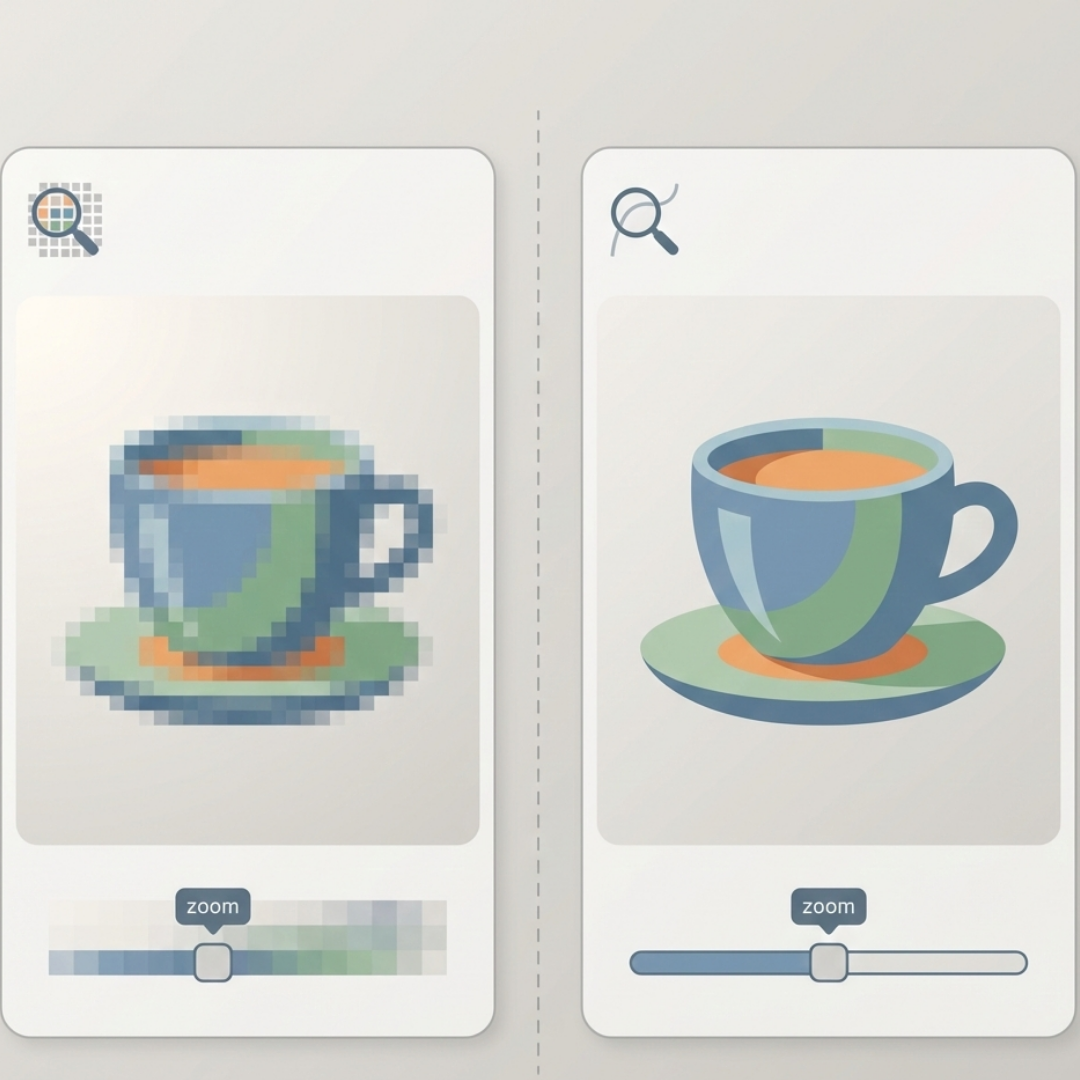
A visual comparison showing how raster images rely on pixels while vector graphics remain sharp at any size.
Raster vs vector is a foundational concept in design, yet it’s often misunderstood or oversimplified. The image type you choose directly affects design quality, clarity, performance, and how your visuals scale across devices, platforms, and print formats.
Many beginners hear that “vector is scalable” and “raster is pixel-based” and stop there. But in real-world design workflows — especially modern, AI-assisted ones like those used in creative platforms such as Freepixel — the difference goes much deeper. This guide explains how raster vs vector truly impacts design quality, when each format works best, and how professionals combine both for reliable, high-quality results.
Quick Overview
- Raster images use pixels, making them ideal for photos and detailed visuals — but they lose quality when resized.
- Vector images use mathematical paths, so they stay sharp at any size and work best for logos, icons, and branding.
- Design quality depends on context: raster for realism, vector for scalability and consistency.
- Modern design workflows combine both, using raster for imagery and vector for UI, logos, and layouts.
- Choosing the wrong format leads to blur, pixelation, or poor performance, especially across screens and print.
Raster vs Vector: The Core Difference Explained
Raster images are made from fixed pixels, while vector images are defined by mathematical paths. This single difference determines how an image scales, how sharp it looks, how large the file becomes, and how well it performs across web and print. Raster images prioritize visual detail. Vector images prioritize precision and scalability. Neither is better by default — the quality outcome depends on choosing the right format for the job.
What Is the Difference Between Raster and Vector Images?
Raster Images Explained
Raster images are composed of pixels — tiny squares of color arranged in a grid. Each pixel stores colour information, and together they create the full image.Common raster formats include:
- JPEG / JPG
- PNG
- WebP
- GIF
- TIFF
- PSD
Key characteristics of raster images:
- Resolution-dependent
- Lose sharpness when scaled up
- Excellent at capturing fine detail and texture
- File size increases with resolution
Raster images are best suited for photographs, complex illustrations, and visuals where realism matters.
Vector Images Explained
Vector images are built using mathematical instructions rather than pixels. Shapes are defined by points, lines, and curves that can be recalculated at any size.
Common vector formats include:
- SVG
- AI
- EPS
- PDF (vector-based)
Key characteristics of vector images:
- Resolution-independent
- Infinitely scalable without quality loss
- Clean, precise edges
- Ideal for structured graphics
Vectors do not store photographic detail. Instead, they store instructions on how the image should be drawn.
How Raster vs Vector Impacts Design Quality
Image Sharpness and Edge Clarity
Raster images appear sharp only at their native resolution. When enlarged beyond that point, pixels become visible and edges soften.
Vector images remain crisp at all sizes. Whether displayed as a small icon or printed on a large banner, the edges stay clean. This is why logos and brand assets are almost always created as vectors.
Scalability Across Screens and Devices
Designs today must adapt to:
- Smartphones
- Tablets
- Laptops
- Large monitors
- High-resolution displays
Raster images often require multiple exports to support these sizes. Vector images scale automatically without additional files, making them easier to manage in responsive design systems.
Detail, Texture, and Realism
Raster images excel at:
- Photography
- Gradients and shadows
- Organic textures
- Complex lighting
Vectors struggle with realism. While modern tools can simulate gradients, vectors cannot truly replicate photographic detail. For this reason, raster remains the preferred format for marketing visuals, social media graphics, and image-heavy layouts.
Resolution, DPI, and PPI Explained Simply
Why Resolution Matters
- PPI (Pixels Per Inch): Determines clarity on screens
- DPI (Dots Per Inch): Determines clarity in print
Common standards:
- Web images: 72–144 PPI
- Print images: 300 DPI
Raster images must be prepared at the correct resolution for their final output. Vector images avoid this issue entirely because they scale freely and are rasterised only at the moment of display or printing.
Rasterisation: Why Vector Images Still Use Pixels
All screens and printers ultimately display pixels. Even vector images are converted into pixels during output.
The key difference is timing:
- Raster images are pixel-based from the start
- Vector images are converted to pixels at the final output size
Because vectors delay rasterisation, they preserve sharpness regardless of scale.
Anti-Aliasing and Visual Artefacts
Raster images can show:
- Pixelation
- Jagged edges (aliasing)
Anti-aliasing smooths edges by blending neighbouring pixels, but it cannot restore lost detail.
Vector images avoid aliasing at the design stage because edges remain mathematically defined until rendering.
Raster vs Vector in Web Design
Performance and User Experience
Raster strengths:
- Ideal for photos and hero images
- Modern formats like WebP reduce file size
Vector strengths:
- SVG icons scale cleanly
- Smaller file sizes for simple graphics
- Consistent clarity on all screen resolutions
Best practice: Use raster images for photographs and vector graphics for icons, logos, and interface elements. This balance improves both performance and visual consistency.
Raster vs Vector in Print Design
Print highlights quality issues immediately.
- Low-resolution raster images appear blurry or soft
- Vector graphics print cleanly at any size
This is why professional print workflows rely heavily on vector files for logos, packaging, signage, and large-format designs.
Can Raster Images Be Converted to Vector?
Yes, but with limitations.
Raster-to-vector conversion works best for:
- Simple logos
- Icons
- High-contrast artwork
It performs poorly with:
- Photographs
- Gradients
- Detailed textures
AI-assisted tools can speed up vectorisation, but they cannot recreate details that don’t exist in the original image.
Real-World Design Workflow Example
A common professional workflow looks like this:
- Vector logo and brand system
- Raster photography for visuals
- Vector icons and UI components
- Raster exports for social media, ads, and campaigns
Using each image type where it performs best leads to more predictable quality outcomes.
Common Mistakes Designers Make with Raster and Vector
- Using low-resolution raster logos for print
- Exporting vectors as raster too early
- Scaling raster images beyond their native size
- Using raster icons instead of SVG in interfaces
Avoiding these mistakes prevents blurry visuals and unnecessary rework.
When Should You Use Raster or Vector?
Use Raster When:
- Working with photographs
- Designing realistic visuals
- Editing pixel-level detail
Use Vector When:
- Creating logos and icons
- Designing scalable brand assets
- Preparing print materials
Most professional projects use both formats together.
Conclusion
Raster vs vector is not about choosing one format over the other. It’s about understanding how each image type affects design quality.
When used correctly:
- Visuals stay sharp
- Performance improves
- Print results are consistent
- Design workflows become more efficient
Understanding image formats helps you avoid quality issues before they become visible problems.
Keep Exploring
If you’re working with both raster and vector images, spending time experimenting with how formats behave at different sizes and outputs can be just as valuable as reading about them. Tools like **Freepixel** can help you explore these differences hands-on — whether you’re testing image clarity, exporting for different use cases, or refining visuals before publishing.
Exploring practical workflows alongside theory often makes the distinction between raster and vector much easier to apply in real projects.
FAQ: Raster vs Vector
What is the main difference between raster and vector images?
Raster images are pixel-based, while vector images are math-based and scalable without quality loss.
Why are logos usually vector files?
Logos must remain sharp across all sizes, from small icons to large prints.
Is SVG better than PNG?
SVG is better for icons and graphics. PNG is better for detailed images.
Does image type affect SEO?
Indirectly. Faster-loading, clearer visuals improve user experience, which supports SEO performance.
메타데이터
- post_id
- 357e02c7cb99
- slug
- raster-vs-vector-how-image-types-affect-design-quality-357e02c7cb99
- url
- https://medium.com/@Allenwriter/raster-vs-vector-how-image-types-affect-design-quality-357e02c7cb99
- canonical_url
- https://medium.com/@Allenwriter/raster-vs-vector-how-image-types-affect-design-quality-357e02c7cb99
- author_url
- https://medium.com/@Allenwriter
- status
- ok
- fetched_at
- 2026-06-26 12:24:55