Windows Registry Explained in Simple Words
Most people use their Windows computer every day without realizing there’s a hidden database quietly working in the background. This…
Windows Registry Explained in Simple Words
Most people use their Windows computer every day without realizing there’s a hidden database quietly working in the background. This database is called the Windows Registry, and it’s what helps your computer remember all the little details from your wallpaper to installed apps, hardware settings, and even how your account loads when you sign in.
For beginners, the Registry can sound scary because you often hear warnings like “Changing this may break your system.” And yes, that’s true, but learning about the Registry isn’t about making risky changes. It’s about understanding how Windows organizes its settings and why that matters for IT pros and cybersecurity experts.
What Is the Windows Registry?
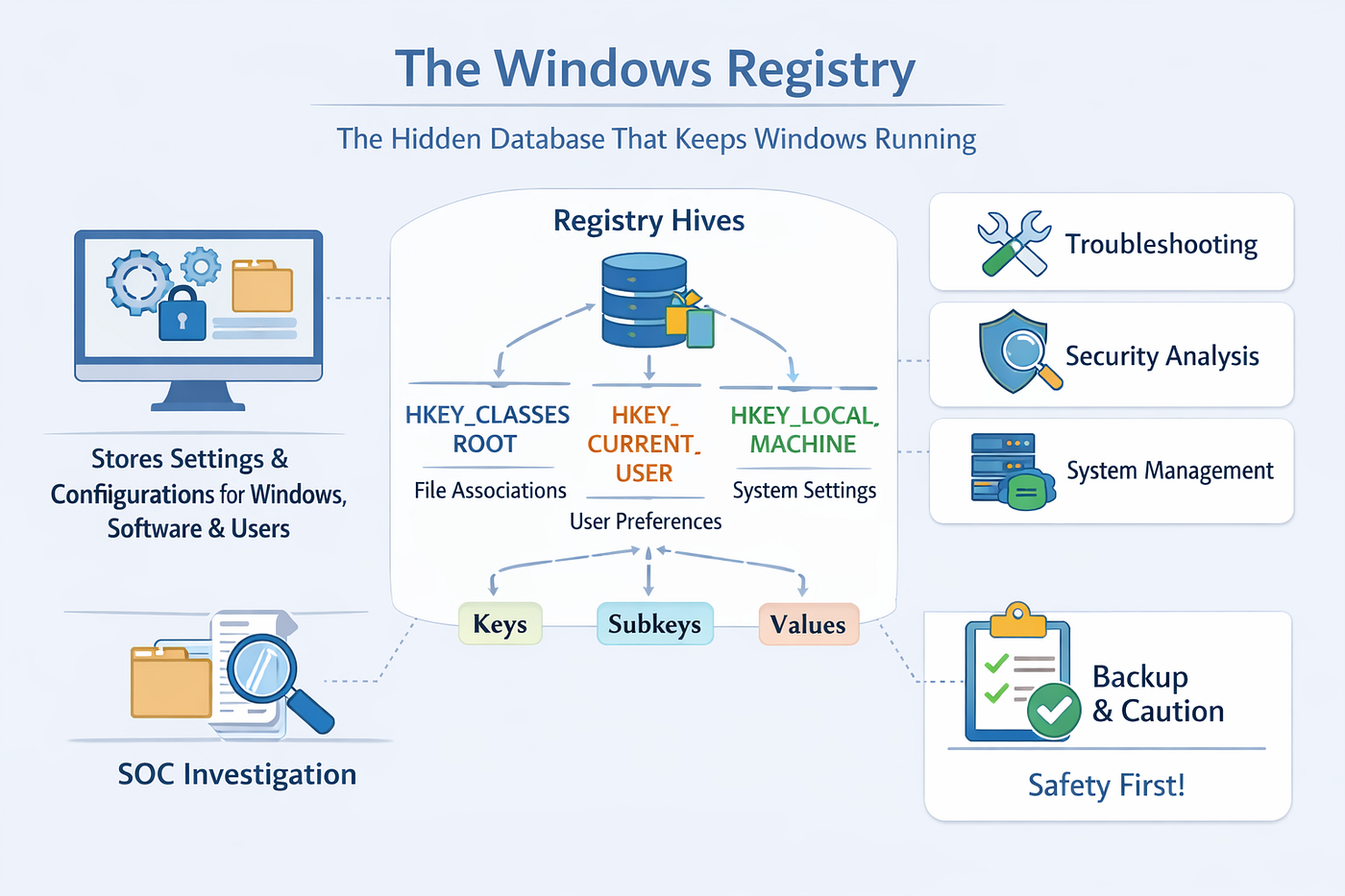
Think of the Registry as a giant filing cabinet where Windows stores important information. Instead of keeping every setting in separate files, Windows puts most of them here. Every time your computer starts, opens a program, or loads your profile, it checks the Registry to know what to do.
The Registry is divided into big sections called Hives, such as:
- HKEY_CLASSES_ROOT: Keeps track of file types and how they open.
- HKEY_CURRENT_USER : Holds settings just for the person currently logged in.
- HKEY_LOCAL_MACHINE: Stores system-wide settings for hardware and software.
Inside these hives are keys, subkeys, and values, which work like folders and files in File Explorer.
Why Should You Care About the Registry?
Many people think the Registry is only for developers, but it’s actually useful for lots of roles:
- IT Support Engineers use it to fix app problems and check system settings.
- System Administrators rely on it to understand how Windows behaves across many computers.
- Cybersecurity Analysts often check it for clues when investigating suspicious activity.
Knowing how Windows organizes its data makes troubleshooting faster and gives you deeper insight into how the system works.
A Real Life Security Investigation Example
Imagine a company’s SOC team gets an alert about strange activity on an employee’s computer. A suspicious app tried to stay on the system even after running once.
Instead of deleting files right away, analysts first look at the Registry. They check areas linked to startup programs and app settings, comparing them with normal baselines. Unexpected changes don’t always mean malware, but they can be important clues when combined with logs and alerts.
The Registry alone doesn’t tell the full story, but it’s often a key piece of the puzzle in understanding what happened.
Safety First Before Making Changes
Because the Registry controls critical settings, professionals are very careful before editing it. They usually:
- Back up the Registry or create a restore point.
- Document changes before applying them.
- Test modifications in a safe environment first.
- Verify results before rolling them out widely.
If you’re just learning, it’s best to explore the Registry with Regedit without changing anything. That way, you can see its structure safely.
Final Thoughts
The Windows Registry is one of the most important, yet least visible parts of Windows. It quietly manages the settings that make your computer, hardware, and apps work together.
Learning about it isn’t about randomly editing values. It’s about understanding how Windows is built, sharpening your troubleshooting skills, and building the foundation needed for roles like IT admin, SOC analyst, or cybersecurity professional.
The more you know about how Windows stores and manages information, the more confident you’ll be when solving problems or investigating security incidents. In cybersecurity, understanding the system itself often makes the difference between just using tools and truly knowing what the computer is telling you.
메타데이터
- post_id
- 35aa85b331a5
- slug
- windows-registry-explained-in-simple-words-35aa85b331a5
- url
- https://medium.com/@himadrisingh061/windows-registry-explained-in-simple-words-35aa85b331a5
- canonical_url
- https://medium.com/@himadrisingh061/windows-registry-explained-in-simple-words-35aa85b331a5
- author_url
- https://medium.com/@himadrisingh061
- status
- ok
- fetched_at
- 2026-07-14 10:19:40