Keeping PII and PCI Out of Your LLM Pipeline: A Practical Guardrail Pattern (Part 1)
Large language models are remarkably good at doing exactly what you ask — including, unfortunately, processing sensitive data you never…
Keeping PII and PCI Out of Your LLM Pipeline: A Practical Guardrail Pattern (Part 1)
Photo by Neum0 on Unsplash*
Large language models are remarkably good at doing exactly what you ask — including, unfortunately, processing sensitive data you never meant to send them. In financial services, that’s not a hypothetical risk: a stray Social Security number, credit card number, or bank routing number sitting in a prompt can turn a helpful chatbot into a compliance incident. Most teams throw cautionary notes “don’t type sensitive data” warning in the UI and call it a day. That’s not a control, it’s a suggestion. This series walks through building an actual guardrail — one that inspects every question before it reaches an LLM, classifies whether it’s even in-scope for the assistant to answer, and rejects anything carrying personally identifiable information (PII) or payment card data (PCI) before a single token gets generated. Part 1 covers the core detection and orchestration logic; Part 2 will include cloud native components like APIM, Content Safety, AI Language services in front of a model hosted in Azure AI Foundry. This is a follow up from our previous article, if you not had a chance to check it please do.
An SSN, a credit card number, and a home address walk into an LLM. The LLM says, “Sorry, we have a strict no-PII policy here.”
They say, “That’s fine, we’ll just wait in the logs instead.”
Here’s what we are trying to build in this section
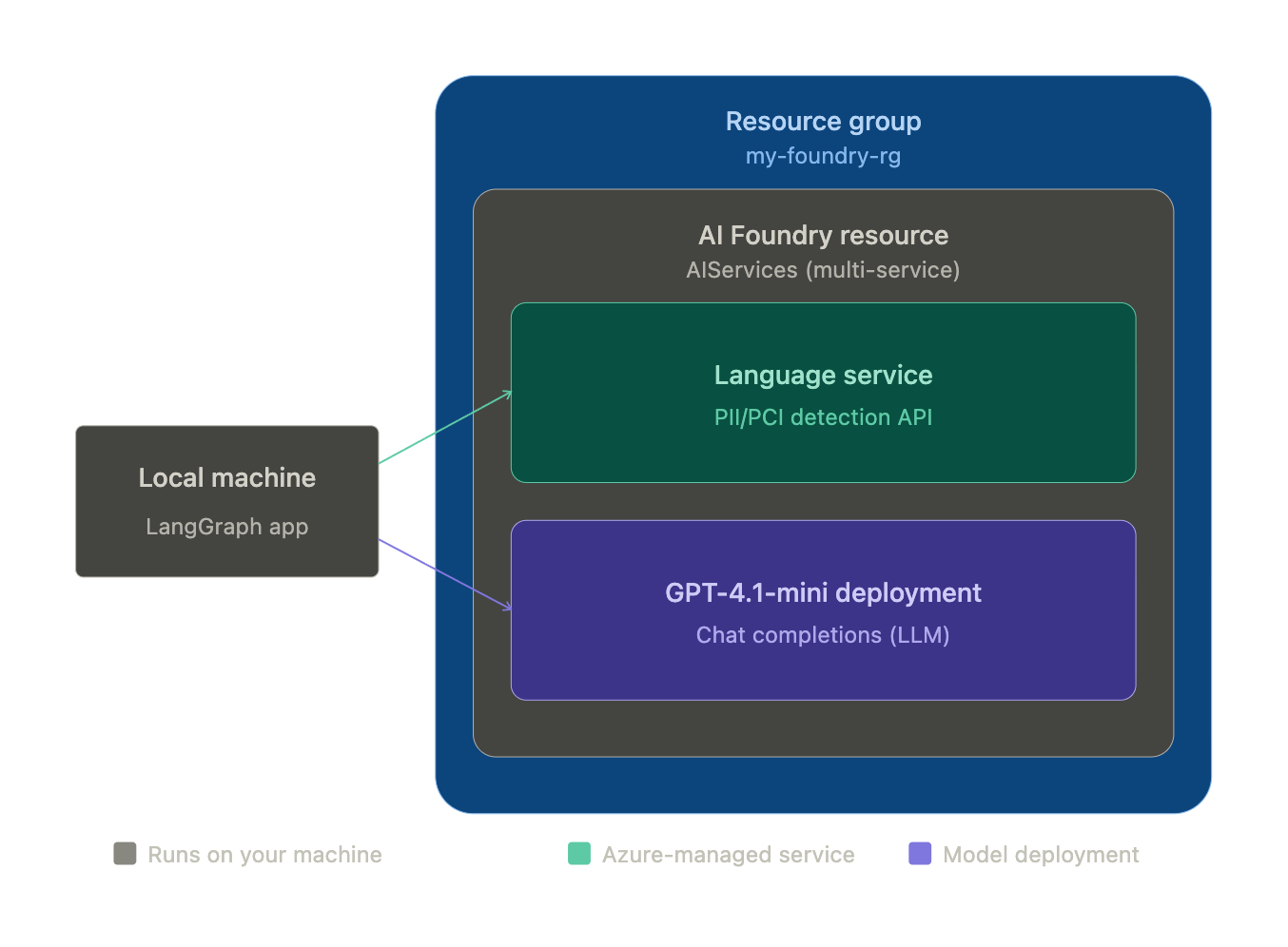
We build a simple LangGraph app running locally, making two separate calls into the same Azure resource group — one to the Language service for PII/PCI detection, one to the GPT-4.1-mini deployment for scope classification and answering — both sitting inside a single AI Foundry AIServices resource.
Let’s get started
1. Create the resource group
RG=my-foundry-rg
LOCATION=eastus
FOUNDRY_NAME=my-foundry-resource-01
FOUNDRY_PROJECT=my-foundry-project

az group create --name $RG --location $LOCATION
Every resource in the solution lives inside a single resource group, so it can be managed, billed, and torn down as one unit.
2. Create the AI Foundry resource
az cognitiveservices account create \
  --name $FOUNDRY_NAME \
  --resource-group $RG \
  --kind AIServices \
  --sku S0 \
  --location $LOCATION \
  --custom-domain $FOUNDRY_NAME \
  --allow-project-management
This provisions the multi-service AIServices resource that hosts both the Language service and model deployments under one endpoint. --allow-project-management is set here because it can't be added later.
3. Create a Foundry project
az cognitiveservices account project create \
  --name $FOUNDRY_NAME \
  --resource-group $RG \
  --project-name $FOUNDRY_PROJECT \
  --location $LOCATION
A project is the working container inside the resource where models get deployed and used — it’s the unit you’d open in the Foundry portal.
4. Verify provisioning succeeded
az cognitiveservices account project show \
  --name $FOUNDRY_NAME \
  --resource-group $RG \
  --project-name $FOUNDRY_PROJECT \
  --query properties.provisioningState --output tsv
# Execution Results
Succeeded
A simple health check before moving forward, confirming the project reached Succeeded rather than silently failing.
5. Retrieve keys and endpoint
az cognitiveservices account keys list \
  --name $FOUNDRY_NAME \
  --resource-group $RG

FOUNDRY_ENDPOINT=$(az cognitiveservices account show \
  --name $FOUNDRY_NAME \
  --resource-group $RG \
  --query properties.endpoint --output tsv)

FOUNDRY_KEY=$(az cognitiveservices account keys list \
  --name $FOUNDRY_NAME \
  --resource-group $RG \
  --query key1 --output tsv)
These credentials are what the application code — and later, the Azure Function — uses to authenticate against the resource.
6. Deploy GPT-4.1-mini
az cognitiveservices account deployment create \
  --name $FOUNDRY_NAME \
  --resource-group $RG \
  --deployment-name gpt-4.1-mini \
  --model-name gpt-4.1-mini \
  --model-version "2025-04-14" \
  --model-format OpenAI \
  --sku-name GlobalStandard \
  --sku-capacity 10
This is the model doing double duty in the graph — classifying whether a question is in scope, and generating the final answer once a request clears both gates.
7. Verify the deployment succeeded
az cognitiveservices account deployment show \
  --deployment-name gpt-4.1-mini \
  --name $FOUNDRY_NAME \
  --resource-group $RG \
  --query properties.provisioningState -o tsv
GPT deployments provision quickly with no external attestation step, unlike Anthropic models on Foundry, so this should return Succeeded almost immediately.
8. Capture the OpenAI-compatible endpoint and key
FOUNDRY_OPENAI_ENDPOINT="https://${FOUNDRY_NAME}.openai.azure.com"
FOUNDRY_OPENAI_KEY=$(az cognitiveservices account keys list \
  --name $FOUNDRY_NAME --resource-group $RG --query key1 -o tsv)
This is the specific endpoint format the LangGraph app’s AzureChatOpenAI client needs — distinct from the general resource endpoint used for the Language service calls.
Here’s what our LangGraph code does

Let’s get started with the code
1. Initialize the project
bash
mkdir pii_pci_check && cd pii_pci_check
uv init --name pii-pci-check --python 3.12
This creates pyproject.toml, .python-version, and a starter main.py — you'll drop your actual script in as lgraph_text_check.py instead.
2. Add dependencies
uv add langgraph langchain-openai azure-ai-textanalytics azure-core pydanticThis resolves and pins everything into pyproject.toml and uv.lock, and creates the .venv automatically — no separate venv/pip install step needed.
3. Add the script
Save your code as lgraph_text_check.py in the project root (same level as pyproject.toml).
import os
from typing import TypedDict
from pydantic import BaseModel
from langgraph.graph import StateGraph, END
from langchain_openai import AzureChatOpenAI
from azure.ai.textanalytics import TextAnalyticsClient
from azure.core.credentials import AzureKeyCredential
from azure.core.exceptions import HttpResponseError

PCI_CATEGORIES = {
    "CreditCardNumber",
    "USBankAccountNumber",
    "InternationalBankingAccountNumber",
    "SWIFTCode",
    "ABARoutingNumber",
    "SortCode",
}

llm = AzureChatOpenAI(
    azure_endpoint=os.environ["FOUNDRY_OPENAI_ENDPOINT"],
    api_key=os.environ["FOUNDRY_OPENAI_KEY"],
    azure_deployment="gpt-4.1-mini",
    api_version="2024-10-21",
)

lang_client = TextAnalyticsClient(
    endpoint=os.environ["FOUNDRY_ENDPOINT"],
    credential=AzureKeyCredential(os.environ["FOUNDRY_KEY"]),
)

class FinancialClassification(BaseModel):
    is_financial: bool

classifier_llm = llm.with_structured_output(FinancialClassification)

class GraphState(TypedDict):
    question: str
    is_financial: bool
    has_pii: bool
    has_pci: bool
    status: str
    answer: str

def classify_financial(state: GraphState) -> GraphState:
    prompt = (
        "Is this question about finance, banking, investing, payments, "
        "loans, mortgages, credit, or financial institutions?\n\n"
        f"Question: {state['question']}"
    )
    result = classifier_llm.invoke(prompt)
    state["is_financial"] = result.is_financial
    return state

def route_financial(state: GraphState) -> str:
    return "pii_pci_check" if state["is_financial"] else "reject_non_financial"

def reject_non_financial(state: GraphState) -> GraphState:
    state["status"] = "rejected_non_financial"
    return state

def pii_pci_check(state: GraphState) -> GraphState:
    try:
        results = lang_client.recognize_pii_entities([state["question"]], language="en")
    except HttpResponseError:
        state["status"] = "error_language_service"
        state["has_pii"] = True
        state["has_pci"] = True
        return state

    doc_result = results[0]
    if doc_result.is_error:
        state["status"] = "error_language_service"
        state["has_pii"] = True
        state["has_pci"] = True
        return state

    has_pii = False
    has_pci = False
    for entity in doc_result.entities:
        if entity.category in PCI_CATEGORIES:
            has_pci = True
        else:
            has_pii = True

    state["has_pii"] = has_pii
    state["has_pci"] = has_pci
    return state

def route_pii_pci(state: GraphState) -> str:
    if state["has_pii"] or state["has_pci"]:
        return "reject_pii_pci"
    return "answer_question"

def reject_pii_pci(state: GraphState) -> GraphState:
    if state.get("status") != "error_language_service":
        if state["has_pci"]:
            state["status"] = "rejected_pci"
        else:
            state["status"] = "rejected_pii"
    return state

def answer_question(state: GraphState) -> GraphState:
    response = llm.invoke(state["question"])
    state["answer"] = response.content
    state["status"] = "answered"
    return state

graph = StateGraph(GraphState)
graph.add_node("classify_financial", classify_financial)
graph.add_node("reject_non_financial", reject_non_financial)
graph.add_node("pii_pci_check", pii_pci_check)
graph.add_node("reject_pii_pci", reject_pii_pci)
graph.add_node("answer_question", answer_question)

graph.set_entry_point("classify_financial")
graph.add_conditional_edges("classify_financial", route_financial)
graph.add_conditional_edges("pii_pci_check", route_pii_pci)
graph.add_edge("reject_non_financial", END)
graph.add_edge("reject_pii_pci", END)
graph.add_edge("answer_question", END)

app = graph.compile()

def run(question: str) -> GraphState:
    return app.invoke({"question": question})

if __name__ == "__main__":
    tests = [
        "What is the current interest rate on a 30-year mortgage?",
        "What's the weather like in Paris today?",
        "My card number is 4532 0151 1283 0366, can you check my account balance?",
    ]
    for q in tests:
        result = run(q)
        print(q, "->", result["status"])
5. Run it
uv run lgraph_text_check.py

# Execution result

/Users/krishnansriram/Projects/Azure/FoundryLanguage/pii_pci_check/.venv/lib/python3.13/site-packages/pydantic/main.py:475: UserWarning: Pydantic serializer warnings:
  PydanticSerializationUnexpectedValue(Expected `none` - serialized value may not be as expected [field_name='parsed', input_value=FinancialClassification(is_financial=True), input_type=FinancialClassification])
  return self.__pydantic_serializer__.to_python(
What is the current interest rate on a 30-year mortgage? -> answered
/Users/krishnansriram/Projects/Azure/FoundryLanguage/pii_pci_check/.venv/lib/python3.13/site-packages/pydantic/main.py:475: UserWarning: Pydantic serializer warnings:
  PydanticSerializationUnexpectedValue(Expected `none` - serialized value may not be as expected [field_name='parsed', input_value=FinancialClassification(is_financial=False), input_type=FinancialClassification])
  return self.__pydantic_serializer__.to_python(
What's the weather like in Paris today? -> rejected_non_financial
/Users/krishnansriram/Projects/Azure/FoundryLanguage/pii_pci_check/.venv/lib/python3.13/site-packages/pydantic/main.py:475: UserWarning: Pydantic serializer warnings:
  PydanticSerializationUnexpectedValue(Expected `none` - serialized value may not be as expected [field_name='parsed', input_value=FinancialClassification(is_financial=True), input_type=FinancialClassification])
  return self.__pydantic_serializer__.to_python(
My card number is 4532 0151 1283 0366, can you check my account balance? -> rejected_pci
uv run automatically syncs the environment against the lockfile before executing, so if you or a teammate pulls the repo fresh, the first uv run will provision the exact same dependency versions without any manual setup step.
We now have a good start
Photo by Irham Setyaki on Unsplash
Local to Azure function
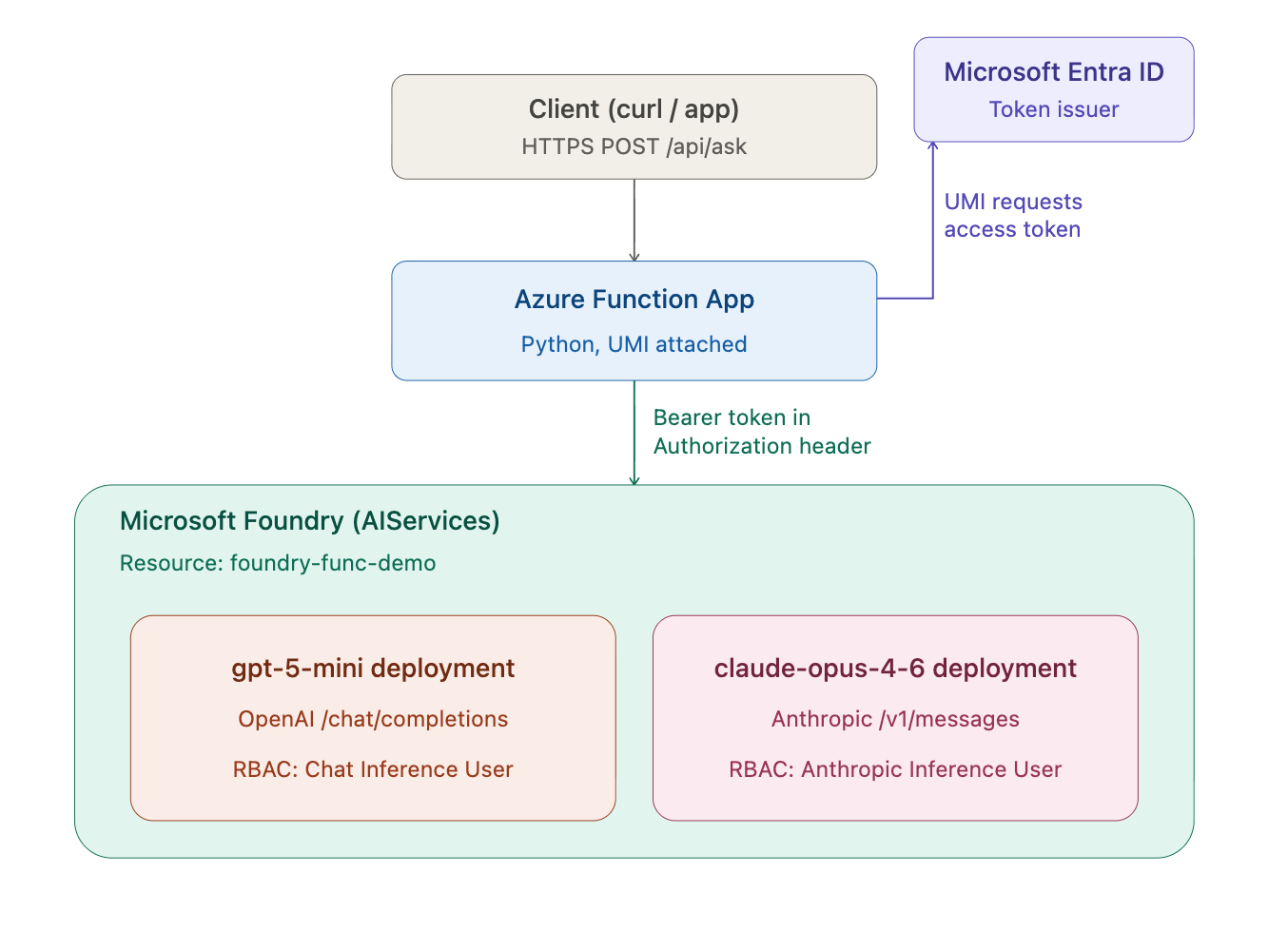
Let’s take the next step of moving our LangGraph implementation over to an Azure function. This way we have all required pieces operating in cloud.
Here’s the design we are going for

Create the storage account
STORAGE_NAME=piipcifuncstorage01
FUNCTION_APP_NAME=pii-pci-check-func
UMI_NAME=pii-pci-func-umi

az storage account create \
  --name $STORAGE_NAME \
  --resource-group $RG \
  --location $LOCATION \
  --sku Standard_LRS
Azure Functions requires a backing storage account for its own runtime state and triggers — this is infrastructure the platform needs, not something the application logic touches directly.
Create the Function App
az functionapp create \
  --resource-group $RG \
  --consumption-plan-location $LOCATION \
  --runtime python \
  --runtime-version 3.12 \
  --functions-version 4 \
  --name $FUNCTION_APP_NAME \
  --storage-account $STORAGE_NAME \
  --os-type Linux
This provisions the actual compute host that runs function_app.py, configured for the Python 3.12 runtime on a Linux Consumption plan.
Set app settings with keys (initial version)
az functionapp config appsettings set \
  --name $FUNCTION_APP_NAME \
  --resource-group $RG \
  --settings \
    FOUNDRY_ENDPOINT=$FOUNDRY_ENDPOINT \
    FOUNDRY_KEY=$FOUNDRY_KEY \
    FOUNDRY_OPENAI_ENDPOINT=$FOUNDRY_OPENAI_ENDPOINT \
    FOUNDRY_OPENAI_KEY=$FOUNDRY_OPENAI_KEY
The first working deployment used static API keys, stored as app settings — functional, but exactly the credential-sprawl risk this whole exercise sets out to remove.
Create the user-assigned managed identity
az identity create \
  --name $UMI_NAME \
  --resource-group $RG \
  --location $LOCATION
This provisions a standalone Entra ID identity, independent of any single resource’s lifecycle, that can be attached to the Function App and granted access elsewhere.
Attach the UMI to the Function App
UMI_CLIENT_ID=$(az identity show --name $UMI_NAME --resource-group $RG --query clientId -o tsv)
UMI_PRINCIPAL_ID=$(az identity show --name $UMI_NAME --resource-group $RG --query principalId -o tsv)
UMI_RESOURCE_ID=$(az identity show --name $UMI_NAME --resource-group $RG --query id -o tsv)

az functionapp identity assign \
  --name $FUNCTION_APP_NAME \
  --resource-group $RG \
  --identities $UMI_RESOURCE_ID
This is what lets the running Function actually request tokens as that identity — without this, the identity exists but the app has no way to use it.
Grant RBAC roles on the Foundry resource
FOUNDRY_RESOURCE_ID=$(az cognitiveservices account show \
  --name $FOUNDRY_NAME --resource-group $RG --query id -o tsv)

az role assignment create \
  --assignee $UMI_PRINCIPAL_ID \
  --role "Cognitive Services User" \
  --scope $FOUNDRY_RESOURCE_ID

az role assignment create \
  --assignee $UMI_PRINCIPAL_ID \
  --role "Cognitive Services OpenAI User" \
  --scope $FOUNDRY_RESOURCE_ID
Two roles are needed because the app calls two different data planes on the same resource — Language service detection and OpenAI chat completions each have their own permission scope.
Swap app settings from keys to the UMI client ID
az functionapp config appsettings delete \
  --name $FUNCTION_APP_NAME \
  --resource-group $RG \
  --setting-names FOUNDRY_KEY FOUNDRY_OPENAI_KEY

az functionapp config appsettings set \
  --name $FUNCTION_APP_NAME \
  --resource-group $RG \
  --settings UMI_CLIENT_ID=$UMI_CLIENT_ID
Disable local authentication on the Foundry resource
SUBSCRIPTION_ID=$(az account show --query id -o tsv)

az rest --method patch \
  --url "https://management.azure.com/subscriptions/${SUBSCRIPTION_ID}/resourceGroups/${RG}/providers/Microsoft.CognitiveServices/accounts/${FOUNDRY_NAME}?api-version=2023-05-01" \
  --body '{"properties": {"disableLocalAuth": true}}'
This is the actual enforcement step — it shuts off key-based access entirely at the resource level, regardless of whether any key still exists somewhere.
Build function
We start with function setup
mkdir pii_pci_check_fn
cd pii_pci_check_fn && func init . --worker-runtime python --model V2
Let’s get all the libraries needed in requirements.txt
# Uncomment to enable Azure Monitor OpenTelemetry
# Ref: aka.ms/functions-azure-monitor-python
# azure-monitor-opentelemetry

azure-functions
langgraph
langchain-openai
azure-ai-textanalytics
azure-core
pydantic
azure-identity
Let’s now get the function code in — function_app.py
import os
import json
import logging
import azure.functions as func
from typing import TypedDict
from pydantic import BaseModel
from langgraph.graph import StateGraph, END
from langchain_openai import AzureChatOpenAI
from azure.ai.textanalytics import TextAnalyticsClient
from azure.identity import ManagedIdentityCredential, get_bearer_token_provider
from azure.core.exceptions import HttpResponseError

app = func.FunctionApp()

PCI_CATEGORIES = {
    "CreditCardNumber",
    "USBankAccountNumber",
    "InternationalBankingAccountNumber",
    "SWIFTCode",
    "ABARoutingNumber",
    "SortCode",
}

credential = ManagedIdentityCredential(client_id=os.environ["UMI_CLIENT_ID"])
token_provider = get_bearer_token_provider(credential, "https://cognitiveservices.azure.com/.default")

llm = AzureChatOpenAI(
    azure_endpoint=os.environ["FOUNDRY_OPENAI_ENDPOINT"],
    azure_ad_token_provider=token_provider,
    azure_deployment="gpt-4.1-mini",
    api_version="2024-10-21",
)

lang_client = TextAnalyticsClient(
    endpoint=os.environ["FOUNDRY_ENDPOINT"],
    credential=credential,
)

classifier_llm = llm.with_structured_output(
    type("FinancialClassification", (BaseModel,), {"__annotations__": {"is_financial": bool}})
)

class GraphState(TypedDict):
    question: str
    is_financial: bool
    has_pii: bool
    has_pci: bool
    status: str
    answer: str

def classify_financial(state: GraphState) -> GraphState:
    prompt = (
        "Is this question about finance, banking, investing, payments, "
        "loans, mortgages, credit, or financial institutions?\n\n"
        f"Question: {state['question']}"
    )
    result = classifier_llm.invoke(prompt)
    state["is_financial"] = result.is_financial
    return state

def route_financial(state: GraphState) -> str:
    return "pii_pci_check" if state["is_financial"] else "reject_non_financial"

def reject_non_financial(state: GraphState) -> GraphState:
    state["status"] = "rejected_non_financial"
    return state

def pii_pci_check(state: GraphState) -> GraphState:
    try:
        results = lang_client.recognize_pii_entities([state["question"]], language="en")
    except HttpResponseError:
        state["status"] = "error_language_service"
        state["has_pii"] = True
        state["has_pci"] = True
        return state

    doc_result = results[0]
    if doc_result.is_error:
        state["status"] = "error_language_service"
        state["has_pii"] = True
        state["has_pci"] = True
        return state

    has_pii = False
    has_pci = False
    for entity in doc_result.entities:
        if entity.category in PCI_CATEGORIES:
            has_pci = True
        else:
            has_pii = True

    state["has_pii"] = has_pii
    state["has_pci"] = has_pci
    return state

def route_pii_pci(state: GraphState) -> str:
    if state["has_pii"] or state["has_pci"]:
        return "reject_pii_pci"
    return "answer_question"

def reject_pii_pci(state: GraphState) -> GraphState:
    if state.get("status") != "error_language_service":
        state["status"] = "rejected_pci" if state["has_pci"] else "rejected_pii"
    return state

def answer_question(state: GraphState) -> GraphState:
    response = llm.invoke(state["question"])
    state["answer"] = response.content
    state["status"] = "answered"
    return state

graph = StateGraph(GraphState)
graph.add_node("classify_financial", classify_financial)
graph.add_node("reject_non_financial", reject_non_financial)
graph.add_node("pii_pci_check", pii_pci_check)
graph.add_node("reject_pii_pci", reject_pii_pci)
graph.add_node("answer_question", answer_question)

graph.set_entry_point("classify_financial")
graph.add_conditional_edges("classify_financial", route_financial)
graph.add_conditional_edges("pii_pci_check", route_pii_pci)
graph.add_edge("reject_non_financial", END)
graph.add_edge("reject_pii_pci", END)
graph.add_edge("answer_question", END)

compiled_graph = graph.compile()

@app.route(route="check", methods=["POST"], auth_level=func.AuthLevel.FUNCTION)
def check(req: func.HttpRequest) -> func.HttpResponse:
    try:
        body = req.get_json()
        question = body.get("question", "").strip()
    except ValueError:
        return func.HttpResponse(
            json.dumps({"error": "Request body must be valid JSON with a 'question' field"}),
            status_code=400,
            mimetype="application/json",
        )

    if not question:
        return func.HttpResponse(
            json.dumps({"error": "Missing 'question' field"}),
            status_code=400,
            mimetype="application/json",
        )

    logging.info(f"Processing question of length {len(question)}")
    result = compiled_graph.invoke({"question": question})

    return func.HttpResponse(
        json.dumps({
            "status": result["status"],
            "answer": result.get("answer"),
        }),
        status_code=200,
        mimetype="application/json",
    )
Deploy & Test
This is the local structure I have.

Azure function setup
First publish the function and make sure your deployment is success before you start testing.
func azure functionapp publish $FUNCTION_APP_NAME
# Execution results
.................
.................
Deployment successful. deployer = Push-Deployer deploymentPath = Functions App ZipDeploy. Extract zip. Remote build.
Remote build succeeded!
[2026-07-08T12:09:23.836Z] Syncing triggers...
Functions in pii-pci-check-func:
    check - [httpTrigger]
        Invoke url: https://pii-pci-check-func.azurewebsites.net/api/check

# Time to test

curl -i "https://${FUNCTION_APP_NAME}.azurewebsites.net/api/check?code=${FUNCTION_KEY}" \
  -H "Content-Type: application/json" \
  -d '{"question": "What is the current interest rate on a 30-year mortgage?"}'

# Execution results
HTTP/1.1 200 OK
Content-Type: application/json
Date: Wed, 08 Jul 2026 12:00:08 GMT
Server: Kestrel
Transfer-Encoding: chunked

{"status": "answered", "answer": "I don't have real-time access to current financial data. For the most up-to-date 30-year mortgage interest rates, I recommend checking reliable sources such as:\n\n- Bank websites (e.g., Wells Fargo, Bank of America)\n- Financial news sites (e.g., CNBC, Bloomberg)\n- Mortgage lenders or brokers\n- Government websites like Freddie Mac\u2019s Primary Mortgage Market Survey\n\nRates can vary based on your credit score, loan amount, location, and other factors, so it\u2019s a good idea to get personalized quotes."}%
Confirms the end-to-end pipeline works in Azure before touching authentication — a deliberate checkpoint, so any later failure is known to be about identity, not the app itself.
What’s Next
This works as a script on a laptop than turned this LangGraph into an **Azure Function. Next is an important transtion to use `Azure API Management** in front of the Azure AI Foundry deployment itself, so the guardrail isn’t just application-layer logic that a future engineer could accidentally bypass, but an enforced network and policy boundary between callers and the model. That’s the difference between “we built a filter” and “we built a control.” We then add actual PII and PCI check withAI Languagecapability in AI Foundry as well as enablecontent security` capability.
Until then keep reading and stay safe!!
메타데이터
- post_id
- 36284e7fbd6b
- slug
- keeping-pii-and-pci-out-of-your-llm-pipeline-a-practical-guardrail-pattern-part-1-36284e7fbd6b
- url
- https://medium.com/@krishnan.srm/keeping-pii-and-pci-out-of-your-llm-pipeline-a-practical-guardrail-pattern-part-1-36284e7fbd6b
- canonical_url
- https://medium.com/@krishnan.srm/keeping-pii-and-pci-out-of-your-llm-pipeline-a-practical-guardrail-pattern-part-1-36284e7fbd6b
- author_url
- https://medium.com/@krishnan.srm
- status
- ok
- fetched_at
- 2026-07-18 12:10:31