Handling record updates in incremental data loads —in ADF
I’m writing this article to present the alternative ways I find every day when trying out Azure Data Factory (ADF). I asked one of my…
Handling record updates in incremental data loads —in ADF
I’m writing this article to present the alternative ways I find every day when trying out Azure Data Factory (ADF). I asked one of my seniors for feedback on the tasks that I do by myself to improve with ADF. At that time, he suggested three scenarios to look at — new records, existing records and updated records- flowing from Source — Raw — Staging. So, I started to enhance my pipeline with what he suggested.
Photo by S O C I A L . C U T on Unsplash
More clearly to think about it practically— Say we update a record in source, and this change needs to get altered in the raw table, then staging table in the next pipeline run.
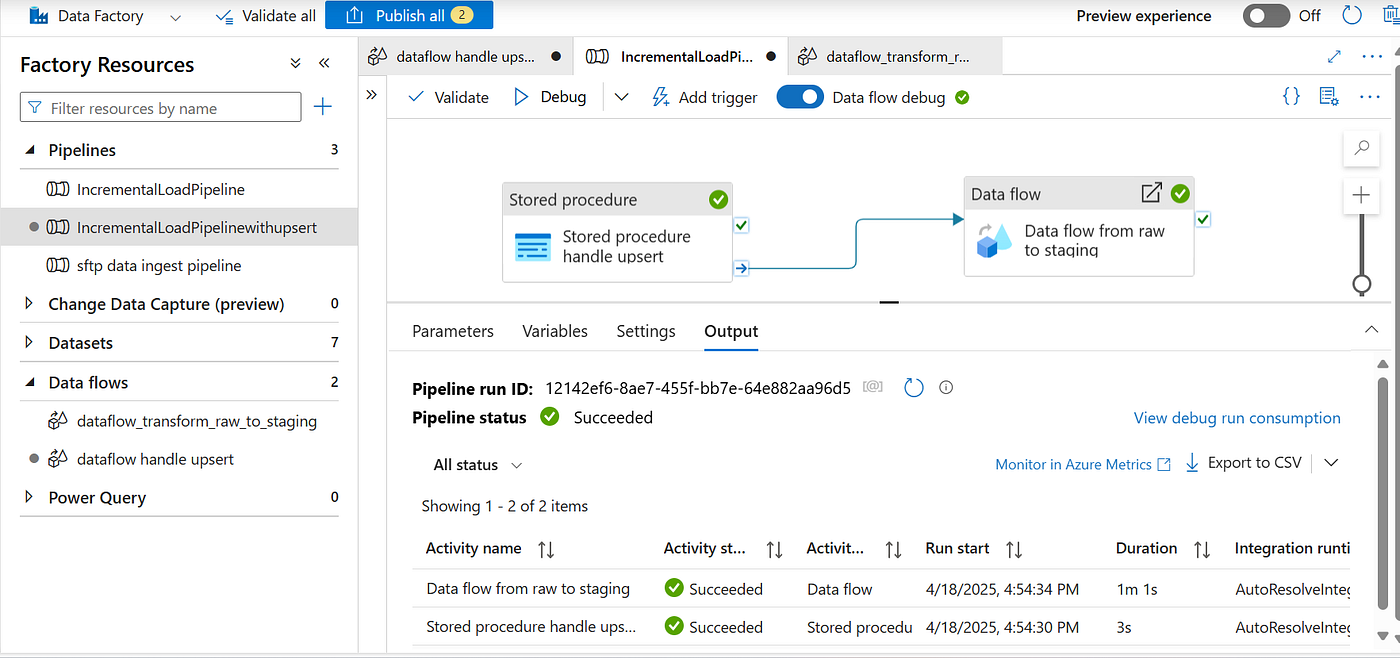
Image by Author: Pipeline creation in ADF
Stored Procedure
I created a stored procedure to implement upsert method from Source to Raw. To detect the updated records,
- fetch MAX(LoadTimestamp) from RawGoodsReceived
- filter out the records that are last modified since the last run of the data loading pipeline.
- merge both filtered records with Raw table by the GRN_ID
- if the key matched — that means there some existing records that needs to be updated — so update the existing records with new values
- if the key unmatched- that means new records- so insert those records
CREATE PROCEDURE UpsertData
AS
BEGIN
    -- Get the maximum LoadTimestamp from RawGoodsReceived
    DECLARE @MaxLoadTimestamp DATETIME2;
    SELECT @MaxLoadTimestamp = MAX(LoadTimestamp) FROM RawGoodsReceived;

    -- Perform the MERGE operation
    MERGE INTO RawGoodsReceived AS target
    USING (
        SELECT 'SourceGoodsReceived' AS SourceFileName, GRN_ID, SupplierName, ItemName, Quantity, Unit, GRN_Date, Status, Remarks, GETDATE() AS LoadTimestamp
        FROM SourceGoodsReceived
        WHERE LastModifiedDate >= @MaxLoadTimestamp
    ) AS source
    ON target.GRN_ID = source.GRN_ID
    WHEN MATCHED THEN
        UPDATE SET
            target.SourceFileName = source.SourceFileName,
            target.SupplierName = source.SupplierName,
            target.ItemName = source.ItemName,
            target.Quantity = source.Quantity,
            target.Unit = source.Unit,
            target.GRN_Date = source.GRN_Date,
            target.Status = source.Status,
            target.Remarks = source.Remarks,
            target.LoadTimestamp = source.LoadTimestamp
    WHEN NOT MATCHED THEN
        INSERT (SourceFileName, GRN_ID, SupplierName, ItemName, Quantity, Unit, GRN_Date, Status, Remarks, LoadTimestamp)
        VALUES (source.SourceFileName, source.GRN_ID, source.SupplierName, source.ItemName, source.Quantity, source.Unit, source.GRN_Date, source.Status, source.Remarks, source.LoadTimestamp);
END
Data Flow
Next is to create a data flow to transform columns and rows from Raw to Staging table. Here we refer both Raw table and Staging as source datasets to again compare and upsert rows.

Image by Author: Data Flow to ingest from raw to staging table
derivedColumn — to modify the data types

columnRenaming — to rename the columns to indicate certain columns was generated at this stage of transformation.

join1 — merge both raw table and staging table — left outer join
alterRecords — by comparing column to column, we decide whether any updates or inserts needs to be done.

Image by Author: Set the alter row conditions for each column if any get mismatched
Sink — Sink is our staging table — so we do the modifications to the staging table based on the conditions we have set.
In the Settings tab of your sink, ensure that updates are enabled and specify the key columns to match on. At a point when I was debugging, I found out that the staging table is not getting updated even though I have set the conditions properly, this is because I haven’t set allow at the Sink.

Image by Author: Set allow for delete, upsert, update
Test cases
To validate the pipeline, we created we need to focus on new records, updated records and delete records. We don’t need to worry about unchanged records.

Image by Author: Testcases to look at when validating the pipeline
These are some sample queries which I used to validate and debug.
INSERT INTO SourceGoodsReceived (GRN_ID, SupplierName, ItemName, Quantity, Unit, GRN_Date, Status, Remarks, LastModifiedDate)
VALUES
    ('GRN025', 'Supplier A', 'Item X', '100', 'kg', '2025-03-24', 'Received', 'No issues', GETDATE())

UPDATE SourceGoodsReceived
SET
    SupplierName = 'Supplier T',
    ItemName = 'Item O',
    Quantity = '100',
    Unit = 'kg',
    GRN_Date = '2025-04-18',
    Status = 'Received',
    Remarks = 'No issues',
    LastModifiedDate = GETDATE()
WHERE
    GRN_ID = 'GRN001';

DELETE FROM SourceGoodsReceived
WHERE GRN_ID  = 'GRN023';
Debug
I ran the pipeline everytime I make a change. Then I check the records in the Azure Database through the query editor — for each table — source, raw and staging.
I hope this article finds you helpful. Thank you for reading my article!
메타데이터
- post_id
- 372f2efa9193
- slug
- handling-record-updates-in-incremental-data-loads-in-adf-372f2efa9193
- url
- https://medium.com/@isharausoof97/handling-record-updates-in-incremental-data-loads-in-adf-372f2efa9193
- canonical_url
- https://medium.com/@isharausoof97/handling-record-updates-in-incremental-data-loads-in-adf-372f2efa9193
- author_url
- https://medium.com/@isharausoof97
- status
- ok
- fetched_at
- 2026-07-13 06:23:13



