Huawei LAB Project
I worked on a project to cover topics in HCIA Datacom. This project provided practical knowledge on configurations and simulated a…
Huawei LAB Project
I worked on a project to cover topics in HCIA Datacom. This project provided practical knowledge on configurations and simulated a real-world instance. The project has an HQ, a branch, an ISP, and a Server using technologies like:
- VLAN (Virtual Local Area Network)
- STP (Spanning Tree Protocol)
- VRRP (Virtual Router Redundancy Protocol)
- DHCP (Dynamic Host Configuration Protocol)
- NAT (Easy IP) (Network Address Translation)
- OSPF (Open Shortest Path First)
- Subnet
- SVI (Sub-Vlan Interface)
The diagram below is the project topology:
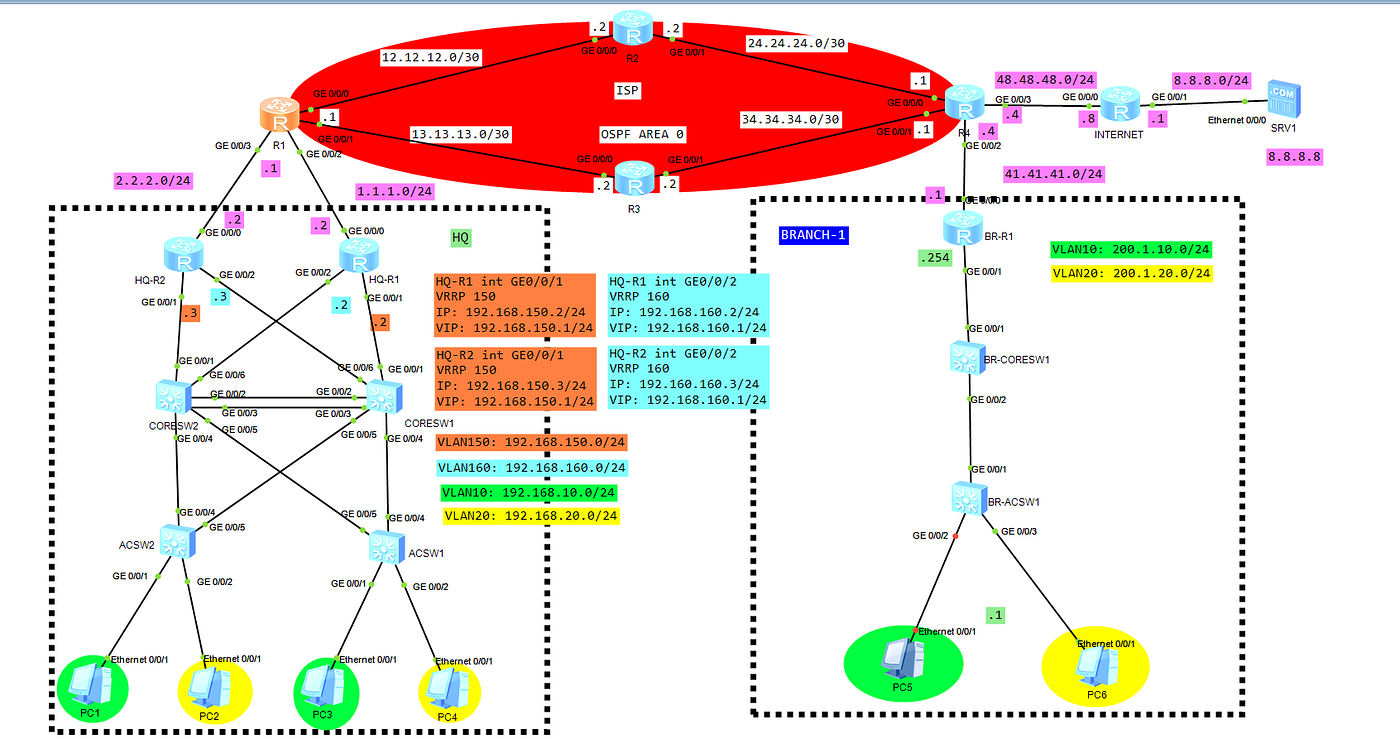
Project Topology
I used ENSP as the simulation environment for this project to work with Huawei routers and switches. The topology contains 3 parts:
- HQ: The main office of an organization, which has 2 HQ routers, 2 core switches, 2 access switches, and endpoint devices or PCs. The routers are connected to the ISP router, and redundancy is configured using VRRP to avoid a single POF (Point Of Failure), like the core switches. The core switches and access switches are connected using a protocol called STP to stop L2 loops created by redundancy. VLANs are also created to separate traffic among devices. DHCP is configured on the routers to automatically assign an IP address to devices, and the core switch acts as the relay agent. NAT(EASY IP) to translate the HQ devices to communicate across the ISP, and also reach SRV1(Internet).
- BRANCH: The other office in another location, which has a single router, core switch, and PCs. The configurations are not as much as the HQ, just VLANs, DHCP, and NAT(EASY IP).
- ISP: The Internet Service Provider creates a connection for the two sites to communicate, and also a connection to the Internet. The ISP uses OSPF to communicate between routers to create a route to forward packets.
Configurations done on each device:
- HQ-R1
sysname HQ-R1
#
dhcp enable
#
acl number 2000
 rule 5 permit
#
ip pool VLAN10
 gateway-list 192.168.10.1
 network 192.168.10.0 mask 255.255.255.0
 dns-list 8.8.8.8
#
ip pool VLAN20
 gateway-list 192.168.20.1
 network 192.168.20.0 mask 255.255.255.0
 dns-list 8.8.8.8
#
...removed configurations...
#
interface GigabitEthernet0/0/0
 ip address 1.1.1.2 255.255.255.0
 nat outbound 2000
#
interface GigabitEthernet0/0/1
 ip address 192.168.150.2 255.255.255.0
 vrrp vrid 150 virtual-ip 192.168.150.1
 vrrp vrid 150 priority 120
 dhcp select global
#
interface GigabitEthernet0/0/2
 ip address 192.168.160.2 255.255.255.0
 vrrp vrid 160 virtual-ip 192.168.160.1
 vrrp vrid 160 priority 120
 dhcp select global
#
interface GigabitEthernet0/0/3
#
ip route-static 0.0.0.0 0.0.0.0 1.1.1.1
ip route-static 192.168.0.0 255.255.224.0 192.168.150.4
ip route-static 192.168.0.0 255.255.224.0 192.168.160.4
#

return- HQ-R2
#
sysname HQ-R2
#
dhcp enable
#
ip pool VLAN10
 gateway-list 192.168.10.1
 network 192.168.10.0 mask 255.255.255.0
 dns-list 8.8.8.8
#
ip pool VLAN20
 gateway-list 192.168.20.1
 network 192.168.20.0 mask 255.255.255.0
 dns-list 8.8.8.8
#
...removed configurations...
#
interface GigabitEthernet0/0/0
 ip address 2.2.2.2 255.255.255.0
#
interface GigabitEthernet0/0/1
 ip address 192.168.150.3 255.255.255.0
 vrrp vrid 150 virtual-ip 192.168.150.1
 dhcp select global
#
interface GigabitEthernet0/0/2
 ip address 192.168.160.3 255.255.255.0
 vrrp vrid 160 virtual-ip 192.168.160.1
 dhcp select global
#
interface GigabitEthernet0/0/3
#
ip route-static 0.0.0.0 0.0.0.0 2.2.2.1
ip route-static 192.168.0.0 255.255.224.0 192.168.150.4
ip route-static 192.168.0.0 255.255.224.0 192.168.160.4
#

return- CORE-SW1
#
sysname CORESW1
#
vlan batch 10 20 150 160
#
stp instance 0 root primary
#
dhcp enable
#
...removed configurations...
#
interface Vlanif1
#
interface Vlanif10
 ip address 192.168.10.2 255.255.255.0
 vrrp vrid 10 virtual-ip 192.168.10.1
 vrrp vrid 10 priority 120
 dhcp select relay
 dhcp relay server-ip 192.168.150.1
 dhcp relay server-ip 192.168.160.1
#
interface Vlanif20
 ip address 192.168.20.2 255.255.255.0
 vrrp vrid 20 virtual-ip 192.168.20.1
 vrrp vrid 20 priority 120
 dhcp select relay
 dhcp relay server-ip 192.168.160.1
 dhcp relay server-ip 192.168.150.1
#
interface Vlanif150
 ip address 192.168.150.5 255.255.255.0
 vrrp vrid 151 virtual-ip 192.168.150.4
 vrrp vrid 151 priority 120
#
interface Vlanif160
 ip address 192.168.160.5 255.255.255.0
 vrrp vrid 161 virtual-ip 192.168.160.4
 vrrp vrid 161 priority 120
#
interface MEth0/0/1
#
interface GigabitEthernet0/0/1
 port link-type access
 port default vlan 150
#
interface GigabitEthernet0/0/2
 port link-type trunk
 port trunk allow-pass vlan 10 20 150 160
#
interface GigabitEthernet0/0/3
 port link-type trunk
 port trunk allow-pass vlan 10 20 150 160
#
interface GigabitEthernet0/0/4
 port link-type trunk
 port trunk allow-pass vlan 10 20 150 160
#
interface GigabitEthernet0/0/5
 port link-type trunk
 port trunk allow-pass vlan 10 20 150 160
#
interface GigabitEthernet0/0/6
 port link-type access
 port default vlan 160
#
ip route-static 0.0.0.0 0.0.0.0 192.168.150.1
ip route-static 0.0.0.0 0.0.0.0 192.168.160.1
#
return- CORE-SW2
#
sysname CORESW2
#
vlan batch 10 20 150 160
#
stp instance 0 root secondary
#
dhcp enable
#
interface Vlanif1
#
interface Vlanif10
 ip address 192.168.10.3 255.255.255.0
 vrrp vrid 10 virtual-ip 192.168.10.1
 dhcp select relay
 dhcp relay server-ip 192.168.150.1
 dhcp relay server-ip 192.168.160.1
#
interface Vlanif20
 ip address 192.168.20.3 255.255.255.0
 vrrp vrid 20 virtual-ip 192.168.20.1
 dhcp select relay
 dhcp relay server-ip 192.168.160.1
 dhcp relay server-ip 192.168.150.1
#
interface Vlanif150
 ip address 192.168.150.6 255.255.255.0
 vrrp vrid 151 virtual-ip 192.168.150.4
#
interface Vlanif160
 ip address 192.168.160.6 255.255.255.0
 vrrp vrid 161 virtual-ip 192.168.160.4
#
interface MEth0/0/1
#
interface GigabitEthernet0/0/1
 port link-type access
 port default vlan 150
#
interface GigabitEthernet0/0/2
 port link-type trunk
 port trunk allow-pass vlan 10 20 150 160
#
interface GigabitEthernet0/0/3
 port link-type trunk
 port trunk allow-pass vlan 10 20 150 160
#
interface GigabitEthernet0/0/4
 port link-type trunk
 port trunk allow-pass vlan 10 20 150 160
#
interface GigabitEthernet0/0/5
 port link-type trunk
 port trunk allow-pass vlan 10 20 150 160
#
interface GigabitEthernet0/0/6
 port link-type access
 port default vlan 160
#
ip route-static 0.0.0.0 0.0.0.0 192.168.150.1
ip route-static 0.0.0.0 0.0.0.0 192.168.160.1
#
return- BR-R1
#
sysname BR-R1
#
dhcp enable
#
acl number 2000
 rule 5 permit
#
ip pool VLAN10
 gateway-list 200.1.10.254
 network 200.1.10.0 mask 255.255.255.0
 dns-list 8.8.8.8
#
interface GigabitEthernet0/0/0
 ip address 41.41.41.1 255.255.255.0
 nat outbound 2000
#
interface GigabitEthernet0/0/1
#
interface GigabitEthernet0/0/1.10
 dot1q termination vid 10
 ip address 200.1.10.254 255.255.255.0
 arp broadcast enable
 dhcp select global
#
interface GigabitEthernet0/0/1.20
 dot1q termination vid 20
 ip address 200.1.20.254 255.255.255.0
 arp broadcast enable
 dhcp select interface
#
ip route-static 0.0.0.0 0.0.0.0 41.41.41.4
#
return- BR-CORESW
sysname BR-CORESW1
#
vlan batch 10 20
#
interface GigabitEthernet0/0/1
 port link-type trunk
 port trunk allow-pass vlan 10 20
#
interface GigabitEthernet0/0/2
 port link-type trunk
 port trunk allow-pass vlan 10 20
#
return- R1
#
sysname R1
#
interface GigabitEthernet0/0/0
 ip address 12.12.12.1 255.255.255.252
#
interface GigabitEthernet0/0/1
 ip address 13.13.13.1 255.255.255.252
#
interface GigabitEthernet0/0/2
 ip address 1.1.1.1 255.255.255.0
#
interface GigabitEthernet0/0/3
 ip address 2.2.2.1 255.255.255.0
#
ospf 1 router-id 1.1.1.1
 area 0.0.0.0
  network 12.12.12.1 0.0.0.0
  network 13.13.13.1 0.0.0.0
  network 1.1.1.0 0.0.0.255
  network 2.2.2.0 0.0.0.255
#
return- R2
#
sysname R2
#
interface GigabitEthernet0/0/0
 ip address 12.12.12.2 255.255.255.252
#
interface GigabitEthernet0/0/1
 ip address 24.24.24.2 255.255.255.252
#
ospf 1 router-id 2.2.2.2
 area 0.0.0.0
  network 12.12.12.2 0.0.0.0
  network 24.24.24.2 0.0.0.0
#
return- R3
#
sysname R3
#
interface GigabitEthernet0/0/0
 ip address 13.13.13.2 255.255.255.252
#
interface GigabitEthernet0/0/1
 ip address 34.34.34.2 255.255.255.252
#
interface GigabitEthernet0/0/2
#
interface GigabitEthernet0/0/3
#
ospf 1 router-id 3.3.3.3
 area 0.0.0.0
  network 13.13.13.2 0.0.0.0
  network 34.34.34.2 0.0.0.0
#
return- R4
#
sysname R4
#
interface GigabitEthernet0/0/0
 ip address 24.24.24.1 255.255.255.252
#
interface GigabitEthernet0/0/1
 ip address 34.34.34.1 255.255.255.252
#
interface GigabitEthernet0/0/2
 ip address 41.41.41.4 255.255.255.0
#
interface GigabitEthernet0/0/3
 ip address 48.48.48.4 255.255.255.0
#
ospf 1 router-id 4.4.4.4
 area 0.0.0.0
  network 24.24.24.1 0.0.0.0
  network 34.34.34.1 0.0.0.0
  network 41.41.41.0 0.0.0.255
  network 48.48.48.0 0.0.0.255
#
return- INTERNET
#
sysname INTERNET
#
interface GigabitEthernet0/0/0
 ip address 48.48.48.8 255.255.255.0
#
interface GigabitEthernet0/0/1
 ip address 8.8.8.1 255.255.255.0
#
interface GigabitEthernet0/0/2
#
interface GigabitEthernet0/0/3
#
ospf 1
 area 0.0.0.0
  network 48.48.48.0 0.0.0.255
  network 8.8.8.0 0.0.0.255
#
return
Reference resources:
https://www.youtube.com/watch?v=OkCn1QOH5mU&list=PLS8LjPHzFGcT8ADfXWvgDxcDZoEfU5VE6
메타데이터
- post_id
- 3781f7eabd7a
- slug
- huawei-lab-project-3781f7eabd7a
- url
- https://medium.com/@abiolaoluwatuyi/huawei-lab-project-3781f7eabd7a
- canonical_url
- https://medium.com/@abiolaoluwatuyi/huawei-lab-project-3781f7eabd7a
- author_url
- https://medium.com/@abiolaoluwatuyi
- status
- ok
- fetched_at
- 2026-07-19 18:13:15