Karpathy’s LLM Wiki System, Explained for People Who Run Businesses. And How To Use Them.
How consultants, founders, and advisors can build a research engine that compounds over time — without a research team.
Karpathy’s LLM Wiki System, Explained for People Who Run Businesses. And How To Use Them.
How consultants, founders, and advisors can build a research engine that compounds over time — without a research team.
Photo by Shubham Dhage on Unsplash
Andrej Karpathy posted a thread a few months ago about how he uses LLMs to build personal knowledge bases. Engineers and researchers immediately recognized what he was describing.
Most consultants, founders, and advisors read it and moved on. Nothing in the post connected to running a consulting practice, managing a portfolio of companies, or trying to do serious market research without a dedicated research team. The examples came from academic labs. The tools he named were command-line tools. The entire frame was researcher language.
That is a missed opportunity. What Karpathy built is one of the most practical research systems a business operator could run. The setup is technical, but the underlying system is not. You just need someone to translate it.
This is that translation.
What Karpathy Actually Built
Not a note-taking app. Not Notion with AI features. Not what most people mean when they say second brain.
Here is the plainest version: you collect raw source material into a folder, an LLM reads everything in that folder and compiles it into an organized wiki, and then you query that wiki like a research assistant who has absorbed everything you have ever fed it.
Three layers. Collect. Compile. Query.
The wiki lives as markdown files on your computer, structured into concepts and categories with backlinks connecting related ideas. You never write the wiki yourself. Claude Code builds it, updates it, and maintains it every time you add new material. Your only job is to feed it focused content and ask it the right questions.
What makes this different from every other knowledge system is compounding. The more material you add, the more powerful the query layer becomes. Karpathy’s own wiki on recent research runs at around 100 articles and 400,000 words. At that scale, he asks it complex multi-part questions that would take hours to answer manually.
There is also a feedback loop most people miss. The outputs from your queries get filed back into the wiki. Every time you run a session and get a useful synthesis, you save it back in. Your own research questions and explorations accumulate over time. The wiki gets smarter the more you use it.
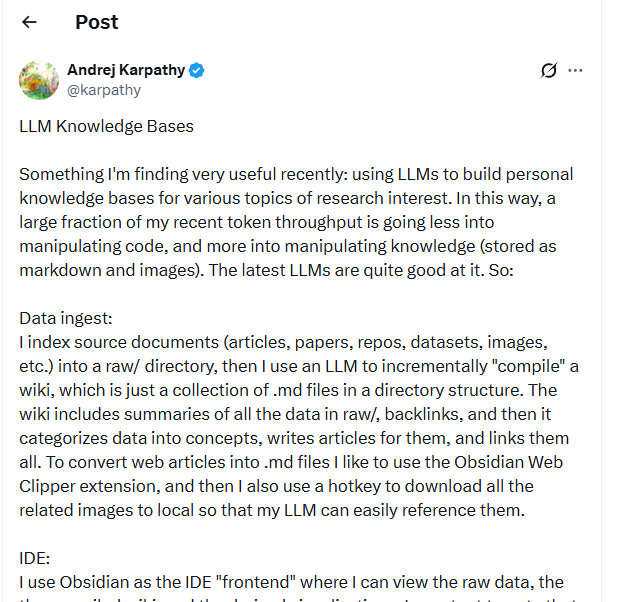
Andrej’s Karpathy original post on his LLM knowledge bases.
The Five Components, Translated for Operators
Data ingest is the input layer. You collect articles, PDFs, reports, and research into a folder called raw. The Obsidian Web Clipper browser extension converts web content into markdown automatically as you read, saving files locally without manual copy-pasting. PDFs and documents go in by drag and drop. You can also set a hotkey to download related images so your LLM can reference them during queries.
The wiki is the compiled layer. Claude Code reads everything in your raw folder and produces organized markdown files. It identifies concepts, writes summary articles for each one, creates backlinks between related ideas, and maintains an index you can navigate. You do not write or edit any of it. The LLM generates and maintains the entire structure.
Q&A is where the return becomes visible. Once your wiki reaches around 80 to 100 articles, you can ask it complex questions in plain language. It reads across the relevant files and returns answers that reading your notes individually would never surface. Karpathy notes this surprised him: he expected to need sophisticated retrieval tools, but the LLM handles navigation well at this scale without them.
Output returns in whatever format you need. Written summaries and analysis come back as markdown files. Presentations come as Marp-format slides. Charts and visualizations come as images. Everything is viewable inside Obsidian, so your entire research environment stays in one place.
Linting is the health check layer. You run periodic passes over your wiki asking Claude Code to find inconsistencies, fill gaps, and surface connections between articles you never explicitly made. This is where the compounding becomes most visible. The wiki finds relationships across your material that you missed reading individually.
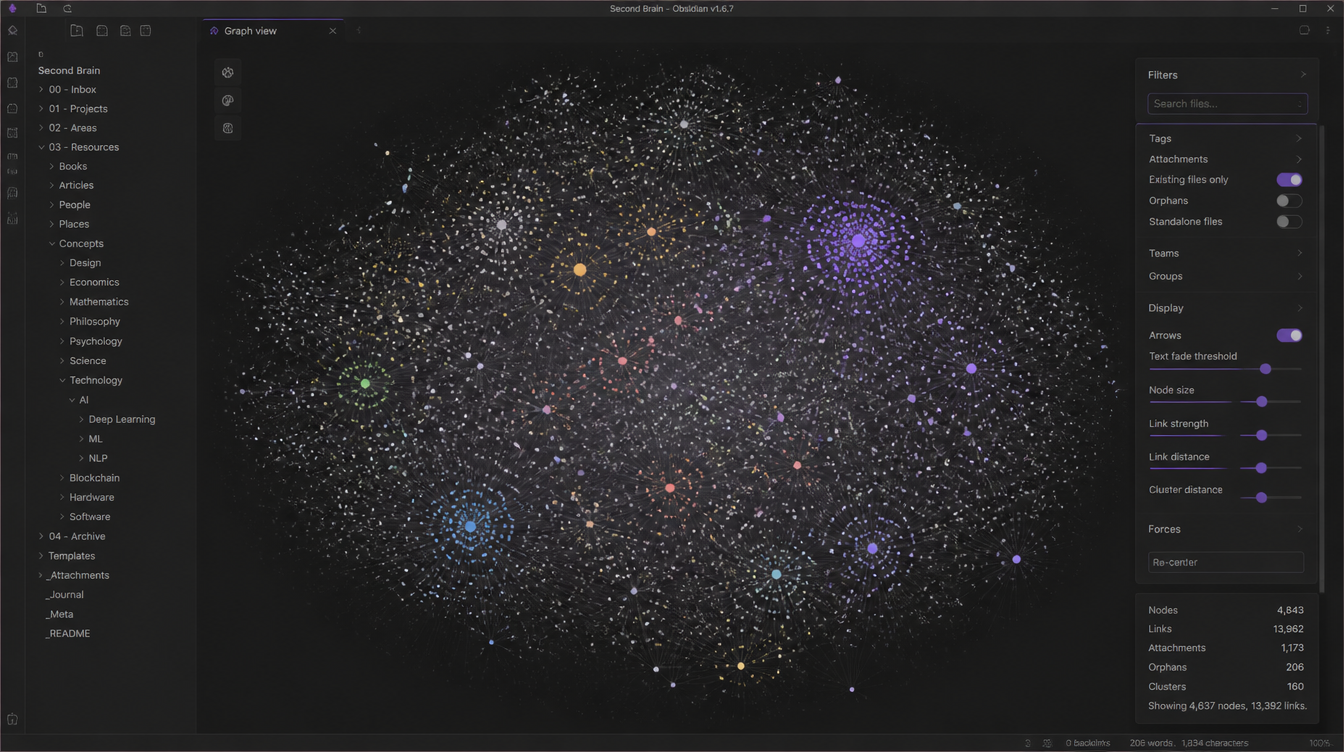
What a populated wiki looks like in Obsidian
How to Set It Up
Three tools: Claude Code, Obsidian, and the Obsidian Web Clipper browser extension.
Claude Code runs the compilation step, reading your raw folder and writing the wiki. Obsidian is the interface where you read the wiki, browse the graph view, and view query outputs. Web Clipper gets web content into your raw folder with a single click while you are already reading.
The full technical walkthrough is in a previous piece. [Link to “How to Build the Knowledge System Andrej Karpathy Uses.”] Get the structure working first, then come back.
Make one decision before you build anything: what domain is this wiki covering? One topic per wiki. Trying to capture everything you read across your entire professional life produces a system useful for nothing. Pick one focus area, build it to 80 articles, and only consider expanding scope once the Q&A layer is returning answers you trust.

Claude Code reading the raw folder and writing the wiki — you don’t touch any of this manually
What to Feed It, By Role
Most operators make the same mistake when they start. They clip everything because clipping is easy. That is wrong.
Your wiki becomes useful in proportion to how focused its inputs are. The question is not what to collect generally. It is what to collect for this specific wiki, for your specific role.
Consultants should build one wiki per industry vertical, not per client. Feed it sector reports, regulatory filings, competitor earnings calls, M&A news, and the research notes from past engagements in that vertical. When a new client comes in from the same industry, your wiki already carries months of compounded context. You arrive at the first discovery call with preparation that normally takes a week to assemble from scratch.
Founders and startup founders should run two wikis. One for the market, one for the product domain. The market wiki gets competitor product updates, investor thesis documents from relevant funds, fundraising announcements from your space, and market sizing research. The product wiki gets user research transcripts, technical literature, and teardowns from adjacent product categories. Keeping them separate means your queries return focused answers instead of mixing investor intelligence with product architecture questions.
Advisors can organize by sector. Build one wiki per industry your portfolio companies operate in. Board prep that used to take two hours becomes a structured 20-minute session because the contextual depth is already compiled and queryable. You stop relying on what you happen to remember from the last board call.
Small business owners should keep it simple: one wiki for the market, one for operations. The market wiki gets customer reviews from your category and your competitors, local pricing intelligence, and relevant trend coverage. The operations wiki gets supplier relationships, process documentation, and regulatory updates that affect your business. Two narrow wikis consistently outperform one sprawling one.

A consulting wiki organized by industry vertical in Obsidian — one folder per sector, not per client
What to Ask It, By Role
The output quality depends entirely on the question quality. Generic questions produce generic answers. Specific questions with real business context produce answers you can act on the same day.
Consultants get the most from questions like “What are the biggest operational shifts in this client’s sector in the last six months?” and “What was my core argument in the last proposal I wrote for a client in this vertical?” The second question becomes powerful once your wiki holds material from several past engagements. You stop rebuilding your arguments from scratch on every new opportunity.
Founders should lean on questions like “What objections do investors in this category raise consistently?” and “Where are the positioning gaps across my top three competitors?” Feed your wiki competitive material for two to three months and that second question will surface patterns you missed reading the same articles one at a time. The wiki synthesizes across sources in a way your memory cannot.
Advisors should ask “What should I know going into the board meeting for Company X this week?” and “Which of my portfolio companies have exposure to the same market pressures right now?” Beyond five active advisory relationships, the second question is almost impossible to answer accurately from memory alone. Your wiki answers it in seconds, pulling from sector coverage spread across months of input.
Small business owners should start with “What problems in my category has no competitor solved yet?” and “How has my main competitor’s pricing or positioning changed in the last year?” The first question is a product or service development brief. The second is a competitive intelligence summary. Both are assembled from sources you were probably already reading without retaining them in any useful form.

A query response returned as a markdown file — synthesized across dozens of sources in seconds
The Step Most People Skip
Run a linting pass every two to three weeks.
Ask Claude Code to scan your wiki for inconsistent or contradictory information, identify topic gaps, and surface connections between articles you never explicitly linked. This is where the compounding becomes concrete rather than theoretical. The wiki finds relationships across your material that you missed when reading each piece individually.
Karpathy uses this step to identify new questions worth investigating and connections between research threads. For a founder, a linting pass might surface two competitor moves that point at the same market shift. For a consultant, it might link a regulatory filing from three months ago to a question a client raised last week. Over time, the linting passes also reveal where your reading has blind spots relative to your domain.

Where This System Falls Short
Comfort with Claude Code is a hard requirement. If you have never used a command line tool, the setup will take longer than an hour and there will be moments where nothing works and there is no support chat to fall back on. That stops a lot of business operators before they get any value.
The wiki is only as good as what you feed it. Clipping low-quality content produces low-quality answers. No configuration compensates for weak inputs. The discipline is in the curation, and curation requires judgment the tool cannot substitute for.
There is no collaboration layer. This is a solo research engine. Sharing outputs with a colleague means exporting files manually, which works but is not seamless.
The useful threshold also takes time to reach. At 20 articles, your wiki is a better-organized folder. At 80 to 100 articles, it starts functioning like a research assistant. Plan for six to eight weeks of consistent input before the Q&A layer returns answers you trust enough to act on.
If You Want a Version That Is Already Built


What we built at Constella is for operators who want the output layer without constructing the infrastructure. If the Claude Code setup in this article felt like a hard requirement you are not ready to meet yet, this is the alternative.
The research canvas maps your sources as nodes in a visual graph, extracts implications automatically, and surfaces research gaps across everything you load into it. The compounding effect, without the command line setup or the six-week ramp.
메타데이터
- post_id
- 37bcfbb7a1e8
- slug
- karpathy-llm-wiki-system-for-business-operators-37bcfbb7a1e8
- url
- https://medium.com/the-smart-founder/karpathy-llm-wiki-system-for-business-operators-37bcfbb7a1e8
- canonical_url
- https://medium.com/the-smart-founder/karpathy-llm-wiki-system-for-business-operators-37bcfbb7a1e8
- author_url
- https://medium.com/@tejas-sharma
- status
- ok
- fetched_at
- 2026-06-20 20:29:01




