Agile VHDL for FPGAs: Why simulate with GHDL before opening Vivado or Quartus?
The Problem: The “Weight” of Proprietary IDEs
Agile VHDL for FPGAs: Why simulate with GHDL before opening Vivado or Quartus?
The Problem: The “Weight” of Proprietary IDEs
If you develop for FPGAs, you know the ritual: open Vivado or Quartus, wait for gigabytes of RAM to be consumed, create a complex project, and wait minutes only to discover that you forgot a signal in your code.
The Solution: The Simulation-First Flow
GHDL (open-source simulator) and GTKWave (waveform viewer) are the modern developer’s “Swiss Army knife”. They allow you to validate your logic in seconds, directly from the terminal, without expensive licenses or heavy hardware. This makes it an excellent approach for both studying VHDL concepts and accelerating professional FPGA development.
Why adopt this flow for ?
- Incredible Speed: Analysis and execution in GHDL are instantaneous compared to hardware synthesis.
- Focus on Logic: You isolate logic errors before worrying about physical constraints (pins, timing, voltage).
- Automation and CI/CD: Because it’s text and terminal-based, you can integrate your tests into automation pipelines (GitHub Actions, Jenkins).
- Portability: Works on Linux, Windows, and even modest machines where Xilinx Vivado or Altera Quartus wouldn’t even open.
1. Environment Setup (Installation)
Linux (Ubuntu / Debian)
Used for this tutorial:
sudo apt update && sudo apt install ghdl gtkwave -yLinux (Arch / Manjaro)
sudo pacman -S ghdl-gcc gtkwaveWindows 11
- Download the GHDL binary from GitHub and GTKWave from SourceForge.
- Add the
binfolder from both to your PATH in the Environment Variables.
2. From Code to Waveform
Step A: The Component (and_gate.vhd)
Let’s create a simple logic gate. Note the use of standard libraries.
library ieee;
use ieee.std_logic_1164.all;

entity and_gate is
    port (
        a, b : in std_logic;
        y    : out std_logic
    );
end and_gate;

architecture rtl of and_gate is
begin
    y <= a and b;
end rtl;
Step B: The Testbench (and_gate_tb.vhd)
The secret to a good simulation is the Testbench — the code that “stimulates” your component.
library ieee;
use ieee.std_logic_1164.all;

entity and_gate_tb is
end and_gate_tb;

architecture sim of and_gate_tb is
    signal a, b, y : std_logic;
begin
    -- Component instantiation
    UUT: entity work.and_gate port map (a => a, b => b, y => y);
    process
    begin
        -- Testing all combinations
        a <= '0'; b <= '0'; wait for 10 ns;
        a <= '0'; b <= '1'; wait for 10 ns;
        a <= '1'; b <= '0'; wait for 10 ns;
        a <= '1'; b <= '1'; wait for 10 ns;

        -- Forces GTKWave to display the last interval.
        a <= '0'; b <= '0'; wait for 10 ns;

        std.env.finish; -- VHDL-2008 feature to end the simulation
    end process;
end sim;
3. Execution Commands (Terminal)
The GHDL flow is divided into three logical steps:
- Analysis (Syntax check and compile)
$ ghdl -a --std=08 and_gate.vhd and_gate_tb.vhd- Elaboration (Build hierarchy)
$ ghdl -e --std=08 and_gate_tb- Execution (Generate waveform file)
$ ghdl -r --std=08 and_gate_tb --vcd=waves_test.vcd
simulation finished @50ns
Why --std=08?
By default, GHDL compiles using the older VHDL-1993 standard (specifically 93c). However, the --std=08 flag tells the compiler to use the VHDL-2008 standard instead. This version introduced essential quality-of-life features to the language, such as the std.env.finish command. In our testbench, we used this command to gracefully stop the simulation right after all stimulus combinations end. If you try to run the analysis without this flag, GHDL will throw an error since it won't recognize the std.env package in the 1993 standard. Furthermore, VHDL-2008 is currently the industry recommendation for writing modern and less verbose verification environments.
4. Viewing the Results
To open the generated waveforms, type:
$ gtkwave waves_test.vcd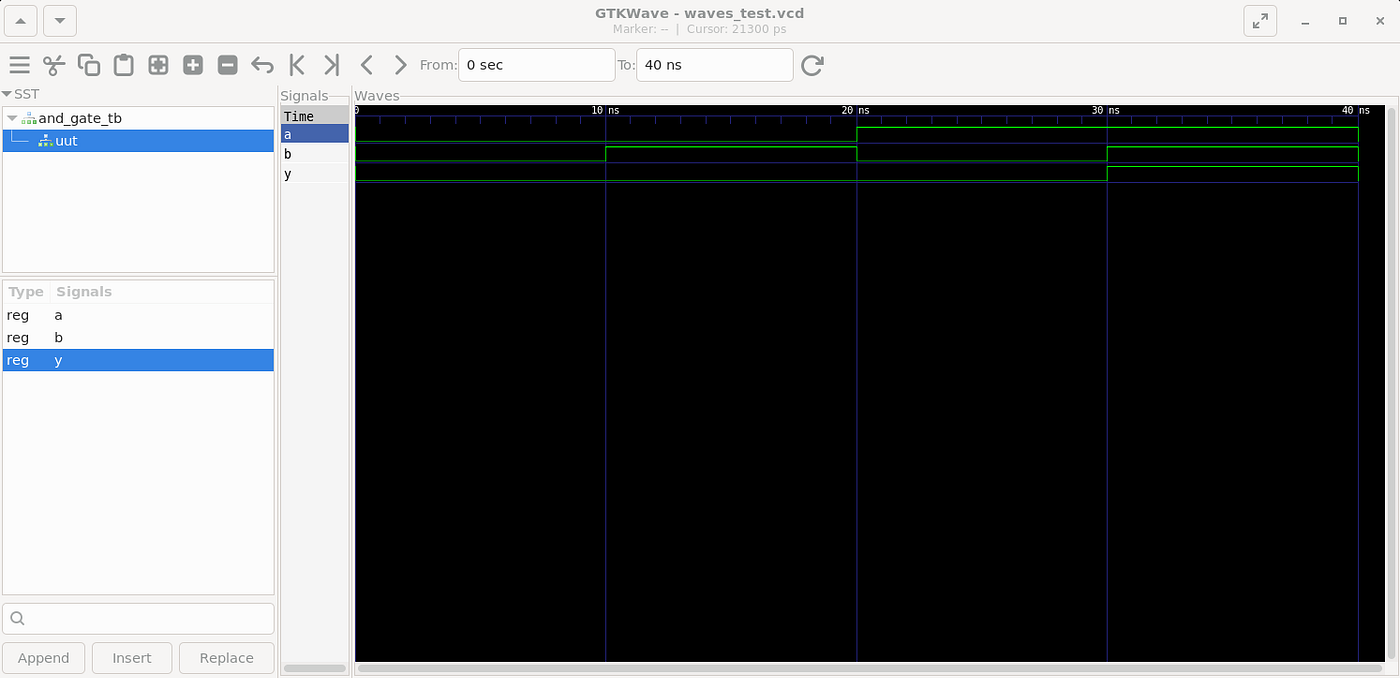
GTKWave visualization window.
In the left panel, select the and_gate_tb, choose the signals, and click Append. Press the Shift + Alt + Fkey to fit the zoom and you are done.
Now you have visual proof that your logic works exactly as intended, long before any hardware constraints come into play.
5. Conclusion
Developing for FPGAs doesn’t have to be a sluggish, resource-heavy process. By adopting the Simulation-First flow with GHDL and GTKWave early in your design cycle, you save invaluable time, spare your machine’s resources, and most importantly: you maintain your focus on solving problems with digital hardware.
References & Further Reading
- **GHDL Official Repository (GitHub):** The main source code, releases, and documentation for the GHDL project.
- **GHDL Official Documentation:** Detailed guide on flags, features, and how GHDL works under the hood.
- **GTKWave Official Website:** Download links and documentation for the GTKWave waveform viewer.
- **VHDL-2008 Standard (IEEE 1076–2008):** Information regarding the VHDL-2008 standard and its new features.
메타데이터
- post_id
- 37eee2959abb
- slug
- agile-vhdl-for-fpgas-why-simulate-with-ghdl-before-opening-vivado-or-quartus-37eee2959abb
- url
- https://medium.com/@alanfr.engel/agile-vhdl-for-fpgas-why-simulate-with-ghdl-before-opening-vivado-or-quartus-37eee2959abb
- canonical_url
- https://medium.com/@alanfr.engel/agile-vhdl-for-fpgas-why-simulate-with-ghdl-before-opening-vivado-or-quartus-37eee2959abb
- author_url
- https://medium.com/@alanfr.engel
- status
- ok
- fetched_at
- 2026-07-12 02:25:03