Building a Self-Service SFTP Platform on AWS: A Real-World System Design Story
How we replaced a pile of manual SSH commands with a proper platform — and what we learned doing it
Building a Self-Service SFTP Platform on AWS: A Real-World System Design Story
How we replaced a pile of manual SSH commands with a proper platform — and what we learned doing it
There is a specific kind of dread that every platform engineer knows.
It is a Tuesday morning. Your Slack has three messages from different teams asking when their partner’s SFTP access will be ready. Your backlog has a ticket from two weeks ago that says “add SSH key for vendor XYZ.” Someone in finance wants to know why a partner can browse directories they are not supposed to see. And somewhere in a shared Google Sheet, an admin is trying to track which users exist on the server and which ones have been removed.
This is the SFTP access management experience at most companies. Not because engineers are bad at their jobs. But because SFTP sits at an uncomfortable intersection between infrastructure management, access control, SSH key hygiene, and business logic. Nobody has a clean story here. Everyone is making it work with duct tape.
We decided to build something better.
This post walks through the design of a self-service SFTP platform we built on AWS. I will cover the architecture, the key decisions, how we handle state reconciliation, and what I would do differently today. The goal is not to give you a copy-paste setup guide, it is to share the thinking behind the design so you can apply it to your own constraints.
The Problem Statement
The use case was straightforward on the surface. Multiple internal teams publish files to a shared storage layer. External partners need to pull those files over SFTP. Each partner should only see their own data, not each other’s. Access must be key-based, not password-based.
The messy part was the operational model. New partners needed to be onboarded frequently. Keys changed. People left organizations. Permissions needed adjusting. All of this was being managed by a small platform team also responsible for a dozen other things.
The admin experience was manual and error-prone. The partner experience was “email us your public key and we will add it, probably by end of week.” There was no audit trail. No self-service. No way to verify that what was actually configured matched what anyone intended.
We needed to fix this properly.
Constraints That Shaped Everything
Before diving into the design, the constraints are worth naming - they shaped almost every decision.
No managed SFTP service. We needed to run our own SFTP infrastructure rather than use a managed service. This was a hard constraint, partly cost-related, partly because existing systems expected specific server behaviors.
Shared storage. Data was written to a shared storage volume by multiple internal systems. We could not change how that data was published. The SFTP layer had to sit on top of it.
Isolated partner access. Each partner needed to be completely isolated from others. Not just logically — at the infrastructure level. Partners should only ever see their own data, even if something at the application layer misbehaves.
Non-technical admins. The people managing partner onboarding were not engineers. They needed a UI, not a runbook.
No application-layer infrastructure access. The backend service should have no direct access to the SFTP servers. All infrastructure changes had to flow through a dedicated automation layer with its own access controls and audit trail.
Architecture Overview
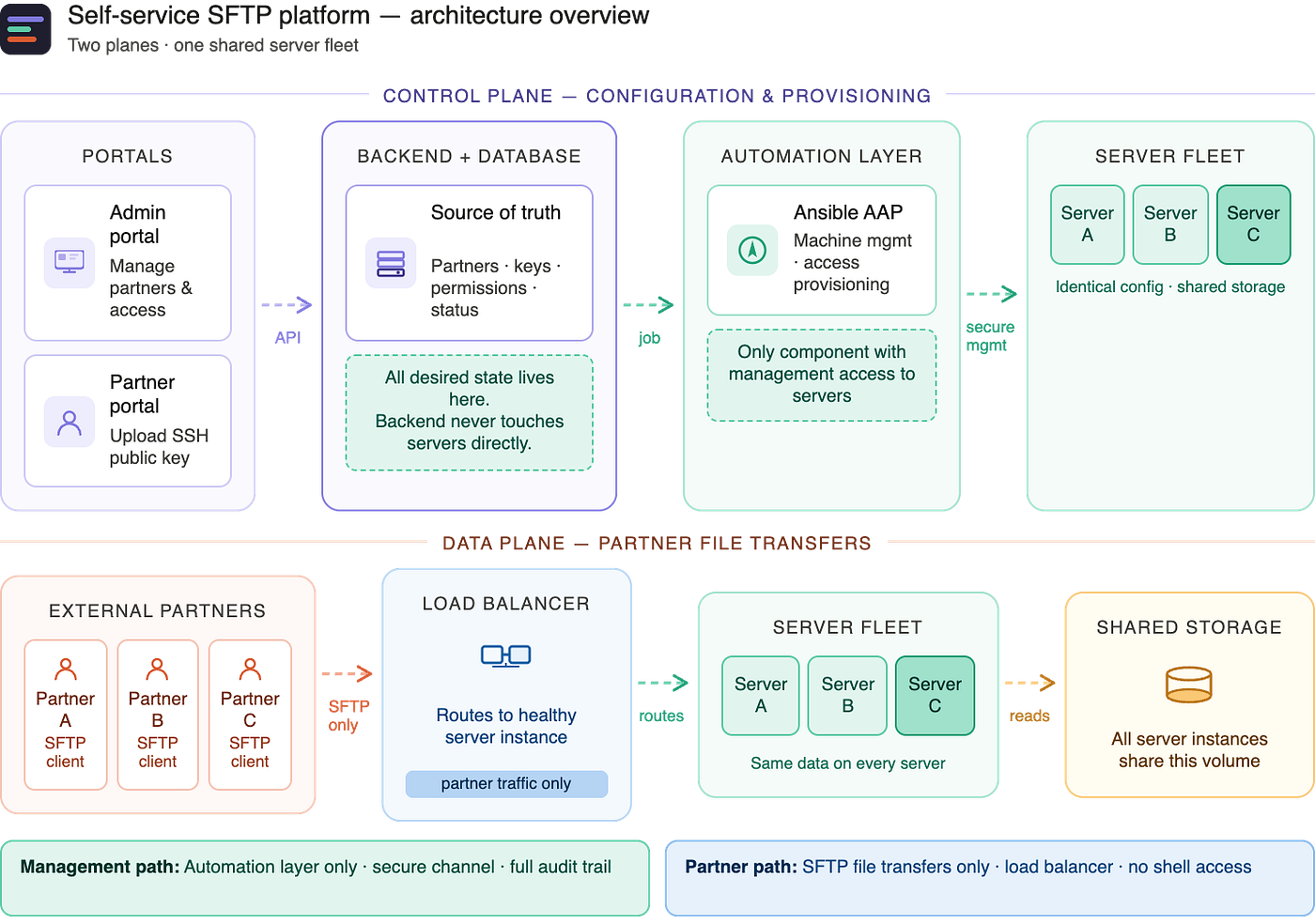
The system has five layers working across two planes.
The control plane manages configuration: who has access, to what, and with which keys. Changes flow from admin UI through the backend, into an automation layer, and out to the servers.
The data plane serves actual file transfers. Partners connect through a load balancer that routes them to one of several server instances, all backed by the same shared storage volume.
Here is a walkthrough of each component.
Admin Portal — an internal web UI where admins create partner accounts, define what each partner can access, and manage the lifecycle of that access. It talks to the backend service over a standard API.
Partner Portal — a separate, simpler UI for external partners. Partners log in, upload their SSH public key, and check their access status. That is essentially all they can do here. The portal validates the key format, stores it through the backend, and triggers provisioning.
Backend Service — the core of the system. It handles all requests from both portals, owns the database, and is the single source of truth for the entire platform. Every partner, every key, every permission record lives here. Crucially, the backend never touches the servers directly. When something needs to change, it delegates to the automation layer.
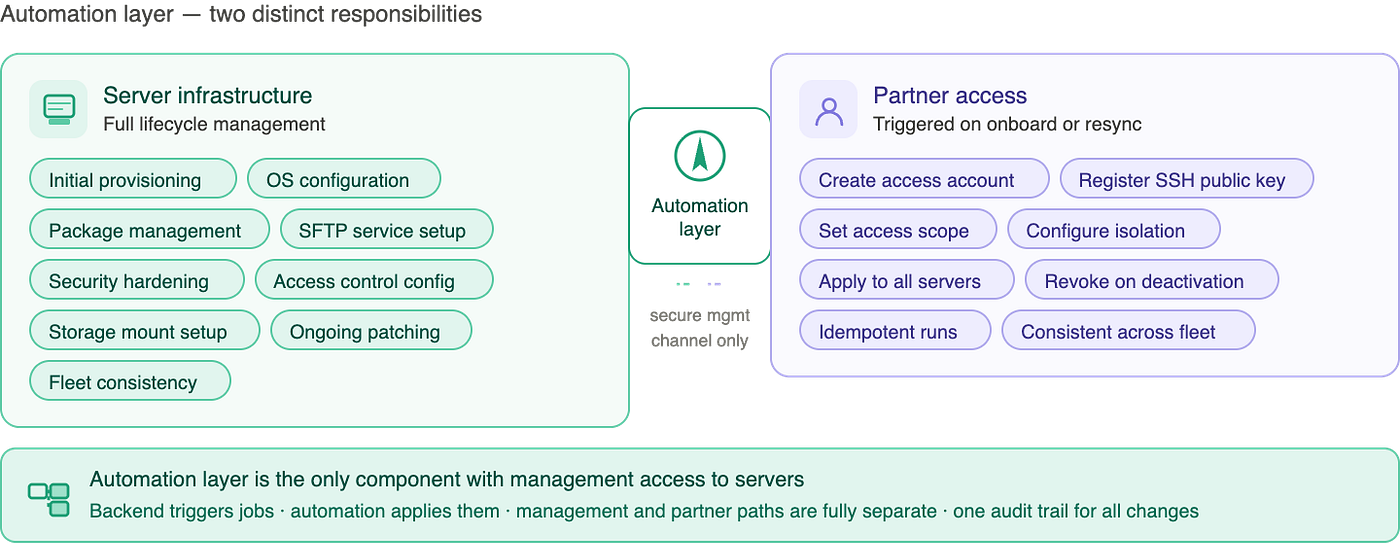
Automation Layer — responsible for two things that are easy to conflate but important to keep separate. First, it provisions and manages the server infrastructure itself: initial setup, ongoing configuration, patching, and hardening. Second, it handles partner-specific changes: creating access accounts, managing keys, setting permissions, and cleaning up when access is revoked. The automation layer is the only component with any management access to the servers. Nothing else has that path.
Server Fleet + Shared Storage — a set of server instances behind a load balancer, all backed by the same shared storage volume. Every instance is configured identically. It does not matter which instance a partner lands on — their data is always there, and their access configuration is identical across the fleet.
How a Partner Gets Onboarded
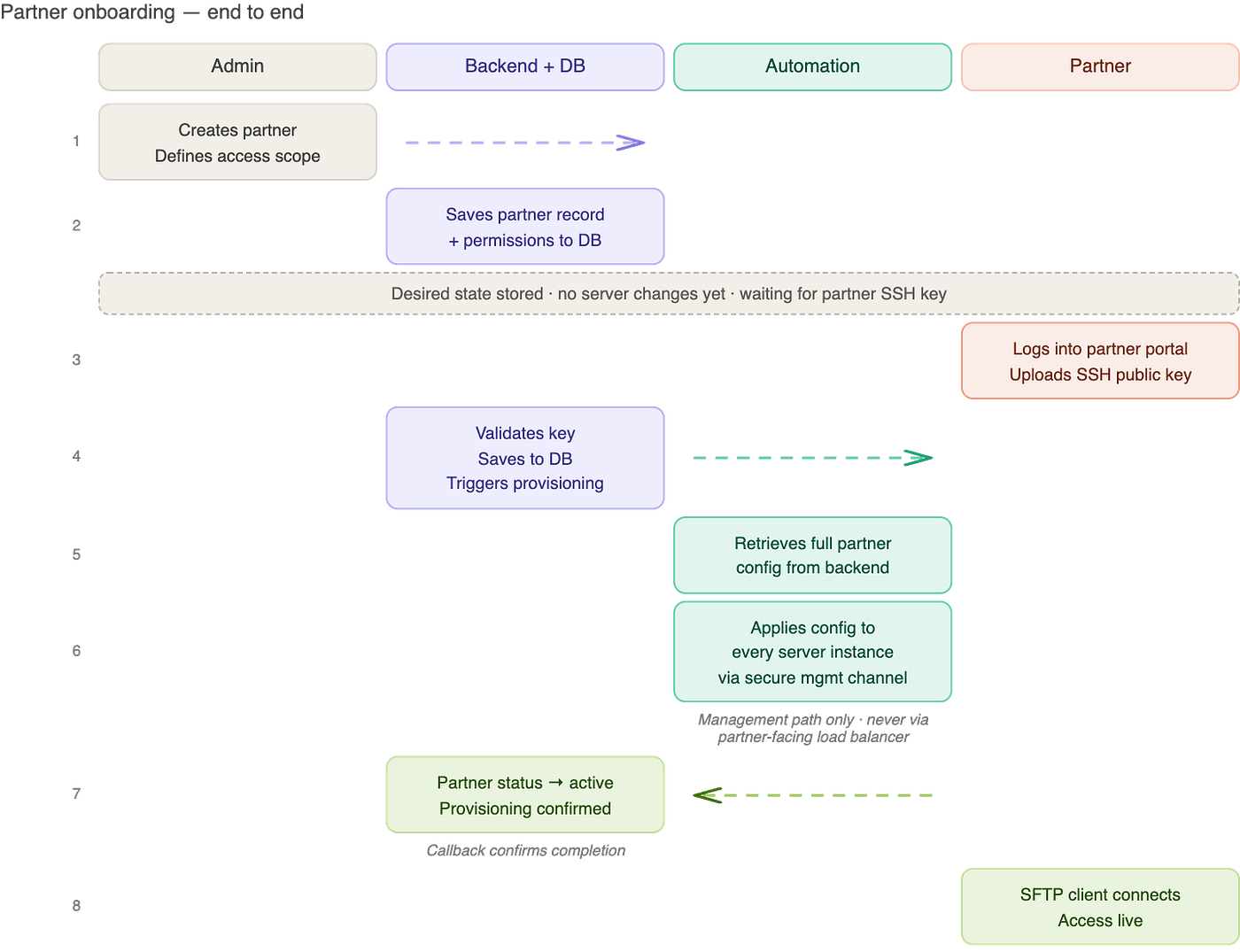
Here is what actually happens when a new partner joins the platform.
An admin logs into the Admin Portal and creates a partner record, specifying what data the partner should be able to access. The backend saves this to the database. At this point, nothing has changed on the servers yet. The desired state exists, but provisioning has not run because a key has not been provided.
The partner logs into the Partner Portal and uploads their SSH public key. The portal validates the format and submits it to the backend, which stores it alongside the partner record.
Now the backend has everything it needs. It triggers a provisioning job in the automation layer. The automation layer picks up the job, retrieves the full partner configuration, and applies it across every server in the fleet. When that completes, the backend marks the partner as active.
From the partner’s perspective: they upload a key, wait a short time, and their SFTP client can connect. They never need to contact the platform team.
This design also meant that admin configuration and partner key upload were decoupled. An admin could set up a partner’s access profile days before the partner was ready. When the partner eventually uploaded their key, provisioning applied the pre-configured access exactly as intended.
What Partners Actually Experience
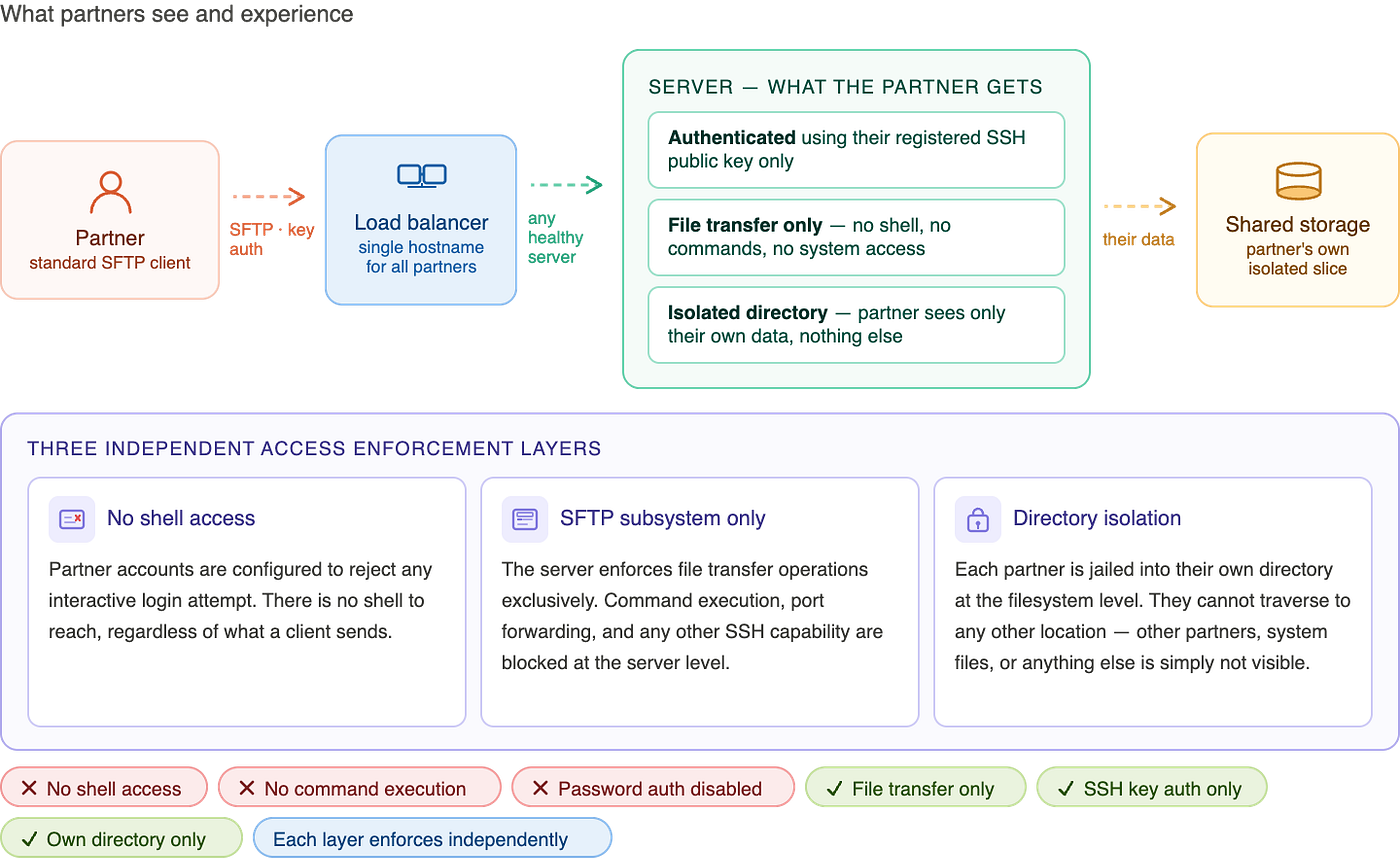
From a partner’s perspective, the experience is straightforward.
They receive a hostname to connect to and set up their SFTP client as they normally would - pointing it at the hostname, using their private key for authentication, on the standard port. No special configuration is needed on their side.
When they connect, three things happen automatically to enforce their access boundaries.
Authentication — only their registered SSH public key is accepted. Password authentication is disabled entirely across the platform. There is no fallback.
Access scope — partners can only perform file transfer operations. They cannot open a shell session, run commands, or access any system-level functionality. This is not just a policy — it is enforced at the server level regardless of what a client attempts.
Directory isolation — partners land directly in their own data directory and cannot navigate outside of it. From their SFTP client, it looks like the entire filesystem is just their data. They have no visibility into the existence of other partners, other directories, or the underlying system structure.
These boundaries are enforced at multiple independent layers. A misconfiguration at one layer does not automatically create a vulnerability, because the others are still in place.
Partners interact through standard SFTP clients - command-line or GUI, whichever they prefer. The platform is compatible with any client that supports SSH key authentication.
Why an Automation Layer? Why Not Just Apply Changes Directly?
This is a question that came up early in design. The backend knows what state the servers should be in. Why route through a separate automation layer at all?
Several reasons, and they compound.
Security boundary. The backend is a web-facing service. Giving it direct management access to the server fleet would mean that any compromise of the backend could translate into compromise of the servers. Routing through a dedicated automation layer with its own access controls and network placement significantly limits that blast radius.
The automation layer manages more than access. This is the part that is easy to underestimate. The automation layer is not just triggered when a partner is onboarded. It is responsible for the server fleet itself: initial provisioning, configuration management, patching, and hardening. The same tool that handles partner access also handles infrastructure lifecycle. One system, one audit trail, one place to look when something goes wrong.
Idempotent by design. The automation layer applies configuration in a way that produces the same result whether it has run once or ten times. This property becomes critical for the resync mechanism described in the next section.
Audit trail. Every action the automation layer takes is logged. You can see exactly what changed, when, and why. When something goes wrong and something always eventually goes wrong, this trail is invaluable.
State Management: The Most Important Part of the Design
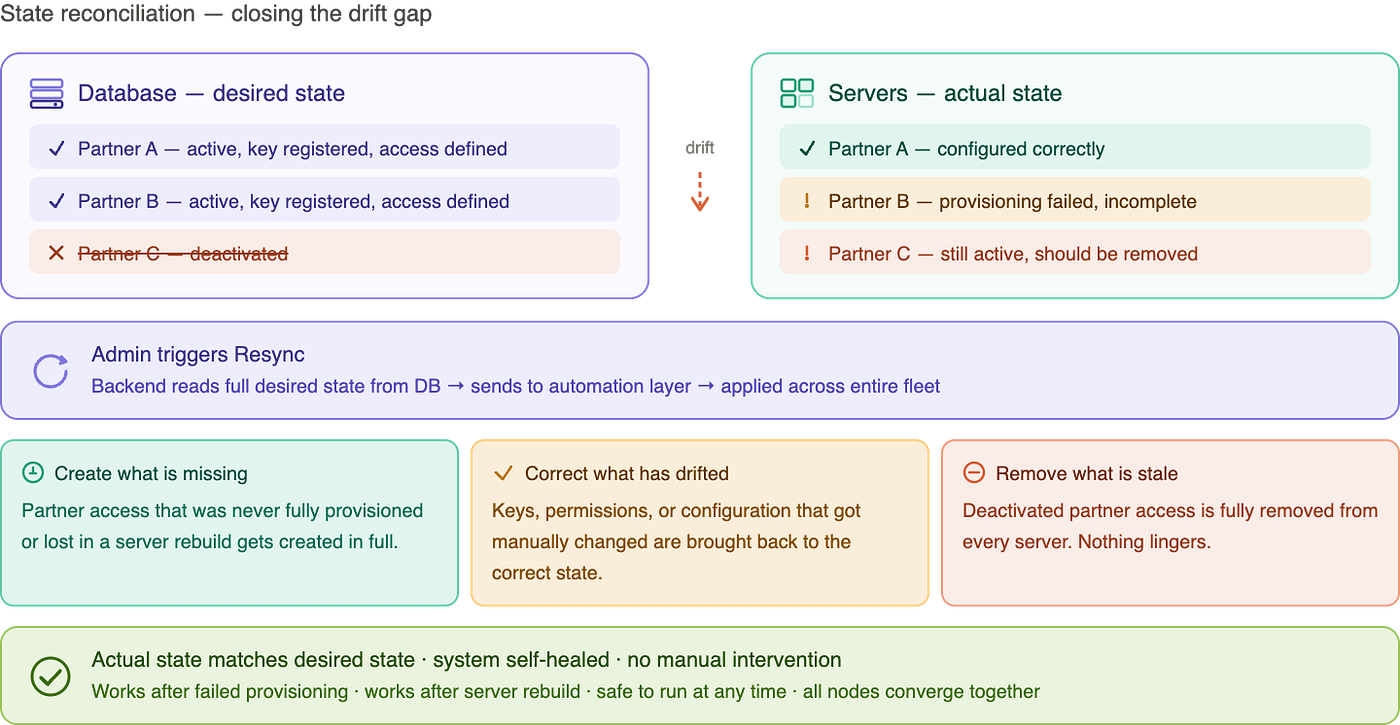
Every system that manages infrastructure eventually hits the same problem: drift. Someone makes a manual change. A job fails halfway through. A server gets rebuilt. The actual state of the infrastructure quietly diverges from what it is supposed to be.
We addressed this with a pattern we internally called state reconciliation.
The database holds the desired state - every partner, every key, every permission, as a current snapshot of intent. Not a log of events. A declaration of what the world should look like right now.
The server fleet holds the actual state - whatever configuration exists on those machines at any given moment.
The gap between these two is drift.
The Re-sync operation closes that gap. An admin triggers it from the portal or it can run automatically on a schedule. The backend reads the full desired state from the database and passes it to the automation layer, which applies it across the entire fleet. Because the automation is idempotent, this is completely safe to run at any time regardless of current server state.
Re-sync handles three cases simultaneously:
- Missing — if a partner’s access was never fully provisioned or a server was rebuilt, it gets created correctly
- Drifted — if a key was manually changed or permissions got corrupted, they are brought back to the correct state
- Stale — if a partner was deactivated in the database, their access is removed from every server in the fleet
This pattern proved valuable in ways we did not fully anticipate before building it.
Self-healing. When a provisioning job fails for any reason, there is no need to debug what partially applied. Fix the root cause, trigger a re-sync, and the system heals.
Disaster recovery. If a server needs to be completely rebuilt, the database still holds the full desired state. Provision a new server, run a re-sync, and it joins the fleet fully configured. No manual reconstruction, no forgotten steps.
Operator confidence. Non-technical admins could press the re-sync button any time something seemed off and know the system would return to the correct state. That confidence in the platform was underrated in its importance.
This is the same reconciliation model that Kubernetes uses for container workloads - declare the desired state, and the system continuously works toward it. We applied the same idea at a smaller scale, but the principle is identical.
Trade-offs Worth Being Honest About
No design is perfect.
Eventual consistency. When a partner uploads a key, access is not instantaneous. The backend queues a provisioning job, which takes some time to complete. For our use case this lag was acceptable. If you need instantaneous access, this architecture needs adaptation.
The automation platform is not lightweight. A production-grade automation platform carries real operational overhead - its own infrastructure, maintenance, and operational burden. For smaller teams, a lighter-weight approach to triggering automation jobs might be more practical.
Running your own servers has a cost. Managing your own SFTP server fleet means taking on OS maintenance, patching, capacity planning, and failover. A managed SFTP service eliminates most of that. We could not use one due to constraints, but the trade-off is real.
Re-sync is a broad operation. A full re-sync re-applies configuration for every partner on every run. At a small partner count this is fine. At scale, you want incremental reconciliation - only apply changes where drift is actually detected.
What Worked Well
Self-service genuinely reduced toil. Before this system, adding a partner required engineering time. After, it was an admin clicking through a UI. The platform team stopped being the bottleneck for routine onboarding tasks.
The re-sync button became a superpower. Any time something looked wrong, admins could trigger a re-sync and know the platform would return to correct state. That capability built real confidence, particularly among non-technical operators who had no other way to verify system health.
Idempotent automation is underrated. The upfront investment in idempotent design pays back continuously. You stop worrying about what happens if something runs twice, and start thinking entirely in terms of desired state. The system becomes recoverable by design.
Separation of concerns held up under pressure. The backend does not touch servers. The servers do not know about the database. The automation layer is the only bridge. When something broke, it was always clear which component to look at.
What I Would Improve Today
Consider a managed SFTP service. If starting today without the same constraints, I would seriously evaluate a managed SFTP service with a custom identity provider backed by our database. The operational overhead of running your own server fleet is real and ongoing. A managed service eliminates most of it. Cost is higher per transfer, but for most teams the engineering time saved pays for it quickly.
Incremental reconciliation. The current re-sync is all-or-nothing. A better design tracks last-applied state per partner, diffs it against current desired state, and only triggers changes where something has actually drifted. Faster, less disruptive, scales properly.
Event-driven provisioning. The backend currently triggers a job synchronously when a key is uploaded. A queue-based approach gives you retries, dead-letter handling, and decouples the API response time from actual provisioning time. More resilient under load.
Automated drift detection. The resync fixes drift — but only when triggered. A background process that continuously compares desired state against actual state, and alerts or auto-heals when a gap is found, would make the platform genuinely self-managing rather than operator-triggered.
Richer observability. We had job-level logging, but no unified view of the health of every partner’s access configuration. A dashboard showing desired state versus confirmed-applied state, per partner, with timestamps, would be enormously useful for day-to-day operations.
Final Thoughts
The patterns here are not specific to SFTP. They apply anywhere you are managing infrastructure state from an application layer.
Keep a database as your source of truth, the authoritative record of what the world should look like. Build automation that is idempotent and can re-apply full desired state at any time. Never give application code direct access to infrastructure. Route through a dedicated automation layer. Build the reconciliation mechanism from day one.
Three things I would carry forward from this experience:
The desired state versus actual state model is one of the most useful frameworks in platform engineering. Any time you are managing infrastructure from software, this lens clarifies your design.
Idempotent automation is what makes a system recoverable. If your automation cannot safely run twice, you will have a bad time when things go wrong. And things always eventually go wrong.
Constraints are design inputs. We worked within real limitations and still delivered the experience we needed. Sometimes the most interesting engineering happens precisely because you cannot take the obvious path.
If you have built something similar or have thoughts on any of these patterns, I would love to hear about it in the comments.
메타데이터
- post_id
- 38131de2aa61
- slug
- building-a-self-service-sftp-platform-on-aws-a-real-world-system-design-story-38131de2aa61
- url
- https://medium.com/@abhishek68/building-a-self-service-sftp-platform-on-aws-a-real-world-system-design-story-38131de2aa61
- canonical_url
- https://medium.com/@abhishek68/building-a-self-service-sftp-platform-on-aws-a-real-world-system-design-story-38131de2aa61
- author_url
- https://medium.com/@abhishek68
- status
- ok
- fetched_at
- 2026-06-13 16:00:06