Python Functions
Python Functions overview
Python Functions
Python Functions overview
Photo by niko n on Unsplash
In Python, a function is a named, reusable block of code designed to perform a specific task. Functions enhance code modularity, reusability, and readability.
Defining a Function: The def keyword, the function name, parentheses (which may include parameters), and a colon are used to define functions. The code block of the function is indented beneath the definition.
def greet(name):
  """This function greets the person passed in as a parameter."""
  print(f"Hello, {name}!")
Calling a Function: To execute the code within a function, call it by its name followed by parentheses, passing any required arguments.
greet("Alice") # Output: Hello, Alice!Types of Functions in Python:
Built-in Functions: These are predefined functions provided by Python’s standard library, always available for use.
Examples include print(), len(), int(), sum(), max(), and min().
User-defined Functions: These are functions created by the programmer to perform specific tasks tailored to their application.
Functions Defined in Modules:
Python’s standard library and third-party libraries contain modules that group related functions. These functions need to be imported from their respective modules before use (e.g., math.sqrt() after import math).
Key Concepts:
Arguments and Parameters:
Arguments are the actual values passed when the function is called, whereas parameters are placeholders in the function definition.
Return Values:
The return statement allows functions to return a value, which ends the function’s execution and sends the value back to the calling environment. A function implicitly returns None in the absence of a return statement.
Docstrings
Docstrings are multiline strings that are used to improve the readability and maintainability of code by documenting the parameters, return values, and purpose of a function.
Variable Scope:
Variables that are defined inside a function are only accessible within that function.
Advantages of using Function:
Code Reusability: By encapsulating routine tasks into functions, you can prevent code repetition. Modularity: Divide intricate programs into more manageable, independent, and smaller parts. Readability: Code is simpler to comprehend and follow when functions are used. Maintainability: Rather than affecting numerous instances of repetitive code, changes or bug fixes can be implemented in a single location (the function definition).
Parameters and arguments
Although they refer to different aspects of passing data into a function, parameters and arguments are essential concepts when working with functions in Python.
Parameters: Definition: The variables enclosed in parenthesis in the definition of a function are called parameters. They serve as stand-ins for the information that the function anticipates receiving upon call.
Role: A function’s interface is established by its parameters, which specify the kind and quantity of inputs it can take. They are local to the scope of the function.
For instance: Name is a parameter in the function definition
def greet(name):Arguments: Arguments are defined as the actual data or values that are supplied to a function upon its invocation. As the function runs, these values are allocated to the appropriate parameters.
Role: Arguments give the function the precise data it will work with, enabling dynamic behavior and varying outcomes depending on the input.
In the function call greet(“Alice”), for instance, “Alice” is an argument that is passed to the name parameter.
Essentially: Parameters are part of the function’s blueprint (definition)
Arguments: are the actual values that are supplied when the function is called.
def add_numbers(a, b): # 'a' and 'b' are parameters
    return a + b
    result = add_numbers(5, 10) # 5 and 10 are arguments
    print(result)
The parameters a and b in the add_numbers function definition are used in this example. The arguments passed to a and b, respectively, are 5 and 10, when add_numbers(5, 10) is called.
Packing and Unpacking Arguments in Python
We can effectively handle variable-length arguments thanks to Python’s concept of packing and unpacking arguments. When we don’t know in advance how many arguments will be passed to a function, this feature comes in handy.
Arguments for Packing
Packing enables the combination of multiple values into a single parameter using * (for tuples/lists) and ** (for dictionaries).
Several positional arguments are packed into a tuple using args (non-keyword arguments). kwargs (Keyword arguments): Constructs a dictionary with several keyword arguments.
1. Packing with *args
The * operator allows us to pass multiple arguments to a function and pack them into a tuple.
def samplepack(*args):
    print("Packed arguments:", args)
    samplepack(1, 2, "this is sample 1", "THIS IS SAMPLE 2")
    #Output
    Packed arguments: (1, 2, "this is sample 1", "THIS IS SAMPLE 2"))
Explanation: Any number of arguments can be passed to the function.
All of the arguments are packed into a tuple by the *args.
- Packing with **kwargs
** operator is used to collect multiple keyword arguments into a dictionary.
def samplekwargs(**kwargs):
    print("Packed keyword arguments:", kwargs)
    samplekwargs(name="John", age=28, country="Brazil")
    #Output
    Packed keyword arguments: {'name': 'John', 'age': 28, 'country': 'Brazil'}
Explanation:
**kwargs collects keyword arguments as a dictionary.
Each key-value pair is stored in kwargs.
Unpacking Arguments
Values from an iterable (list, tuple, or dictionary) can be supplied to a function as distinct arguments by unpacking them.
- Breaking Down a List or Tuple with To unpack components from a list or tuple, we utilize .
def addition(a, b, c,d,e):
    return a + b + c+d+e
    num = (1, 5, 10,12,14)
    result = addition(*num)
    print("Sum:", result)
    #Output
    Sum: 42
**Explanation: ***numbers unpacks numbers into a, b, c,d,e.
2. Unpacking a Dictionary with **
We use ** to unpack key-value pairs from a dictionary.
def info(name, age, country):
    print(f"Name: {name}, Age: {age}, Country: {country}")
    data = {"name": "Test Unpack", "age": 40, "country": "Brazil"}
    info(**data)
    #Output
    Name: Test Unpack, Age: 40, Country: Brazil
Explanation: **data unpack dictionary values and assign them to parameters.
Packing and Unpacking Together
We can use Packing and Unpacking in same function
def packunpacktogether(*args, **kwargs):
    print("Positional:", args)
    print("Keyword arguments:", kwargs)
    packunpacktogether(1, 2, name="Test Both", age=40)
    #Output
    Positional: (1, 2)
    Keyword arguments: {'name': 'Test Both', 'age': 40}
Explanation:
*args collects (1, 2, 3) as a tuple.
**kwargs collects name=”geeks for geeks” and age=30 into a dictionary.
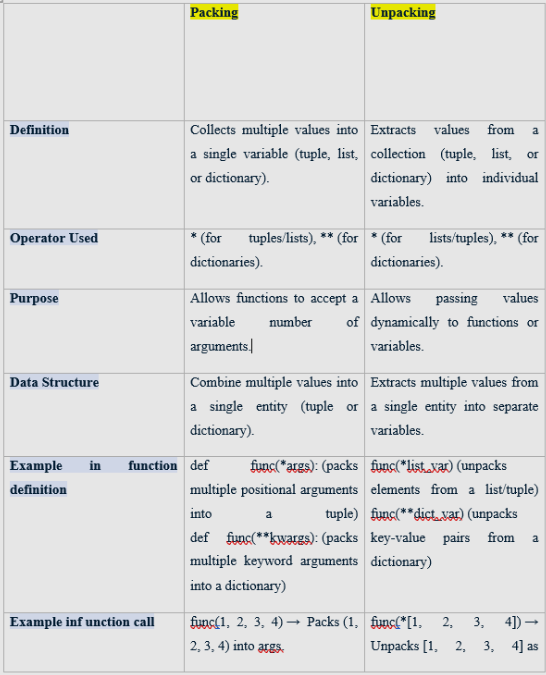
Difference between Packing and Unpacking
Return values
Python functions can use the return statement to return values to the section of code that called them. This makes it possible for functions to generate results that can be utilized in other parts of your program.
How to use a Python function to return values:
Make use of the return keyword: Put the return keyword inside your function and then the value or expression you wish to return.
def add(a, b):
    result = a + b
    return result # Returns the value of 'result'
Assign the returned value: You can designate a variable with the returned value when you call the function.
sum_of_numbers = add(5, 3)
print(sum_of_numbers) # Output: 8
Return multiple values: Functions can return multiple values by separating them with commas. Python automatically packs these into a tuple.
def get_coordinates():
    x = 10
    y = 20
    return x, y # Returns a tuple (10, 20)
    coord_x, coord_y = get_coordinates()
    print(f"X: {coord_x}, Y: {coord_y}") # Output: X: 10, Y: 20
No explicit return: If a function does not have a return statement, or if return is used without a value, the function implicitly returns None.
def greet(name):
    print(f"Hello, {name}!")
    result = greet("Alice")
    print(result) # Output: None
Important details regarding return: The function’s execution is immediately terminated by the return statement. Any code inside the function that comes after return won’t be run.
Any Python object, including dictionaries, lists, strings, numbers, custom objects, and even other functions, can be returned.
Because it enables functions to carry out particular operations and produce outcomes without directly altering global variables, returning values is essential for writing modular and reusable code.
The pass Statement
function definitions cannot be empty, but if you for some reason have a function definition with no content, put in the pass statement to avoid getting an error. Example
def myfunction():
   pass
Scope of variables (local and global).
In Python, a variable’s scope dictates where it can be accessed and changed within the program. The two primary variable scope types defined by Python are local and global.
1. Local Scope: A local scope is a variable declared inside a function. Only within that particular function is it available. Lifetime: When a function is called, local variables are created; when the function is finished running, they are destroyed.
def my_function():
    local_var = "I am local"
    print(local_var)
    my_function()
    # print(local_var) # This would raise a NameError because local_var is not defined in the global scope
Global Scope: A variable at the top level of a script or module that is declared outside of any functions has a global scope. It can be accessed from inside functions as well as from anywhere else in the code.
Lifetime: Global variables are set up at the beginning of the program and remain there until it ends.
global_var = "I am global"
def another_function():
    print(global_var)
    another_function()
    print(global_var)
메타데이터
- post_id
- 382b2cd0cd71
- slug
- python-functions-382b2cd0cd71
- url
- https://medium.com/no-time/python-functions-382b2cd0cd71
- canonical_url
- https://medium.com/no-time/python-functions-382b2cd0cd71
- author_url
- https://medium.com/@sharathvyas
- status
- ok
- fetched_at
- 2026-06-21 12:17:11