Why Developers Are Reconsidering LibreOffice for Document Conversion
For many development teams, LibreOffice is the first practical solution they encounter for server-side document conversion.
Why Developers Are Reconsidering LibreOffice for Document Conversion
For many development teams, LibreOffice is the first practical solution they encounter for server-side document conversion.
It supports common Office formats, runs on Linux, works in headless mode, and is free to use. A simple command like this is often enough to get started:
libreoffice --headless --convert-to pdf file.docxFor prototypes, internal tools, and low-volume workloads, this approach can work well. But as systems scale, teams often encounter operational challenges that were less visible during initial testing.
This article is not an argument against LibreOffice. Instead, it examines why some teams move away from it in production environments, what architectural tradeoffs are involved, and where LibreOffice still remains a reasonable choice.
Table of Contents:
- How LibreOffice Handles Conversion
- Why LibreOffice Became So Popular
- Common Challenges in Production Environments
- Formatting Fidelity
- How the Ecosystem Has Responded
- Alternatives Teams Commonly Evaluate
- When LibreOffice Still Makes Sense
- A Broader Architectural Pattern
- Conclusion
1. How LibreOffice Handles Conversion
Although the CLI command appears lightweight, LibreOffice conversion is not implemented as a small standalone rendering library.
Behind the scenes, LibreOffice starts a substantial portion of its office runtime environment:
- Initializes the rendering engine
- Loads a user profile from disk
- Starts font and layout subsystems
- Processes the document
- Shuts down after conversion completes
The --headless flag disables the graphical interface, but the application architecture remains largely desktop-oriented.
As a result, each conversion behaves more like launching an application process than calling an in-process API. Compared with library-based conversion engines, this introduces noticeably higher startup overhead.
2. Why LibreOffice Became So Popular
LibreOffice solved several real problems at a time when alternatives were limited.
Earlier server-side approaches — especially Microsoft Office Interop — introduced significant operational constraints:
- Windows-only deployment
- Full Office installation requirements
- Licensing considerations
- Poor reliability in unattended server environments
LibreOffice offered a much simpler deployment model:
- Linux support
- No licensing fees
- Broad Office format compatibility
- Headless command-line execution
For many teams, especially smaller ones, this was a major improvement. A large ecosystem of tutorials, Docker images, wrappers, and Stack Overflow solutions quickly formed around the workflow.
Even today, it remains a practical solution for many lightweight workloads.
3. Common Challenges in Production Environments
The limitations typically appear when workloads become more concurrent, containerized, or latency-sensitive.
3.1 Startup and Resource Overhead
LibreOffice initialization can take several seconds, especially in cold environments where fonts, profiles, and rendering subsystems must be loaded.
In modern infrastructure environments, this can affect:
- API response times
- Pod startup duration
- Autoscaling efficiency
- Serverless viability
Compared with lightweight in-process SDKs, LibreOffice generally consumes more CPU, memory, and storage resources per conversion task.
3.2 Concurrency Limitations
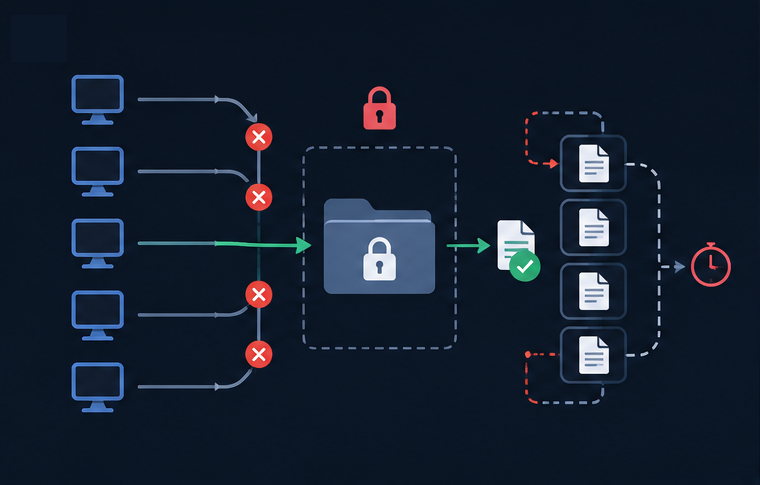
LibreOffice was originally designed for interactive desktop usage rather than highly parallel backend execution.
One commonly discussed limitation is profile locking. Multiple concurrent processes may compete for access to the same LibreOffice user profile directory, which can lead to:
- Hanging conversion jobs
- Stalled queues
- Locked temporary files
- Orphaned
soffice.binprocesses
To improve reliability, teams often introduce additional infrastructure such as:
- Worker queues
- Isolated temporary profiles
- Process supervision
- Automatic cleanup and restart logic
These solutions are workable, but they add operational complexity.
3.3 Container and Cloud Deployment Friction
LibreOffice can run successfully in containers, but deployment often requires additional configuration.
Common operational concerns include:

Font handling is particularly important. Documents may render differently between environments if required fonts are unavailable, resulting in subtle layout inconsistencies.
4. Formatting Fidelity
LibreOffice provides strong compatibility with Microsoft Office formats, especially considering the complexity of those formats and the limited access to proprietary rendering specifications.
However, differences can still appear in complex documents.
Examples include:
- Word pagination and spacing changes
- Excel formula or conditional formatting differences
- PowerPoint animation and theme inconsistencies
For internal reporting workflows, these differences may be acceptable. For customer-facing documents, contracts, invoices, or regulated outputs, layout precision can become more important.

5. How the Ecosystem Has Responded
Several projects have emerged to make LibreOffice easier to operate in production systems.
5.1 Gotenberg
Gotenberg wraps LibreOffice behind an HTTP API and provides process isolation, queue handling, and container-friendly deployment patterns.
This reduces operational burden for many teams, particularly in Docker-based environments.
5.2 Collabora Online
Collabora Online is an enterprise-focused LibreOffice derivative with commercial support and active server-oriented development.
It is often considered by organizations already committed to the LibreOffice ecosystem.
5.3 LibreOffice.js
LibreOffice.js explores running LibreOffice through WebAssembly, potentially reducing subprocess overhead and improving integration flexibility.
The project is still evolving, but it reflects ongoing efforts to modernize deployment models.
6. Alternatives Teams Commonly Evaluate
Different workloads tend to favor different approaches.

Examples of commercial SDK providers include Aspose, Spire.Office, and Syncfusion.
Examples of specialized open-source tools include Pandoc and python-docx.
No single option is universally better. The right choice depends heavily on:
- Traffic volume
- Fidelity requirements
- Infrastructure model
- Budget
- Compliance constraints
- Supported document types
7. When LibreOffice Still Makes Sense
Despite its operational challenges, LibreOffice remains a valid choice for many scenarios.
It is often well suited for:
- Low-volume conversion workloads
- Batch processing systems
- Internal tooling
- Cost-sensitive projects
- Teams with moderate fidelity requirements
In these environments, the operational overhead may be entirely manageable.
The decision to move away from LibreOffice usually happens when teams find themselves spending increasing engineering effort on process management, scaling behavior, or output consistency rather than on core product development.

8. A Broader Architectural Pattern
LibreOffice is not unique in facing challenges within modern backend infrastructure.
Many desktop-era tools encounter similar friction when adapted for:
- Stateless execution
- High concurrency
- Containerized deployment
- Horizontal scaling
Typical symptoms include:
- Process lifecycle issues
- Environment-dependent behavior
- Heavy runtime initialization
- Increased operational complexity
Modern backend systems increasingly favor lightweight, in-process, stateless services because they scale more predictably under production workloads.
LibreOffice reflects design assumptions from an earlier software era, when desktop-first architectures were more common. That context helps explain both its strengths and its limitations.
9. Conclusion
LibreOffice remains capable and widely used open-source software for document conversion.
For low-concurrency workloads, internal systems, and cost-sensitive deployments, it can still be an effective solution.
However, as infrastructure requirements evolve toward stateless, highly concurrent, cloud-native architectures, some teams find that LibreOffice introduces operational complexity that becomes difficult to justify at scale.
The shift away from LibreOffice is therefore less about rejecting open source and more about aligning tooling with modern infrastructure patterns and production requirements.
메타데이터
- post_id
- 382ecb529dea
- slug
- why-developers-are-reconsidering-libreoffice-for-document-conversion-382ecb529dea
- url
- https://medium.com/@alexaae9/why-developers-are-reconsidering-libreoffice-for-document-conversion-382ecb529dea
- canonical_url
- https://medium.com/@alexaae9/why-developers-are-reconsidering-libreoffice-for-document-conversion-382ecb529dea
- author_url
- https://medium.com/@alexaae9
- status
- ok
- fetched_at
- 2026-06-17 19:05:49