Part 6: Production-Grade Secret Management via CSI & AWS Secrets Manager
This is the final installment of a 6-part series on building a production-ready EKS cluster with Terraform. If you’re landing here from…
Part 6: Production-Grade Secret Management via CSI & AWS Secrets Manager
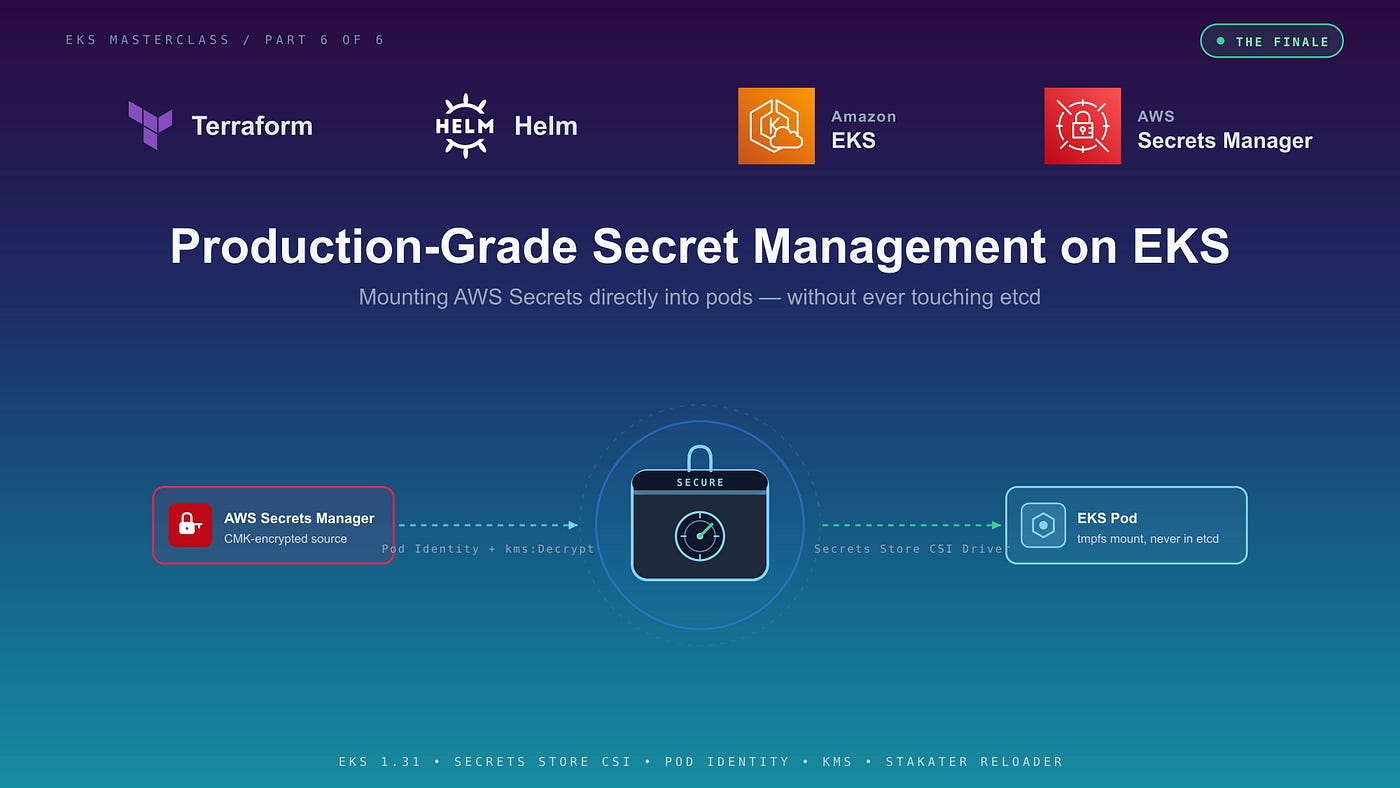
Production-Grade Secrets Management on EKS
This is the final installment of a 6-part series on building a production-ready EKS cluster with Terraform. If you’re landing here from search, the earlier parts establish the foundation this article relies on — particularly Pod Identity (Part 4) and KMS-encrypted control plane (Part 2):
- Part 1 — Comprehensive-guide-to-provisioning-an-aws-eks-cluster-with-terraform (Network Foundation: Multi-AZ VPC with Auto-Discovery Tagging)
- Part 2 — Provisioning the “Brain” — EKS Control Plane & Managed Nodes
- Part 3 — The Controller Ecosystem — Helm, Ingress, and Observability
- Part 4 — The Identity Shield — Access Entries & EKS Pod Identity
- Part 5 — The Compute Layer — Karpenter for Nodes, HPA for Pods
This final part closes the loop: secret delivery without putting credentials in Git, container images, or etcd.
TL;DR
- Native Kubernetes Secrets are base64, not encryption. Anyone with
kubectl get secret -o yamlreads your production credentials in plaintext.
- We mount secrets from AWS Secrets Manager directly into pods using the Secrets Store CSI Driver — credentials live in a
tmpfsvolume and never touchetcd.
- Access is gated by EKS Pod Identity (from Part 4) with least-privilege IAM and the often-missed
kms:Decryptpermission for CMK-encrypted secrets.
- Legacy apps that require environment variables are handled via
secretObjectssync + namespace-scoped RBAC + Stakater Reloader, giving you zero-downtime credential rotation with no application code changes.
- A VPC Interface Endpoint for Secrets Manager keeps secret-retrieval traffic off the public internet and off your NAT gateway bill.
1. The Problem with How You’re Probably Doing It
Your production database password is sitting in a Git repository right now. It’s “encrypted” with base64 — which means anyone with read access to that repo, or anyone who can run *kubectl get secret -n prod*, decodes it in three seconds with a one-line command.
That’s how most teams ship “Kubernetes secrets,” and it’s the gap we’re closing in this article.
Here we wire up the AWS Secrets and Configuration Provider (ASCP) for the Secrets Store CSI Driver to mount credentials directly into your pods from AWS Secrets Manager. No plaintext in Git. No persistent storage in *etcd*(when used in pure mode). No application code changes. And — with one carefully placed annotation — automatic credential rotation with zero downtime.
2. The Architectural Choice: CSI Driver vs. External Secrets Operator (ESO)
When engineering an enterprise platform, you will face a choice between the External Secrets Operator (ESO) and the Secrets Store CSI Driver. Both are mature and production-ready, but they follow different philosophies regarding Kubernetes *etcd* storage.
External Secrets Operator (ESO): ESO polls AWS Secrets Manager and writes plaintext data into a standard Kubernetes *v1/Secretobject. Those secrets live in `etcd*. If RBAC is misconfigured or a namespace is compromised, an attacker can dump credentials withkubectl get secret -o yaml`. ESO’s genuine strengths are worth acknowledging: declarative templating, support for multiple backends (Vault, GCP, Azure) under one operator, and easier handling of complex JSON secret payloads.
Secrets Store CSI Driver (Pure Mode): The CSI driver injects the secret payload directly into the pod via a *tmpfs volume. The secret lives only inside the running container; if the pod dies, its secret footprint vanishes instantly. In pure mode, `etcd`*is never involved.
A balancing note on etcd risk: EKS encrypts *etcd at rest by default, and with KMS envelope encryption (covered in Part 2) the at-rest blob is wrapped with a customer-managed key. This narrows ESO’s risk profile considerably — the same RBAC misconfiguration that would expose ESO-managed secrets would also expose the CSI-synced `app-env-secrets`* object we create later. The architectural choice here is about defense in depth, not absolute safety.
The pragmatic enterprise reality: In a perfect world, every application reads configuration from local files. In practice, a large share of enterprise applications strictly require environment variables. The CSI driver solves this via the *secretObjects* (Secret Sync) feature, which mirrors mounted files into a native K8s Secret.
Architect’s strategy: We will use the CSI Driver. For modern apps, we mount in-memory via *tmpfs*. For legacy apps requiring environment variables, we use the CSI sync feature, but lock the resulting Secret down with strict, namespace-scoped RBAC. One caveat worth being explicit about: pure CSI mounts are more ephemeral, but the node’s kubelet still holds the credential in memory, and any privileged DaemonSet or debugging pod with host filesystem access could read it. The CSI driver’s value is in reducing — not eliminating — the credential’s blast radius.
3. The IAM Least-Privilege Policy & Pod Identity
We scope IAM permissions exclusively to the exact secret paths the application requires and bind them using the EKS Pod Identity model established in Part 4. Two often-missed details:
-
***kms:Decrypt* is required* when your Secrets Manager secret is encrypted with a customer-managed key (the recommended default for production secrets). Without it, `GetSecretValue* returnsAccessDeniedException`. -
The trailing
*-** on the secret ARN accounts for the random 6-character suffix AWS automatically appends to every secret. Without it, your IAM policy will not match the actual ARN.
A note on KMS keys — this is a different key from Part 2.
In Part 2 we created a customer-managed key for EKS envelope encryption of
*etcd* — that key is used exclusively by the EKS service to encrypt Kubernetes*Secret*objects stored in the control plane database. It is never touched by workloads.
The key we create below is a separate CMK dedicated to AWS Secrets Manager — Secrets Manager uses it to encrypt your application secret values, and your application’s Pod Identity role decrypts via it through the
*kms:ViaService* condition. Keeping the two keys separate limits the blast radius of either compromise, lets you rotate them on independent schedules, and keeps your workload IAM out of the EKS encryption key’s policy. Do not reuse the Part 2 key here.
data "aws_caller_identity" "current" {}
data "aws_region" "current" {}

# Customer-managed KMS key dedicated to AWS Secrets Manager.
# This is NOT the same key as the one created in Part 2 for EKS etcd
# envelope encryption — that key is owned by the EKS service principal
# and should never be referenced by workload IAM. Separation of the
# two keys is intentional: different services, different principals,
# different rotation cadences, smaller blast radius.
resource "aws_kms_key" "secrets_manager" {
  description             = "CMK for AWS Secrets Manager — app production secrets"
  deletion_window_in_days = 30
  enable_key_rotation     = true

  tags = {
    Name    = "${module.eks.cluster_name}-secrets-manager-cmk"
    Purpose = "secrets-manager-encryption"
  }
}

resource "aws_kms_alias" "secrets_manager" {
  name          = "alias/${module.eks.cluster_name}-secrets-manager"
  target_key_id = aws_kms_key.secrets_manager.key_id
}

# IAM Policy: read access only to this workload's secrets.
resource "aws_iam_policy" "app_secrets_policy" {
  name        = "${module.eks.cluster_name}-app-secrets-policy"
  description = "Allows access to application-specific production secrets"

  policy = jsonencode({
    Version = "2012-10-17"
    Statement = [
      {
        Effect = "Allow"
        Action = [
          "secretsmanager:GetSecretValue",
          "secretsmanager:DescribeSecret"
        ]
        # The trailing "-*" matches the 6-character random suffix
        # AWS Secrets Manager appends to every secret ARN.
        Resource = "arn:aws:secretsmanager:${data.aws_region.current.name}:${data.aws_caller_identity.current.account_id}:secret:prod/app/db-credentials-*"
      },
      {
        Effect   = "Allow"
        Action   = ["kms:Decrypt"]
        Resource = aws_kms_key.secrets_manager.arn
        Condition = {
          StringEquals = {
            # Restrict use of the KMS key to Secrets Manager only —
            # this role cannot decrypt arbitrary ciphertext with the key.
            "kms:ViaService" = "secretsmanager.${data.aws_region.current.name}.amazonaws.com"
          }
        }
      }
    ]
  })
}

# Trust policy: assumed by EKS Pod Identity.
resource "aws_iam_role" "app_secrets_role" {
  name = "${module.eks.cluster_name}-app-secrets-role"

  assume_role_policy = jsonencode({
    Version = "2012-10-17"
    Statement = [
      {
        Effect    = "Allow"
        Principal = { Service = "pods.eks.amazonaws.com" }
        Action    = ["sts:AssumeRole", "sts:TagSession"]
      }
    ]
  })
}

resource "aws_iam_role_policy_attachment" "app_secrets_attach" {
  role       = aws_iam_role.app_secrets_role.name
  policy_arn = aws_iam_policy.app_secrets_policy.arn
}

# Bind the role to the application's service account via Pod Identity.
resource "aws_eks_pod_identity_association" "app_secrets_association" {
  cluster_name    = module.eks.cluster_name
  namespace       = "app-namespace"
  service_account = "app-service-account"
  role_arn        = aws_iam_role.app_secrets_role.arn
}
4. Network Path: VPC Endpoint for Secrets Manager (Recommended)
Before installing the driver, establish a Day-1 production control: a VPC Interface Endpoint for Secrets Manager. This keeps secret-retrieval traffic on the AWS private network — off the public internet and off your NAT gateway. The benefits are concrete: lower NAT data-transfer costs at scale, no internet egress dependency for pod startup, and a smaller attack surface for credential retrieval.
resource "aws_security_group" "vpce_secretsmanager" {
  name        = "${module.eks.cluster_name}-vpce-secretsmanager"
  description = "Allow HTTPS from EKS nodes to Secrets Manager VPC endpoint"
  vpc_id      = module.vpc.vpc_id

  ingress {
    from_port       = 443
    to_port         = 443
    protocol        = "tcp"
    security_groups = [module.eks.node_security_group_id]
  }
}

resource "aws_vpc_endpoint" "secretsmanager" {
  vpc_id              = module.vpc.vpc_id
  service_name        = "com.amazonaws.${data.aws_region.current.name}.secretsmanager"
  vpc_endpoint_type   = "Interface"
  subnet_ids          = module.vpc.private_subnets
  security_group_ids  = [aws_security_group.vpce_secretsmanager.id]
  private_dns_enabled = true

  tags = {
    Name = "${module.eks.cluster_name}-secretsmanager-vpce"
  }
}
5. Installing the Unified Engine via Helm
Rather than juggling separate installations for the core CSI driver and the AWS plugin, we use the official AWS provider Helm chart. By enabling *secrets-store-csi-driver.install*, the chart provisions a compatible core driver as a dependency — keeping the codebase DRY and guaranteeing version compatibility.
To support legacy applications that require environment variables, we enable Secret Synchronization. We also enable rotation polling, but with a more conservative interval than the upstream test default.
resource "helm_release" "csi_secrets_store_provider_aws" {
  name       = "secrets-provider-aws"
  repository = "https://aws.github.io/secrets-store-csi-driver-provider-aws"
  chart      = "secrets-store-csi-driver-provider-aws"
  version    = "3.1.0"
  namespace  = "kube-system"

  values = [
    <<-EOT
    secrets-store-csi-driver:
      install: true

      # Live secret rotation polling.
      # Note: this feature is alpha upstream — validate behavior under
      # your rotation cadence before relying on it for strict-SLA credentials.
      enableSecretRotation: "true"

      # 10 minutes is a reasonable production default. The upstream example
      # value of 2m is appropriate for testing only — at scale, aggressive
      # polling drives up Secrets Manager API costs (each pod issues one
      # GetSecretValue per interval) and raises the risk of throttling on
      # shared accounts.
      rotationPollInterval: "10m"

      # Synchronization to native K8s Secrets — required for env var injection.
      # This is a CLUSTER-WIDE capability flag: once enabled, ANY
      # SecretProviderClass in the cluster that declares secretObjects will
      # create a native v1/Secret in etcd. Review at the platform level,
      # not the app level. Apply strict, namespace-scoped RBAC to every
      # resulting Secret object.
      syncSecret:
        enabled: true
    EOT
  ]
}
Resilience expectation: The CSI driver fetches secrets synchronously during pod startup via *GetSecretValue. If Secrets Manager is unreachable (transient AWS issue, VPC endpoint misconfiguration, IAM regression), the pod will fail to start with a `MountVolume.SetUp failed`*error. This is a deliberate fail-closed posture — your application will not boot with stale or missing credentials. Build alerting around CSI mount failures in your observability stack so you find out before your customers do.
6. Declaring the Broker: SecretProviderClass
The SecretProviderClass maps your cloud data to your cluster. We configure it to mount the raw credentials as files, while simultaneously using *secretObjects* to mirror specific fields into a local Secret for applications that require environment variables.
We use the official *hashicorp/kubernetesprovider’s `kubenetes_manifest* resource so we do not introduce a third-party provider dependency. One operational note:kubenetes_manifest` validates against the cluster’s CRDs at plan time, so on a clean apply you’ll either need a two-stage apply (Install the Helm release first, then plan the manifests) or an explicit *kubenetes_manifest depends_on = helm_release.csi_secrets_provider_aws *on the resources below.
terraform {
  required_providers {
    kubernetes = {
      source  = "hashicorp/kubernetes"
      version = "~> 2.30"
    }
  }
}

resource "kubernetes_manifest" "secret_provider_class" {
  manifest = {
    apiVersion = "secrets-store.csi.x-k8s.io/v1"
    kind       = "SecretProviderClass"
    metadata = {
      name      = "app-aws-secrets"
      namespace = "app-namespace"
    }
    spec = {
      provider = "aws"
      parameters = {
        objects = yamlencode([
          {
            objectName = "prod/app/db-credentials"
            objectType = "secretsmanager"
            jmesPath = [
              { path = "username", objectAlias = "DB_USER" },
              { path = "password", objectAlias = "DB_PASSWORD" }
            ]
          }
        ])
      }
      # Sync logic: mirror specific files into a native K8s Secret for
      # applications that need environment-variable ingestion.
      secretObjects = [
        {
          secretName = "app-env-secrets"
          type       = "Opaque"
          data = [
            { objectName = "DB_USER",     key = "DATABASE_USER" },
            { objectName = "DB_PASSWORD", key = "DATABASE_PASSWORD" }
          ]
        }
      ]
    }
  }
}
Senior Architect Warning: Defining *secretObjectscauses the CSI driver to create a native Kubernetes Secret in `etcd*. While this solves the environment-variable requirement for legacy apps, the synced secret is no longer strictly ephemeral. To maintain a defense-in-depth posture, apply strict Kubernetes RBAC (RoleBindings`) in *app-namespace ensuring that only the specific application `secretObjects*hasget/list/watch `permissions on *app-env-secrets* — and explicitly deny it for human users, including platform operators, unless break-glass procedures are followed.
7. Consuming Secrets in Workloads
With the infrastructure ready, your workloads consume the configuration by mounting the CSI driver volume. This forces the container initialization loop to retrieve and validate secrets from AWS Secrets Manager (via Pod Identity) before the app can boot.
To solve the rotation problem, we use Stakater Reloader (deployed earlier in this masterclass). Reloader watches the synced K8s Secret object — not AWS directly — and detects a data-hash change the moment the CSI driver mutates that Secret during rotation, then triggers a rolling restart.
In keeping with the series’ Terraform-first approach, we declare the Deployment as a managed manifest as well. If your release pipeline hands Deployments off to Argo CD or Flux at this layer, declare it there instead — the principle is the same.
resource "kubernetes_manifest" "billing_api_deployment" {
  manifest = {
    apiVersion = "apps/v1"
    kind       = "Deployment"
    metadata = {
      name      = "billing-api"
      namespace = "app-namespace"
      annotations = {
        # Stakater Reloader: watch the synced K8s Secret and trigger
        # a rolling restart when its data hash changes.
        "secret.reloader.stakater.com/reload" = "app-env-secrets"
      }
    }
    spec = {
      replicas = 3
      selector = {
        matchLabels = { app = "billing-api" }
      }
      template = {
        metadata = { labels = { app = "billing-api" } }
        spec = {
          serviceAccountName = "app-service-account" # Pod Identity link
          containers = [
            {
              name  = "web"
              image = "custom-registry/api:v1.0"

              # Method A: ingestion via environment variables
              # (enabled by syncSecret + secretObjects).
              env = [
                {
                  name = "DB_USER"
                  valueFrom = {
                    secretKeyRef = {
                      name = "app-env-secrets"
                      key  = "DATABASE_USER"
                    }
                  }
                },
                {
                  name = "DB_PASSWORD"
                  valueFrom = {
                    secretKeyRef = {
                      name = "app-env-secrets"
                      key  = "DATABASE_PASSWORD"
                    }
                  }
                }
              ]

              # Method B: ingestion via direct filesystem mount.
              volumeMounts = [
                {
                  name      = "secret-volume"
                  mountPath = "/mnt/secrets"
                  readOnly  = true
                }
              ]
            }
          ]
          volumes = [
            {
              name = "secret-volume"
              csi = {
                driver   = "secrets-store.csi.k8s.io"
                readOnly = true
                volumeAttributes = {
                  secretProviderClass = "app-aws-secrets"
                }
              }
            }
          ]
        }
      }
    }
  }
}
Senior Architect Reality Check: The “Auto-Rotation” Myth
With *enableSecretRotation: “true”, the CSI driver dynamically updates the values inside `/mnt/secrets* and updates the synced K8s Secret (app-env-secrets`) when AWS rotates the secret. But infrastructure updating the secret does not mean your application knows about it.
-
Environment variables (Method A): Kubernetes does not hot-reload environment variables into a running container’s process memory. Once
*etcd os.environ* is read at startup, the rotation is invisible to the application. -
File mounts (Method B): The file on disk updates, but most frameworks (Spring, Node, Python) read config files only at startup.
This is exactly why we deployed Stakater Reloader earlier in this series. The chain works like this: AWS rotates the secret → CSI driver detects the change at the next poll interval → CSI driver updates the underlying K8s Secret object → Reloader detects the K8s Secret’s data hash has changed → Reloader triggers a rolling restart of *billing-api* → pods boot with the new credentials in memory. Zero-downtime rotation, zero application code changes.
Alternative for sub-second SLAs: If a rolling restart’s milliseconds of disruption are unacceptable, your application must explicitly watch */mnt/secrets for changes (e.g., using `fsnotify* in Go,watchdog` in Python, or filesystem polling) and reload connection pools in place.
8. What This Masterclass Deliberately Did Not Cover
To keep scope tight, several adjacent topics were intentionally left out:
-
HashiCorp Vault, SOPS, sealed-secrets: All viable for specific architectures (multi-cloud, GitOps-of-secrets, air-gapped environments). The trade-offs vs. AWS Secrets Manager + CSI warrant their own series.
-
Runtime secret scanning (Falco, GitGuardian, Snyk for live cluster scans): orthogonal to provisioning; belongs to a security operations track.
-
Cross-account secret access via resource policies: relevant for multi-account org topologies but not required for the single-account pattern we built.
-
Custom rotation Lambdas for credentials outside AWS-managed rotation (service-to-service API keys, third-party tokens): a deeper topic worth a dedicated post.
9. Series Finale: The Masterclass Complete
With Part 6 deployed, our modern EKS transformation framework is complete. Looking back at the architecture we engineered:
-
Part 1: A decoupled, multi-AZ network foundation tagged for dynamic auto-discovery.
-
Part 2: A clean control plane using modern API-driven cluster authentication, with KMS envelope encryption on
*etcd*. -
Part 3: An HA NGINX Ingress system protected by anti-affinity rules, backed by cost-filtered logging.
-
Part 4: Eliminated the legacy
*aws-auth* ConfigMap using Access Entries and Pod Identities. -
Part 5: Transitioned from rigid node groups to an intelligent, just-in-time compute loop via Karpenter v1.
-
Part 6: Secured the application configuration layer with in-memory secret volume injection — and made it survive credential rotation.
You are no longer running a stock, baseline cluster. You are operating an explicit, defense-in-depth, automatically optimizing cloud-native platform.
메타데이터
- post_id
- 38bcb32e5e4c
- slug
- part-6-production-grade-secret-management-via-csi-aws-secrets-manager-38bcb32e5e4c
- url
- https://medium.com/@mbilalayyoob/part-6-production-grade-secret-management-via-csi-aws-secrets-manager-38bcb32e5e4c
- canonical_url
- https://medium.com/@mbilalayyoob/part-6-production-grade-secret-management-via-csi-aws-secrets-manager-38bcb32e5e4c
- author_url
- https://medium.com/@mbilalayyoob
- status
- ok
- fetched_at
- 2026-06-09 15:37:30