Switching Daily Task List
The Daily Task List is highly flexible, which often leads to indecision and laziness. The new method to prevent this is the Switching Daily…
Switching Daily Task List
The Daily Task List is highly flexible, which often leads to indecision and laziness. The new method to prevent this is the Switching Daily Task List.
Switching Daily Task List
This method involves preparing multiple daily task lists and alternating between them.
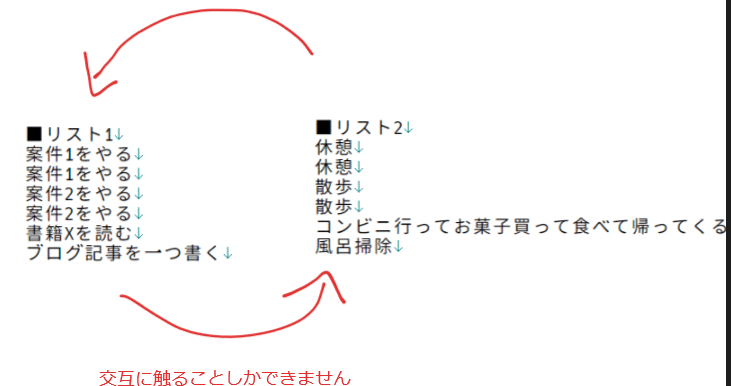
Interact alternately.
The rules are as follows:
- Only one list is visible at a time.
- After completing one item (task), switch to the next list.
The name “Switching” comes from the task list switching every time an item is completed.
What’s Beneficial?
It’s primarily about reducing indecision and laziness.
A standalone daily task list often leads to procrastination due to its high degree of freedom. For instance, it’s difficult to evenly handle work, housework, and frequent breaks.
A task list is much better than nothing, but it doesn’t ensure that all tasks will be completed.
If you want to increase the likelihood of completing tasks, you need to impose stricter constraints. However, since you’re using a flexible method, you might not favor overly strong constraints.
The Switching Daily Task List provides just the right balance and constraints.
From here on, we’ll look into the details for implementing and operating the Switching Daily Task List.
Principles
These are the principles that need to be adhered to.
It Doesn’t Have to Be Just Two
Although the initial explanation suggests alternating between two, there’s no problem using three or more lists.
However, the order of switching is fixed. Once the end is reached, it loops back.

Switching occurs in a fixed direction and loops.
Lists Should Be Closed
The Switching Daily Task List operates as follows:
- Choose an item from List 1.
- Complete it.
- Switch to List 2 and choose an item.
- Complete it.
- ……
You select and complete from pre-listed items.
In other words, each list must be pre-prepared.
For instance, compile the items at the beginning of the day and complete them one by one throughout the day. Items should not be added midway. *There are methods for this, which will be explained later.
There are two types of lists: “open,” which allows adding or deleting items, and “closed,” which does not. The Switching Daily Task List operates as the latter, closed.
Don’t Skip Switching
The key to the Switching Daily Task List is switching every time an item is completed. Do not skip this switching.
Ideally, this would be done automatically through tools, but currently, no such tools exist.
Do not compromise on implementing a system that ensures switching without skipping.
For instance, if using an analog system, you could create each list as papers or cards of the same size and stack them so only the top is visible. Since only the top is visible, it encourages switching to the next one.
You might be tempted to lay all lists side by side and view them all, but refrain from doing so. The Switching Daily Task List involves dealing with only one list at a time. The strength of this restriction is crucial. Do not view multiple lists simultaneously.
The strong constraints allow the act of switching to function effectively.
Operational Example
Let’s look at some examples to make this clear.
In Case of Two
“Work” and “Housework”
- Useful when working remotely.
Here’s a simple illustration.

Complete one work task → complete one housework task → complete one work task → ……, and so forth.
“Work” and “Housework/Break”
- Similar to the above but List 2 includes breaks in addition to housework.
- In other words, in List 2, you will do either housework or take a break.
“Desk Work” and “Change of Mood”
- Prolonged desk work accumulates physical damage.
- To mitigate this, alternate between the desk work list and the change of mood list to change mood frequently.
In Case of Three
“Work 1”, “Work 2”, and “Housework”
- If you have multiple jobs, such as side jobs, you can alternate between them this way.
- Some people might find it easier to insert housework as a cushion between Work 1 and Work 2.
“Boring Work,” “Interesting Work,” and “Break or Housework”
- The way you divide the lists is flexible and can be based on criteria such as fun.
- This setup creates a rhythm like reward → chore → others.
In Case of Four
“Checking Communication Tools,” “Work,” “Organizing Information and Notes,” and “Work”
This is rather complex, but let’s give it a try:
- First, “Work” is inserted twice: As such, reusing the same list is fine.
- Also, there’s a dedicated list for checking communication tools, whether it’s chat or email.
- Explicit organization is also included.
Thus, this operation follows a cycle of check → work → organize → work → ……
For example, a list for checking communication tools would appear like so. Each task is completed one by one, and once all are completed, there are no more checks for the day.

This person probably uses Teams as their main tool and seems to emphasize the first email address as well.
Daily Flow
Let’s look at how a day flows when using a Switching Daily Task List.
- It’s almost the same as the Daily Task List.
1: Setup
- Choose the lists to use today: It will be covered later (concept of a deck).
- Prepare the items for each list.
2: Rotate
- Engage with a list, complete one item, then switch to the next.
3: Close
- End the day when all lists are completed or when you wish to finish for the day.
- Briefly review and make slight adjustments (to each list).
Expandability
This is a more advanced topic.
The Switching Daily Task List is modular. You can combine how to use the unit of lists as components.
Specifically, the following concepts exist. Using these allows you to build your preferred operation.
Deck and Hand
Deck refers to “all the lists you possess.”
Hand refers to “the lists used today.”
Hands are chosen from the deck, and when that becomes the Switching Daily Task List, there is an order. As mentioned above, you can use the same list multiple times.

Hands(手札) and Deck(デッキ)
List and Unit
The Switching Daily Task List actually switches by the unit of unit.
What has been described so far is a pattern where there is only one list in one unit.

Since only one list is in the unit, it will always be used.
So, in reality, you can put multiple lists in one unit and choose which list to use.
Currently, as there are no tools to implement the Switching Daily Task List, we must choose ourselves, but when tools are available in the future, diverse choices like “random selection” will be possible.

Let’s say the middle unit selects randomly. There’s a 1 in 2 chance of performing the red list twice in a row.
Q&A
Here are common questions and answers.
Q: How to deal with interruptions?
Ans: Create an irregular list or handle it on the spot.
Either handle it quickly on the spot and return to the current list, or if that’s not possible, add it to an irregular list.
An Irregular List is an open list containing only the interruption details.

An example of placing the irregular list as the fourth option.
In this case, interruptions will be addressed when switching to the fourth list.
Note that the Switching Daily Task List is generally not strong against interruptions. It cannot be effectively used in situations with frequent interruptions.
Q: Is digital better? Or analog?
Ans: Either is feasible.
Ultimately, it’s just “dealing with one list at a time” and “switching to the next list after finishing one item,” so analog is also sufficient.
The key, as discussed, is adhering to the constraints of the Switching Daily Task List. Analog can surprisingly be easier. The digital medium may have too much overview or operability, or lack physical engagement, thus making constraints less effective.
However, should tools or apps for the Switching Daily Task List emerge, it will be manageable digitally, potentially on smartphones.
Q: How should empty lists be handled during operation?
Ans: Skip them.
We tend to add more for satisfaction or balance, but refrain from doing so.
If it feels unsatisfactory or imbalanced, it means the initial list compilation was lacking. Accept and adjust it in upcoming days.
As mentioned before, the Switching Daily Task List operates as a closed list. Do not add items afterward. Allowing this leads to easy stagnation.
메타데이터
- post_id
- 39ed65100eb2
- slug
- switching-daily-task-list-39ed65100eb2
- url
- https://medium.com/@workhack20/switching-daily-task-list-39ed65100eb2
- canonical_url
- https://medium.com/@workhack20/switching-daily-task-list-39ed65100eb2
- author_url
- https://medium.com/@workhack20
- status
- ok
- fetched_at
- 2026-08-10 12:01:12




