How to Build a Zero Trust Logging Infrastructure using Confidential Consortium Framework (CCF)…
Conventional business logging systems frequently rely on perimeter security; once a log entry is received by an internal syslog aggregator…
How to Build a Zero Trust Logging Infrastructure using Confidential Consortium Framework (CCF), HAProxy, and Fluentd
Conventional business logging systems frequently rely on perimeter security; once a log entry is received by an internal syslog aggregator, it is considered reliable. This model poses significant risks to organizations, including unauthorized log alterations by compromised root administrators, insider threats, and clear-text exposure at intermediate network layers. Importantly, it renders infrastructure highly susceptible to threats such as CAPEC-81 (Web Server Logs Tampering), allowing attackers with local access to eliminate their digital tracks, fabricate system records, or insert harmful payloads aimed at downstream SIEM systems.
This guide outlines the deployment of a Zero Trust Logging System that fully removes implicit trust by transitioning from insecure, file-based storage to a secure, end-to-end encrypted framework. This production-ready framework channels organized JSON logs directly into a decentralized Confidential Consortium Framework (CCF) cluster, creating an append-only cryptographic trust anchor that makes log history entirely resistant to administrative deletion or manipulation. This guide illustrates how to build a strong, isolated audit trail by combining Layer 4 TLS passthrough, HAProxy load balancing, and Fluentd mTLS authentication — ensuring that incoming payloads are securely verified and processed within a protected enclave sandbox before they reach your downstream analytics layer.
In this article, we’ll use this topology:
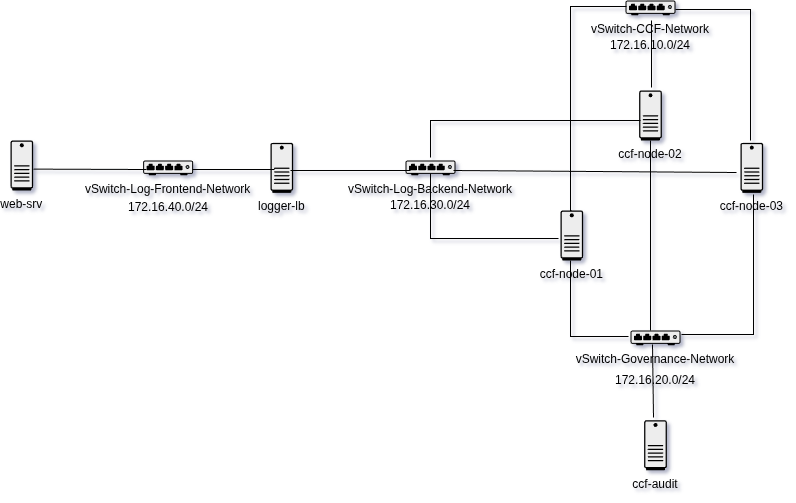
How to Build a Zero Trust Logging Infrastructure using Confidential Consortium Framework (CCF), HAProxy, and Fluentd — Topology
Components and prerequisites for this lab are:
- web-srv (Ubuntu 22.04 Server - 172.16.40.20/24) This server hosts the web workload and will forward web access logs to the log ingestion application hosted within the CCF cluster using Fluentd. The web service has been provisioned using Nginx.
- logger-lb (Microsoft Azure Linux 3.0 - 172.16.40.10/24, 172.16.30.40/24) This server will host the HAProxy load balancer to provide high availability for the log ingestion application across CCF cluster nodes. HAProxy will be configured without TLS termination, allowing TLS traffic to be fully forwarded to the serving CCF node while preserving end-to-end encryption.
- CCF cluster nodes (Microsoft Azure Linux 3.0) Consisting of three nodes:
- ccf-node-01 (172.16.10.10/24, 172.16.20.10/24, and 172.16.30.10/24)
- ccf-node-02 (172.16.10.20/24, 172.16.20.20/24, and 172.16.30.20/24)
- ccf-node-03 (172.16.10.30/24, 172.16.20.30/24, and 172.16.30.30/24) This CCF cluster hosts the log ingestion application and receives log entries directly from logger-lb. Each node participates in the Byzantine Fault Tolerant (BFT) consensus protocol to maintain log integrity and prevent unauthorized modification of log data. The nodes are connected to three separate networks:
- Log Backend Network - receives log ingestion traffic from **logger-lb.
- CCF Network - **handles intra-cluster replication and consensus communication.
- Governance Network - used for cluster administration and governance operations.
- ccf-audit (Microsoft Azure Linux 3.0 - 172.16.20.40/24) This host will be used to manage governance operations for the CCF cluster. Operations such as query, vote, and verification of the append-only CCF ledger will be performed from this host. This host is isolated within a dedicated network connected to the governance network of the CCF cluster.
How the Infrastructure Works?
The logging pipeline is designed around a Zero Trust architecture where no component is implicitly trusted, including the load balancer, operating sytem, or network layer. It will works in the following sequence:
- Log collection and forwarding web-srv runs a Fluentd agent that collects and forwards Nginx access logs to logger-lb over a mutually authenticated TLS (mTLS) connection. Both the log source and destination must present valid certificates before any log traffic is accepted.
- TLS passthrough load balancing logger-lb runs HAProxy in Layer 4 TCP passthrough mode. TLS traffic is forwarded directly to CCF nodes without TLS termination, allowing end-to-end encryption to be preserved between Fluentd and the serving CCF node. Because HAProxy does not decrypt the traffic, the load balancer cannot inspect or modify log contents.
- Log ingestion and consensus Once received by a CCF node, the log entry is submitted into the CCF ledger as a transaction. The CCF cluster uses the Byzantine Fault Tolerant (BFT) consensus protocol to ensure log entries cannot be modified unilaterally by a single node. Every committed transaction is replicated across cluster members and protected using cryptographic verification.
- Network separation The CCF cluster separates traffic using multiple network segments. The log backend network handles log ingestion traffic from logger-lb, while the CCF network is dedicated for intra-cluster replication and consensus communication. This separation isolates consensus traffic from external log ingestion workloads.
- Governance and audit operations ccf-audit is connected to the governance network and is used to perform governance operations, ledger queries, and receipt verification against the CCF cluster. The governance network is isolated from the log ingestion network to separate administration and audit operations from application log traffic.
A. Prepare the Governance Workspace
Before creating the CCF clusters, we first need to prepare the administrative workspace, which will serve as the central environment for all CCF cluster operations. In this setup, ccf-audit will be configured as the isolated governance workspace.
- Install the required dependencies, the
ccf=develbinary package, and the Python 3 libraries used for CCF administration. At the time this article was written, the latest version of CCF was v7.0.3
# Install dependencies required by ccf-devel
tdnf install -y nano wget jq python3 python3-pip libsodium libcurl openssl ca-certificates

# Install the latest version of CCF from the ccf-devel binary package
export CCF_VERSION=$(curl -Ls -o /dev/null -w %{url_effective} https://github.com/microsoft/CCF/releases/latest | sed 's/^.*ccf-//')
wget https://github.com/microsoft/CCF/releases/download/ccf-${CCF_VERSION}/ccf_devel_${CCF_VERSION}_x86_64.rpm
tdnf install -y ccf_devel_${CCF_VERSION}_x86_64.rpm

# Install Python 3 libraries required for CCF administration
pip3 install ccf pycose cryptography- Create a dedicated workspace directory for CCF administration and operational tasks
# Create the workspace directory and apply minimum required permissions
mkdir -p /etc/ccf-governance
chmod 700 /etc/ccf-governance

# Change to the workspace directory
cd /etc/ccf-governance- Generate administrator keys and client certificates used by the CCF cluster. Each administrator will have:
- An ECC P-384 key pair for governance operations such as signing proposals and ballots
- An RSA 2048-bit key pair for recovery share decryption
Here, we will have three administrators (
admin1,admin2, andadmin3). We also generate separate mTLS client certificates for Fluentd and log consumers.
# Generate ECC P-384 and RSA 2048 key pairs for admin1
openssl ecparam -out ccf-admin1_privk.pem -name secp384r1 -genkey
openssl req -new -key ccf-admin1_privk.pem -x509 -nodes -days 365 -out ccf-admin1_cert.pem -subj "/CN=ccf-admin1"
openssl genrsa -out ccf-admin1_enc_privk.pem 2048
openssl rsa -in ccf-admin1_enc_privk.pem -pubout -out ccf-admin1_enc_pubk.pem

# Generate ECC P-384 and RSA 2048 key pairs for admin2
openssl ecparam -out ccf-admin2_privk.pem -name secp384r1 -genkey
openssl req -new -key ccf-admin2_privk.pem -x509 -nodes -days 365 -out ccf-admin2_cert.pem -subj "/CN=ccf-admin2"
openssl genrsa -out ccf-admin2_enc_privk.pem 2048
openssl rsa -in ccf-admin2_enc_privk.pem -pubout -out ccf-admin2_enc_pubk.pem

# Generate ECC P-384 and RSA 2048 key pairs for admin3
openssl ecparam -out ccf-admin3_privk.pem -name secp384r1 -genkey
openssl req -new -key ccf-admin3_privk.pem -x509 -nodes -days 365 -out ccf-admin3_cert.pem -subj "/CN=ccf-admin3"
openssl genrsa -out ccf-admin3_enc_privk.pem 2048
openssl rsa -in ccf-admin3_enc_privk.pem -pubout -out ccf-admin3_enc_pubk.pem

# Generate mTLS client certificate for FluentD
openssl ecparam -out fluentd_privk.pem -name secp384r1 -genkey
openssl req -new -key fluentd_privk.pem -x509 -nodes -days 365 -out fluentd_cert.pem -subj "/CN=fluentd-logger"

# Generate mTLS client certificate for Log Consumer
openssl ecparam -out log_consumer_privk.pem -name secp384r1 -genkey
openssl req -new -key log_consumer_privk.pem -x509 -nodes -days 365 -out log_consumer_cert.pem -subj "/CN=log-consumer"
B. Bootstrap the CCF cluster
After preparing the administrator certificates and keys, we can bootstrap the CCF cluster on ccf-node-01. This node will become the initial Primary node of the cluster. During the bootstrap process, the node loads the administrator certificates and recovery public keys from the ccf-audit workspace to configure the consortium governance and recovery settings.
- Install the required dependencies, the
ccf=develbinary package
# Install dependencies required by ccf-devel
tdnf install -y nano wget jq python3 python3-pip libsodium libcurl openssl ca-certificates

# Install the latest version of CCF from the ccf-devel binary package
export CCF_VERSION=$(curl -Ls -o /dev/null -w %{url_effective} https://github.com/microsoft/CCF/releases/latest | sed 's/^.*ccf-//')
wget https://github.com/microsoft/CCF/releases/download/ccf-${CCF_VERSION}/ccf_devel_${CCF_VERSION}_x86_64.rpm
tdnf install -y ccf_devel_${CCF_VERSION}_x86_64.rpm- Generate the constitution files for the CCF cluster. In this setup, we use the production-ready sample constitution provided by CCF. Since the default CCF installation directory is /opt/ccf, the constitution files will also be stored there
# Create a custom constitution directory in /opt/ccf and enter that directory
mkdir /opt/ccf/constitution
cd /opt/ccf/constitution

# Download the production-ready sample constitution provided by CCF
wget https://raw.githubusercontent.com/microsoft/CCF/refs/heads/main/samples/constitutions/default/actions.js
wget https://raw.githubusercontent.com/microsoft/CCF/refs/heads/main/samples/constitutions/default/apply.js
wget https://raw.githubusercontent.com/microsoft/CCF/refs/heads/main/samples/constitutions/default/resolve.js
wget https://raw.githubusercontent.com/microsoft/CCF/refs/heads/main/samples/constitutions/default/validate.js- Create a new directory to store the CCF configuration files and generated service files. Then, copy the administrators’ certificates and recovery public keys from the
ccf-auditworkspace into this directory
# Create a dedicated directory for CCF configuration and generated service files and assign minimal permission
mkdir -p /etc/ccf-node
chmod 700 /etc/ccf-node

# Change to the new directory
cd /etc/ccf-node

# After that, copy the administrators' certificates and recovery public keys
# from ccf-audit into this directory. Then, assign minimal permission to the certificate and public key files
chmod 644 ccf-admin1_cert.pem
chmod 644 ccf-admin1_enc_pubk.pem
chmod 644 ccf-admin2_cert.pem
chmod 644 ccf-admin2_enc_pubk.pem
chmod 644 ccf-admin3_cert.pem
chmod 644 ccf-admin3_enc_pubk.pem- Create a new CCF configuration file to bootstrap the cluster. This configuration defines the cluster network interfaces, administrator members, constitution files, ledger locations, and service output files
nano /etc/ccf-node/ccf_config.jsonContent of the configuration:
{
  "network": {
    "node_to_node_interface": {
      "bind_address": "172.16.10.10:8001",
      "published_address": "172.16.10.10:8001"
    },
    "rpc_interfaces": {
      "audit_interface": {
        "bind_address": "172.16.20.10:8000",
        "published_address": "172.16.20.10:8000"
      },
      "logging_interface": {
        "bind_address": "172.16.30.10:8000",
        "published_address": "172.16.30.10:8000"
      }
    }
  },
  "command": {
    "type": "Start",
    "start": {
      "constitution_files": [
        "/opt/ccf/bin/validate.js",
        "/opt/ccf/bin/apply.js",
        "/opt/ccf/bin/resolve.js",
        "/opt/ccf/bin/actions.js"
      ],
      "members": [
        {
          "certificate_file": "/etc/ccf-node/ccf-admin1_cert.pem",
          "encryption_public_key_file": "/etc/ccf-node/ccf-admin1_enc_pubk.pem"
        },
        {
          "certificate_file": "/etc/ccf-node/ccf-admin2_cert.pem",
          "encryption_public_key_file": "/etc/ccf-node/ccf-admin2_enc_pubk.pem"
        },
        {
          "certificate_file": "/etc/ccf-node/ccf-admin3_cert.pem",
          "encryption_public_key_file": "/etc/ccf-node/ccf-admin3_enc_pubk.pem"
        }
      ]
    }
  },
  "ledger": {
    "directory": "/etc/ccf-node/ledger"
  },
  "snapshots": {
    "directory": "/etc/ccf-node/snapshots"
  },
  "output_files": {
    "pid_file": "/var/run/ccf-node.pid",
    "node_certificate_file": "/etc/ccf-node/nodecert.pem"
  }
}- Save the configuration file. After that, create a new service file to run the CCF process in the background as a
systemdservice
# Create a new log directory for CCF service and assign sufficient permission
mkdir -p /var/log/ccf
chmod 755 /var/log/ccf

# Create a new systemd service file
nano /etc/systemd/system/ccf-node.service
---
[Unit]
Description=Confidential Consortium Framework Node Engine
After=network-online.target iptables-restore.service
Wants=network-online.target

[Service]
Type=simple
User=root
WorkingDirectory=/etc/ccf-node
ExecStart=/opt/ccf/bin/js_generic --config /etc/ccf-node/ccf_config.json
Restart=always
RestartSec=5
PIDFile=/var/run/ccf-node.pid
StandardOutput=append:/var/log/ccf/ccf_audit.log
StandardError=append:/var/log/ccf/ccf_error.log

[Install]
WantedBy=multi-user.target
---

# Save the systemd service file, then start the service
systemctl start ccf-node.service
systemctl status ccf-node.service

# Verify the service log and make sure there is no error that is crashing the service
tail -f /var/log/ccf/ccf_audit.log
tail -f /var/log/ccf/ccf_error.log- Since Microsoft Azure Linux 3.0 uses a default iptables policy that only allows SSH traffic and ICMP type 3 and 11 packets, we need to allow inbound traffic to the CCF ports and save the rules to make them persistent
# Allow incoming CCF nodes traffic
iptables -A INPUT -p tcp -s 172.16.10.0/24 --dport 8001 -j ACCEPT

# Allow incoming traffic from governance network for administration
iptables -A INPUT -p tcp -s 172.16.20.0/24 --dport 8000 -j ACCEPT

# Allow incoming traffic from logging backend network to access the log ingestion app hosted in CCF cluster
iptables -A INPUT -p tcp -s 172.16.30.0/24 --dport 8000 -j ACCEPT

# Save the rules for persistency
iptables-save > /etc/systemd/scripts/ip4save
C. Activate Administrative Members and Open the CCF Service
After the cluster is bootstrapped, the administrator members are registered on the ledger but are not yet active for governance operations. In this section, each administrator activates their membership by retrieving and signing the network state digest from the running CCF cluster. Once enough members are activated to form a voting quorum, the administrators can submit and approve the transition_service_to_open proposal. After the proposal is approved, the CCF service enters the Open state, allowing additional nodes to join the cluster and enabling client services such as Fluentd and log consumers to connect to the logging interfaces. Both will be done in ccf-audit
- Enter the governance workspace, copy the generated
service_cert.pemfile fromccf-node-01:/etc/ccf-node, and calculate the Member IDs for the three administrators. Also, create an empty JSON file namedempty.json. Although the request only retrieves the member state digest and does not modify the ledger, CCF still requires every request to be sent as a signed COSE action with a valid JSON body
# Enter the governance workspace directory
cd /etc/ccf-governance

# Copy the service_cert from ccf-node-01:/etc/ccf-node to this directory, and assign minimum permission
chmod 644 service_cert.pem

# Calculate Member IDs for admin1, admin2, and admin3
admin1_id=$(openssl x509 -in ccf-admin1_cert.pem -outform DER | sha256sum | cut -d' ' -f1)
admin2_id=$(openssl x509 -in ccf-admin2_cert.pem -outform DER | sha256sum | cut -d' ' -f1)
admin3_id=$(openssl x509 -in ccf-admin3_cert.pem -outform DER | sha256sum | cut -d' ' -f1)

# Verify that the administrator ID variables were successfully generated
echo "Admin 1: $admin1_id"
echo "Admin 2: $admin2_id"
echo "Admin 3: $admin3_id"

# Generate empty JSON file for POST payload
echo '{}' > empty.json- Activate the administrator members by performing a State Digest Acknowledgment (ACK). Each administrator retrieves the current ledger state digest from the CCF cluster, signs it using their private key, and submits the signed acknowledgment back to the cluster. After the acknowledgment is accepted, the administrator becomes an Active voting member
# Create and sign the state digest request for admin1
ccf_cose_sign1 --ccf-gov-msg-type state_digest --ccf-gov-msg-created-at "$(date -u +"%Y-%m-%dT%H:%M:%SZ")" --signing-key ccf-admin1_privk.pem --signing-cert ccf-admin1_cert.pem --content empty.json > admin1_update.cose
# Request the current state digest of admin1 from the CCF cluster
curl -s -X POST "https://172.16.20.10:8000/gov/members/state-digests/${admin1_id}:update?api-version=2024-07-01" --cacert service_cert.pem --data-binary @admin1_update.cose -H "content-type: application/cose" > admin1_digest.json
# Sign the returned state digest of admin1
ccf_cose_sign1 --ccf-gov-msg-type ack --ccf-gov-msg-created-at "$(date -u +"%Y-%m-%dT%H:%M:%SZ")" --signing-key ccf-admin1_privk.pem --signing-cert ccf-admin1_cert.pem --content admin1_digest.json > admin1_ack.cose
# Submit the signed acknowledgment to activate admin1
curl -is -X POST "https://172.16.20.10:8000/gov/members/state-digests/${admin1_id}:ack?api-version=2024-07-01" --cacert service_cert.pem --data-binary @admin1_ack.cose -H "content-type: application/cose"

# Repeat the same steps for admin2
ccf_cose_sign1 --ccf-gov-msg-type state_digest --ccf-gov-msg-created-at "$(date -u +"%Y-%m-%dT%H:%M:%SZ")" --signing-key ccf-admin2_privk.pem --signing-cert ccf-admin2_cert.pem --content empty.json > admin2_update.cose
curl -s -X POST "https://172.16.20.10:8000/gov/members/state-digests/${admin2_id}:update?api-version=2024-07-01" --cacert service_cert.pem --data-binary @admin2_update.cose -H "content-type: application/cose" > admin2_digest.json
ccf_cose_sign1 --ccf-gov-msg-type ack --ccf-gov-msg-created-at "$(date -u +"%Y-%m-%dT%H:%M:%SZ")" --signing-key ccf-admin2_privk.pem --signing-cert ccf-admin2_cert.pem --content admin2_digest.json > admin2_ack.cose
curl -is -X POST "https://172.16.20.10:8000/gov/members/state-digests/${admin2_id}:ack?api-version=2024-07-01" --cacert service_cert.pem --data-binary @admin2_ack.cose -H "content-type: application/cose"

# Repeat the same steps for admin3
ccf_cose_sign1 --ccf-gov-msg-type state_digest --ccf-gov-msg-created-at "$(date -u +"%Y-%m-%dT%H:%M:%SZ")" --signing-key ccf-admin3_privk.pem --signing-cert ccf-admin3_cert.pem --content empty.json > admin3_update.cose
curl -s -X POST "https://172.16.20.10:8000/gov/members/state-digests/${admin3_id}:update?api-version=2024-07-01" --cacert service_cert.pem --data-binary @admin3_update.cose -H "content-type: application/cose" > admin3_digest.json
ccf_cose_sign1 --ccf-gov-msg-type ack --ccf-gov-msg-created-at "$(date -u +"%Y-%m-%dT%H:%M:%SZ")" --signing-key ccf-admin3_privk.pem --signing-cert ccf-admin3_cert.pem --content admin3_digest.json > admin3_ack.cose
curl -is -X POST "https://172.16.20.10:8000/gov/members/state-digests/${admin3_id}:ack?api-version=2024-07-01" --cacert service_cert.pem --data-binary @admin3_ack.cose -H "content-type: application/cose"- Verify that all three administrators have been successfully activated by checking the global member registry on
ccf-node-01
curl -s "https://172.16.20.10:8000/gov/service/members?api-version=2024-07-01" --cacert service_cert.pem | jq '.value[] | {memberId, recoveryRole, status}'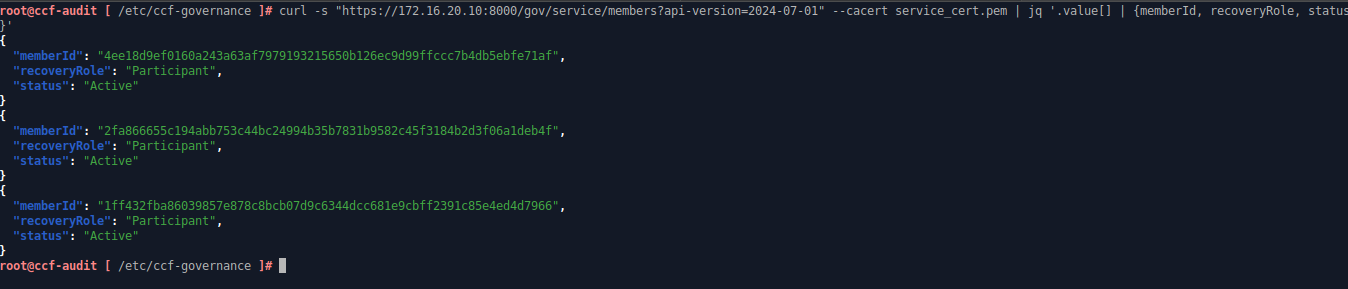
Verify that all three administrators have been successfully activated
- Create and submit the proposal to transition the CCF service into the Open state. In this step,
admin1submits the proposal, whileadmin2andadmin3vote to approve it. Once the required voting quorum is reached, the CCF service transitions to the Open state and becomes ready for node replication and client connections
# Create the approving voting ballot and open network proposal
echo '{"ballot": "export function vote (rawProposal, proposerId) { return true; }"}' > ballot.json
jq -n --rawfile cert service_cert.pem '{actions: [{name: "transition_service_to_open", args: {next_service_identity: $cert}}]}' > open_service.json

# Sign and submit the proposal with admin1
ccf_cose_sign1 --ccf-gov-msg-type proposal --ccf-gov-msg-created-at "$(date -u +"%Y-%m-%dT%H:%M:%SZ")" --signing-key ccf-admin1_privk.pem --signing-cert ccf-admin1_cert.pem --content open_service.json > signed_open_service.cose
response=$(curl -s -X POST "https://172.16.20.10:8000/gov/members/proposals:create?api-version=2024-07-01" --cacert service_cert.pem --data-binary @signed_open_service.cose -H "content-type: application/cose")

# Save and verify the open network proposal ID
echo "$response" | jq
proposal_id=$(echo "$response" | jq -r .proposalId)
echo $proposal_id

# Vote with admin2
admin2_id=$(openssl x509 -in ccf-admin2_cert.pem -outform DER | sha256sum | cut -d' ' -f1)
ccf_cose_sign1 --ccf-gov-msg-type ballot --ccf-gov-msg-proposal-id "$proposal_id" --ccf-gov-msg-created-at "$(date -u +"%Y-%m-%dT%H:%M:%SZ")" --signing-key ccf-admin2_privk.pem --signing-cert ccf-admin2_cert.pem --content ballot.json > signed_ballot.cose
curl -s -X POST "https://172.16.20.10:8000/gov/members/proposals/$proposal_id/ballots/$admin2_id:submit?api-version=2024-07-01" --cacert service_cert.pem --data-binary @signed_ballot.cose -H "content-type: application/cose" | jq

# Vote with admin3
admin3_id=$(openssl x509 -in ccf-admin3_cert.pem -outform DER | sha256sum | cut -d' ' -f1)
ccf_cose_sign1 --ccf-gov-msg-type ballot --ccf-gov-msg-proposal-id "$proposal_id" --ccf-gov-msg-created-at "$(date -u +"%Y-%m-%dT%H:%M:%SZ")" --signing-key ccf-admin3_privk.pem --signing-cert ccf-admin3_cert.pem --content ballot.json > signed_ballot_admin3.cose
curl -s -X POST "https://172.16.20.10:8000/gov/members/proposals/$proposal_id/ballots/$admin3_id:submit?api-version=2024-07-01" --cacert service_cert.pem --data-binary @signed_ballot_admin3.cose -H "content-type: application/cose" | jq- Verify the CCF service status. Make sure it’s in
Openstate
curl -s "https://172.16.20.10:8000/gov/service/info?api-version=2024-07-01" --cacert service_cert.pem | jq '.status'
Make sure that CCF service status is Open
D. Join ccf-node-02 and ccf-node-03 to the CCF Cluster
After the CCF network enters the Open state, additional nodes can join the cluster and start replicating the ledger from the Primary node. In this step, ccf-node-02 and ccf-node-03 will join the cluster as follower nodes to provide redundancy and high availability.
Perform the following node join steps on both ccf-node-02 and ccf-node-03. The node trust operations will be performed later from the ccf-audit workspace.
- Install the required dependencies, the
ccf=develbinary package
# Install dependencies required by ccf-devel
tdnf install -y nano wget jq python3 python3-pip libsodium libcurl openssl ca-certificates

# Install the latest version of CCF from the ccf-devel binary package
export CCF_VERSION=$(curl -Ls -o /dev/null -w %{url_effective} https://github.com/microsoft/CCF/releases/latest | sed 's/^.*ccf-//')
wget https://github.com/microsoft/CCF/releases/download/ccf-${CCF_VERSION}/ccf_devel_${CCF_VERSION}_x86_64.rpm
tdnf install -y ccf_devel_${CCF_VERSION}_x86_64.rpm- Create a new directory to store the CCF configuration files and generated service files. Then, copy the CCF CA certificate file (
service_cert.pem) fromccf-node-01:/etc/ccf-nodeto this directory
# Create a dedicated directory for CCF configuration and generated service files and assign minimal permission
mkdir -p /etc/ccf-node
chmod 700 /etc/ccf-node

# Change to the new directory
cd /etc/ccf-node

# Copy the service_cert.pem from ccf-node-01:/etc/ccf-node to this directory and assign minimum permission
chmod 644 service_cert.pem- Create a new CCF configuration file for the joining nodes. This configuration defines the cluster network interfaces, the address of the Primary node, and the local ledger and service output locations used to join the existing CCF cluster
nano /etc/ccf-node/ccf_config.jsonContent of the configuration for ccf-node-02:
{
  "network": {
    "node_to_node_interface": {
      "bind_address": "172.16.10.20:8001",
      "published_address": "172.16.10.20:8001"
    },
    "rpc_interfaces": {
      "audit_interface": {
        "bind_address": "172.16.20.20:8000",
        "published_address": "172.16.20.20:8000"
      },
      "logging_interface": {
        "bind_address": "172.16.30.20:8000",
        "published_address": "172.16.30.20:8000"
      }
    }
  },
  "command": {
    "type": "Join",
    "service_certificate_file": "/etc/ccf-node/service_cert.pem",
    "join": {
      "target_rpc_address": "172.16.20.10:8000"
    }
  },
  "ledger": {
    "directory": "/etc/ccf-node/ledger"
  },
  "snapshots": {
    "directory": "/etc/ccf-node/snapshots"
  },
  "output_files": {
    "pid_file": "/var/run/ccf-node.pid",
    "node_certificate_file": "/etc/ccf-node/nodecert.pem"
  }
}
Content of the configuration for ccf-node-03:
{
  "network": {
    "node_to_node_interface": {
      "bind_address": "172.16.10.30:8001",
      "published_address": "172.16.10.30:8001"
    },
    "rpc_interfaces": {
      "audit_interface": {
        "bind_address": "172.16.20.30:8000",
        "published_address": "172.16.20.30:8000"
      },
      "logging_interface": {
        "bind_address": "172.16.30.30:8000",
        "published_address": "172.16.30.30:8000"
      }
    }
  },
  "command": {
    "type": "Join",
    "service_certificate_file": "/etc/ccf-node/service_cert.pem",
    "join": {
      "target_rpc_address": "172.16.20.10:8000"
    }
  },
  "ledger": {
    "directory": "/etc/ccf-node/ledger"
  },
  "snapshots": {
    "directory": "/etc/ccf-node/snapshots"
  },
  "output_files": {
    "pid_file": "/var/run/ccf-node.pid",
    "node_certificate_file": "/etc/ccf-node/nodecert.pem"
  }
}- Save the configuration file, then create a systemd service file to start the CCF process in the background
# Create a new log directory for CCF service and assign sufficient permission
mkdir -p /var/log/ccf
chmod 755 /var/log/ccf

# Create a new systemd service file
nano /etc/systemd/system/ccf-node.service
---
[Unit]
Description=Confidential Consortium Framework Node Engine
After=network-online.target iptables-restore.service
Wants=network-online.target

[Service]
Type=simple
User=root
WorkingDirectory=/etc/ccf-node
ExecStart=/opt/ccf/bin/js_generic --config /etc/ccf-node/ccf_config.json
Restart=always
RestartSec=5
PIDFile=/var/run/ccf-node.pid
StandardOutput=append:/var/log/ccf/ccf_audit.log
StandardError=append:/var/log/ccf/ccf_error.log

[Install]
WantedBy=multi-user.target
---

# Save the systemd service file, then start the service
systemctl start ccf-node.service
systemctl status ccf-node.service

# Verify the service log and make sure there is no error that is crashing the service
tail -f /var/log/ccf/ccf_audit.log
tail -f /var/log/ccf/ccf_error.log- Allow inbound traffic to the required CCF ports, then save the iptables rules to make them persistent
# Allow incoming CCF nodes traffic
iptables -A INPUT -p tcp -s 172.16.10.0/24 --dport 8001 -j ACCEPT

# Allow incoming traffic from governance network for administration
iptables -A INPUT -p tcp -s 172.16.20.0/24 --dport 8000 -j ACCEPT

# Allow incoming traffic from logging backend network to access the log ingestion app hosted in CCF cluster
iptables -A INPUT -p tcp -s 172.16.30.0/24 --dport 8000 -j ACCEPT

# Save the rules for persistency
iptables-save > /etc/systemd/scripts/ip4save- Verify the nodes status from
ccf-audit. Make sure there are two nodes inPendingstate
curl -s "https://172.16.20.10:8000/node/network/nodes" --cacert service_cert.pem | jq '.nodes[] | select(.status == "Pending") | {node_id, rpc_interfaces, status}'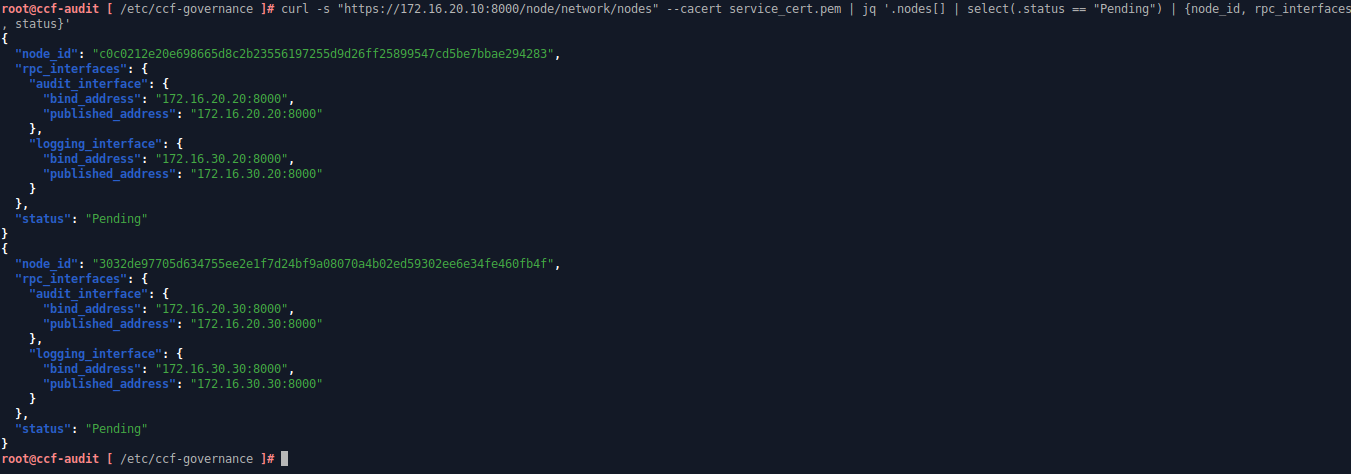
Verify there are two nodes in Pending state
- From here, we will trust the nodes from the
ccf-auditworkspace. Save the Node IDs from the previous output into variables, then create an approving ballot that will be used to vote for the node trust proposals
# Enter the Governance directory
cd /etc/ccf-governance

# Define variables to store ccf-node-02 and ccf-node-03 IDs
node2_id="c0c0212e20e698665d8c2b23556197255d9d26ff25899547cd5be7bbae294283"
node3_id="3032de97705d634755ee2e1f7d24bf9a08070a4b02ed59302ee6e34fe460fb4f"

# Create the approving voting ballot
echo '{"ballot": "export function vote (rawProposal, proposerId) { return true; }"}' > ballot.json- Create and submit the trust proposal for
ccf-node-02. In this step,admin1submits the proposal to trust the node, thenadmin1andadmin2vote to approve it. After the proposal reaches the required voting quorum, the node transitions to the Trusted state and can fully participate in the CCF cluster
# Create the trust proposal for ccf-node-02
valid_time=$(date -u +"%y%m%d%H%M%SZ")
jq -n --arg id "$node2_id" --arg time "$valid_time" '{actions: [{name: "transition_node_to_trusted", args: {node_id: $id, valid_from: $time}}]}' > trust_node2.json

# Sign and submit the proposal with admin1
ccf_cose_sign1 --ccf-gov-msg-type proposal --ccf-gov-msg-created-at "$(date -u +"%Y-%m-%dT%H:%M:%SZ")" --signing-key ccf-admin1_privk.pem --signing-cert ccf-admin1_cert.pem --content trust_node2.json > signed_trust_node2.cose
response=$(curl -s -X POST "https://172.16.20.10:8000/gov/members/proposals:create?api-version=2024-07-01" --cacert service_cert.pem --data-binary @signed_trust_node2.cose -H "content-type: application/cose")
echo $response | jq

# Save the Proposal ID
proposal_id=$(echo "$response" | jq -r .proposalId)
echo $proposal_id

# Vote with admin1 to approve the trust proposal for ccf-node-02
admin1_id=$(openssl x509 -in ccf-admin1_cert.pem -outform DER | sha256sum | cut -d' ' -f1)
ccf_cose_sign1 --ccf-gov-msg-type ballot --ccf-gov-msg-proposal-id "$proposal_id" --ccf-gov-msg-created-at "$(date -u +"%Y-%m-%dT%H:%M:%SZ")" --signing-key ccf-admin1_privk.pem --signing-cert ccf-admin1_cert.pem --content ballot.json > signed_ballot_admin1_node2.cose
curl -s -X POST "https://172.16.20.10:8000/gov/members/proposals/$proposal_id/ballots/$admin1_id:submit?api-version=2024-07-01" --cacert service_cert.pem --data-binary @signed_ballot_admin1_node2.cose -H "content-type: application/cose" | jq

# Vote with admin2 to approve the trust proposal for ccf-node-02
admin2_id=$(openssl x509 -in ccf-admin2_cert.pem -outform DER | sha256sum | cut -d' ' -f1)
ccf_cose_sign1 --ccf-gov-msg-type ballot --ccf-gov-msg-proposal-id "$proposal_id" --ccf-gov-msg-created-at "$(date -u +"%Y-%m-%dT%H:%M:%SZ")" --signing-key ccf-admin2_privk.pem --signing-cert ccf-admin2_cert.pem --content ballot.json > signed_ballot_admin2_node2.cose
curl -s -X POST "https://172.16.20.10:8000/gov/members/proposals/$proposal_id/ballots/$admin2_id:submit?api-version=2024-07-01" --cacert service_cert.pem --data-binary @signed_ballot_admin2_node2.cose -H "content-type: application/cose" | jq- Create and submit the trust proposal for
ccf-node-03. In this step,admin2submits the proposal to trust the node, whileadmin1andadmin3vote to approve it. After the proposal reaches the required voting quorum,ccf-node-03transitions to the Trusted state and joins the CCF cluster as a fully trusted node.
# Create the trust proposal for ccf-node-03
valid_time=$(date -u +"%y%m%d%H%M%SZ")
jq -n --arg id "$node3_id" --arg time "$valid_time" '{actions: [{name: "transition_node_to_trusted", args: {node_id: $id, valid_from: $time}}]}' > trust_node3.json

# Sign and submit the proposal with admin2
ccf_cose_sign1 --ccf-gov-msg-type proposal --ccf-gov-msg-created-at "$(date -u +"%Y-%m-%dT%H:%M:%SZ")" --signing-key ccf-admin2_privk.pem --signing-cert ccf-admin2_cert.pem --content trust_node3.json > signed_trust_node3.cose
response=$(curl -s -X POST "https://172.16.20.10:8000/gov/members/proposals:create?api-version=2024-07-01" --cacert service_cert.pem --data-binary @signed_trust_node3.cose -H "content-type: application/cose")
echo $response | jq

# Save the Proposal ID
proposal_id=$(echo "$response" | jq -r .proposalId)
echo $proposal_id

# Vote with admin1 to approve the trust proposal for ccf-node-03
admin1_id=$(openssl x509 -in ccf-admin1_cert.pem -outform DER | sha256sum | cut -d' ' -f1)
ccf_cose_sign1 --ccf-gov-msg-type ballot --ccf-gov-msg-proposal-id "$proposal_id" --ccf-gov-msg-created-at "$(date -u +"%Y-%m-%dT%H:%M:%SZ")" --signing-key ccf-admin1_privk.pem --signing-cert ccf-admin1_cert.pem --content ballot.json > signed_ballot_admin1_node3.cose
curl -s -X POST "https://172.16.20.10:8000/gov/members/proposals/$proposal_id/ballots/$admin1_id:submit?api-version=2024-07-01" --cacert service_cert.pem --data-binary @signed_ballot_admin1_node3.cose -H "content-type: application/cose" | jq

# Vote with admin3 to approve the trust proposal for ccf-node-03
admin3_id=$(openssl x509 -in ccf-admin3_cert.pem -outform DER | sha256sum | cut -d' ' -f1)
ccf_cose_sign1 --ccf-gov-msg-type ballot --ccf-gov-msg-proposal-id "$proposal_id" --ccf-gov-msg-created-at "$(date -u +"%Y-%m-%dT%H:%M:%SZ")" --signing-key ccf-admin3_privk.pem --signing-cert ccf-admin3_cert.pem --content ballot.json > signed_ballot_admin3_node3.cose
curl -s -X POST "https://172.16.20.10:8000/gov/members/proposals/$proposal_id/ballots/$admin3_id:submit?api-version=2024-07-01" --cacert service_cert.pem --data-binary @signed_ballot_admin3_node3.cose -H "content-type: application/cose" | jq- The cluster should now have three trusted nodes
curl -s "https://172.16.20.10:8000/node/network/nodes" --cacert service_cert.pem | jq '.nodes[] | select(.status == "Trusted") | {node_id, rpc_interfaces, status}'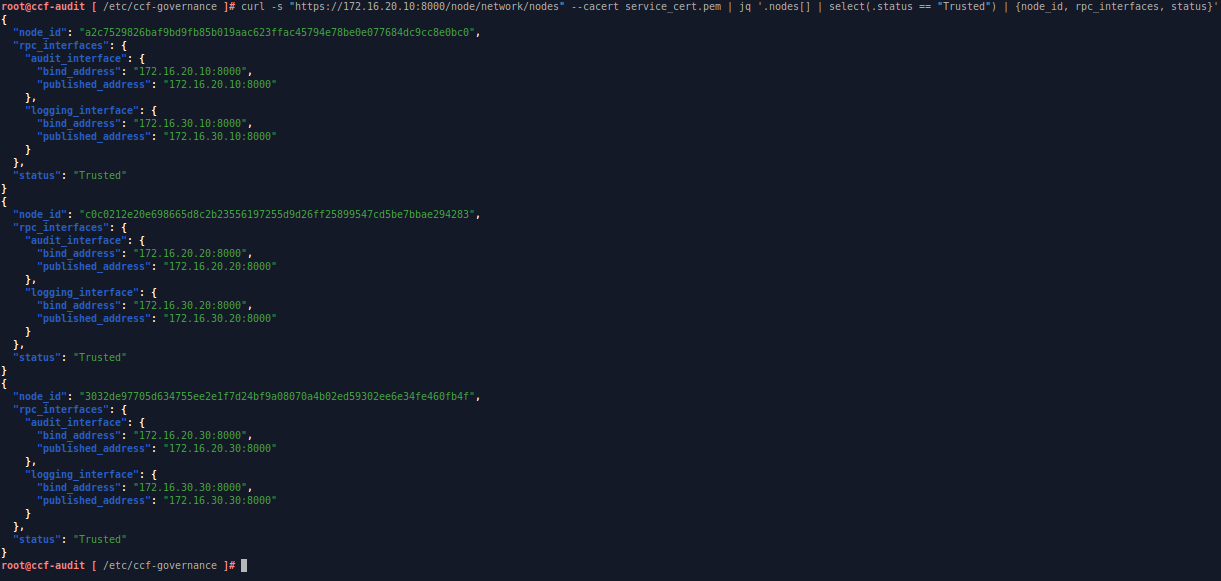
Verify trusted nodes on the cluster
E. Deploy the Log Receiver Application to the CCF Cluster
After all nodes have joined the cluster and the CCF service has entered the Open state, the cluster is ready to host the Log Receiver application. In this step, we will package the JavaScript application, submit it through a governance proposal, and activate the log ingestion endpoints used by the logging infrastructure. We’ll do this from ccf-audit.
- Create and submit the proposal to trust the Fluentd mTLS client certificate. In this step,
admin3submits the proposal, whileadmin3andadmin1vote to approve it. After the proposal reaches the required voting quorum, the Fluentd client certificate is registered as a trusted user and can connect to the CCF logging interface
# Create the proposal to register the Fluentd mTLS client certificate
jq -n --arg cert "$(cat fluentd_cert.pem)" '{actions: [{name: "set_user", args: {cert: $cert}}]}' > add_fluentd_certificate.json

# Sign and submit the proposal with admin3
ccf_cose_sign1 --ccf-gov-msg-type proposal --ccf-gov-msg-created-at "$(date -u +"%Y-%m-%dT%H:%M:%SZ")" --signing-key ccf-admin3_privk.pem --signing-cert ccf-admin3_cert.pem --content add_fluentd_certificate.json > signed_add_fluentd_certificate.cose
response=$(curl -s -X POST "https://172.16.20.10:8000/gov/members/proposals:create?api-version=2024-07-01" --cacert service_cert.pem --data-binary @signed_add_fluentd_certificate.cose -H "content-type: application/cose")
echo $response | jq

# Save the Proposal ID
proposal_id=$(echo "$response" | jq -r .proposalId)
echo $proposal_id

# Create the approving ballot
echo '{"ballot": "export function vote (rawProposal, proposerId) { return true; }"}' > ballot.json

# Vote with admin3 to trust the Fluentd mTLS client certificate
admin3_id=$(openssl x509 -in ccf-admin3_cert.pem -outform DER | sha256sum | cut -d' ' -f1)
ccf_cose_sign1 --ccf-gov-msg-type ballot --ccf-gov-msg-proposal-id "$proposal_id" --ccf-gov-msg-created-at "$(date -u +"%Y-%m-%dT%H:%M:%SZ")" --signing-key ccf-admin3_privk.pem --signing-cert ccf-admin3_cert.pem --content ballot.json > signed_ballot_admin3_fluentd_certificate.cose
curl -s -X POST "https://172.16.20.10:8000/gov/members/proposals/$proposal_id/ballots/$admin3_id:submit?api-version=2024-07-01" --cacert service_cert.pem --data-binary @signed_ballot_admin3_fluentd_certificate.cose -H "content-type: application/cose" | jq

# Vote with admin1 to trust the Fluentd mTLS client certificate
admin1_id=$(openssl x509 -in ccf-admin1_cert.pem -outform DER | sha256sum | cut -d' ' -f1)
ccf_cose_sign1 --ccf-gov-msg-type ballot --ccf-gov-msg-proposal-id "$proposal_id" --ccf-gov-msg-created-at "$(date -u +"%Y-%m-%dT%H:%M:%SZ")" --signing-key ccf-admin1_privk.pem --signing-cert ccf-admin1_cert.pem --content ballot.json > signed_ballot_admin1_fluentd_certificate.cose
curl -s -X POST "https://172.16.20.10:8000/gov/members/proposals/$proposal_id/ballots/$admin1_id:submit?api-version=2024-07-01" --cacert service_cert.pem --data-binary @signed_ballot_admin1_fluentd_certificate.cose -H "content-type: application/cose" | jq- Register the Log Consumer mTLS client certificate as a trusted user in the CCF cluster. In this step,
admin1submits the proposal, whileadmin2andadmin3approve it through governance voting. After the proposal is accepted, the Log Consumer service can securely connect to the CCF logging interface
# Create the proposal to register the Log Consumer mTLS client certificate
jq -n --arg cert "$(cat log_consumer_cert.pem)" '{actions: [{name: "set_user", args: {cert: $cert}}]}' > add_log_consumer_certificate.json

# Sign and submit the proposal with admin1
ccf_cose_sign1 --ccf-gov-msg-type proposal --ccf-gov-msg-created-at "$(date -u +"%Y-%m-%dT%H:%M:%SZ")" --signing-key ccf-admin1_privk.pem --signing-cert ccf-admin1_cert.pem --content add_log_consumer_certificate.json > signed_add_log_consumer_certificate.cose
response=$(curl -s -X POST "https://172.16.20.10:8000/gov/members/proposals:create?api-version=2024-07-01" --cacert service_cert.pem --data-binary @signed_add_log_consumer_certificate.cose -H "content-type: application/cose")
echo $response | jq

# Save the Proposal ID
proposal_id=$(echo "$response" | jq -r .proposalId)
echo $proposal_id

# Create the approving ballot
echo '{"ballot": "export function vote (rawProposal, proposerId) { return true; }"}' > ballot.json

# Vote with admin2 to trust the Log Consumer mTLS client certificate
admin2_id=$(openssl x509 -in ccf-admin2_cert.pem -outform DER | sha256sum | cut -d' ' -f1)
ccf_cose_sign1 --ccf-gov-msg-type ballot --ccf-gov-msg-proposal-id "$proposal_id" --ccf-gov-msg-created-at "$(date -u +"%Y-%m-%dT%H:%M:%SZ")" --signing-key ccf-admin2_privk.pem --signing-cert ccf-admin2_cert.pem --content ballot.json > signed_ballot_admin2_log_consumer_certificate.cose
curl -s -X POST "https://172.16.20.10:8000/gov/members/proposals/$proposal_id/ballots/$admin2_id:submit?api-version=2024-07-01" --cacert service_cert.pem --data-binary @signed_ballot_admin2_log_consumer_certificate.cose -H "content-type: application/cose" | jq

# Vote with admin3 to trust the Log Consumer mTLS client certificate
admin3_id=$(openssl x509 -in ccf-admin3_cert.pem -outform DER | sha256sum | cut -d' ' -f1)
ccf_cose_sign1 --ccf-gov-msg-type ballot --ccf-gov-msg-proposal-id "$proposal_id" --ccf-gov-msg-created-at "$(date -u +"%Y-%m-%dT%H:%M:%SZ")" --signing-key ccf-admin3_privk.pem --signing-cert ccf-admin3_cert.pem --content ballot.json > signed_ballot_admin3_log_consumer_certificate.cose
curl -s -X POST "https://172.16.20.10:8000/gov/members/proposals/$proposal_id/ballots/$admin3_id:submit?api-version=2024-07-01" --cacert service_cert.pem --data-binary @signed_ballot_admin3_log_consumer_certificate.cose -H "content-type: application/cose" | jq- Create the Log Receiver application and API endpoint configuration for the CCF cluster. The JavaScript application handles log ingestion and log retrieval, while the
app.jsonfile defines the API routes, authentication policies, and endpoint behaviors exposed by the CCF service
# Create the application directory
mkdir /etc/ccf-governance/ccf-logger

# Enter the application directory
cd /etc/ccf-governance/ccf-logger

# Create the source directory and the JavaScript application
mkdir src
nano src/web-access-logger.js

# Save the application, then create app.json to define the API routes
nano app.json
Content of src/web-access-logger.js:
/**
 * Zero Trust Web Access Logger App
 * - Stores web access logs in the CCF KV ledger
 * - Provides APIs to retrieve individual logs or list all logs
 */
const accessLogTable = ccf.kv["public:web_access_logs"];

// POST /log/web/access
// Store a web access log entry into the CCF ledger
export function ingestAccessLog(request) {
    try {
        const body = request.body.json();

        if (!body.remote_ip || !body.request_path || !body.status_code) {
            return {
                body: { error: "Schema Validation Failed: Missing required log fields" },
                statusCode: 400
            };
        }

        const logId = "log-" + Math.random().toString(36).substring(2, 11);
        const enclaveTime = new Date().toISOString();

        const structuredLog = {
            log_id: logId,
            received_at: enclaveTime,
            remote_ip: body.remote_ip,
            method: body.method || "GET",
            path: body.request_path,
            status: parseInt(body.status_code),
            user_agent: body.user_agent || "unknown",
            bytes_sent: parseInt(body.bytes_sent || 0)
        };

        const logString = JSON.stringify(structuredLog);
        const logDataBuffer = ccf.strToBuf(logString);

        // Save the log entry into the KV ledger
        accessLogTable.set(
            ccf.strToBuf(logId),
            logDataBuffer
        );

        // Generate SHA-256 digest for integrity verification
        const digestBuffer = ccf.crypto.digest("SHA-256", logDataBuffer);
        const digestHex = Array.from(new Uint8Array(digestBuffer))
            .map(b => b.toString(16).padStart(2, "0"))
            .join("");

        console.log(`[WEB_ACCESS_LOG] Committed log_id=${logId} digest=${digestHex}`);

        return {
            body: {
                status: "Committed & Integrity-Verified",
                ledger_id: logId,
                digest_hex: digestHex
            },
            statusCode: 200
        };
    } catch (err) {
        return {
            body: { error: `Enclave Runtime Exception: ${err.message}` },
            statusCode: 500
        };
    }
}

// GET /log/web/access/{log_id}
// Retrieve a log entry by log_id
export function getAccessLog(request) {
    try {
        const logId = request.params.log_id;

        if (!logId) {
            return {
                body: { error: "Missing required path parameter: log_id" },
                statusCode: 400
            };
        }

        const entryBuffer = accessLogTable.get(ccf.strToBuf(logId));

        if (entryBuffer === undefined) {
            return {
                body: { error: `Log entry not found: ${logId}` },
                statusCode: 404
            };
        }

        const entry = JSON.parse(ccf.bufToStr(entryBuffer));

        return {
            body: { entry },
            statusCode: 200
        };
    } catch (err) {
        return {
            body: { error: `Enclave Runtime Exception: ${err.message}` },
            statusCode: 500
        };
    }
}

// GET /log/web/access
// Retrieve all stored web access logs
export function listAccessLogs(request) {
    try {
        // Parse query parameters from the raw query string
        const queryParams = {};
        const queryString = request.query || "";

        if (queryString) {
            queryString.split("&").forEach(pair => {
                const [key, value] = pair.split("=");
                if (key && value !== undefined) {
                    queryParams[decodeURIComponent(key)] = decodeURIComponent(value);
                }
            });
        }

        const limit = parseInt(queryParams.limit) || 100;
        const offset = parseInt(queryParams.offset) || 0;

        const entries = [];

        accessLogTable.forEach((valueBuffer, keyBuffer) => {
            const entry = JSON.parse(ccf.bufToStr(valueBuffer));
            entries.push(entry);
        });

       // Sort by received_at descending so the output is ordered from the latest log
        entries.sort((a, b) => new Date(b.received_at) - new Date(a.received_at));

        const paginated = entries.slice(offset, offset + limit);

        return {
            body: {
                total: entries.length,
                offset,
                limit,
                entries: paginated
            },
            statusCode: 200
        };
    } catch (err) {
        return {
            body: { error: `Enclave Runtime Exception: ${err.message}` },
            statusCode: 500
        };
    }
}
Content of app.json:
{
  "endpoints": {
    "/log/web/access": {
      "post": {
        "js_module": "web-access-logger.js",
        "js_function": "ingestAccessLog",
        "mode": "readwrite",
        "forwarding_required": "sometimes",
        "authn_policies": [
          "user_cert"
        ],
        "openapi": {}
      },
      "get": {
        "js_module": "web-access-logger.js",
        "js_function": "listAccessLogs",
        "mode": "readonly",
        "forwarding_required": "never",
        "authn_policies": [
          "user_cert"
        ],
        "openapi": {}
      }
    },
    "/log/web/access/{log_id}": {
      "get": {
        "js_module": "web-access-logger.js",
        "js_function": "getAccessLog",
        "mode": "readonly",
        "forwarding_required": "never",
        "authn_policies": [
          "user_cert"
        ],
        "openapi": {}
      }
    }
  }
}- Create and submit the proposal to deploy the Log Receiver application to the CCF cluster. In this step,
admin1submits the application bundle, whileadmin2andadmin3vote to approve the deployment. After the proposal reaches the required voting quorum, the JavaScript application and API endpoints become active in the CCF cluster
# Create the Log Receiver application deployment proposal
jq -n \
  --argjson metadata "$(cat ccf-logger/app.json)" \
  --rawfile code ccf-logger/src/web-access-logger.js \
  '{
    actions: [{
      name: "set_js_app",
      args: {
        bundle: {
          metadata: $metadata,
          modules: [{
            name: "web-access-logger.js",
            module: $code
          }]
        }
      }
    }]
  }' > deploy_web_access_logger.json

# Sign and submit the proposal with admin1
ccf_cose_sign1 --ccf-gov-msg-type proposal --ccf-gov-msg-created-at "$(date -u +"%Y-%m-%dT%H:%M:%SZ")" --signing-key ccf-admin1_privk.pem --signing-cert ccf-admin1_cert.pem --content deploy_web_access_logger.json > signed_deploy_web_access_logger.cose
response=$(curl -s -X POST "https://172.16.20.10:8000/gov/members/proposals:create?api-version=2024-07-01" --cacert service_cert.pem --data-binary @signed_deploy_web_access_logger.cose -H "content-type: application/cose")
echo $response | jq

# Save the Proposal ID
proposal_id=$(echo "$response" | jq -r .proposalId)
echo $proposal_id

# Create the approving ballot
echo '{"ballot": "export function vote (rawProposal, proposerId) { return true; }"}' > ballot.json

# Vote with admin2 to approve the application deployment
admin2_id=$(openssl x509 -in ccf-admin2_cert.pem -outform DER | sha256sum | cut -d' ' -f1)
ccf_cose_sign1 --ccf-gov-msg-type ballot --ccf-gov-msg-proposal-id "$proposal_id" --ccf-gov-msg-created-at "$(date -u +"%Y-%m-%dT%H:%M:%SZ")" --signing-key ccf-admin2_privk.pem --signing-cert ccf-admin2_cert.pem --content ballot.json > signed_ballot_admin2_web_logger.cose
curl -s -X POST "https://172.16.20.10:8000/gov/members/proposals/$proposal_id/ballots/$admin2_id:submit?api-version=2024-07-01" --cacert service_cert.pem --data-binary @signed_ballot_admin2_web_logger.cose -H "content-type: application/cose" | jq

# Vote with admin3 to approve the application deployment
admin3_id=$(openssl x509 -in ccf-admin3_cert.pem -outform DER | sha256sum | cut -d' ' -f1)
ccf_cose_sign1 --ccf-gov-msg-type ballot --ccf-gov-msg-proposal-id "$proposal_id" --ccf-gov-msg-created-at "$(date -u +"%Y-%m-%dT%H:%M:%SZ")" --signing-key ccf-admin3_privk.pem --signing-cert ccf-admin3_cert.pem --content ballot.json > signed_ballot_admin3_web_logger.cose
curl -s -X POST "https://172.16.20.10:8000/gov/members/proposals/$proposal_id/ballots/$admin3_id:submit?api-version=2024-07-01" --cacert service_cert.pem --data-binary @signed_ballot_admin3_web_logger.cose -H "content-type: application/cose" | jq- Verify the application functionality by sending a test log and retrieve logs stored in the ledger. Use Fluentd mTLS certificate to POST the log and Log Consumer mTLS certificate to retrieve logs
# Send a test log to the application
curl -X POST "https://172.16.20.10:8000/log/web/access" \
  --cert fluentd_cert.pem \
  --key fluentd_privk.pem \
  --cacert service_cert.pem \
  -H "Content-Type: application/json" \
  -d '{
    "remote_ip": "192.168.1.100",
    "request_path": "/api/v1/dashboard",
    "status_code": "200",
    "method": "GET",
    "user_agent": "Mozilla/5.0",
    "bytes_sent": "4821"
  }' | jq

# Get all logs
curl -X GET "https://172.16.20.10:8000/log/web/access" \
  --cert log_consumer_cert.pem \
  --key log_consumer_privk.pem \
  --cacert service_cert.pem | jq

# Get specific log by ledger_id
curl -X GET "https://172.16.20.10:8000/log/web/access/log-basvxkudj" \
  --cert log_consumer_cert.pem \
  --key log_consumer_privk.pem \
  --cacert service_cert.pem | jq

# Get latest 5 logs
curl -X GET "https://172.16.20.10:8000/log/web/access?limit=5&offset=0" \
  --cert log_consumer_cert.pem \
  --key log_consumer_privk.pem \
  --cacert service_cert.pem | jq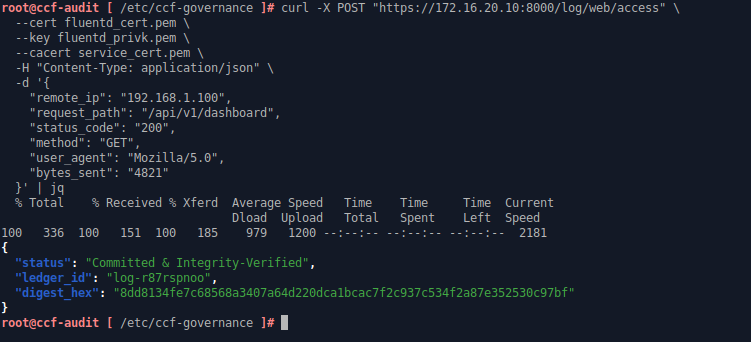
Send a test log to the application
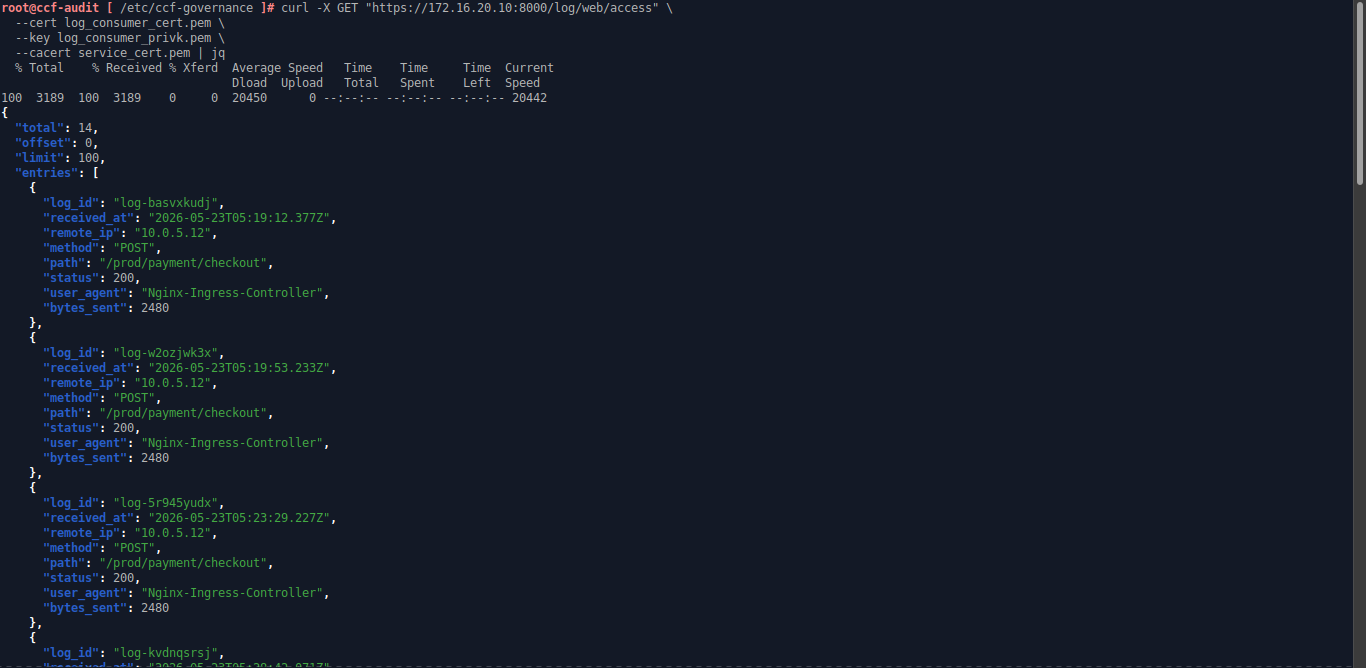
Get all logs
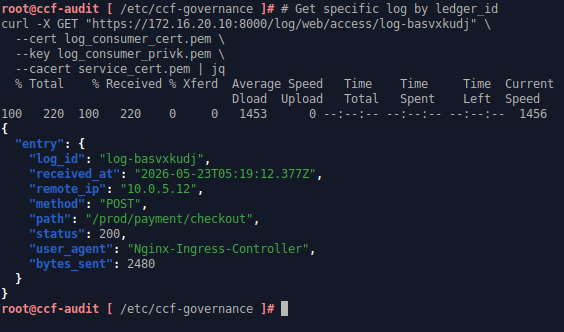
Get specific log by ledger_id
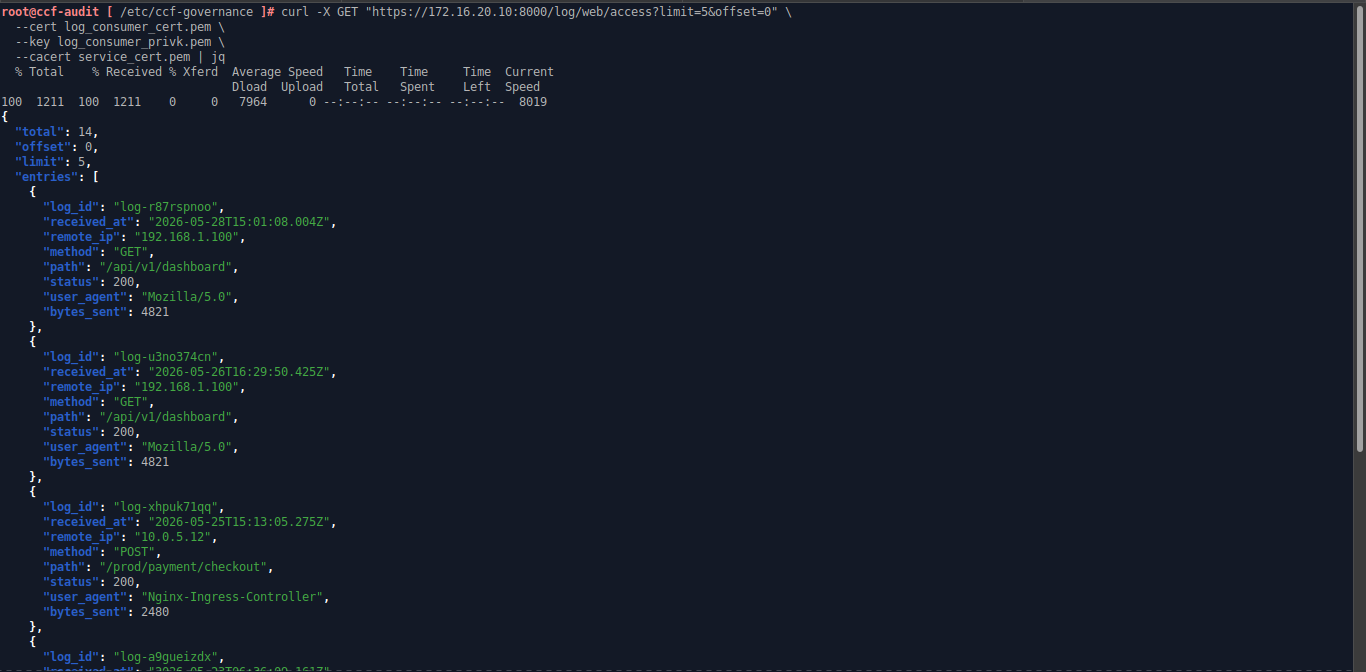
# Get latest 5 logs
F. Deploy HAProxy for High Availability Log Ingestion
With the CCF logging endpoints now active, we can deploy HAProxy as the secure ingress gateway for log ingestion traffic. In this section, HAProxy will forward encrypted TCP traffic to the CCF cluster while continuously checking which node is currently acting as the Primary node through the /node/primary endpoint. If the Primary node changes or becomes unavailable, HAProxy automatically redirects traffic to the new healthy Primary node, providing a stable endpoint for the logging infrastructure. In this article, HAProxy will be configured in logger-lb
- Install HAProxy and needed dependencies
tdnf install -y nano wget openssl ca-certificates haproxy- Copy the
service_cert.pemfrom CCF nodes or CCF Audit node to/etc/ssl/certs/ccf_service_cert.pemand assign minimum permission
chmod 644 /etc/ssl/certs/ccf_service_cert.pem- Edit HAProxy configuration. Disable all default frontend and backend configuration and create custom configuration for the log ingestion
nano /etc/haproxy/haproxy.cfg
---
# Custom frontend and backend for log ingestion to CCF cluster

# Frontend that receive the log traffic
frontend ccf_ingress
    bind *:8000
    mode tcp                  # Pure packet pass-through
    default_backend ccf_secure_backend

# End-to-End Encrypted Backend
backend ccf_secure_backend
    mode tcp
    balance roundrobin

    # Health check definitions remain Layer 7 encrypted blocks
    option httpchk GET /node/primary
    http-check expect status 200

    # Explicitly tell HAProxy to verify the CA chain.
    server ccf-node-01 172.16.30.10:8000 check check-ssl verify required ca-file /etc/ssl/certs/ccf_service_cert.pem inter 2000 rise 2 fall 3
    server ccf-node-02 172.16.30.20:8000 check check-ssl verify required ca-file /etc/ssl/certs/ccf_service_cert.pem inter 2000 rise 2 fall 3
    server ccf-node-03 172.16.30.30:8000 check check-ssl verify required ca-file /etc/ssl/certs/ccf_service_cert.pem inter 2000 rise 2 fall 3
---- Save the configuration, then configure
iptablesto allow incoming TCP/8000 traffic. After that, enable and start the HAProxy service.
# Allow incoming TCP/8000 traffic and make it persistent
iptables -A INPUT -p tcp -m tcp --dport 8000 -j ACCEPT
iptables-save > /etc/systemd/scripts/ip4save

# Enable and restart HAProxy, then verify service status
systemctl enable haproxy
systemctl restart haproxy
systemctl status haproxy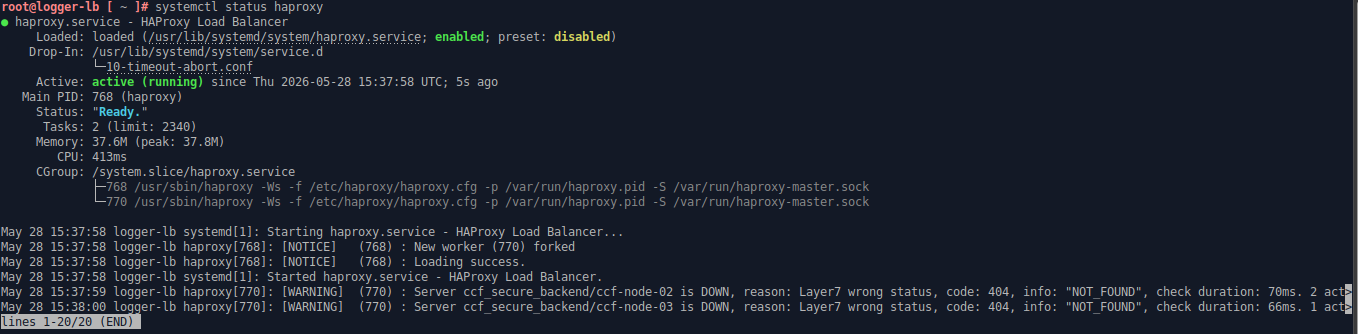
Verify HAProxy service status
G. Send Nginx Access Logs to the CCF Log Receiver using Fluentd
With the CCF logging infrastructure fully deployed, we can now configure the log source and forwarding pipeline. In this section, Nginx will generate structured web access logs, while Fluentd will collect, transform, and securely forward the logs through the HAProxy gateway into the CCF cluster using mutual TLS authentication. Here, we’ll configure web-srv to send web access log to CCF Log Receiver Application.
- Install needed dependencies and tools
apt install curl gnupg2 logrotate- Configure Nginx access log to match JSON structure of the Log Ingestion Application hosted in CCF cluster. After that, apply the configuration by restarting Nginx service
nano /etc/nginx/nginx.conf
---
# In http section, disable default access_log configuration
#access_log /var/log/nginx/access.log;

# Then, add this access_log configuration in the http section
log_format ccf_json escape=json '{'
  '"remote_ip":"$remote_addr",'
  '"request_path":"$uri",'
  '"status_code":"$status",'
  '"method":"$request_method",'
  '"user_agent":"$http_user_agent",'
  '"bytes_sent":"$body_bytes_sent"'
'}';

access_log /var/log/nginx/access_json.log ccf_json;
---

# Save the configuration, then restart Nginx service
service nginx restart
service nginx status- Install latest Fluentd
curl -fsSL https://fluentd.cdn.cncf.io/sh/install-ubuntu-jammy-fluent-package6-lts.sh | sh- Prepare the Fluentd environment for secure communication with the CCF cluster. In this step, create the required directories for mTLS certificates and Fluentd buffering, copy the Fluentd mTLS client and CA certificates (
service_cert.pem,fluentd_cert.pem, andfluentd_privk.pem) fromccf-audit:/etc/ccf-governance, assign the correct permissions, and allow Fluentd to access the Nginx log files
# Create directories for Fluentd certificates and log buffer
mkdir -p /etc/fluent/certs
mkdir -p /var/log/fluentd/buffer

# Copy the service_cert.pem, fluentd_cert.pem, and fluentd_privk.pem from ccf-audit:/etc/ccf-governance to /etc/fluent/certs
# After that, assign the correct ownership for Fluentd directories
chown -R _fluentd:_fluentd /etc/fluent/certs
chown -R _fluentd:_fluentd /var/log/fluentd

# Assign minimum required permissions for the mTLS certificate files
chmod 600 /etc/fluent/certs/fluentd_privk.pem
chmod 644 /etc/fluent/certs/fluentd_cert.pem
chmod 644 /etc/fluent/certs/service_cert.pem

# Check the Nginx log directory group ownership and add _fluentd to the same group
ls -l /var/log/nginx
usermod -aG adm _fluentd- Backup default Fluentd configuration and create new configuration to send Nginx access log to CCF cluster
mv /etc/fluent/fluentd.conf /etc/fluent/fluentd.conf.bak
nano /etc/fluent/fluentd.conf
---
# Ingest the structured JSON Nginx access logs
<source>
  @type tail
  path /var/log/nginx/access_json.log
  pos_file /var/log/fluentd/nginx-access.log.pos
  tag nginx.ccf.access
  <parse>
    @type json
  </parse>
</source>

# Route the records via flat TLS parameters to the HAProxy VIP
<match nginx.ccf.access>
  @type http
  endpoint https://172.16.40.10:8000/log/web/access
  open_timeout 2

  # Flattened TLS parameters for the native out_http engine
  tls_ca_cert_path /etc/fluent/certs/service_cert.pem
  tls_client_cert_path /etc/fluent/certs/fluentd_cert.pem
  tls_private_key_path /etc/fluent/certs/fluentd_privk.pem
  tls_verify_mode none

  <format>
    @type json
  </format>

  <buffer>
    @type file
    path /var/log/fluentd/buffer/ccf_delivery
    flush_mode interval
    flush_interval 1s
    retry_max_interval 30s
    retry_forever true
  </buffer>
</match>
---- After that, enable and restart Fluentd service
# Enable and restart the service
systemctl enable fluentd
service fluentd restart

# Verify service status and make sure there is no error crash the service
service fluentd status
tail -f /var/log/fluent/fluentd.log - To verify the logging system, open the website and test both existing and non-existing paths to generate normal and 404 access logs
curl -i http://192.168.1.216 2> /dev/null | grep HTTP
curl -i http://192.168.1.216/notfound.html 2> /dev/null | grep HTTP
Generate web access logs by accessing the website
Then, from ccf-audit, retrieve the latest 2 logs from the CCF cluster using the Log Consumer certificate for mTLS authentication.
curl -X GET "https://172.16.20.10:8000/log/web/access?limit=2&offset=0" --cert log_consumer_cert.pem --key log_consumer_privk.pem --cacert service_cert.pem | jqThis confirms that the web access logs were successfully ingested into the Log Receiver application hosted in the CCF cluster and can be securely retrieved using Log Consumer mTLS authentication.
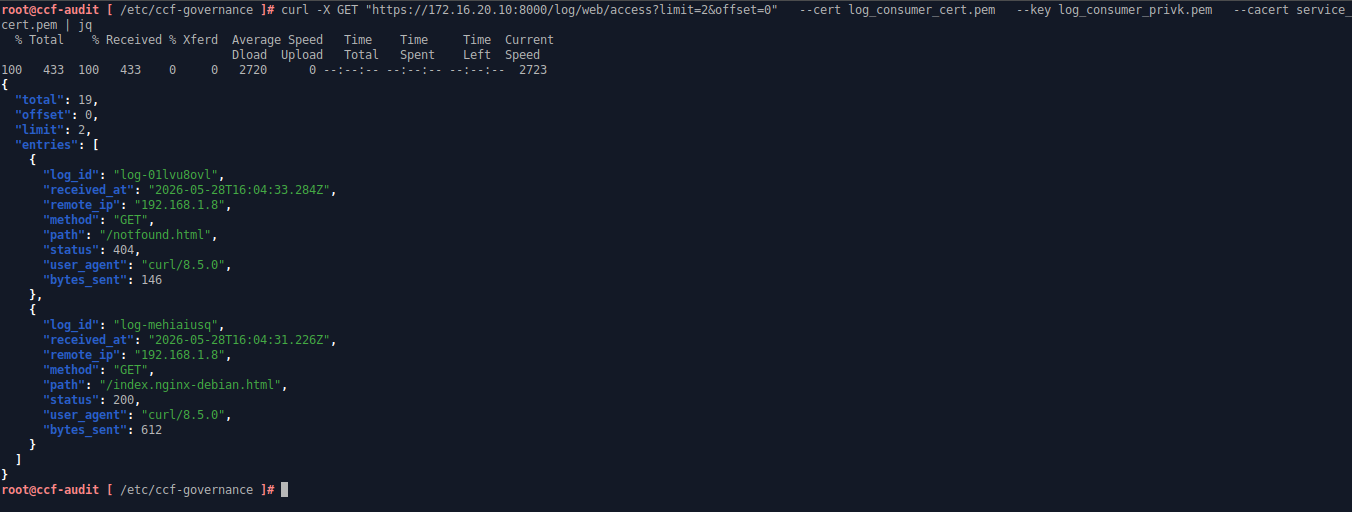
Web access logs are sucessfully ingested to CCF cluster and retrieved using mTLS authentication
H. Additional Section: Troubleshooting and Common Administrative Tasks
- While joining nodes to the CCF cluster, you might encounter this message in the CCF audit log and notice that the node does not appear as
Pendingin the cluster. This usually happens because the joining node fails to retrieve the current snapshot from the Primary node. In many cases, this occurs after the Primary node has been bootstrapped or reset multiple times.
tail -f /var/log/ccf/ccf_audit.log
Joining node is failing to retrieve snapshot from primary node
To resolve this issue, manually copy the snapshot files from the CCF snapshots directory on the Primary node to the CCF snapshots directory on the joining node, then restart the CCF service on the joining node.
- To remove existing app hosted in CCF cluster (run from
ccf-audit):
# Enter governance workspace directory
cd /etc/ccf-governance

# Create a proposal file that overwrites the current application with an empty bundle (effectively deleting it)
cat << 'EOF' > remove_app.json
{
  "actions": [
    {
      "name": "set_js_app",
      "args": {
        "bundle": {
          "modules": [],
          "metadata": {
            "endpoints": {}
          }
        }
      }
    }
  ]
}
EOF

# Sign the removal proposal with admin1's keys and submit it to the network to start the vote
PROPOSAL_RES=$(ccf_cose_sign1 \
  --ccf-gov-msg-type proposal \
  --ccf-gov-msg-created_at "$(date -uIs)" \
  --signing-key ccf-admin1_privk.pem \
  --signing-cert ccf-admin1_cert.pem \
  --content remove_app.json \
  | curl -s https://172.16.20.10:8000/gov/members/proposals:create?api-version=2024-07-01 \
    --cacert service_cert.pem \
    --data-binary @- \
    -H 'content-type: application/cose')

# Extract the newly created Proposal ID from the network response and verify it
PROPOSAL_ID=$(echo "$PROPOSAL_RES" | jq -r '.proposalId')
echo "App Removal Proposal ID: $PROPOSAL_ID"

# Generate the unique Member IDs for admin2 and admin3 from their certificates
ADMIN2_ID=$(openssl x509 -in ccf-admin2_cert.pem -outform DER | sha256sum | cut -d' ' -f1)
ADMIN3_ID=$(openssl x509 -in ccf-admin3_cert.pem -outform DER | sha256sum | cut -d' ' -f1)

# Sign and submit admin2's approving vote for this specific Proposal ID
ccf_cose_sign1 \
  --ccf-gov-msg-type ballot \
  --ccf-gov-msg-proposal-id "$PROPOSAL_ID" \
  --ccf-gov-msg-created_at "$(date -uIs)" \
  --signing-key ccf-admin2_privk.pem \
  --signing-cert ccf-admin2_cert.pem \
  --content ballot.json \
  | curl -s https://172.16.20.10:8000/gov/members/proposals/$PROPOSAL_ID/ballots/$ADMIN2_ID:submit?api-version=2024-07-01 \
    --cacert service_cert.pem \
    --data-binary @- \
    -H 'content-type: application/cose' > | jq

# Sign and submit admin3's approving vote to pass quorum, trigger the removal, and show the final state (should be "Accepted")
ccf_cose_sign1 \
  --ccf-gov-msg-type ballot \
  --ccf-gov-msg-proposal-id "$PROPOSAL_ID" \
  --ccf-gov-msg-created_at "$(date -uIs)" \
  --signing-key ccf-admin3_privk.pem \
  --signing-cert ccf-admin3_cert.pem \
  --content ballot.json \
  | curl -s https://172.16.20.10:8000/gov/members/proposals/$PROPOSAL_ID/ballots/$ADMIN3_ID:submit?api-version=2024-07-01 \
    --cacert service_cert.pem \
    --data-binary @- \
-H 'content-type: application/cose' | jq '.proposalState'- To shutdown the CCF cluster:
# From ccf-audit, check which node is the current primary node
curl -s "https://172.16.20.10:8000/node/network/nodes" --cacert service_cert.pem | jq '.nodes[] | select(.primary == true)'

# Next, shut down the non-primary nodes first, followed by the primary node.- Recover CCF cluster after shutdown:
# Run from bootstrap/primary node (ccf-node-01)
# Archive the old CA certificate and configure recovery mode for the CCF service
cp /etc/ccf-node/service_cert.pem /etc/ccf-node/service_cert.pem.old
nano /etc/ccf-node/ccf_config.json
---
{
  "network": {
    "node_to_node_interface": {
      "bind_address": "172.16.10.10:8001",
      "published_address": "172.16.10.10:8001"
    },
    "rpc_interfaces": {
      "audit_interface": {
        "bind_address": "172.16.20.10:8000",
        "published_address": "172.16.20.10:8000"
      },
      "logging_interface": {
        "bind_address": "172.16.30.10:8000",
        "published_address": "172.16.30.10:8000"
      }
    }
  },
  "command": {
    "type": "Recover",
    "recover": {
      "previous_service_identity_file": "/etc/ccf-node/service_cert.pem.old"
    }
  },
  "ledger": {
    "directory": "/etc/ccf-node/ledger"
  },
  "snapshots": {
    "directory": "/etc/ccf-node/snapshots"
  },
  "output_files": {
    "pid_file": "/var/run/ccf-node.pid",
    "node_certificate_file": "/etc/ccf-node/nodecert.pem"
  }
}
---
systemctl start ccf-node.service
systemctl status ccf-node.service

# In ccf-audit, Archive the old CA certificate
mv /etc/ccf-governance/service_cert.pem /etc/ccf-governance/service_cert.pem.old
# Then, Copy the new CA certificate (service_cert.pem) from ccf-node-01:/etc/ccf-node to ccf-audit:/etc/ccf-governance

# After that, open the CCF service from ccf-audit
# Then, submit recovery share for each administrative member

# Submit recovery share for admin1
/opt/ccf/bin/submit_recovery_share.sh https://172.16.20.10:8000 \
  --member-enc-privk ccf-admin1_enc_privk.pem \
  --api-version 2024-07-01 \
  --member-id-privk ccf-admin1_privk.pem \
  --member-id-cert ccf-admin1_cert.pem \
  --cacert service_cert.pem

# Submit recovery share for admin2
/opt/ccf/bin/submit_recovery_share.sh https://172.16.20.10:8000 \
  --member-enc-privk ccf-admin2_enc_privk.pem \
  --api-version 2024-07-01 \
  --member-id-privk ccf-admin2_privk.pem \
  --member-id-cert ccf-admin2_cert.pem \
  --cacert service_cert.pem

# Submit recovery share for admin3
/opt/ccf/bin/submit_recovery_share.sh https://172.16.20.10:8000 \
  --member-enc-privk ccf-admin3_enc_privk.pem \
  --api-version 2024-07-01 \
  --member-id-privk ccf-admin3_privk.pem \
  --member-id-cert ccf-admin3_cert.pem \
  --cacert service_cert.pem

# Next, verify the enclave status
curl -s https://172.16.20.10:8000/node/state --cacert service_cert.pem | jq

# Finally, rejoin ccf-node-02 and ccf-node-03 to the cluster- When your primary node gets disconnected from the cluster, another node will be elected as the new primary node. You can rejoin the old primary node to the cluster again
# Enter CCF service directory
cd /etc/ccf-node

# Configure CCF join mode
nano ccf_config.json
---
{
  "network": {
    "node_to_node_interface": {
      "bind_address": "172.16.10.10:8001",
      "published_address": "172.16.10.10:8001"
    },
    "rpc_interfaces": {
      "audit_interface": {
        "bind_address": "172.16.20.10:8000",
        "published_address": "172.16.20.10:8000"
      },
      "logging_interface": {
        "bind_address": "172.16.30.10:8000",
        "published_address": "172.16.30.10:8000"
      }
    }
  },
  "command": {
    "type": "Join",
    "service_certificate_file": "/etc/ccf-node/service_cert.pem",
    "join": {
      "target_rpc_address": "<audit_network_IP_address_of_primary_node>:8000"
    }
  },
  "ledger": {
    "directory": "/etc/ccf-node/ledger"
  },
  "snapshots": {
    "directory": "/etc/ccf-node/snapshots"
  },
  "output_files": {
    "pid_file": "/var/run/ccf-node.pid",
    "node_certificate_file": "/etc/ccf-node/nodecert.pem"
  }
}
---

systemctl restart ccf-node
systemctl status ccf-node
tail -f /var/log/ccf/ccf_audit.log
tail -f /var/log/ccf/ccf_error.log
References:
메타데이터
- post_id
- 39ff7d4494d5
- slug
- how-to-build-a-zero-trust-logging-infrastructure-using-confidential-consortium-framework-ccf-39ff7d4494d5
- url
- https://medium.com/@kevintim/how-to-build-a-zero-trust-logging-infrastructure-using-confidential-consortium-framework-ccf-39ff7d4494d5
- canonical_url
- https://medium.com/@kevintim/how-to-build-a-zero-trust-logging-infrastructure-using-confidential-consortium-framework-ccf-39ff7d4494d5
- author_url
- https://medium.com/@kevintim
- status
- ok
- fetched_at
- 2026-06-09 15:37:30