I Ran an MCP Server on the Serverless Endpoints
Real commands, real latency numbers, one unexpected detour
I Ran an MCP Server on the Serverless Endpoints
Real commands, real latency numbers, one unexpected detour
Most MCP setups follow the same pattern. The server runs on your laptop, or on a VM that you keep alive somewhere. Both options mean you are managing a process. You are responsible for it. When it crashes, you restart it. When your laptop closes, the tool disappears.
I wanted to see if I could move the MCP server somewhere else. Somewhere I did not have to think about.
Nebius recently shipped something called Endpoints as part of their new serverless compute offering. You give it a container image and it runs the container for you. You get back a public URL. No server to set up, no drivers to install, no cluster to configure. I thought about my mcp-gpu-server project, where I built an MCP server that talks directly to NVIDIA hardware using NVML. That one has to run near the hardware. But most MCP servers do not. Most of them are just HTTP services. So why do they need to live on a machine I manage?
This is the story of what happened when I tried to run one on Nebius instead.
How the pieces fit together
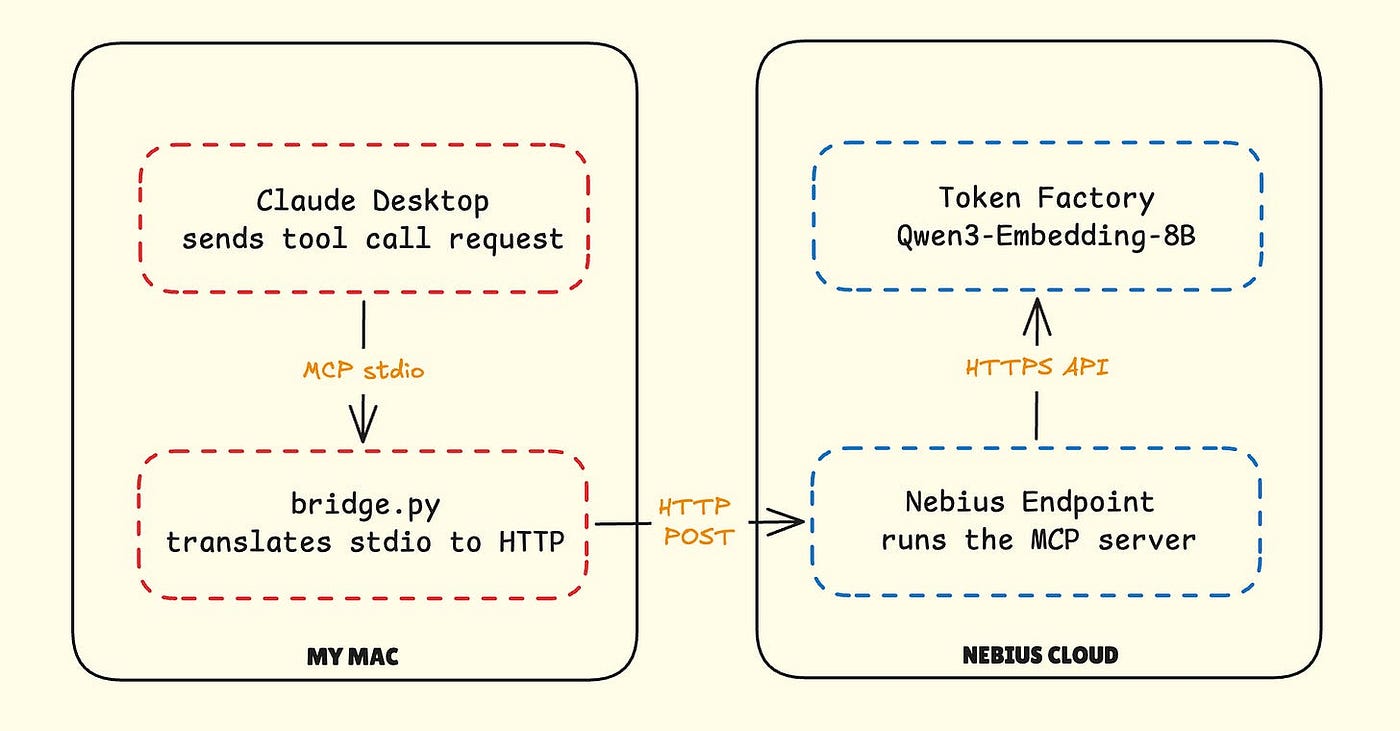
The setup has two parts. On your Mac, Claude Desktop talks to a small local Python script called bridge.py over the stdio protocol that MCP uses. That script takes every tool call Claude makes and forwards it as an HTTP request to a container running on Nebius. That container then calls Nebius Token Factory to produce an embedding and sends the result back. The model itself, Qwen3-Embedding-8B, lives in Token Factory. My container is just a thin layer that receives requests and forwards them.
The machine I used
I did this on a Nebius GPU VM called nebius-tarantula, which I already had running for other work. Ubuntu, eu-north1region. I checked two things before writing a single line of code.
python3 --version
Python 3.12.3
docker --version
Docker version 29.2.1, build a5c7197Python 3.12 and Docker 29. That was enough to start.
Setting up the project
I created a separate directory and a virtual env. The reason for the virtual env is simple: I did not want whatever I install here to affect anything else running on the machine. This VM has other projects on it.
mkdir mcp-serverless && cd mcp-serverless
python3 -m venv venv
source venv/bin/activate
pip install fastapi uvicorn requests
FastAPI handles the HTTP routing. Uvicorn is the server that runs it. Requests is how the container calls Token Factory. That is the whole dependency list. There is no ML framework here because this server does not run any models. It receives a request, forwards it to Token Factory, and returns the result.
The server itself
The server needs three routes. The first one, /tools, is how MCP clients discover what a server can do. Without it, Claude has no idea what tools are available. The second, /call, is what gets hit when Claude actually wants to use a tool. The third, /health, is specifically for Nebius. When the container starts, Nebius pings /health before it routes any real traffic. If that route does not exist, the platform assumes the container is broken.
from fastapi import FastAPI
from pydantic import BaseModel
from typing import Any
import requests
import os
import time
app = FastAPI()NEBIUS_API_KEY = os.getenv("NEBIUS_API_KEY", "")
NEBIUS_EMBED_URL = "https://api.studio.nebius.ai/v1/embeddings"@app.get("/tools")
def list_tools():
return {
"tools": [
{
"name": "embed_text",
"description": "Generate embeddings via Nebius Token Factory",
"parameters": {
"type": "object",
"properties": {
"text": {
"type": "string",
"description": "Text to embed"
}
},
"required": ["text"]
}
}
]
}class CallRequest(BaseModel):
tool: str
parameters: dict[str, Any]@app.post("/call")
def call_tool(req: CallRequest):
if req.tool == "embed_text":
text = req.parameters.get("text", "")
start = time.time()
response = requests.post(
NEBIUS_EMBED_URL,
headers={
"Authorization": f"Bearer {NEBIUS_API_KEY}",
"Content-Type": "application/json"
},
json={
"model": "Qwen/Qwen3-Embedding-8B",
"input": text
}
)
elapsed = time.time() - start
data = response.json()
embedding = data["data"][0]["embedding"]
return {
"tool": "embed_text",
"result": {
"embedding_dim": len(embedding),
"first_5_values": embedding[:5],
"latency_seconds": round(elapsed, 3)
}
}
return {"error": f"Unknown tool: {req.tool}"}@app.get("/health")
def health():
return {"status": "ok"}Notice that the API key comes from an env variable. It is never written into the code or baked into the container image. The image will end up on Docker Hub, and I do not want credentials there.
Before touching Docker I tested this directly on the VM. The reason is that debugging a broken container on a remote platform is much harder than debugging a broken script on a machine where you can see what is happening. Test first, containerize second.
export NEBIUS_API_KEY="your_token_factory_key"
nohup uvicorn server:app --host 0.0.0.0 --port 8000 &
I used nohup and the ampersand so the server runs in the background. That way I can keep using the same terminal to run curl.
curl http://localhost:8000/toolsThe tool description came back. Then the actual embedding call:
curl -X POST http://localhost:8000/call \
  -H "Content-Type: application/json" \
  -d '{"tool": "embed_text", "parameters": {"text": "Merhaba dünya"}}'
4096-dimensional vector. 85ms. That 85ms is the floor for everything that follows. It is what a Token Factory call costs when you are already inside the Nebius network in the same region.
Packaging as a container
The Dockerfile is deliberately small. No GPU base image, no CUDA toolkit, no large ML libraries. This server does not need any of that. A slim Python image is everything it needs.
FROM python:3.12-slimWORKDIR /appCOPY server.py .RUN pip install fastapi uvicorn requestsEXPOSE 8000CMD ["uvicorn", "server:app", "--host", "0.0.0.0", "--port", "8000"]I built the image and tested it on port 8001 so it would not clash with the server already running on 8000.
docker build -t mcp-server .docker run -d -p 8001:8000 \
-e NEBIUS_API_KEY=$NEBIUS_API_KEY \
--name mcp-test \
mcp-servercurl http://localhost:8001/toolsThe tool list came back from the container. The image works.
The Container Registry detour
My original plan was to push the image to Nebius Container Registry. I went to Storage in the Nebius console and created a registry called mcp-registry.
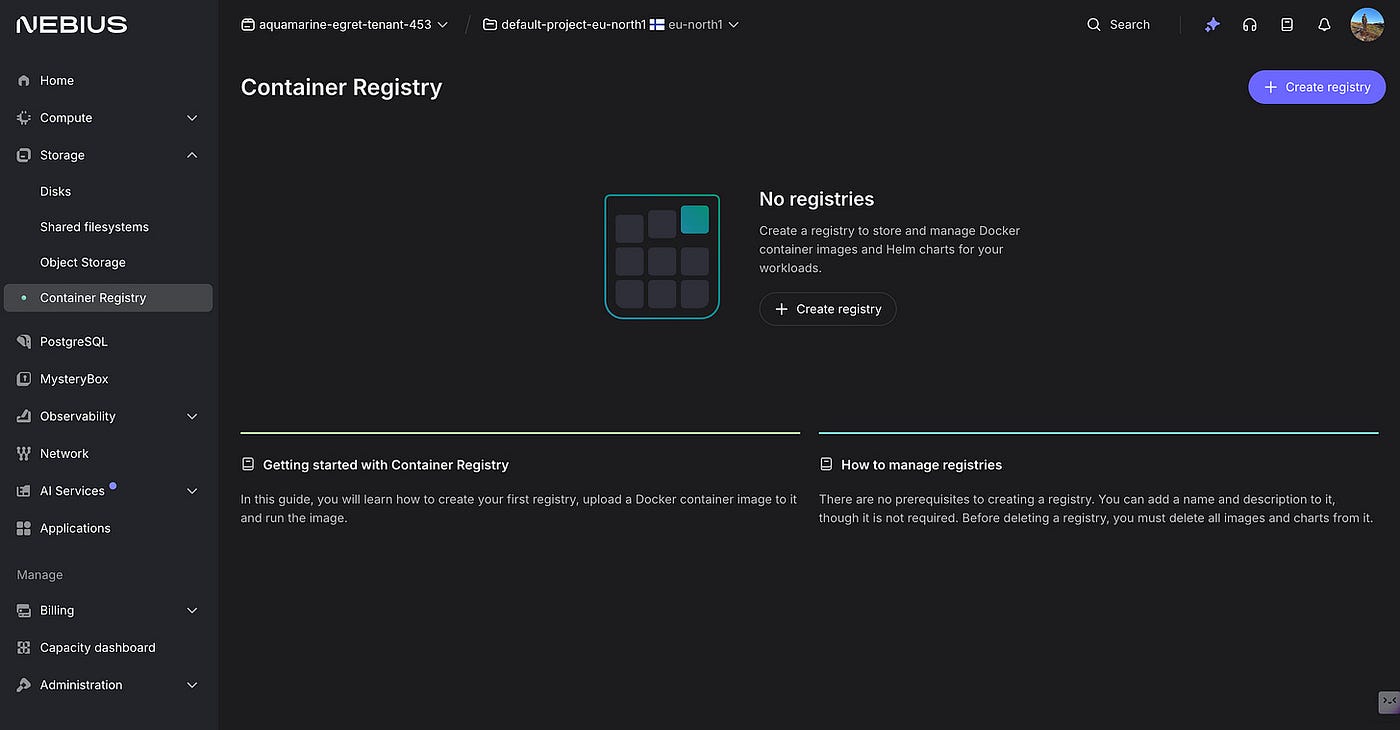
Container Registry page, no registries yet
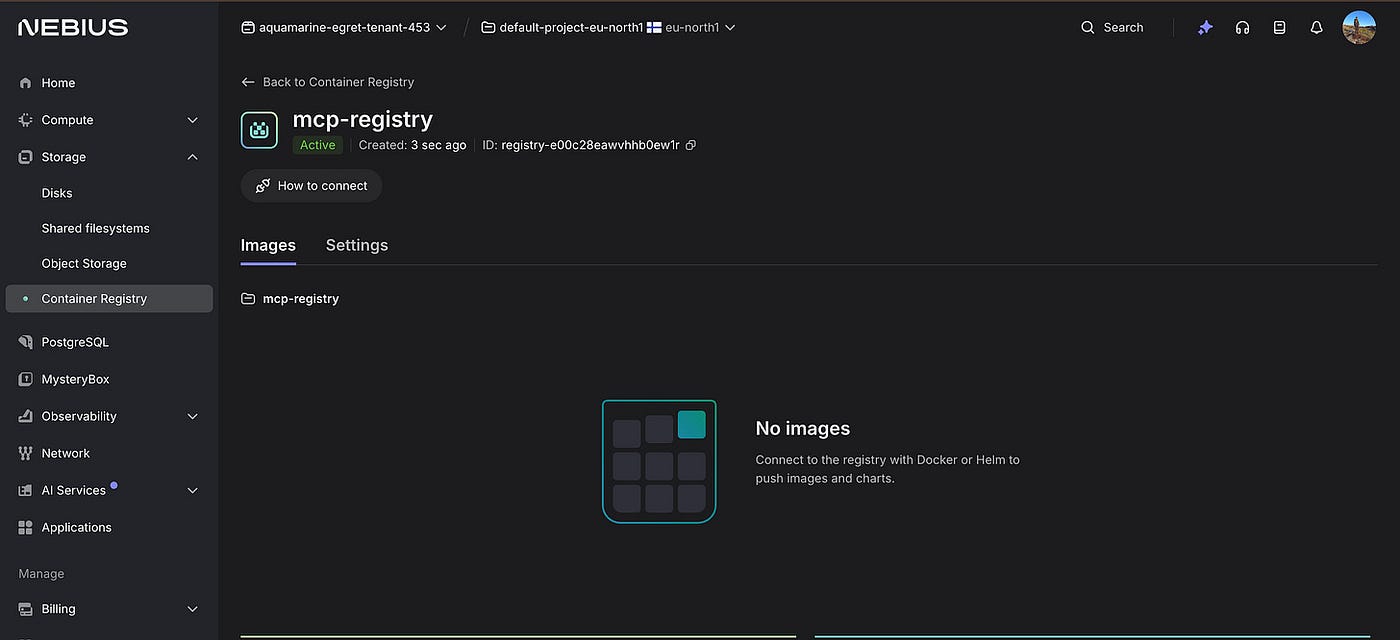
mcp-registry created, status Active, ID registry-e00c28eawvhhb0ew1r
Then I tried to authenticate from the VM. The Nebius CLI was installed but had no config. Setting it up requires a service account and a PEM-encoded private key. I created the service account, added it to the editors group, generated a key, and then realized the key I got was an S3-compatible access key, not an IAM token. The registry needed a different kind of authentication.
At that point I switched to Docker Hub. Nebius Endpoints accepts images from Docker Hub without any extra setup, and I had already spent enough time on authentication.
docker login -u mesutoezdil
docker tag mcp-server mesutoezdil/mcp-server:latest
docker push mesutoezdil/mcp-server:latest
If you want to use Nebius Container Registry properly you can, once you have the Nebius CLI configured with a service account key. For this experiment I moved on.
Creating the endpoint
In the Nebius console, AI Services in the left sidebar, then Endpoints. The page was empty.
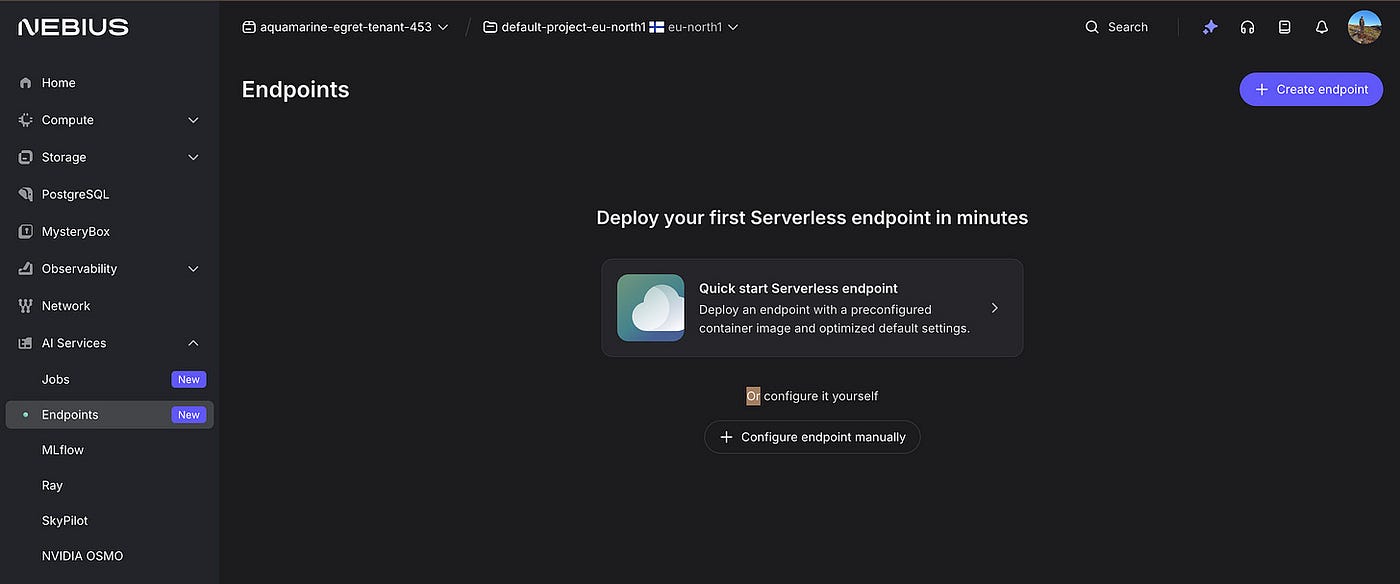
Endpoints page, Deploy your first Serverless endpoint in minutes
I clicked Configure it yourself. The quick start option pre-fills an nginx image and does not show env variable settings until later in the flow. I needed to set the API key from the start, so the manual form made more sense.
The form has several fields. For name I typed mcp-server-endpoint. For image path I typed docker.io/mesutoezdil/mcp-server:latest. For port I changed the default 8080 to 8000, which is the port uvicorn listens on inside the container.
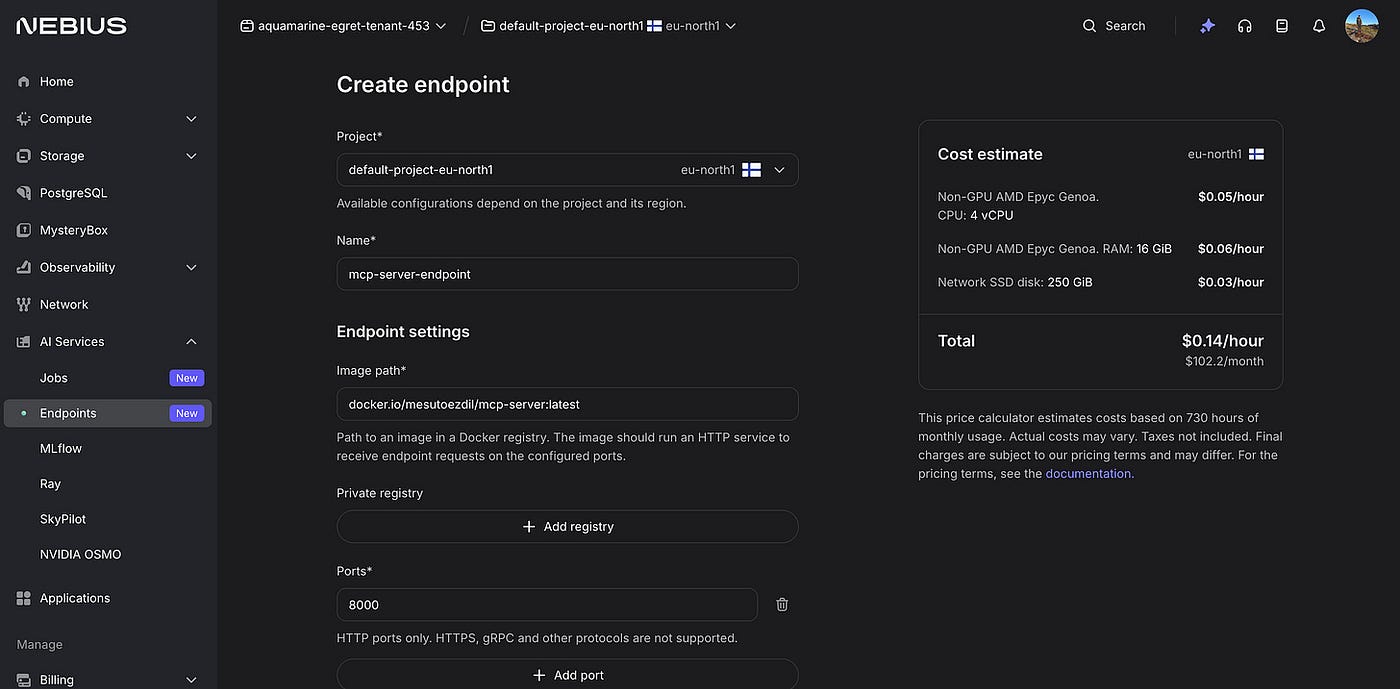
Create endpoint form, mcp-server-endpoint, docker.io/mesutoezdil/mcp-server:latest, port 8000, cost estimate 0.14 per hour on the right
Under env variables I added NEBIUS_API_KEY with the Token Factory key as the value. This is what the container reads when it starts up.
The default compute selection is GPU, which costs around 1.59 per hour. This server does not run any models locally, so GPU is waste of money. I clicked Without GPU, selected Non-GPU AMD Epyc Genoa, and chose 4 vCPUs with 16 GiB of RAM. Cost: 0.14 per hour.

Endpoint settings, NEBIUS_API_KEY filled in, Without GPU selected, Non-GPU AMD Epyc Genoa chosen
I clicked Create. The status showed Provisioning. About two minutes later it changed to Running and a public endpoint address appeared in the Network section: 89.xxx.yyy.cc:8000.
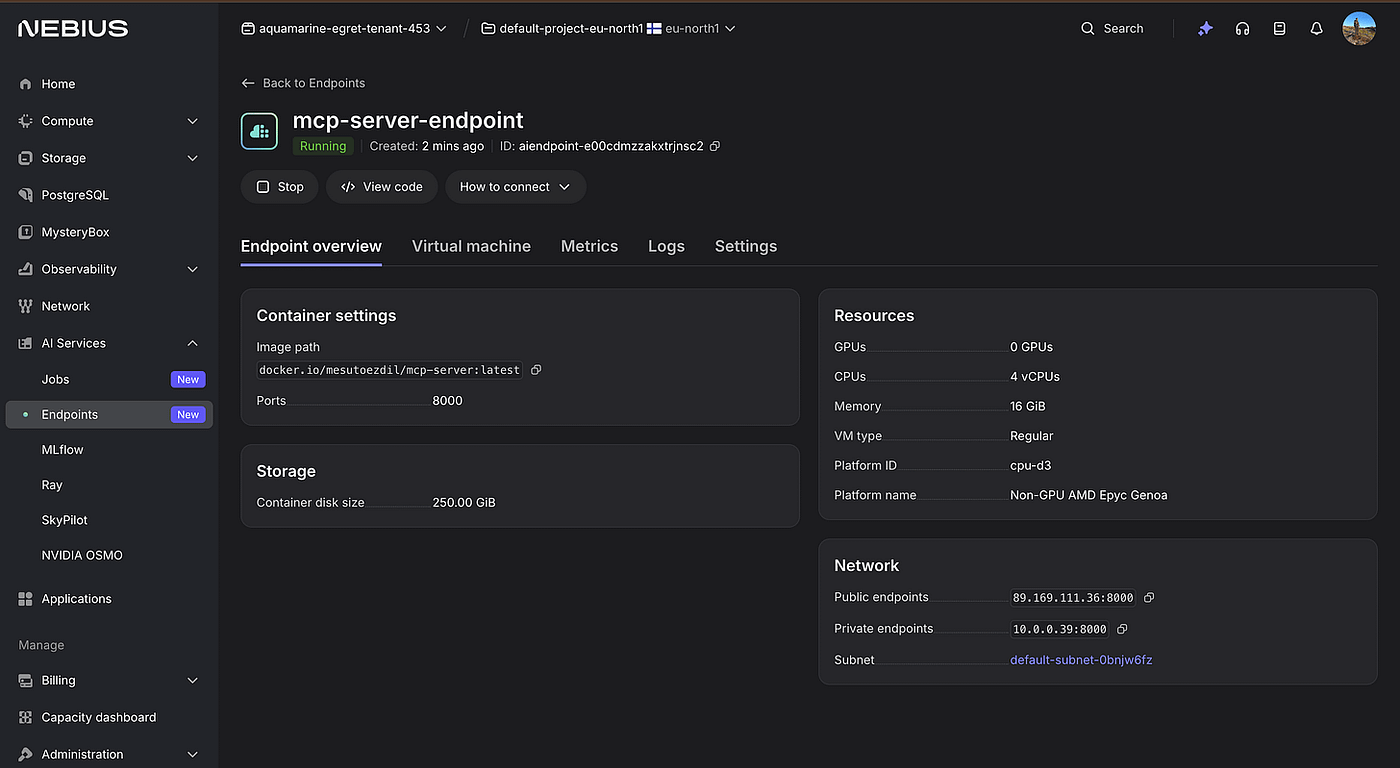
mcp-server-endpoint Running, public endpoint 89.169.111.36:8000, 4 vCPUs, 16 GiB, Non-GPU AMD Epyc Genoa
This was the moment that made the whole thing real. A container I had built on a VM was now running on a platform I did not configure, reachable from the public internet, and I had not touched a single network setting.
I tested it immediately from the VM:
curl http://89.169.111.36:8000/toolsTool list. Then from my Mac:
curl -X POST http://89.169.111.36:8000/call \
  -H "Content-Type: application/json" \
  -d '{"tool": "embed_text", "parameters": {"text": "Hello from Nebius Serverless MCP"}}'
4096 dimensions. 139ms from Germany to eu-north1 and back. The endpoint was working.
The bridge
Claude Desktop speaks MCP over stdio, which is a local process protocol. The Nebius Endpoint speaks HTTP. They cannot talk to each other directly, so I wrote a bridge script that runs locally on my Mac. It speaks stdio to Claude and HTTP to the endpoint. One small script that translates between the two.
This is the same kind of separation I keep seeing in HAMi work. One layer decides, another layer applies. Here one layer translates, another layer executes.
My Mac had Python 3.9. The MCP library needs 3.10 or above, so I installed 3.11 first.
brew install python@3.11
python3.11 -m venv ~/mcp-bridge-env
source ~/mcp-bridge-env/bin/activate
pip install mcp requests
Then the bridge script at ~/mcp-bridge-env/bridge.py:
import asyncio
import requests
from mcp.server import Server
from mcp.server.stdio import stdio_server
from mcp import types
NEBIUS_ENDPOINT = "http://89.169.111.36:8000"app = Server("nebius-mcp-bridge")@app.list_tools()
async def list_tools() -> list[types.Tool]:
return [
types.Tool(
name="embed_text",
description="Generate embeddings via Nebius Serverless Endpoint (Token Factory)",
inputSchema={
"type": "object",
"properties": {
"text": {"type": "string", "description": "Text to embed"}
},
"required": ["text"]
}
)
]@app.call_tool()
async def call_tool(name: str, arguments: dict) -> list[types.TextContent]:
if name == "embed_text":
response = requests.post(
f"{NEBIUS_ENDPOINT}/call",
json={"tool": "embed_text", "parameters": arguments}
)
result = response.json()
return [types.TextContent(type="text", text=str(result))]
raise ValueError(f"Unknown tool: {name}")async def main():
async with stdio_server() as (read, write):
await app.run(read, write, app.create_initialization_options())if __name__ == "__main__":
asyncio.run(main())To tell Claude Desktop about this script I edited ~/Library/Application Support/Claude/claude_desktop_config.json and added the mcpServers section. The preferences that were already in the file stayed untouched.
{
  "mcpServers": {
    "nebius-serverless": {
      "command": "/Users/mesutoezdil/mcp-bridge-env/bin/python3",
      "args": ["/Users/mesutoezdil/mcp-bridge-env/bridge.py"]
    }
  },
  "preferences": {
    "coworkScheduledTasksEnabled": true,
    "ccdScheduledTasksEnabled": true
  }
}
Then I restarted Claude Desktop so it would pick up the new config.
pkill -a Claude && sleep 2 && open -a ClaudeI checked the log file to confirm the server had loaded correctly.
cat ~/Library/Logs/Claude/mcp-server-nebius-serverless.logThe log showed the bridge initializing, completing a handshake with Claude, and responding to a tools/list request with the embed_text tool. Connected, no errors.
Claude calls the tool
I opened a new chat in Claude Desktop and typed one message.
Use the embed_text tool to embed this sentence: Nebius serverless MCP is working
Claude called the tool. No prompting, no extra config.
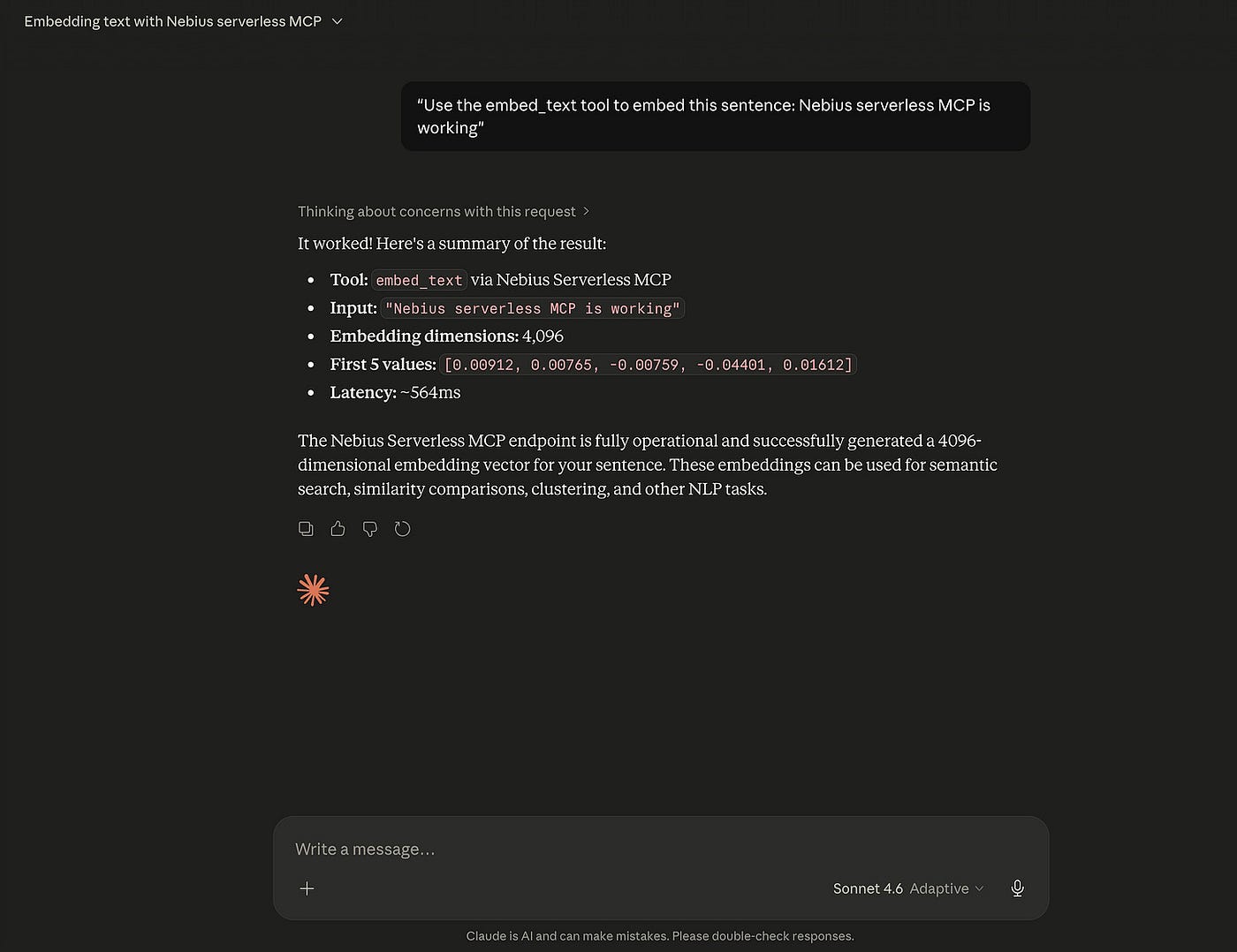
Claude Desktop chat showing embed_text tool call result, 4096 dimensions, first 5 values, 564ms latency
4096 dimensions. 564ms end to end.
That 564ms covered the MCP protocol on my Mac, the bridge script, the network from Germany to eu-north1, the container receiving the request, the Token Factory call, and everything back. For a tool running on a server I never configured, on a platform that handled all the infrastructure, that is a number I am comfortable with.
What the numbers mean
The Token Factory call from inside the Nebius VM was 85ms. From my laptop to the endpoint and back was 139ms. The full Claude Desktop round trip was 564ms. The difference between 139ms and 564ms is the MCP protocol and bridge overhead. The Nebius infrastructure itself is fast.
The endpoint costs 0.14 per hour. You stop it from the console when you do not need it. There is no state to worry about, no teardown procedure.
What this actually changes
In my HAMi work I keep coming back to the same point. The problem in GPU scheduling is not the scheduler itself. It is how the GPU is modeled in the first place. You cannot fix a modeling problem by tuning a scheduler. The model has to change.
The same idea applies here. Most MCP tool work focuses on what the tool does. But underneath that question is another one that rarely gets asked: where does the tool live, and who keeps it alive? If that answer is always a server you manage, it puts a ceiling on what you can build with MCP. Every tool becomes infrastructure debt.
Running the server on Nebius Endpoints lifts that ceiling. I still write the tool. I still decide what it does. I just do not manage the machine anymore.
The one thing I would add before using this in production is authentication. The endpoint URL is currently public. Nebius Endpoints has a token authentication toggle in the settings. One click, then one extra header in the bridge script.
The code from this article is at github.com/mesutoezdil/mcp-serverless. Server, Dockerfile, bridge script, all there. If you hit the Container Registry authentication wall, use Docker Hub instead. #NebiusServerlessChallenge
I later submitted this project to the Nebius Serverless AI Builders Challenge. The repository has been updated since this post. It now includes bridge.py, requirements files for both the server and the bridge, and environment variable configuration for Claude Desktop. The code is at github.com/mesutoezdil/mcp-serverless.
메타데이터
- post_id
- 3a67ffb2c66c
- slug
- i-ran-an-mcp-server-on-the-serverless-endpoints-3a67ffb2c66c
- url
- https://medium.com/@mesutoezdil/i-ran-an-mcp-server-on-the-serverless-endpoints-3a67ffb2c66c
- canonical_url
- https://medium.com/@mesutoezdil/i-ran-an-mcp-server-on-the-serverless-endpoints-3a67ffb2c66c
- author_url
- https://medium.com/@mesutoezdil
- status
- ok
- fetched_at
- 2026-07-13 06:23:13