Dependency Injection in Swift
As software projects grow, dependencies between classes increase. A dependency exists when one class relies on another class to perform…
Dependency Injection in Swift
As software projects grow, dependencies between classes increase.A dependency exists when one class relies on another class to perform its tasks. For example, a class that needs to interact with a database depends on a database class. Dependencies can complicate code, making it harder to test and modify.
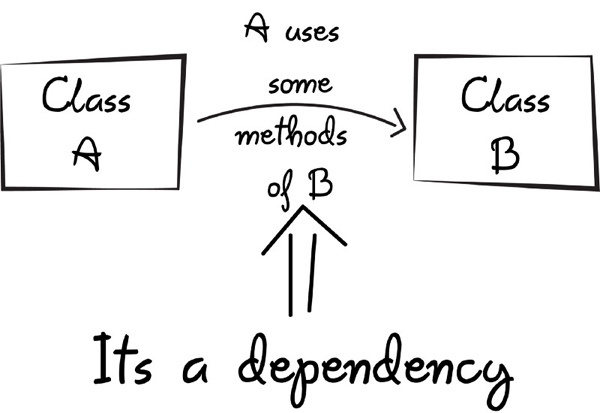
Image Source
What is Dependency Injection?
Dependency Injection is a design pattern that reduces dependencies between classes. It involves providing a class with its required dependencies externally rather than having the class create them internally. This enhances code modularity, testability, and maintainability by making replacing or modifying components easier without affecting the entire system.
There are four main ways to implement DI:
- Constructor Injection: When creating an object, its dependencies are supplied through the initializer’s parameters. This is the most common and recommended method.
- Property Injection: Dependencies are set on public properties of the object after it has been created.
- Method Injection: Dependencies are passed to a method of the object. This approach is less favored and less flexible than others.
- Interface Injection: Dependencies are provided through protocols. It offers a more abstract way to manage dependencies and is suitable for larger applications.

Image Source
In this article, we will examine DI methods using the Service and LoggingService classes that we have created.
class Service {
    func performServiceAction() {
        print("Service action performed")
    }
}

class LoggingService {
    func performLoggingAction() {
        print("Logging action performed")
    }
}
Without Dependency Injection
class ViewModel {
    private let service: Service?
    private let loggingService: LoggingService?

    init() {
        self.service = Service()
        self.loggingService = LoggingService()
    }

    func execute() {
        service.performServiceAction()
        loggingService.performLoggingAction()
    }
}

let viewModel = ViewModel()
viewModel.execute()
When creating a ViewModel instance, Service and LoggingService objects are instantiated automatically. The ViewModel depends on these services, creating a tight coupling between them.
Constructor Injection
class ViewModel {
    private let service: Service
    private let loggingService: LoggingService

    init(service: Service, loggingService: LoggingService) {
        self.service = service
        self.loggingService = loggingService
    }

    func execute() {
        service.performServiceAction()
        loggingService.performLoggingAction()
    }
}

let service = Service()
let loggingService = LoggingService()
let viewModel = ViewModel(service: service, loggingService: loggingService)
viewModel.execute()
When creating an object, dependencies are provided externally, and the object becomes ready to work with these dependencies. We only need to change the dependency if we want to use a different service.
Property Injection
class ViewModel {
    var service: Service?
    var loggingService: LoggingService?

    func execute() {
        service?.performServiceAction()
        loggingService?.performLoggingAction()
    }
}

let viewModel = ViewModel()
viewModel.service = Service() // Dependency is injected from outside
viewModel.loggingService = LoggingService() // // Dependency is injected from outside
viewModel.execute()
Property Injection requires manual assignment of dependencies. If these dependencies are not appropriately set, null reference exceptions can occur. Careful attention is required to avoid runtime errors.
Method Injection
class ViewModel {
    func execute(service: Service, loggingService: LoggingService) {
        service.performServiceAction()
        loggingService.performLoggingAction()
    }
}

let service = Service()
let loggingService = LoggingService()
let viewModel = ViewModel()
viewModel.execute(service: service, loggingService: loggingService)
It accepts what a class needs dependencies as inputs to a method. These dependencies can be used within that method. This is useful for making different calls using the same method. However, if you have too many parameters, your code can become more challenging to read and understand.
Interface Injection
protocol DependencyInjectable {
    func injectService(service: Service)
    func injectLoggingService(loggingService: LoggingService)
}

class ViewModel: DependencyInjectable {
    private var service: Service?
    private var loggingService: LoggingService?

    func injectService(service: Service) {
        self.service = service
    }

    func injectLoggingService(loggingService: LoggingService) {
        self.loggingService = loggingService
    }

    func execute() {
        service?.performServiceAction()
        loggingService?.performLoggingAction()
    }
}

let service = Service()
let loggingService = LoggingService()
let viewModel = ViewModel()

// injects dependencies with interface injection
viewModel.injectService(service)
viewModel.injectLoggingService(loggingService)

viewModel.execute()
The DependencyInjectable protocol provides two main methods for adding dependencies: injectService and injectLoggingService. These methods let you give the class objects of type Service and LoggingService.
By using these methods to give the ViewModel the services it needs, we can make it work with different services in different situations. This makes our code more flexible, as classes can use various services.Since classes can use other services, the code is more flexible, and it’s easier to change the application.
Conclusion
Choosing the right way to inject dependencies can make a big difference in how good, easy to maintain, and easy to test your code is. You’ll get better results by picking the best method for your project.
Thanks for reading!
References
cocoacasts: Dependency Injection in Swift
Needone.app: Dependency Injection
Wikipedia: Dependency Injection
메타데이터
- post_id
- 3a9bc30bf112
- slug
- dependency-injection-in-swift-3a9bc30bf112
- url
- https://medium.com/@esraturk/dependency-injection-in-swift-3a9bc30bf112
- canonical_url
- https://medium.com/@esraturk/dependency-injection-in-swift-3a9bc30bf112
- author_url
- https://medium.com/@esraturk
- status
- ok
- fetched_at
- 2026-07-09 10:05:04





