ARP Poisoning Attack and Mitigation for Cisco Catalyst
Many enterprises implement comprehensive defense-in-depth strategy covering many of the OSI layers to protect their network. However, one…
ARP Poisoning Attack and Mitigation for Cisco Catalyst

Many enterprises implement comprehensive defense-in-depth strategy covering many of the OSI layers to protect their network. However, one layer that is often overlooked is hardening Layer 2 and this could open network to variety of attacks and compromises.
In this article, I will discuss the ARP Poisoning Layer 2 attack and countermeasure taken to mitigate the risk of this attack. For testing purpose, I used a Cisco Catalyst 3560 series switch running IOS Software and Ettercap tool to initiate Layer 2 attacks. Two laptops was used for these test, the attacker ran Linux on VMware and the victim ran Windows 7.
Please note that the attacks were tested in a lab environment, it is not recommended to perform this attacks in your company network.
Before we discuss further about ARP poisoning attack, we need to understand the ARP and how it works.
What is ARP and how it works?
ARP (Address Resolution Protocol) is a protocol that used to translate an IP (Internet Protocol) address to a physical address or MAC (Media Access Control) address. MAC Address is a unique 48-bit address that is hard coded on the Ethernet interface. IP address is a logical address that is configured via software and can changed frequently.
ARP works on ethernet network as follows. For instance, there are two hosts connected on the same subnet, Host A (192.168.1.1) and Host B (192.168.1.2).
- Host A initiated an ICMP ping request to Host B.
- Host A performs logical AND operation to determine that host B in the same subnet, so it does not pass the request to its default gateway.
- Host A sends a ARP request broadcast to the whole subnet asking “Who has 192.168.1.2? Tell 192.168.1.1″. All hosts on the 192.168.1.x subnet will receive this broadcast, read the header, compare it to their own IP address and discard it because its not intended to them.
- Host B will realize that this broadcast is intended for it and send ARP reply to 192.168.1.1, stating that the MAC address for 192.168.1.2 is at 00:0c:29:c1:2f:67.
- Upon receiving reply from Host B, Host A will add this IP to MAC resolution in its ARP cache, a table that maintains MAC addresses and its corresponding IP addresses.
The picture below is a capture packets with the Wireshark packet sniffer to depict the ARP request and reply process. The ARP sent via Broadcast and the ARP reply sent via Unicast.

The picture below is ARP table of Host A upon receiving reply from Host B.

What is ARP Poisoning?
ARP Poisioning is a Layer 2 attack which is achieved when an attacker can alter the ARP cache of two devices with the MAC address of their ethernet NIC. This attack often used to launch other attack such as Man-In-The-Middle (MITM), Denial of Service (DoS), or session hijacking.
Man-In-The-Middle attack puts the attacker in the middle of connection and allows him to easily monitor all communication between victim devices. The purpose of this attack is to intercept and view the information being passed the two victim devices.
Diagram below illustrating routing in a local area network under normal conditions and subject to ARP cache poisoning.

Testing ARP Poisoning Attack in the Lab Environment
The picture below is the topology that were used for testing the ARP poisoning attack in the lab environment. Two laptops and a DHCP Server connected to same physical switch (Cisco Catalyst 3560). All machines are in the in the same VLAN (VLAN 2).

View initial ARP cache on the victim (Windows 7)

View initial ARP cache on the switch

From the above mac address table, IP address 10.2.0.1 is Interface VLAN 2 on the Cisco Catalyst 3560 switch. IP address 10.2.0.50 is the victim machine running Windows 7, and 10.2.0.51 is the attacker running Ubuntu.
Start Ettercap application
Ettercap (Ethernet Capture) is a comprehensive suite for man in the middle attacks. It features sniffing of live connections, content filtering on the fly and many other interesting tricks. It supports active and passive dissection of many protocols and includes many features for network and host analysis.
Ettercap can be run in text mode, ncurses or in graphical gtk mode. In this article, we will mainly focus on the graphical gtk mode.
Ettercap was started in the attacker machine by using the following command:
root@rab:~# ettercap -G
Note: Ettercap requires super-user access (root) to be able put in the promiscuous mode. Promiscuous mode means that a Network Interface Card (NIC) will pass all frames received up to the operating system for processing. Promisc mode is used to “sniff” all traffic on the wire.
Once ettercap was started, the default “Promisc mode” was verified under Options menu.

Configure Ettercap for “Unified Sniffing
Unified sniffing was selected from the Sniff menu. Unified sniffing used to sniff all packets that pass on the cable.

Next, the Interface eth0 was selected.

Scan hosts on the subnet
Scan for hosts was selected under the Hosts menu

Hosts List
Once target was completed, the Host list was selected to view all available hosts in the LAN.

Add targets
The targets for ARP attack were selected. The Cisco Catalyst 3560 (10.2.0.1) was selected as Target 1 and the Victim (10.2.0.50) was selected as Target 2.

Start Sniffing
Start sniffing was selected from Start menu. This option will start to capture all frames.

Launch ARP Poisoning Attack
To start the attack, Arp poisoing option was selected under Mitm menu

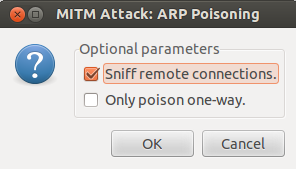
When asked for optional parameters, the “Sniff remote connections” option was selected
Select the plugin
Manage the plugins were selected to activate plugins.

Two plugins were selected, “repoison_arp” and “remote_browser” plugin.
repoison_arp plugin used to poison arp table in a regular interval.
remote_browser plugin used to view the web pages that a victim machine visits.

View Connections
This is the fun part was began, at the “View” menu, “Connections” was selected. Nothing was seen showing up until the victim machine made a connection to the Cisco Catalyst 3560 switch.

Open telnet connection
The victim (Windows 7) opened a telnet connection to 10.2.0.1 (Interface VLAN 2 of Cisco Catalyst 3560 switch)

View connection details
The active connection from victim to switch was shown on the connections list.
A right click on the entry enabled the option to select “View Details”.

Details of the connection were then displayed with the information such as MAC address, IP address, protocol, port numbers as well as total bytes transferred by stream.

View connection data
Double clicking the active connection displayed connection data from both machines in Split view. The victim (Windows 7) machine appeared on the left and the CLI window for the Cisco Catalyst 3560 on the right.

To placed the view in a single window, “Join Views” was selected.

It is clear that the victim entered “cisc0″ as the password on the Cisco Catalyst.
Inject Character
Characters can be injected into either side of the connection.

Here is what Cisco Catalyst and Victim PC saw when the data “show version” was injected.

Next, data was injected to Victim PC

Below is the screen shot of Victim PC when data was injected.

ARP Poisoning Mitigation
Countermeasure to mitigate the risk of this attack is by enabling “DHCP Snooping” and “Dynamic ARP Inspection (DAI)” features on Cisco Catalyst.
DHCP Snooping
DHCP Snooping is a security feature that inspects DHCP packets transiting a Layer 2 switch. This feature provide security by filtering “untrusted” DHCP messages and maintaining a DHCP snooping binding table.
DHCP snooping classifies interfaces as either trusted or untrusted. DHCP messages received on trusted interfaces will be permitted to pass through the Cisco Catalyst, but DHCP messages received on untrusted interface in a Cisco Catalyst results in putting the port into an err-disabled state.
An untrusted interfaces may initiate traffic attacks or other hostile actions (e.g. workstation, firewall, or some downstream switch). For such ports, the switch applies DHCP message filtering, only accepting messages expected from DHCP clients (DHCPREQUEST, DHCPDISCOVER, DHCPRELEASE). DHCP snooping acts like a firewall between untrusted hosts and DHCP servers.
A trusted interfaces can accept and send any type of DHCP packet, typically the port connected to the DHCP server is a trusted port.
The default trust states of all interfaces is untrusted. The interface connected to DHCP server should be configured as trusted.
Dynamic ARP Inspection (DAI)
DAI is a security feature that helps prevent ARP poisoning and other ARP-based attacks by intercepting all ARP requests and responses, and by verifying their authenticity before updating the switch’s local ARP cache or forwarding the packets to the intended destinations.
ARP Inspection creates a special IP to MAC address binding table in the switch. This table is dynamically populated based on the DHCP snooping database contents. Static entries also can be added to the database manually by using configuration commands for ARP Inspection access-lists.
When the switch receives an ARP packet on an untrusted port, it inspects the packet contents. Based on the IP to MAC address binding information in the packet, the switch permits the packet only if it matches the ARP Inspection table. This prevents ARP Poisoning attacks.
The switch performs DAI validation checks, which rate limits incoming ARP packets to prevent a denial-of-service attack. By default, the rate for untrusted interfaces is 15 packets per second (pps). Trusted interfaces are not rate limited. When the interface exceeds the rate, the switch will bring it to the error-disabled state.
Enabling DHCP Snooping

Enabling Dynamic ARP Inspection (DAI)

Configure trusted port
The interface connected to DHCP server should be configured as trusted.

Disable Rate Limiting on Attacker Port
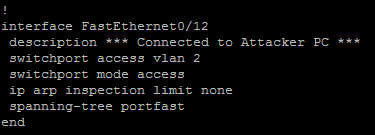
In order to allow ettercap to scan the hosts, ARP rate limiting was disabled on the attacker’s interface port.

Interface configurations connected to DHCP server, victim machine and attacker machine


Running ARP Poisoning Attack with Mitigation Enabled on the switch
Attacker getting a DHCP address from DHCP server (Linux server)

The attacker was successfully pinging the gateway and the victim machine.

DHCP snooping bindings on Cisco Catalyst switch are seen.

DHCP snooping command is shown. Port Fa0/24 which is connected to DHCP server was configured as “trusted” port.

Ettercap on attacker machine shown the list of scanned hosts.
10.2.0.1 was added as Target 1 and 10.2.0.50 was added as Target 2.

ARP Poisoning attack was selected under Mitm and Sniff remote connections was selected as well.


There was no connections exist from within Ettercap for the two targets.

ARP Inspection command is shown. ARP packets were dropped by the switch.

The debug output from switch that was logged during Ettercap ARP Poisoning attack. It can be seen that the ARP packets are dropped.

Summary
ARP Poisoning attack is a Layer 2 attack where the attacker successfully modify ARP cache of two devices. Knowing how ARP works will greatly help to understand this attack. Ettercap is a free and open source tool that can be used to perform attacks against ARP protocol. ARP Poisoning attack can be mitigated by implementing Dynamic ARP Inspection (DAI) on the Cisco Catalyst switch, this attack cannot be prevented by using just port-security, access-list or other well-known features.
— EOF
메타데이터
- post_id
- 3affaa3f0c12
- slug
- arp-poisoning-attack-and-mitigation-for-cisco-catalyst-3affaa3f0c12
- url
- https://medium.com/@abubakar.roy/arp-poisoning-attack-and-mitigation-for-cisco-catalyst-3affaa3f0c12
- canonical_url
- https://medium.com/@abubakar.roy/arp-poisoning-attack-and-mitigation-for-cisco-catalyst-3affaa3f0c12
- author_url
- https://medium.com/@abubakar.roy
- status
- ok
- fetched_at
- 2026-08-19 00:41:51