12 Claude Code Mistakes I Keep Seeing (And How to Avoid Them)
From bloated CLAUDE.md files to zero planning workflows: Why your AI agent loops and how to build a better system
12 Claude Code Mistakes I Keep Seeing (And How to Avoid Them)
From bloated CLAUDE.md files to zero planning workflows: Why your AI agent loops and how to build a better system
Not a Medium member? Read for free here.
I also turned this workflow into production-ready **Claude Code workspaces for AI Engineering** that you can copy into your own projects (check the end of the article more)

image by author
After spending hours digging through GitHub issues, official documentation, engineering blogs, and community discussions, I realized something fascinating: Most Claude Code problems aren’t AI problems, but they are engineering workflow problems.
People are struggling not because Claude Code isn’t capable enough, but because they are treating it like a standard chatbot instead of an engineering teammate.
I started noticing consistent patterns and mistakes. Some of these habits surface directly in production teams, while others are discussed repeatedly across GitHub issues.
I began writing them down, and here are the 12 anti-patterns (let’s call it this way) I see most often and how you can avoid them.
1. Treating CLAUDE.md Like Static Documentation
Many developers create a **CLAUDE.md** file exactly once at the very start of a project and never touch it again. But what happens as the project evolves?
The architecture shifts, coding conventions improve, dependencies get replaced, and major system decisions are made. If your project memory stays frozen in time, Claude’s context does too!
As a reader noted on my previous article about why CLAUDE.md is vital: It isn’t a magical file that automatically fixes your workflow. It requires constant sync.
Your
CLAUDE.mdfile must evolve alongside your repository.
2. Writing a 300-Line CLAUDE.md
On the flip side, some developers treat this file like a desk that accumulates so many books but they start falling off the edge once filled!
If you cram every coding rule, architectural decision, meeting note, and minor repository detail into one generic file, performance plummets. Large context windows do not automatically mean better context. (remember my article on context windows? if you aren’t aware of it check it out!)
In fact, bloating your file often leads to a “loss in the middle” phenomenon where the AI misses crucial details.
Rule of thumb: A highly focused on boarding document will almost always outperform an encyclopedia!
3. Asking for Code Without Defining Success
Shot-in-the-dark prompts like "build authentication" or "build an AI system" leave too much room for interpretation and hallucination.
Instead, clearly describe what success actually looks like for your current project scope. If the scope is too broad, break it down into smaller micro-milestones.
- Bad:
"Fix error handling and add auth." - Good:
"Implement JWT token support with rule-based access control, write unit tests for the middleware, and ensure explicit error logging."
Clear acceptance criteria will always produce better code than a massive prompt shot in the dark.
4. Skipping Planning Entirely (/plan)
Many developers are hardwired to dive straight into implementation. They jump in, and Claude happily starts editing files.
But five minutes later, the architecture falls apart because no one planned ahead! (painful isnt it?)
Claude is an agentic tool, which is exactly why it features a dedicated planning mode.
/planSpending just two minutes asking Claude to propose a plan before it writes a single line of code will easily save you 30 minutes of cleanup later.
It ensures you approve the path the agent is taking and solidifies its understanding of the architecture.
5. Letting Context Grow Forever ♾️
Context dilution happens when a single conversation accumulates endless requirements, debugging attempts, and competing ideas without a reset. Eventually, Claude is forced to carry around old, irrelevant information.
Keep your primary repo rules in your memory files, but when a chat session feels heavy or sluggish, don’t hesitate to clear it out.
Starting a fresh conversation is a core part of good context management too. It saves the model from hallucination and keeps token usage efficient.
6. Asking for Massive Refactors in One Shot
It is tempting to throw a massive prompt at a powerful agent: "Rewrite the backend, convert everything to TypeScript, and migrate the database."
Technically, the underlying agent architecture is capable of handling complex chains,(it’s AI obviously) but doing this in a single leap is incredibly brittle.
Breaking large scale refactors into smaller milestones gives Claude clear objectives and gives you logical points to review the diffs.
7. Trusting Every Line of Generated Code
Claude writes deeply impressive code, we all know that but we must also remember that LLMs are probabilistic in nature. They make mistakes just like humans do.
Reviewing generated code isn’t a lack of trust,but it’s fundamental software engineering (or AI engineering!).
You are the system architect, and you own the production code. Hence:
- Run your evaluations.
- Put up validation gates.
- Carefully read the git diffs.
- Verify assumptions.
AI should dramatically reduce your workload, but it should never replace your technical responsibility.
8. Deleting Failing Tests Instead of Fixing Root Issues
This anti-pattern pops up very often.
A developer updates an implementation using Claude, three existing unit tests start failing, and the immediate reflex is to simply remove or comment out the tests to get a green build.
Failing tests are revealing something highly valuable about your system’s regressions or state changes.
Use Claude to dissect why the test broke and fix the underlying architectural drift rather than throwing away your safety net.
9. Writing Restrictive Rules Without Giving Alternatives
We often see strict engineering rules in prompts or configurations like: “Never use recursion” or “Never use global state.”
These sound helpful until Claude runs into an edge case where it desperately needs an alternative direction.
Good engineering guidance is directional, not just restrictive. If you tell Claude what not to do, always explain what it should do instead.
10. Accumulating File Clutter
Some repositories still suffer from chaotic naming conventions:
**auth_service_v2.py****auth_service_final.py****auth_service_final_revised.py**
Claude heavily mirrors existing repository conventions.
If your codebase contains stale, duplicate, or chaotic files, the agent will naturally continue that messy pattern in its output. So, keep your working directory pristine.
11. Treating Security as an Afterthought
In agentic ecosystems, security cannot be a final checklist item before deployment(this.remember this.). It must be baked into your project memory from day one.
Input validation, least-privilege permissions, rate limiting, and secrets management need to be explicitly outlined in your setup.
Additionally, always maintain a robust .gitignore and local environment files to ensure Claude never accidentally exposes or uploads sensitive API keys during an automated run!
12. Thinking Prompt Engineering Is the Only Variable
A year ago, it felt like writing the perfect prompt was the only thing that mattered.
Today, the biggest productivity benefits don’t come from prompt vocabulary rather they come from context engineering, project memory, architecture reviews, and clean engineering standards.
The work you do to organize your project before you run your first prompt determines the quality of the output.
The better the project structure, the less you have to explain later. This is exactly why robust system prompting and scaffolding matter so much.
The Bigger Pattern I Noticed
The most successful developers using Claude Code aren’t writing secret, magical prompts. They are building better systems around the AI.
They maintain an updated project memory, enforce strict code review habits, iterate in small chunks, and build reusable workflows.
Claude becomes immensely more useful when it thoroughly understands the environment it is working in much like a talented junior engineer joining your team!
My Final Thoughts ❤️
Most of us began our AI journey with prompt engineering because it is highly visible, text driven, and immediately interactive.
But over time, the real change happens when you spend less time trying to write a flawless, poetic prompt and more time improving the engineering ecosystem around it, could be:
- Better context layers
- Rigorous planning phases
- Clean codebase hygiene
When you treat an AI agent like a true engineering teammate that understands your system architecture, you stop starting every conversation from zero. And that changes the entire development experience.
So, what are you improving next?
Want to Accelerate your Workflow?
If this article helped you, I think you’ll enjoy these resources:
1. The Complete AI Engineering Workspace Collection for Claude Code
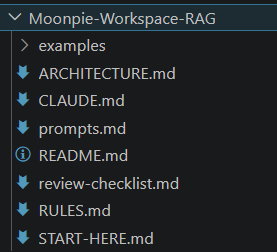
sample for RAG workspace in The Complete AI Engineering Workspace Collection for Claude Code
7 Production Workspaces • 210+ Claude Code Prompts • AI Agents • RAG • MCP • Architecture Guides • Engineering Standards • Review Checklists • Examples • Lifetime Updates
So you can spend less time setting up projects and more time building them! Tailored for all (I covered most teams, let me know if you want it specialised for your team!)
2. The Complete Field Manual: Claude Code Mastery Guide
If you’re ready to move beyond CLAUDE.md, the guide dives deep into Context Engineering, Hooks, MCP, Subagents, custom commands, GitHub Actions, SDKs, Loop Engineering, cost optimization, autonomous workflows, and production-ready AI engineering patterns.
Preview: Table of Contents
29 Chapters • Real-World Recipes • Power Moves • Loop Engineering Supplement • Lifetime Updates
Whether you’re just getting started or already using Claude Code every day, they help you spend less time explaining your projects to AI and more time building things that matter.
Happy building! 💻
More articles you’ll love ❤
메타데이터
- post_id
- 3b31e1fdcf79
- slug
- 12-claude-code-mistakes-i-keep-seeing-and-how-to-avoid-them-3b31e1fdcf79
- url
- https://medium.com/the-tech-trek-by-tech-chick/12-claude-code-mistakes-i-keep-seeing-and-how-to-avoid-them-3b31e1fdcf79
- canonical_url
- https://medium.com/the-tech-trek-by-tech-chick/12-claude-code-mistakes-i-keep-seeing-and-how-to-avoid-them-3b31e1fdcf79
- author_url
- https://medium.com/@theipocmwanderer
- status
- ok
- fetched_at
- 2026-07-08 16:17:31