Mastering Focus in Jira: Applying the Pomodoro Technique with “Getting Work Done”
In our previous article, we explored the Pomodoro Technique, a globally recognized method for overcoming distractions and managing time…
Mastering Focus in Jira: Applying the Pomodoro Technique with “Getting Work Done”
In our previous article, we explored the Pomodoro Technique, a globally recognized method for overcoming distractions and managing time effectively.
25 minutes of deep work followed by a 5-minute break… It sounds great in theory. However, putting this concept into practice is often easier said than done. When your daily routine is deeply embedded in project management tools like Jira, trying to maintain that perfect focus loop usually leads you straight into a major roadblock: Context switching. Leaving your Jira board to open a separate timer app, manually logging what you worked on, and jumping between tabs shatters your focus before you even begin.
To solve this, **Getting Work Done (GWD)** integrates the Pomodoro technique directly into the heart of Jira, so you can transition from “busy” to “productive” without the friction.
Here is how you can apply the Pomodoro technique in Jira using Getting Work Done:
1. Start the Timer Directly from Your Works
Inside the Getting Work Done app (whether you are in your Actions, Agenda, or Matrix tab), you can simply click the “Start Pomodoro” option from the menu next to any Jira work item (issue) or private task.
There is no need to switch apps. A compact, unobtrusive timer panel instantly appears at the top or bottom of your screen, allowing you to dive straight into deep work.
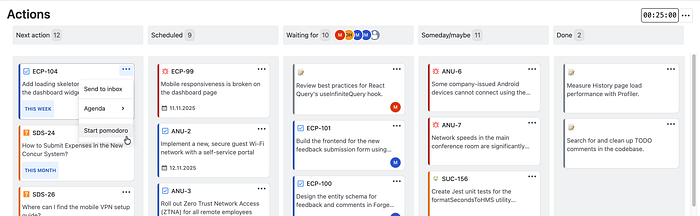
Starting a Pomodoro on the Actions page
2. Flexible Time Management
We know that everyone’s focus span is different. While Getting Work Done offers the traditional 25-minute work / 5-minute break cycle by default, you can completely customize these intervals to match your personal workflow. You can easily pause the timer, stop it early, or skip directly to your next break right from the interface.

Pause and skip work session operations on the Actions page
Track Your Productivity: Dashboard Gadgets
Applying the technique is the first step, but tracking your progress helps you maintain the habit. Getting Work Done provides custom Pomodoro Gadgets that you can add directly to your standard Jira Dashboard to review your focus metrics.
Here are the tools you can use to monitor your daily and weekly progress:
1. Focus Tracker
**The Focus Tracker gadget gives you a real-time view of your active session right on your dashboard. Its key feature is the “Daily Focus Goal,”** which allows you to set your own daily target for deep work. You can easily track how many hours and minutes you need to hit your goal today. You can also pause, stop, or skip sessions directly from this gadget without opening the main app.

Getting Work Done Focus Tracker Gadget
2. Pomodoro Activity Chart
**Pomodoro Activity Chart** provides a comprehensive overview of your Pomodoro performance over the last 7 days (trailing). It visualizes both the count of completed sessions and the time spent, broken down minutely into work and break details.

Getting Work Done Pomodoro Activity Chart
3. Pomodoro Duration by Work Chart
If you want to know where your time went, this Pomodoro Duration by Work Chart breaks down your Pomodoro sessions by specific Jira work items (issues) or private tasks. It helps you see which tasks required more effort than estimated, making future sprint planning easier.

Getting Work Done Pomodoro Duration by Work Chart
4. Pomodoro Completion Rate Chart
**The Pomodoro Completion Rate Chart** displays the percentage of planned Pomodoros you successfully completed over the last 7 days. Reviewing your weekly success rate (e.g., 77%) helps you understand your focus trends and plan your upcoming week more realistically.

Getting Work Done Pomodoro Completion Rate Chart
5. Pomodoro Completion Heatmap
Similar to a GitHub contribution graph, this **Pomodoro Completion Heatmap** provides a quick overview of your monthly activity. Darker blocks indicate days with more completed sessions, helping you visually track and build a consistent focus habit over time.

Getting Work Done Pomodoro Completion Heatmap
Reclaim Your Time
Productivity is about making your working hours count. **Getting Work Done** is designed to reduce distractions and help you progress on your tasks right inside Jira.
It is available on the Atlassian Marketplace.
메타데이터
- post_id
- 3c016bee0f40
- slug
- mastering-focus-in-jira-applying-the-pomodoro-technique-with-getting-work-done-3c016bee0f40
- url
- https://medium.com/@thestarware/mastering-focus-in-jira-applying-the-pomodoro-technique-with-getting-work-done-3c016bee0f40
- canonical_url
- https://medium.com/@thestarware/mastering-focus-in-jira-applying-the-pomodoro-technique-with-getting-work-done-3c016bee0f40
- author_url
- https://medium.com/@thestarware
- status
- ok
- fetched_at
- 2026-06-25 12:15:08




