Claude Code + Ralph: How I Built an AI That Ships Production Code While I Sleep
Ralph, the autonomous AI coding loop that ships features using bash, git, and tight feedback loops.
Claude Code + Ralph: How I Built an AI That Ships Production Code While I Sleep
The simplest autonomous coding loop I’ve seen — and why it actually works.
You know that feeling? You’ve pushed one more commit. Tests are flaky. Your brain is fried. And the backlog is still staring at you like it knows you’re tired.
I hit that wall hard last year. And honestly, I started wondering if there was a different way to work. Not “AI will replace engineers” nonsense. But something more boring. More practical. Something that just… keeps going when I stop.
That’s where Ralph comes in.
Everyone’s raving about Ralph right now. And I get why. It’s not flashy. It’s not magical. It’s almost disappointing how simple it is.
But it ships code. While you sleep.
Let me walk you through what it actually is, how it works, and why this approach feels like a quiet shift in how we build software.
What Ralph Actually Is
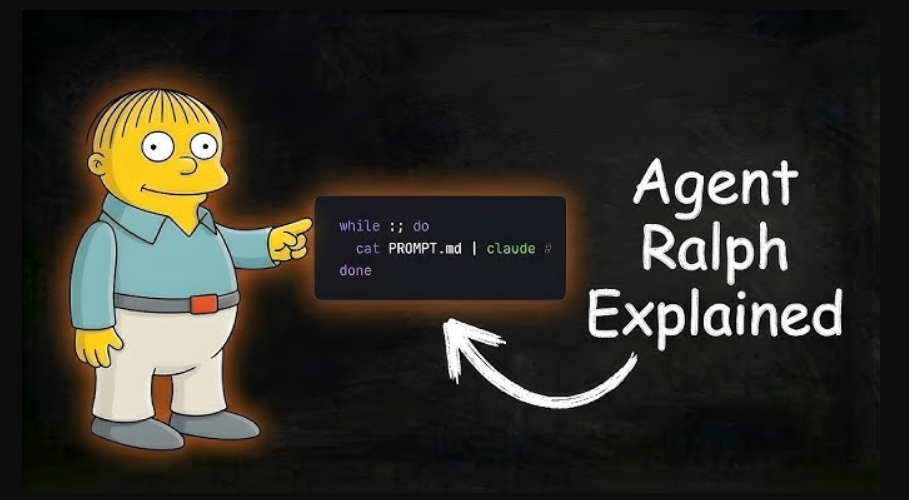
Ralph is an autonomous AI coding loop.
Not an agent framework. Not a SaaS dashboard. Not a research demo.
Just a bash script that keeps running, feeding instructions to an AI coding agent, and letting git act as memory.
That’s the whole trick.
Here’s the mental model I wish someone had given me earlier:
Ralph is less like a genius engineer and more like a junior dev who never gets tired, follows instructions literally, and writes everything down.
And honestly… that’s enough.
The Core Idea
At its heart, Ralph does one thing over and over:
- Reads a list of small, explicit tasks
- Picks the next one
- Implements it
- Runs checks
- Commits if things pass
- Writes down what it learned
- Repeats
No long-term hidden memory. No vector databases. No “AI cognition.”
Just files. And git.
And that’s why it works.
How the Loop Works
Let’s slow this down and walk through it like you’re sitting next to me and we’re reading the code together.
Ralph is a bash loop that:
- Pipes a prompt into your AI agent
- The agent picks the next story from
prd.json - Implements it
- Runs typecheck + tests
- Commits if passing
- Marks the story done
- Logs learnings
- Loops again
That’s it.
Memory persists only through:
- Git commits
- progress.txt (learnings)
- prd.json (task status)
No state beyond that. Which feels limiting until you realize… that’s exactly how humans work on teams too.
File Structure
Here’s the entire Ralph setup:
scripts/ralph/
├── ralph.sh
├── prompt.md
├── prd.json
└── progress.txt
Four files. That’s the system.
If this feels refreshingly small, that’s because it is.
The Loop: ralph.sh
This is the engine. Read it slowly.
#!/bin/bash
set -e

MAX_ITERATIONS=${1:-10}
SCRIPT_DIR="$(cd "$(dirname \
  "${BASH_SOURCE[0]}")" && pwd)"
echo "Starting Ralph"
for i in $(seq 1 $MAX_ITERATIONS); do
  echo "═══ Iteration $i ═══"

  OUTPUT=$(cat "$SCRIPT_DIR/prompt.md" \
    | amp --dangerously-allow-all 2>&1 \
    | tee /dev/stderr) || true

  if echo "$OUTPUT" | \
    grep -q "<promise>COMPLETE</promise>"
  then
    echo "Done!"
    exit 0
  fi

  sleep 2
done
echo "Max iterations reached"
exit 1
A few things worth calling out.
First, this isn’t “AI orchestration.” It’s a for loop.
Second, the AI agent doesn’t get to decide when it’s done. The code does. The loop only stops when the agent explicitly outputs:
<promise>COMPLETE</promise>That constraint matters more than it seems. It forces the agent to reason about task completion instead of just vibing.
And yes, you can swap the agent. People are using Claude Code too:
claude --dangerously-skip-permissionsThe loop doesn’t care.
Making It Runnable
One small but important step:
chmod +x scripts/ralph/ralph.shThis is the kind of detail that trips agents up if you forget it. Humans too, honestly.
The Brain: prompt.md
This file is where Ralph’s “personality” lives. And by personality, I mean rules.
# Ralph Agent Instructions

## Your Task
1. Read `scripts/ralph/prd.json`
2. Read `scripts/ralph/progress.txt`
   (check Codebase Patterns first)
3. Check you're on the correct branch
4. Pick highest priority story
   where `passes: false`
5. Implement that ONE story
6. Run typecheck and tests
7. Update AGENTS.md files with learnings
8. Commit: `feat: [ID] - [Title]`
9. Update prd.json: `passes: true`
10. Append learnings to progress.txt
## Progress Format
APPEND to progress.txt:
## [Date] - [Story ID]
- What was implemented
- Files changed
- **Learnings:**
  - Patterns discovered
  - Gotchas encountered
---
## Codebase Patterns
Add reusable patterns to the TOP
of progress.txt:
## Codebase Patterns
- Migrations: Use IF NOT EXISTS
- React: useRef<Timeout | null>(null)
## Stop Condition
If ALL stories pass, reply:
<promise>COMPLETE</promise>
Otherwise end normally.
There’s a subtle but powerful idea here.
Ralph isn’t asked to “build a feature.” It’s asked to follow a checklist.
That’s the difference between chaos and compounding progress.
The Task List: prd.json
This is your backlog. But structured in a way an agent can’t misunderstand.
{
  "branchName": "ralph/feature",
  "userStories": [
    {
      "id": "US-001",
      "title": "Add login form",
      "acceptanceCriteria": [
        "Email/password fields",
        "Validates email format",
        "typecheck passes"
      ],
      "priority": 1,
      "passes": false,
      "notes": ""
    }
  ]
}
Three fields matter more than people realize:
priority— lower goes firstpasses— the single source of truthacceptanceCriteria— this is non-negotiable
If you’re vague here, Ralph will punish you by shipping nonsense. And that’s on you, not the agent.
The Memory: progress.txt
This file starts simple:
# Ralph Progress Log
Started: 2024-01-15

## Codebase Patterns
- Migrations: IF NOT EXISTS
- Types: Export from actions.ts
## Key Files
- db/schema.ts
- app/auth/actions.ts
---
And then it grows.
After every story, Ralph appends:
- What changed
- Where
- What it learned
Over time, this becomes shockingly valuable. By story 10, the agent isn’t guessing anymore. It’s following patterns it discovered itself.
That’s the quiet magic.
Running Ralph
This part feels almost anticlimactic.
./scripts/ralph/ralph.sh 25That’s it.
Up to 25 iterations. Each one:
- Pulls the next story
- Implements
- Commits
- Moves on
When everything passes, it stops itself.
Why This Actually Works
Let me be opinionated for a second.
Most autonomous coding systems fail because they try to be smart. Ralph works because it’s dumb in the right ways.
Here are the real success factors.
1. Small Stories
This is where people mess up.
 Too big:
> "Build entire auth system"
That will fail. Every time.
 Right size:
> "Add login form"
> "Add email validation"
> "Add auth server action"
If it doesn’t fit in one context window, it doesn’t belong in Ralph.
Be ruthless.
2. Fast Feedback Loops
Ralph needs to know quickly if it broke something.
At minimum:
npm run typechecknpm test
Without these, mistakes stack silently. And then iteration 8 explodes because iteration 2 was wrong.
Ask me how I know.
3. Explicit Acceptance Criteria
This is the difference between “works” and actually works.
 Vague:
> "Users can log in"
Explicit:
> - Email/password fields
> - Validates email format
> - Shows error on failure
> - typecheck passes
> - Verify at localhost:$PORT/login (PORT defaults to 3000)Ralph does not infer intent. It executes instructions.
That’s a feature.
4. Learnings Compound
This is the part people underestimate.
By story 10, Ralph knows:
- How migrations are written
- Where types live
- Which tests are fragile
- What patterns to reuse
Those learnings live in two places:
progress.txt— short-term memoryAGENTS.md— long-term documentation
This is how the system gets better without getting more complex.
5. AGENTS.md Matters
Ralph updates AGENTS.md files when it learns something reusable.
Good examples:
- "When modifying X, also update Y"
- "This module uses pattern Z"
- "Tests require dev server running"
Bad examples:
- Story-specific notes
- Temporary hacks
- Things already in progress.txt
Think of AGENTS.md as institutional memory. For humans and machines.
6. Browser Testing (For UI Work)
UI work needs eyes.
Ralph can do this too, using the dev-browser skill:
# Start the browser server
~/.config/amp/skills/dev-browser/server.sh &
# Wait for "Ready" message
Then a scripted browser session:
cd ~/.config/amp/skills/dev-browser && npx tsx <<'EOF'
import { connect, waitForPageLoad } from "@/client.js";

const client = await connect();
const page = await client.page("test");
await page.setViewportSize({ width: 1280, height: 900 });
const port = process.env.PORT || "3000";
await page.goto(`http://localhost:${port}/your-page`);
await waitForPageLoad(page);
await page.screenshot({ path: "tmp/screenshot.png" });
await client.disconnect();
EOF
If there’s no screenshot, the story isn’t done. Period.
Common Gotchas
A few things you’ll run into.
Idempotent migrations:
ADD COLUMN IF NOT EXISTS email TEXT;Interactive prompts:
echo -e "\n\n\n" | npm run db:generateSchema changes ripple:
After editing schema, always check:
- Server actions
- UI components
- API routes
Fixing related files is not scope creep. It’s reality.
Monitoring Progress
This part is satisfying.
# Story status
cat scripts/ralph/prd.json | \
jq '.userStories[] | {id, passes}'
# Learnings
cat scripts/ralph/progress.txt# Commits
git log --oneline -10Watching commits appear while you’re doing something else feels… weirdly calming.
Results
We used Ralph to build an evaluation system.
- 13 user stories
- ~15 iterations
- 2–5 minutes per iteration
- About 1 hour total
By the end, the agent wasn’t experimenting. It was executing.
That’s the difference between iteration and automation.
When You Shouldn’t Use Ralph
Let’s be clear. This isn’t a hammer for every nail.
Don’t use Ralph for:
- Exploratory work
- Major refactors without criteria
- Security-critical code
- Anything that needs human judgment
Ralph is a worker. Not an architect.
The Bigger Shift
Here’s the part that sticks with me.
Ralph doesn’t replace engineers. It replaces wasted attention.
It turns clear thinking into repeatable execution. And that’s powerful.
If you can break work into honest, testable steps… If you can say what “done” actually means… If you’re willing to let go of control just a little…
Then yeah. You might finally sleep through the night.
And wake up to shipped code.
메타데이터
- post_id
- 3ca37d08edaa
- slug
- claude-code-ralph-how-i-built-an-ai-that-ships-production-code-while-i-sleep-3ca37d08edaa
- url
- https://medium.com/coding-nexus/claude-code-ralph-how-i-built-an-ai-that-ships-production-code-while-i-sleep-3ca37d08edaa
- canonical_url
- https://medium.com/coding-nexus/claude-code-ralph-how-i-built-an-ai-that-ships-production-code-while-i-sleep-3ca37d08edaa
- author_url
- https://medium.com/@codebun
- status
- ok
- fetched_at
- 2026-06-13 07:35:29