Cost Optimization for AWS EKS: Leveraging Python Lambda and AWS EventBridge to Reduce Expenses by…
Amazon Elastic Kubernetes Service (EKS) allows organizations to deploy and scale Kubernetes applications efficiently. EKS nodes can be run…
Cost Optimization for AWS EKS: Leveraging Python Lambda and AWS EventBridge to Reduce Expenses by Automatically Stopping UAT/Testing Worker Nodes
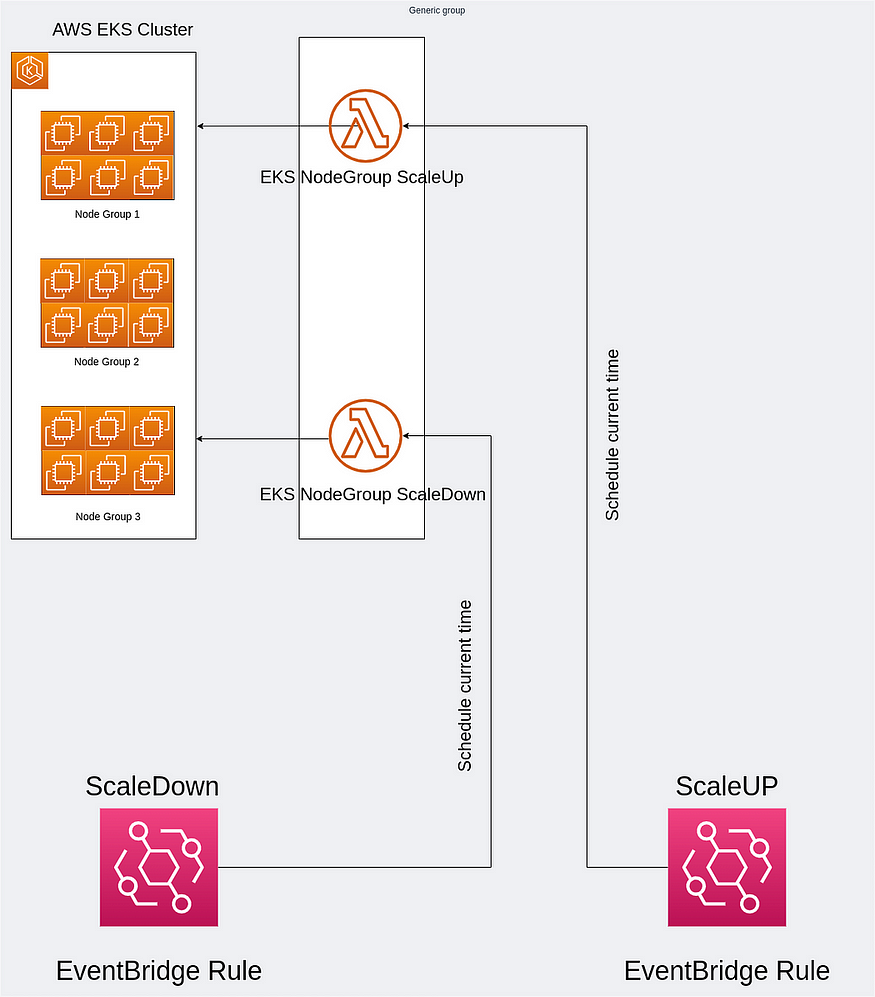
Amazon Elastic Kubernetes Service (EKS) allows organizations to deploy and scale Kubernetes applications efficiently. EKS nodes can be run using EC2 instances or AWS Fargate, but this discussion will focus solely on the scale-up and scale-down processes for EKS nodes operating on EC2.
Each EKS cluster incurs a base cost of $0.10 per hour, alongside the costs for running EC2 instances and their associated storage volumes. The hourly EC2 costs vary depending on the selected instance type.
For non-production clusters, such as those used for testing, maintaining availability 24/7 might not be necessary. By implementing a process to scale down these clusters during nighttime or non-business hours, organizations can significantly reduce their EC2 instance costs.
This can be achieved using an AWS Lambda function with a Python script, triggered by AWS EventBridge, to automatically scale down EKS clusters during off-peak hours.
Step-by-Step Guide to Automate EKS Node Scaling with AWS Lambda and EventBridge
Step 1: Configure an IAM Policy for EKS Cluster Permissions
- Navigate to IAM Policies:
- Go to the IAM console.
- In the navigation pane under Access Management, click Policies.
- Create a New Policy:
- Click Create policy.
- Select the JSON tab and paste the following code:
{
    "Version": "2012-10-17",
    "Statement": [
        {
            "Sid": "VisualEditor0",
            "Effect": "Allow",
            "Action": [
                "eks:ListNodegroups",
                "eks:UpdateNodegroupConfig",
                "eks:DescribeNodegroup"
            ],
            "Resource": [
                "arn:aws:eks:CLUSTER_REGION:ACCOUNT_ID:cluster/CLUSTER_NAME",
                "arn:aws:eks:CLUSTER_REGION:ACCOUNT_ID:nodegroup/CLUSTER_NAME/*/*"
            ]
        }
    ]
}
Replace the following placeholders:
CLUSTER_REGION: Region of your EKS cluster (e.g.,us-east-1).ACCOUNT_ID: Your AWS account ID.CLUSTER_NAME: Name of your EKS cluster.
- Review and Save:
- Click Next: Tags (optional) > Next: Review.
- Name the policy: eks_node_group_update..
- Click Create policy.
Step 2: Create an IAM Role for Lambda
- Navigate to IAM Roles:
- In the IAM console, under Access Management, click Roles.
2. Create a New Role:
- Click Create role.
- Under Trusted entity type, select AWS service.
- For Common use cases, choose Lambda.
- Click Next: Permissions.
3. Attach the Policy:
- Search for the policy you created,
eks_node_group_update. - Select the checkbox next to the policy name.
- Click Next: Tags (optional) > Next: Review.
- Name the role:
Lambda_EKS_ScaleRole. - Click Create role.
Note:
BasicExecution Role: To log the events logs into AWS Cloudwatch Log group.
LamdaSNSTopic Role: To allow lambda to interact with SNS and send notifications of ScaleUP and ScaleDown Events.
eks_node_group_update Role: To allow Lambda to update the EKS AutoScaling group config to scale down & Up the worker nodes.
Step 3: Create 2 Lambda Functions for ScaleUp and ScaleDown.
Step 3.1: Lambda Function for ScaleUP
1. Create the Function
a. Go to AWS Lambda Console:
- Navigate to the AWS Lambda service.
b. Click “Create Function”:
- Choose the Author from scratch option.
c. Set up the Function:
- Function name:
EKS_Node_ScaleUP. - Runtime: Python 3.7 (or the latest version available).
- Execution role:
- Choose “Use an existing role”.
- Select the IAM role created earlier (
Lambda_EKS_ScaleRole)(with EKS permissions).
d. Click “Create Function”.
2. Add the ScaleUP Code
- Once the function is created, navigate to the Code section.
- Replace the default code with the following Python script:
import boto3
import json

def lambda_handler(event, context):
    print(event)

    # Initialize clients
    eks = boto3.client("eks")
    sns = boto3.client("sns")

    # Define variables
    region_name = "<region>"
    cluster_name = "<cluster_name>"
    nodegroup_names = ["<ng-1>", "<ng-2>"]
    new_desiredSize = 1  #change according to your will
    new_minSize = 1  #change according to your will
    new_maxSize = 3  #change according to your will

#SNS topic to alert during scale-UP event
    sns_topic_arn = "<sns-topic-arn>"

    # Loop through the node groups and update their scaling configuration
    for nodegroup_name in nodegroup_names:
        response = eks.update_nodegroup_config(
            clusterName=cluster_name,
            nodegroupName=nodegroup_name,
            scalingConfig={
                "desiredSize": new_desiredSize,
                "minSize": new_minSize,
                "maxSize": new_maxSize
            }
        )

        # Publish a notification to SNS
        sns_message = {
            "ClusterName": cluster_name,
            "NodeGroupName": nodegroup_name,
            "DesiredSize": new_desiredSize,
            "MinSize": new_minSize,
            "MaxSize": new_maxSize,
            "Status": "Scaling update triggered"
        }

        sns.publish(
            TopicArn=sns_topic_arn,
            Message=json.dumps(sns_message),
            Subject="EKS Node Group Scaling Update Notification"
        )

        # Print the response
print(response)- Update the placeholders (
<region>,<cluster_name>,<ng-1>,<sns-topic-arn>) with actual values.
Step 3.2: Lambda Function for ScaleDown
1. Create the Function
a. Go to AWS Lambda Console:
- Navigate to the AWS Lambda service.
b. Click “Create Function”:
- Choose the Author from scratch option.
c. Set up the Function:
- Function name:
EKS_Node_ScaleDown. - Runtime: Python 3.7 (or the latest version available).
- Execution role:
- Choose “Use an existing role”.
- Select the same IAM role created earlier for the ScaleUP function.
d. Click “Create Function”.
2. Add the ScaleDown Code
- Once the function is created, go to the Code section.
- Replace the default code with the following Python script:
import boto3
import json

def lambda_handler(event, context):
    print(event)

    # Initialize clients
    eks = boto3.client("eks")
    sns = boto3.client("sns")

    # Define variables
    region_name = "<region>"
    cluster_name = "<cluster_name>"
    nodegroup_names = ["<ng-1>", "<ng-2>"]
    new_desiredSize = 0
    new_minSize = 0
    new_maxSize = 1

#SNS topic to alert during scale-UP event
    sns_topic_arn = "<sns-topic-arn>"

    # Loop through the node groups and update their scaling configuration
    for nodegroup_name in nodegroup_names:
        response = eks.update_nodegroup_config(
            clusterName=cluster_name,
            nodegroupName=nodegroup_name,
            scalingConfig={
                "desiredSize": new_desiredSize,
                "minSize": new_minSize,
                "maxSize": new_maxSize
            }
        )

        # Publish a notification to SNS
        sns_message = {
            "ClusterName": cluster_name,
            "NodeGroupName": nodegroup_name,
            "DesiredSize": new_desiredSize,
            "MinSize": new_minSize,
            "MaxSize": new_maxSize,
            "Status": "Scaling update triggered"
        }

        sns.publish(
            TopicArn=sns_topic_arn,
            Message=json.dumps(sns_message),
            Subject="EKS Node Group Scaling Update Notification"
        )

        # Print the response
print(response)- Update the placeholders (
<region>,<cluster_name>,<ng-1>,<sns-topic-arn>) with actual values.
Step 4: Create 2 EventBridge Rule Schedules for ScaleUp and ScaleDown.
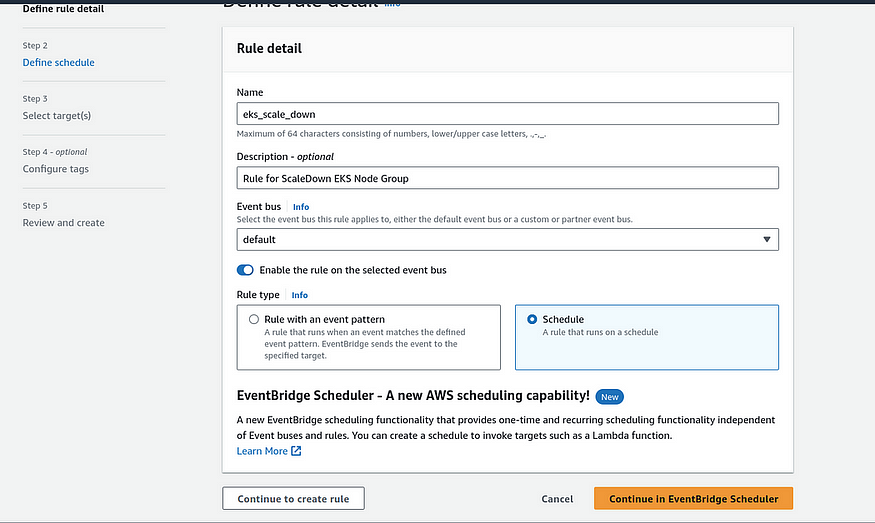
- On the console, in the navigation pane, choose EventBridge.
- Choose to Create Rule.
- Type Rule Name eks_scale_down
- Type Rule Description
- Choose Rule Type ` Schedule
- Push Button Continue in EventBridge Scheduler
- Next
-
Schedule Pattern
-
Choose a Recurring Schedule and a Cron-based schedule
-
Define your specific schedule.
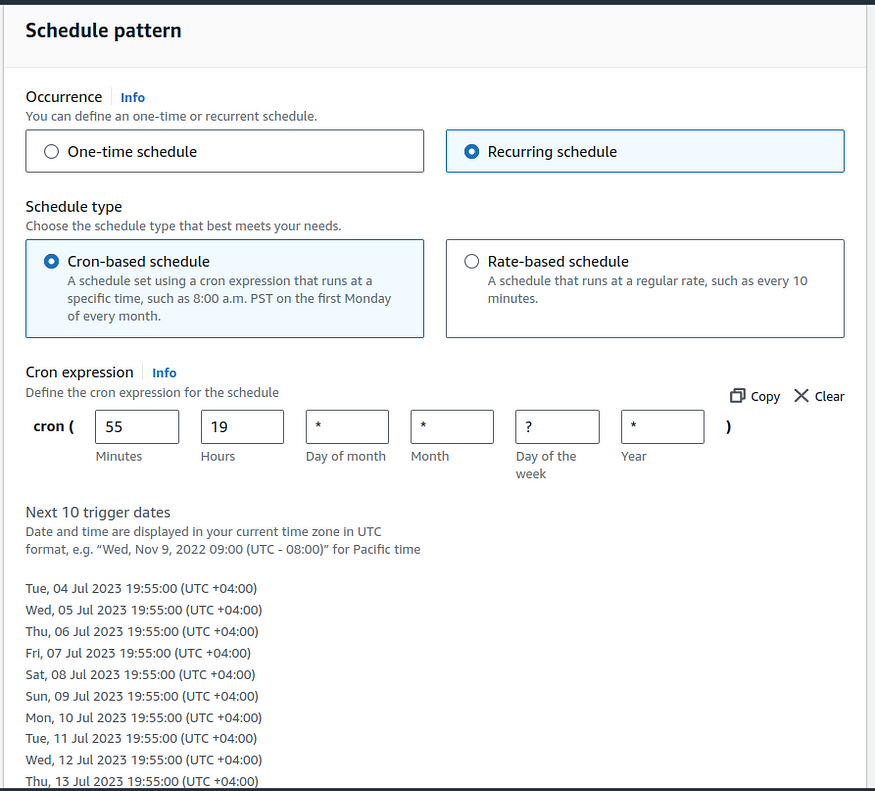
- Once you have set the scheduled time, proceed by pressing the “Next” button.
For the next step, we need to choose the target service for AWS EventBridge.
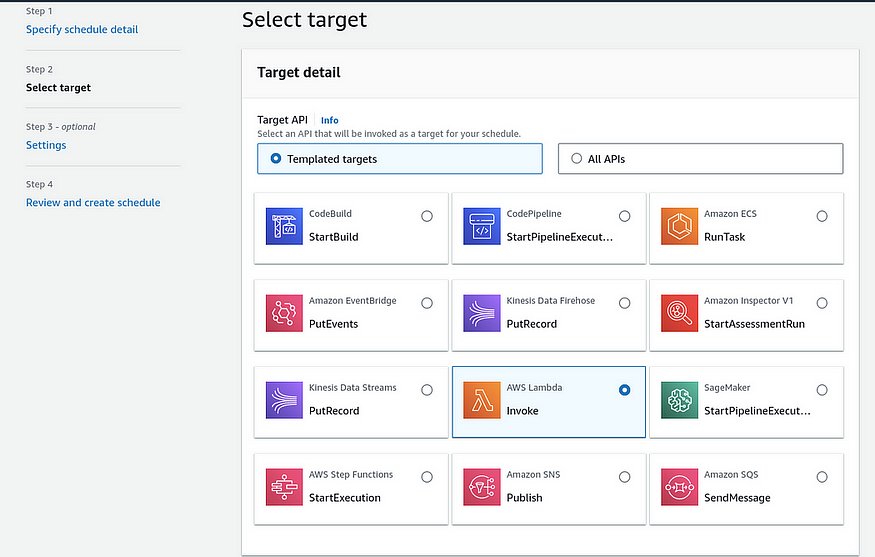
Choose AWS Lambda then select Functions.
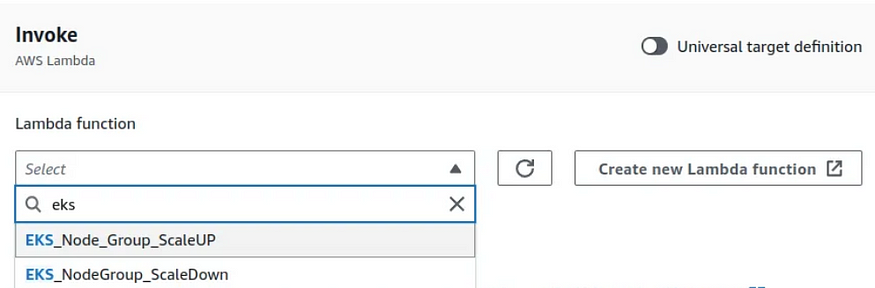
Next, Review your Rule, and Create a Schedule. Repeat Step 3 will create a rule for ScaleUP.
After you add this Up you should be able to see Eventbridge coming up in your Lambda.
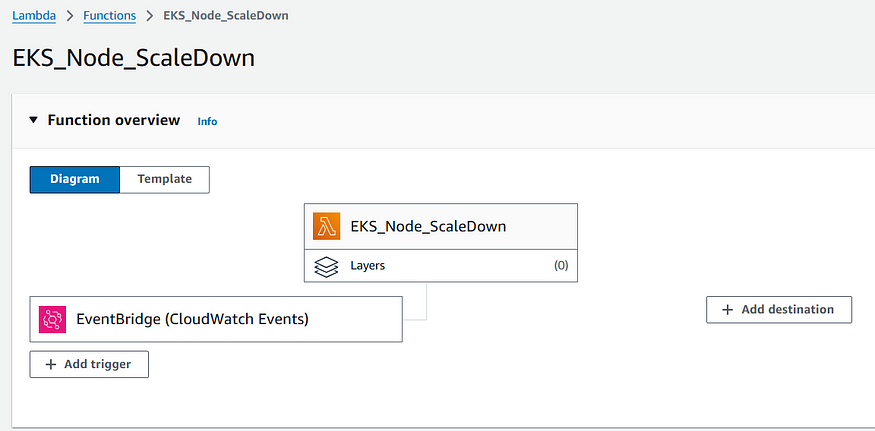
And after setting up the Eventbridge you should see this weird named Policy under the resource based Policy of your Lambda function which helps Eventbridge to use the Eventbridge rule in which the timings are defined to scale.

If it didn’t came up then you can create on your own and For the Lambda function to know when to get triggered and run the Python function.
Go to Configuration Tab and then Click on Permissions.
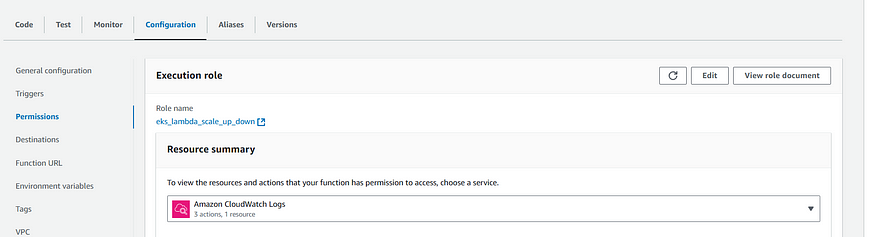
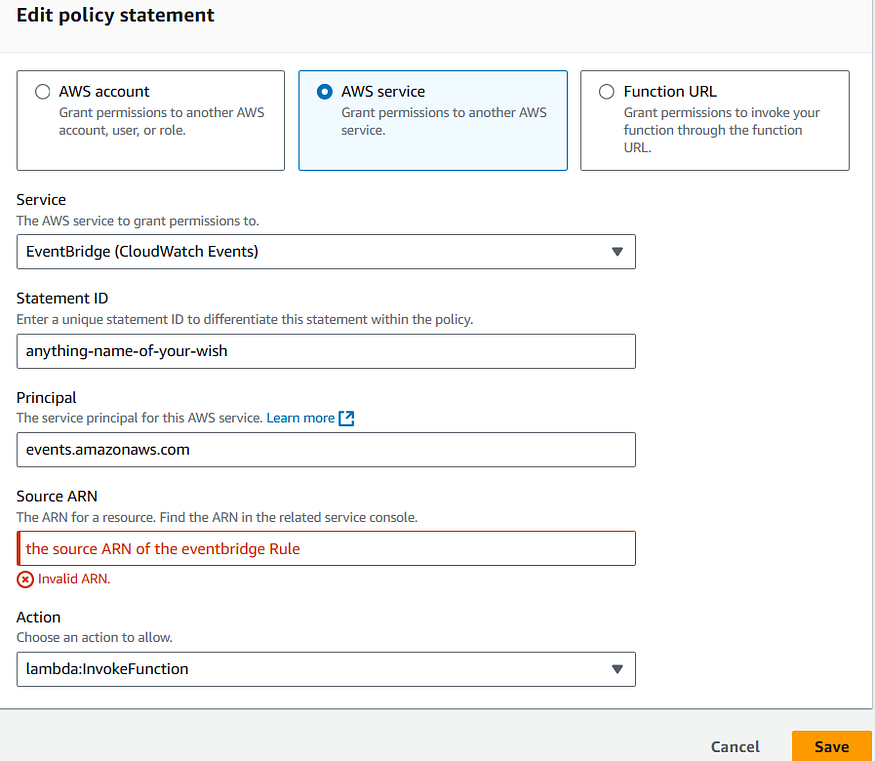
Then click on Add Permissions under Resource Based Policy.

Then follow the below picture to add up the things in place to have this policy onto your Lambda function required to be triggered by the Eventbridge.
Workflow of the Whole Setup
The automation setup consists of the following key components and workflow:
1. Scheduled Execution via AWS EventBridge
- AWS EventBridge Scheduler triggers the Lambda functions at predefined intervals.
- ScaleUp Function is triggered at times when resources are anticipated to be needed (e.g., before peak hours).
- ScaleDown Function is triggered during low-demand periods (e.g., off-peak hours).
- The scheduler ensures that the scaling actions occur automatically and without manual intervention.
2. Role of Lambda Functions
- Lambda Functions are responsible for scaling the EKS cluster’s managed node groups:
- ScaleDown Lambda:
- Reduces the number of worker nodes to zero (minimum allowed size set to 0 and maximum to 1).
- Ideal for cost savings during periods of inactivity.
- ScaleUp Lambda:
- Increases the number of worker nodes to match the demand.
- Configures node group sizes based on predefined scaling parameters in the Python script.
- Each Lambda function uses the
boto3library to interact with: - AWS EKS: To update node group scaling configurations.
- AWS SNS: To send notifications on scaling actions.
3. Access Control
- The Lambda functions utilize an IAM Role with permissions to:
- Access and modify the EKS cluster and its node groups.
- Publish notifications to an SNS topic for logging and alerting.
4. Cost Optimization through Scaling
- When the ScaleDown Lambda is triggered:
- Reduces the number of worker nodes in the node group to 0.
- Retains a minimal
maxSizeof 1 as a safeguard (AWS does not allow amaxSizeof 0). - Saves significant costs by halting resource usage during idle periods.
- When the ScaleUp Lambda is triggered:
- Increases the number of worker nodes to predefined values to handle demand.
- Ensures sufficient capacity during peak operations.
Conclusion
This automated workflow dynamically adjusts EKS worker node groups based on the specified schedule, helping optimize cloud costs while maintaining operational efficiency.
Benefits:
- Cost Savings: Nodes are scaled down to 0 during off-peak hours.
- Operational Efficiency: Ensures enough resources during peak demand.
- Automation: Eliminates manual intervention with EventBridge Scheduler.
- Notifications: Alerts provide visibility into scaling actions.
By following this guide, you can implement a cost-effective and efficient scaling solution for your AWS EKS clusters. Feel free to share this workflow with others to help them optimize their cloud expenses.
메타데이터
- post_id
- 3cd07e7ebd87
- slug
- cost-optimization-for-aws-eks-leveraging-python-lambda-and-aws-eventbridge-to-reduce-expenses-by-3cd07e7ebd87
- url
- https://medium.com/@pramesh.palkonda18/cost-optimization-for-aws-eks-leveraging-python-lambda-and-aws-eventbridge-to-reduce-expenses-by-3cd07e7ebd87
- canonical_url
- https://medium.com/@pramesh.palkonda18/cost-optimization-for-aws-eks-leveraging-python-lambda-and-aws-eventbridge-to-reduce-expenses-by-3cd07e7ebd87
- author_url
- https://medium.com/@pramesh.palkonda18
- status
- ok
- fetched_at
- 2026-08-02 05:51:14


