Behind Incognito Mode: Who Can Still See Your Online Activity?
Opening an Incognito window can feel like switching on a privacy shield, but it doesn’t make you invisible online. Private browsing is…
Behind Incognito Mode: Who Can Still See Your Online Activity?
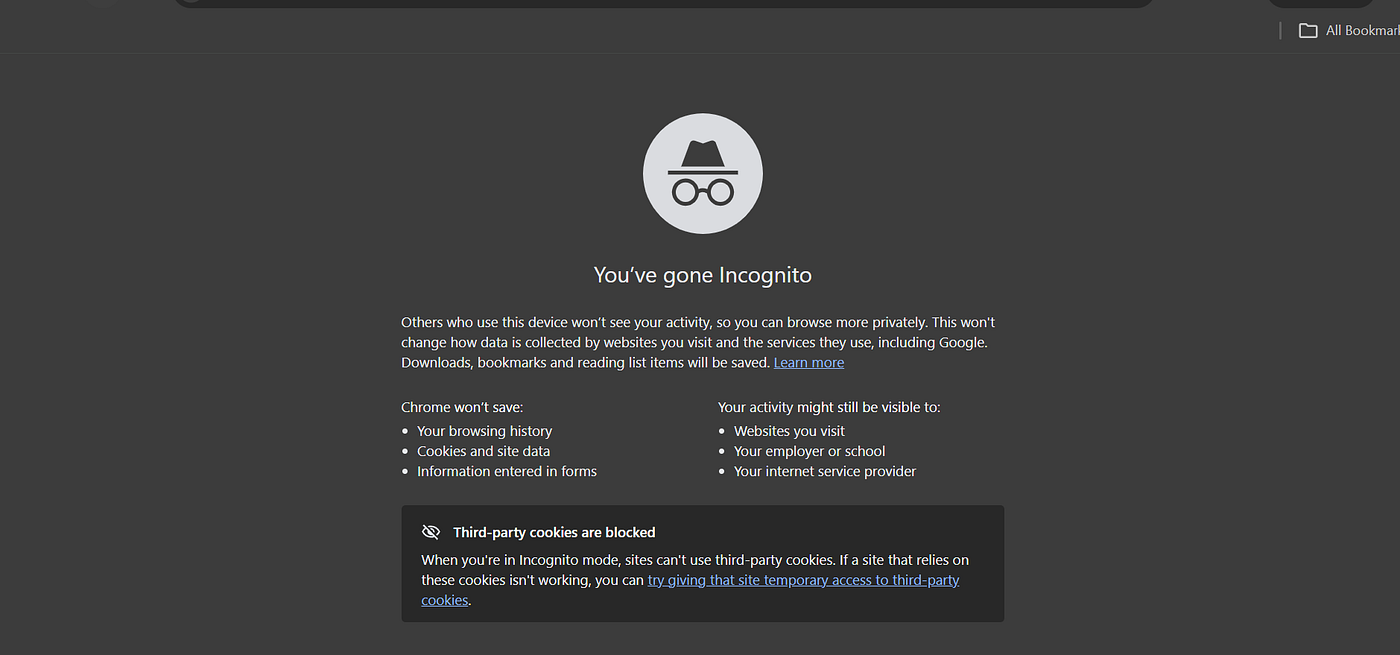
Opening an Incognito window can feel like switching on a privacy shield, but it doesn’t make you invisible online. Private browsing is mainly designed to stop your browser from keeping certain records on your device after the session ends. It does not erase every trace of what you do online.
What Really Happens When You Use Incognito?
When you browse privately, your browser generally doesn’t add the websites you visit to your normal browsing history. It also limits the storage of cookies and other temporary browsing data once you close the private session.
This makes [Incognito particularly useful ](https://factscheck.co.uk/does-incognito-mode-hide-your-browsing-history/)when you’re sharing a computer with someone else. For example, you can search for something without having those pages appear in the browser’s regular history later.
But there’s an important distinction: your browser not saving information doesn’t mean the internet isn’t receiving it.
Can Someone Still See Your Browsing Activity?
Yes, depending on who they are and how the network is managed.
Your internet service provider may be able to observe aspects of your internet traffic. If you’re using a work or school network, administrators may also have monitoring systems in place. The websites you visit can collect information about your visit as well.
Incognito mode also doesn’t conceal your IP address. So, while your browsing history may disappear from the browser on your computer, your online activity isn’t automatically anonymous.
What Gets Deleted When You Close the Window?
After you close an Incognito session, the browser typically removes the local browsing history and temporary site data associated with that session.
However, some things aren’t automatically removed. Files you download can remain on your device, and bookmarks you save will still be there. Any information that was already collected by a website or network isn’t erased simply because you closed the Incognito window.
Think of it this way: Incognito can clean up the record on your device, but it can’t rewind the internet.
When Is Incognito Mode Useful?
Private browsing still has plenty of practical uses. It can be helpful when you’re using a public or shared computer, checking a website without relying on existing cookies, or keeping a particular browsing session separate from your normal browser activity.
It’s also useful when you don’t want searches and visited pages appearing in your browser’s local history.
Just don’t confuse convenience with complete privacy.
Is Incognito the Same as Anonymous Browsing?
No. Incognito and anonymity are two different things.
Private browsing primarily controls what information your browser stores locally. Anonymous browsing involves much broader privacy considerations, including your IP address, network activity, website tracking and other forms of online identification.
Using Incognito alone doesn’t prevent websites, network operators or other parties from potentially observing activity.
The Bottom Line
Incognito mode is useful, but its privacy benefits are often exaggerated. It can prevent your browser from keeping a visible history of your private session, but it doesn’t make your internet activity disappear.
So if you’re using Incognito because you don’t want someone checking your browser history on the same computer, it can help. If you’re expecting it to make you completely anonymous online, that’s a different story.
Incognito hides parts of your browsing history from your device — it doesn’t make you invisible on the internet.
메타데이터
- post_id
- 3ce5a2d94e4f
- slug
- behind-incognito-mode-who-can-still-see-your-online-activity-3ce5a2d94e4f
- url
- https://medium.com/@factscheckuk/behind-incognito-mode-who-can-still-see-your-online-activity-3ce5a2d94e4f
- canonical_url
- https://medium.com/@factscheckuk/behind-incognito-mode-who-can-still-see-your-online-activity-3ce5a2d94e4f
- author_url
- https://medium.com/@factscheckuk
- status
- ok
- fetched_at
- 2026-08-15 10:31:04



