Fully Machine-Readable Design Systems
The frontier of our design work is no longer documentation. It is context architecture.
Fully Machine-Readable Design Systems
The frontier of our design work is no longer documentation. It is context architecture.
At Indeed, we started where most teams start. A design system MCP that returns the Card, Button, and props on demand, but generates UI that still lands with broken typography hierarchy, inconsistent spacing, incorrect icon usage, and layouts that felt structurally unlike Indeed. I assumed that exposing our design system to LLMs through an MCP would solve compliance, and it does, partially. It solves component retrieval, but It doesn’t solve for quality. The failure is not in the component metadata. The failure is in the loading model. After many months of testing, we have a solution that holds at our scale.
For some context, our Indeed design system serves more than 2,000 R&D designers and engineers across jobseeker and employer platforms. This article is the story of what we built recently, why it took this shape, and what fully machine-readable actually means once you stop using the phrase as marketing.
The MCP has blind spots
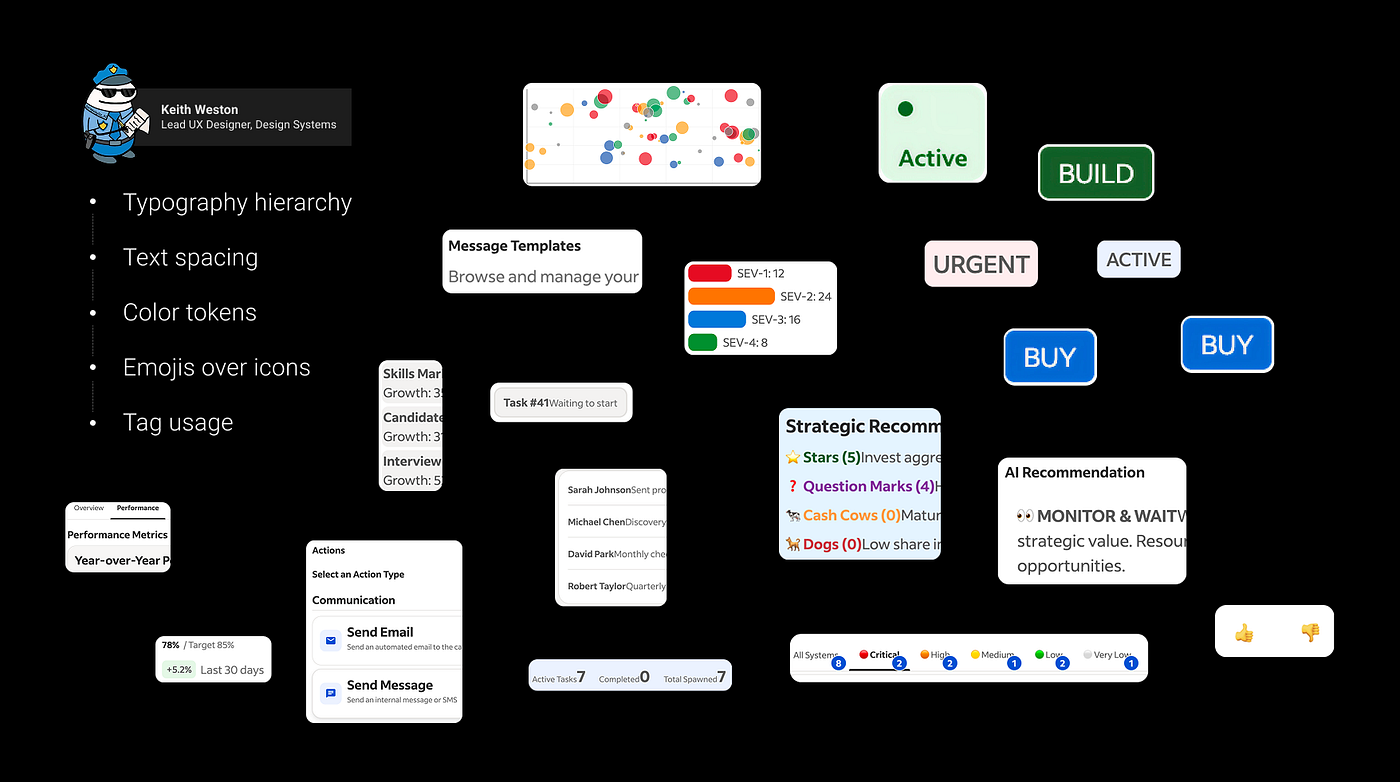
Prototype audit that surfaces foundational design system infractions
Keith Weston, one of our designers, audited a sample of those prototypes. The audit surfaced a category of failure we had not expected. Typography hierarchy that did not follow our levels. Text spacing inconsistent across surfaces. Color tokens used in the wrong surfaces. Emojis where icons should have been.
That was when I recognized the structural blind spot. An MCP is on-demand. It returns only what the prompt asks for. The foundational knowledge: spacing grammar, typography hierarchy, icon conventions, the brand’s compositional intuition. All of it was in the MCP. The vector database just did not surface it unless the prompt explicitly asked, and users rarely ask for this. A prompt for ”build me a card” returned Card and Button knowledge. It did not return the spacing token grammar that determines whether the card breathes correctly inside a page.
When foundations were missing from the response, the LLM guessed. Its guesses produced UI that did not match our design system.
Components are on-demand: the LLM fetches them when the prompt asks. Foundations cannot be fetched. They have to be attached to the file before the LLM writes a line of UI code. Different timing, different mechanisms. That is the constraint that shaped everything we built next.
Progressive context disclosure
What we built is a plugin, a packaging convention Anthropic and Cursor use to deliver context to AI clients. The principle behind it is progressive context disclosure: each layer of knowledge delivered through the loading mechanism that fits it, at the moment the LLM can act on it, not before. Dump every design system standard into one prompt and the model drowns. Load too little, and the model guesses.
A plugin is a directory with a defined shape: skills, references, agents, MCP definitions, and rules. An AI client loads it progressively, surfacing each piece under the loading strategy that fits.
Beyond the DESIGN.md
What is design, exactly? Many AI tools, including Stitch and Lovable, let you drop in a single DESIGN.md file as your design system context. That convention works when "design" means a small set of colors, a typography scale, and a few components. It collapses when "design" means what it actually means at scale.
Design is more than tokens and components. Tokens are just the foundation. Above them sits everything that determines whether a UI feels coherent: spacing, hierarchy, composition, density, rhythm, and brand expression. Some of that can be objectively checked. A component is used correctly. The spacing between elements follows the system rules. Tokens are correctly applied. But another part is harder to measure. Does the layout breathe? Does the density feel calm or crowded? Does the interface feel like Indeed, or does it feel generic?
Those are different kinds of knowledge. One is correctness. The other is judgment. A machine-readable design system has to encode both.
No single voice can hold all of that. No single file can carry it. That is why we did not write a DESIGN.md. We created six layers and placed them inside of a folder called "References". Above them, one skill carries that indexes all the design system context, routing the LLM to the right layer for the task at hand. The skill is what turns progressive disclosure from an idea into something the model actually does. The Design System plugin carries all the layers as a context library.
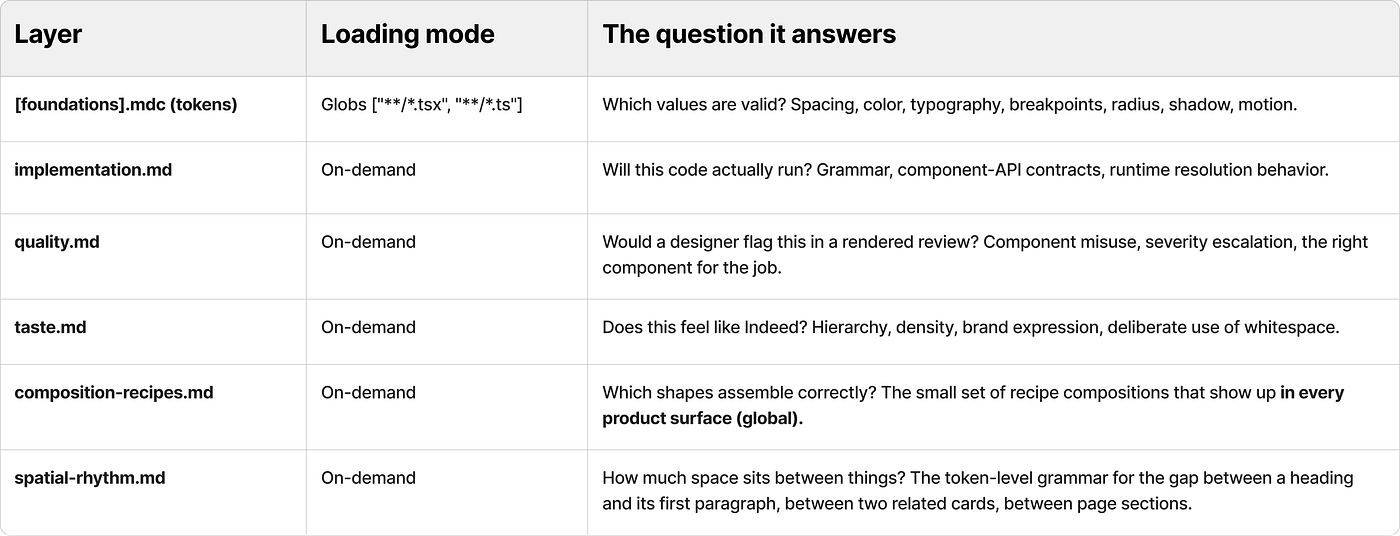
The plugin and the Design System MCP work as one system. The MCP holds the authoritative documentation about components, props, tokens, and icons. The plugin holds the knowledge that surrounds those answers: when to reach for which component, what shape to assemble it into, how much space sits between things, whether the result feels like Indeed. The MCP verifies what is currently true. The plugin teaches the model about design system standards.
Anthropic / Claude Code           Cursor
───────────────────────           ───────────────────────
plugin/                           cursor/
├── plugin.json                   ├── .cursor-plugin/
├── .mcp.json                     │   └── plugin.json
├── README.md                     ├── README.md
├── agents/                       ├── agents/
├── assets/                       ├── references/
├── references/                   ├── rules/
│   └── foundations/              │   └── foundations/
└── skills/                       ├── mcp.json
                                  └── skills/
Two conventions, one plugin
The next question was how to ship the plugin so it runs in any AI client. Plugins are a shared idea right now, but the taxonomy is not yet shared. Anthropic and Cursor both use plugins to package AI context. They agree on the building blocks (skills, MCP servers, agents, rules), but they disagree on where each one lives.
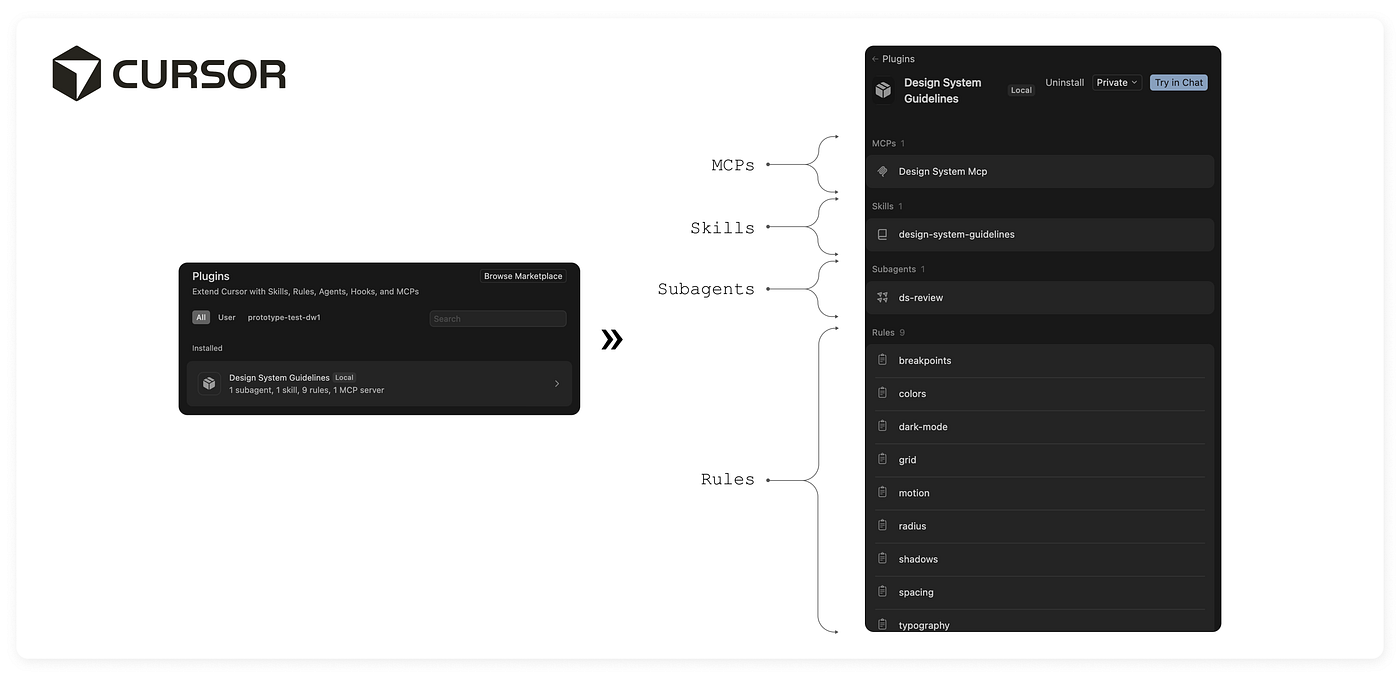
Cursor plugins, layers parsing
The disagreement is not aesthetic. Each client parses its plugin folder differently. The file paths are how the client knows what to load, when to load it, and which loading mode to use.
The overlaps tell you what is portable. Skills sit at skills/<skill>/SKILL.md in both. Agents sit at agents/*.md in both. References sit at references/. Those folders carry over without rewrites.
Following the conventions exactly is how the layers land in the right loading mode in each client. Foundations have to sit in the folder Cursor watches. The manifest has to live where each client's tooling expects it. At Indeed, we followed Anthropic's conventions and are currently enabling Cursor support in the repo, so the same plugin runs in both clients. Conventions are how a thing scales. By following them, the plugin ships through our internal AI marketplace and stays portable to whatever AI tool comes next.
Why this took longer than it looks
The technical surface of this work is small. The hard part was conceptual. Most of the months went into philosophical conversations about what "good" and "taste" mean in a system that has to be machine-readable. Concepts designers absorb intuitively, like "this layout breathes" or "this density feels right", do not survive contact with an LLM unless they are reduced to something specific. We had to find what was specific behind the intuition, and we had to ground it in evidence:
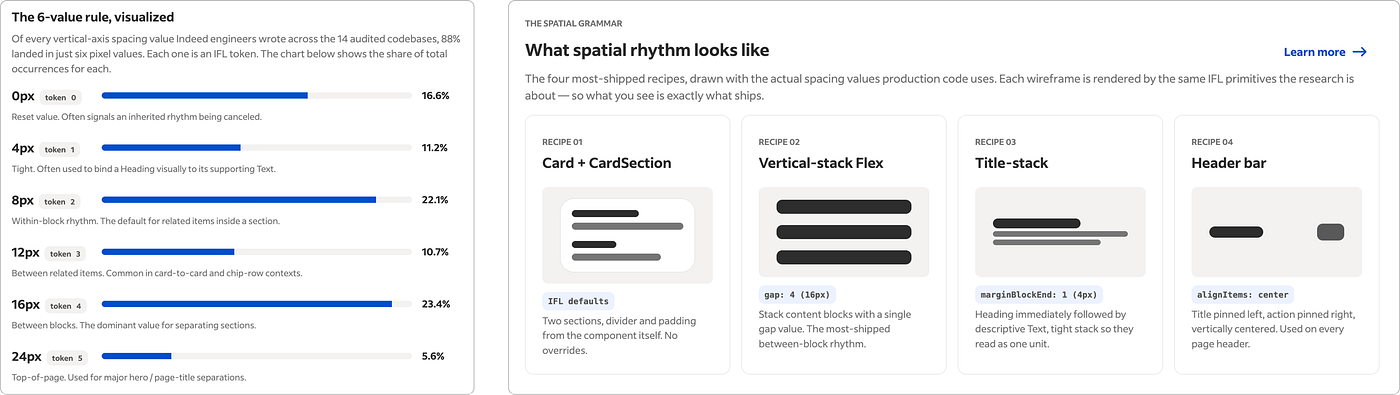
#1 — Production audit: I needed to know how our design system is adopted in production. The design system team rarely sees that view when there are so many verticals. I ran a Sourcegraph MCP audit across 14 production codebases: 1,697 files and 6,147 spacing token occurrences. After all that research, I identified six spacing tokens and four global recipes that recur on every product surface and were the baseline to create spatial rhythm and composition recipes layers. All rooted in evidence, not in any one designer’s authored opinion.
#2 — Calibration runs: Running the plugin against real prompts surfaced gaps that were not in the plugin at all. They were in our documentation. One example: left-border accents on active cards. We had deprecated that style years ago, but the documentation still prescribed it. The LLM followed the documentation, so every card came back with the accent. We fixed the documentation and added an obligation to the quality.md layer in the plugin. The next run had no accent borders. LLMs are excellent at following instructions when those instructions are clear, and the plugin is only as good as the context it reads.
What "fully machine-readable" actually means
A fully machine-readable design system is not only an MCP. It is a context library: a small set of Markdown layers that codify the design system knowledge, each one short enough that the AI client can load it cheaply.
When the AI client loads, it follows the loading-strategy taxonomy: Foundations whenever a .tsx or .ts file is open, Quality and Taste when reviewing or composing, Implementation when writing source, Composition recipes when assembling, Spatial rhythm when spacing decisions matter, and the MCP whenever the prompt asks about a specific component.
When an LLM reasons over all the plugin layers at the start of a conversation, the token cost of reading every layer once is real. It is also significantly smaller than the token cost of back-and-forth prompting when the model is missing context and guessing. That trade is what makes progressive disclosure affordable.
What is not solved
Two layers are deliberately outside the design system plugin.
- Recipe layer: UX recipes like Form-With-Errors, Empty State, and Search-and-Filter. These show up across products, but they encode product context the design system team does not own. The recipe cookbook ships as its own plugin, authored separately. The design system plugin stays focused on what is universal across every product surface.
- Vertical layers: Surface-specific UX patterns for jobseeker, employer, monetization, and other product lanes. Each vertical has conventions a global plugin should not impose and contributes to the business context that the design system naturally doesn't author.
Three lean plugins composing into one LLM context. Not one giant plugin trying to know everything. Holding that split inside an organization our size is its own challenge, but that is for another article.
The real benchmark
Attention to detail is my moat and my obsession. It is what made the plugin necessary in the first place, and it is the only honest way to evaluate whether the plugin works.
The example throughout this section is a jobseeker job-search surface every Indeed user has seen. I picked it deliberately so the demo can be shared without exposing any internal flows.
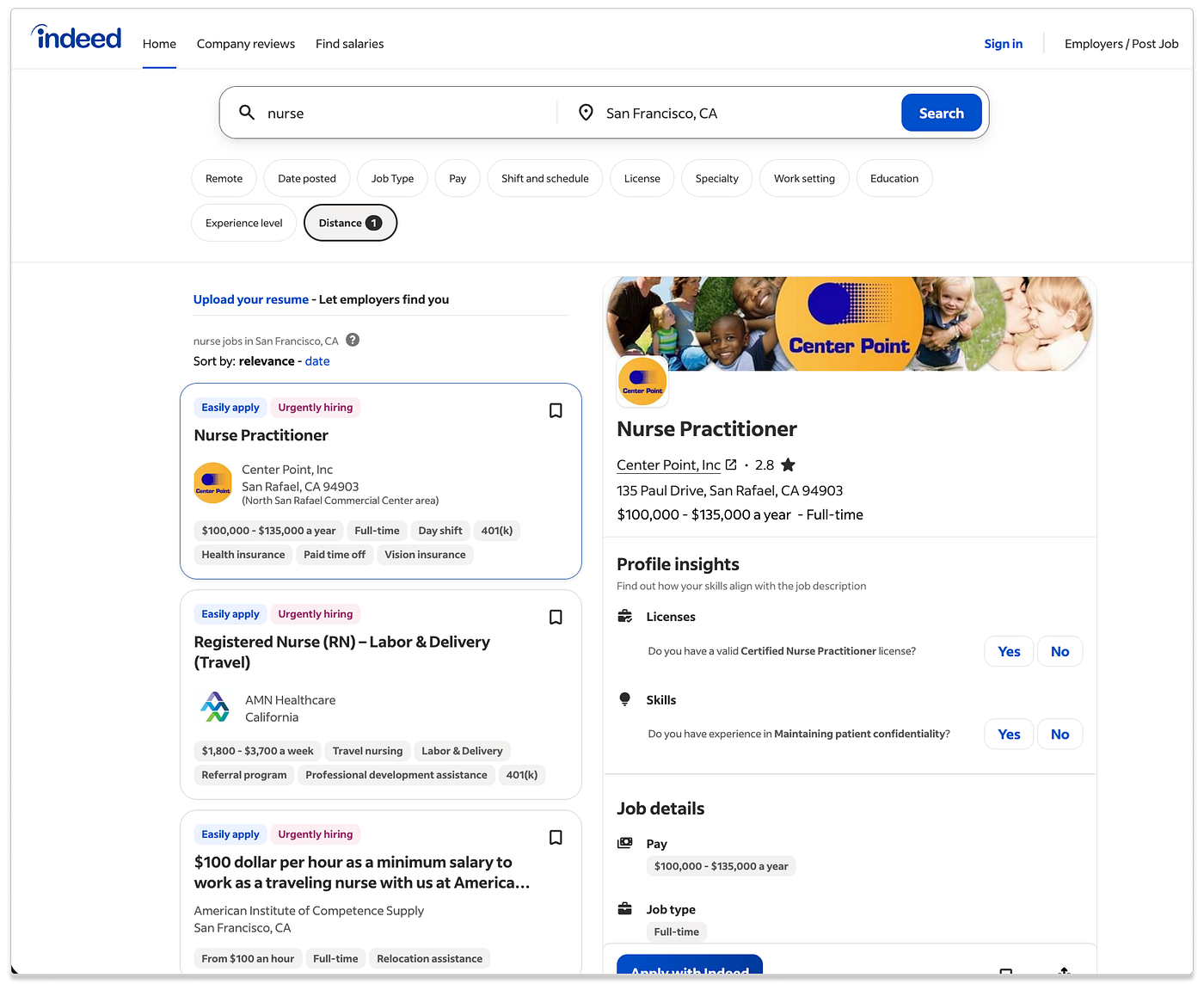
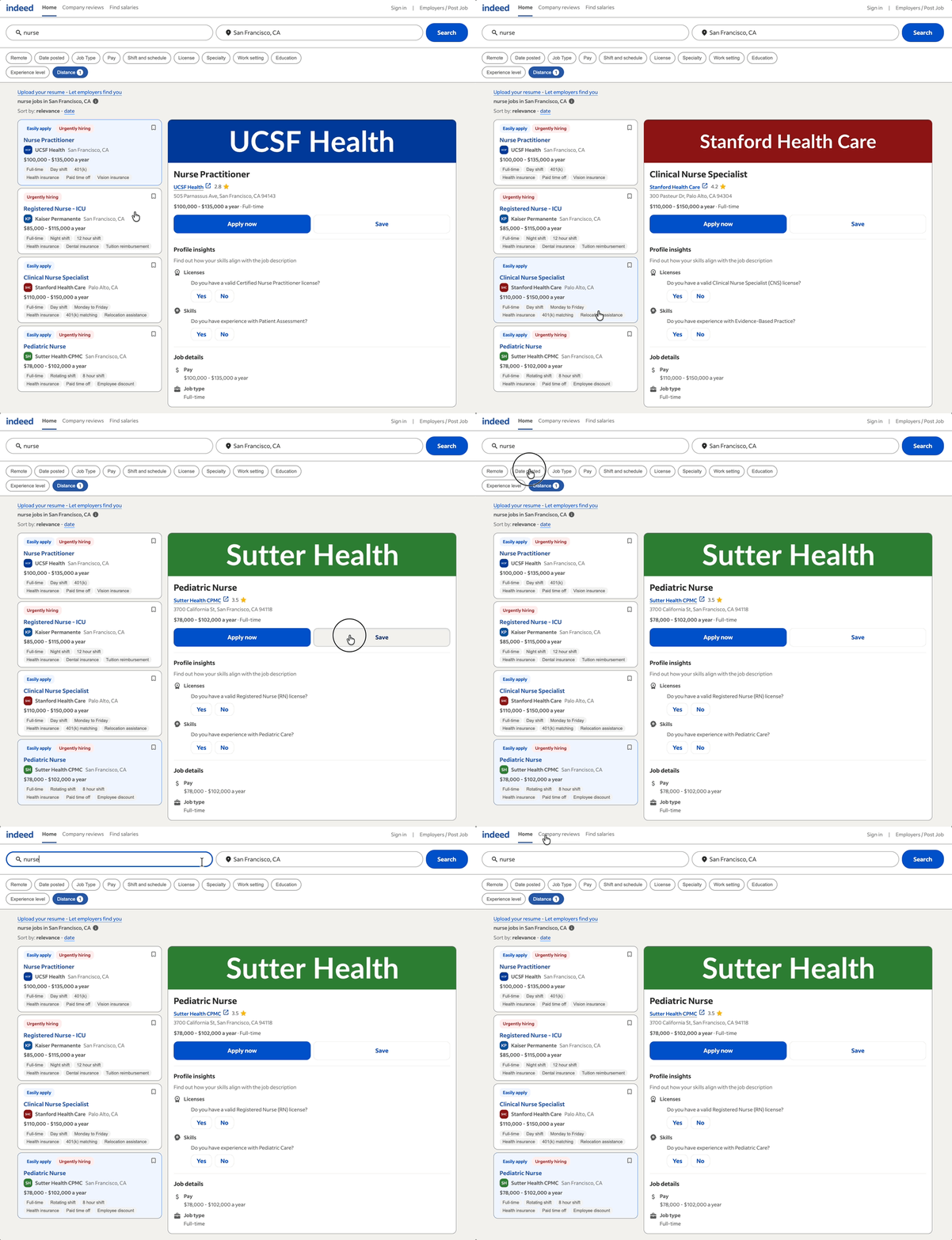
Live Indeed jobseeker job-search results page
The reference: Above is the live Indeed experience the prompt is modeled on. I asked Cursor to reason over this page screenshot and write the prompt used in every run below, so the test starts from the live design rather than from how I would have framed it.
Prototype generated using only Design System MCP
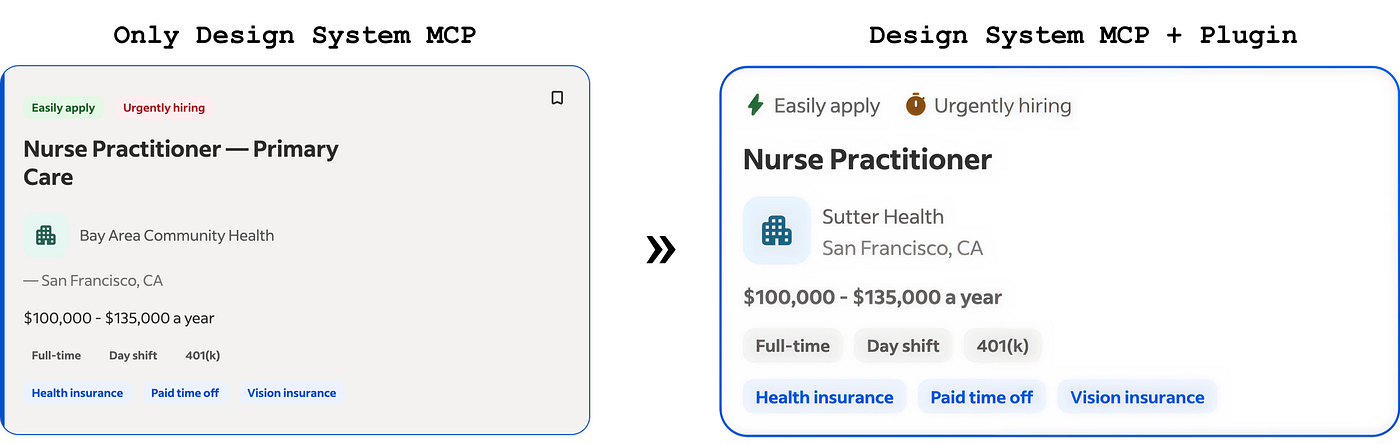
Without the plugin: I ran the prompt with only the Design System MCP connected on Claude Code and Cursor. Some components were correct. Icons render. But foundations drift: wrong border radius, wrong color tokens, wrong card active states, uneven spacing and typography hierarchy. The prompt didn't specify any of that. Real user prompts rarely do.
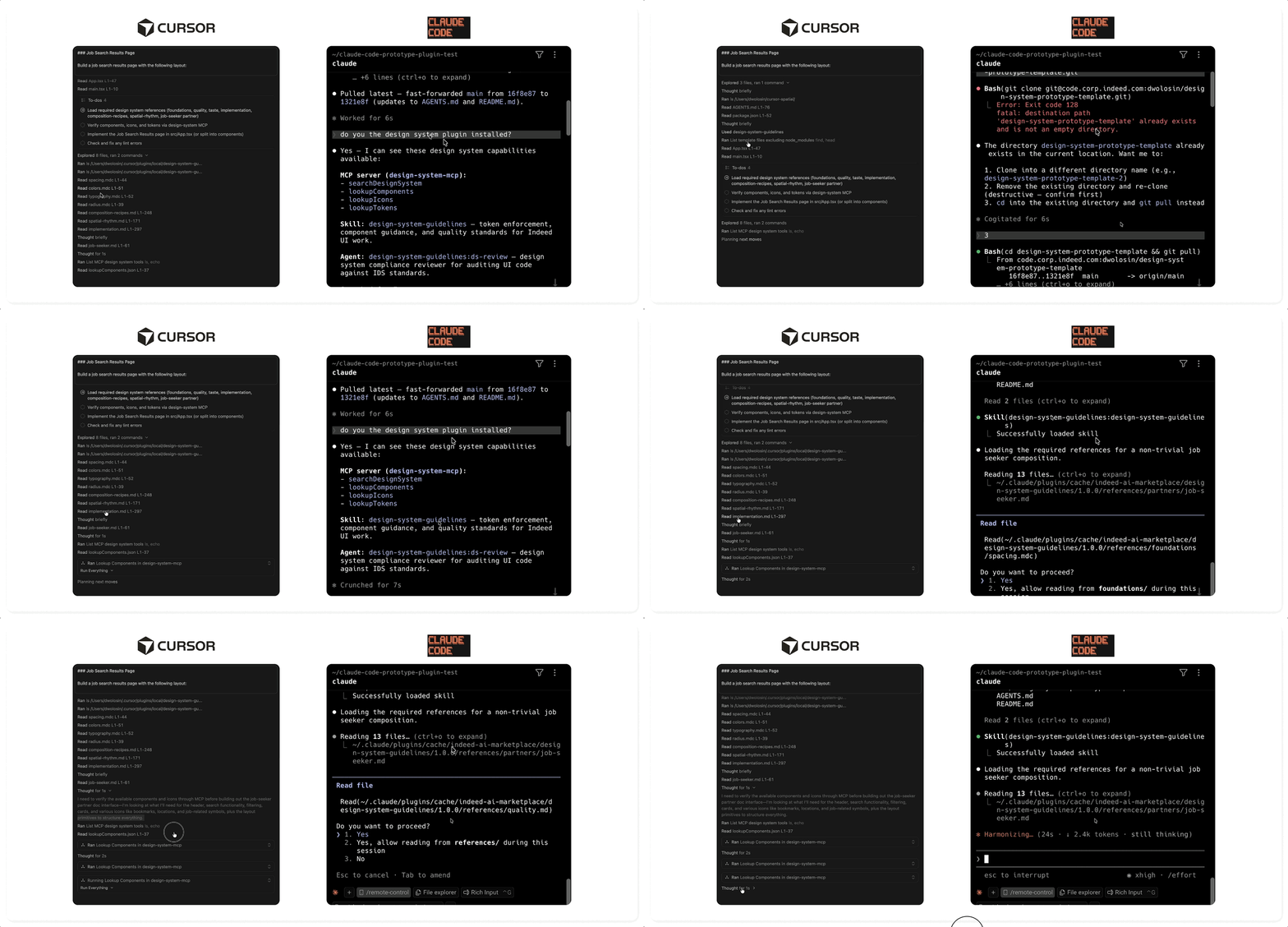
Progressive context disclousure for Cursor and Claude Code
Loading the plugin: The plugin is invoked as “design-systems-guidelines”, its SKILL.md activates, the index routes, and the layers stream into the conversation in the order the task needs them, and then calls the design system MCP. This is progressive context disclosure. The LLM is now aware about all the foundations, and component usage in the context window.
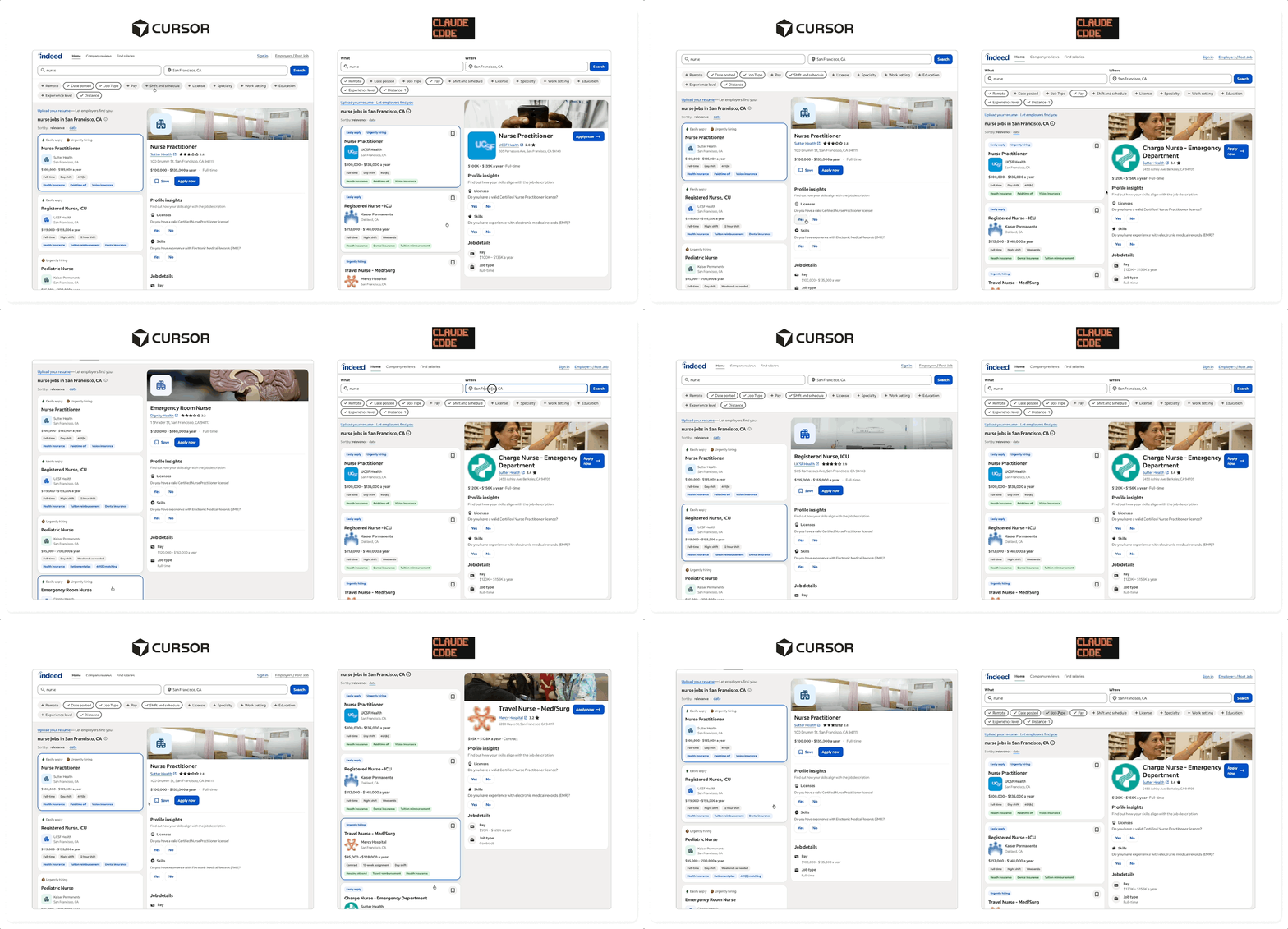
AI-generated prototypes with Cursor and Claude Code
The result: Components correct, foundations correct, composition correct, spatial rhythm correct, brand expression correct. The surface starts to feel like Indeed. Icons are properly sized and placed. Overall foundations are "correctly" applied, and the experience looks "good".
After seeing the results, Cursor and Claude each generated interesting details. The plugin closes the gap between “components correct” and “a prototype that feels like the Indeed”. The gap is not just about looks. My kind of prototype is the one that does real work: a designer can bring an idea to reality in minutes, an engineer can build from it as the code underneath uses our React components the way the "implementation.md" layer prescribes, a researcher can run a study with it. The other kind of prototype has to be rewritten multiple times to hit an acceptable design system compliance level.
The mental shift
The frontier of design systems is no longer documentation. It is context architecture. The problem is no longer only storing design knowledge. It is structuring that knowledge so AI systems can load, interpret, and apply it correctly.
That changes what design systems become operationally. Product teams can prototype directly in code environments using the same constraints engineering uses in production. System designers can prototype the design system itself. The distance between designing and implementing continues to collapse.
But the deeper shift is architectural, a fully machine-readable design system is not one giant doc.md, one MCP server, or one plugin that knows everything. It is a layered context system, where different kinds of design knowledge load at the moment the model can actually use them. Components can be fetched on demand, foundations cannot.
*Special thanks to Keith Weston, Carl Bean-Larson, and Akira Sudoh for helping shape the plugin and codify knowledge into a language AIs can understand.
메타데이터
- post_id
- 3d43329ec3e3
- slug
- fully-machine-readable-design-systems-3d43329ec3e3
- url
- https://www.designsystemscollective.com/fully-machine-readable-design-systems-3d43329ec3e3
- canonical_url
- https://www.designsystemscollective.com/fully-machine-readable-design-systems-3d43329ec3e3
- author_url
- https://medium.com/@dianawolosin
- status
- ok
- fetched_at
- 2026-06-09 15:37:30