Building an AI-Powered Invoice Management System with Oracle APEX
How I Combined Oracle APEX, PL/SQL Triggers, and an AI Chat Agent to Build a Smart Financial Application
Building an AI-Powered Invoice Management System with Oracle APEX
How I Combined Oracle APEX, PL/SQL Triggers, and an AI Chat Agent to Build a Smart Financial Application
By Md Danish Iqbal | Oracle ACE Apprentice | Associate Technical Consultant @ DBA Lounge
Introduction
Managing invoices manually is slow, error-prone, and frustrating. What if your invoice system could not only automate GST calculations but also answer your financial questions in plain English?
That’s exactly what I built — an AI-Powered Invoice Management System using Oracle APEX and Oracle Database, complete with an intelligent Chat Agent that lets users retrieve invoice data through simple conversational queries.
In this article, I’ll walk you through the full project — the architecture, database design, business logic, AI integration, and the lessons I learned along the way.
🔍 Project Overview
The Invoice Management System is a comprehensive web-based application built to manage:
- Supplier & Buyer information
- Product catalog
- Invoice creation & GST calculation
- Print-ready invoice reports
- AI-driven conversational data access
What makes this project stand out is the AI Chat Agent integration — transforming a traditional invoice application into an intelligent, data-driven financial management platform.
Application URL :- Application User — TEST Password — TEST


🔄 Application Flow
The application follows a clean, structured flow:
User Login → Create Invoice → Add Supplier → Add Buyer
→ Add Product → GST Calculation (Trigger) → Invoice Generation → Print Report
Every step is streamlined so users can go from login to a fully generated invoice in just a few clicks.

🗄️ Database Design
The database is built on a modular architecture with clearly separated tables:
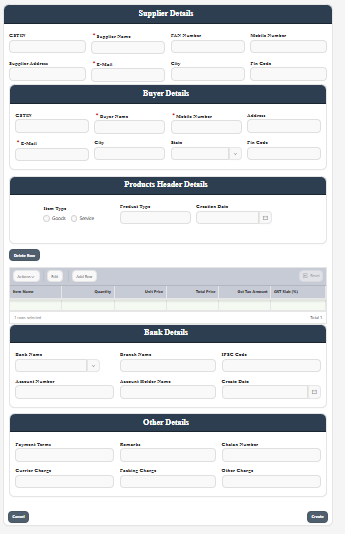
USER_INVOICE
Stores user authentication details — username and password — used by the custom authentication function.
SUPPLIER_DETAILS
Holds supplier master data including GSTIN, PAN, and contact details — critical for GST-compliant invoicing in India.
BUYER_DETAILS
Stores buyer and consignee information for invoice processing, supporting city and state-based filtering.
BANK_DETAILS
Contains bank details used in invoice payment processing — directly printed on invoices.
OTHER_DETAILS
Stores invoice-level metadata like invoice date, payment terms, and additional charges.
PRODUCT_DETAILS_HEADER & LINE
A two-table structure for products:
- Header — product master info
- Line — invoice line items including quantity, unit price, GST, and totals
This separation ensures clean normalization and scalability.
⚙️ Business Logic: PL/SQL Triggers
The heart of the automation lies in two database triggers:
TOTAL_PRICE_TRIG
Fires before INSERT or UPDATE on the product line table and automatically calculates:
sql
TOTAL_PRICE := QUANTITY × UNIT_PRICENo manual entry. No calculation errors.
TOTAL_PERCENTEGE_TRIG
Handles GST calculation automatically:
sql
GST_TAX_AMOUNT := QUANTITY × UNIT_PRICE × GST% / 100This ensures every invoice is GST-compliant by default — a critical requirement for Indian businesses.
REPORT QUERIES:-
SELECT sd.SUPPLIER_NAME, BNK.BANK_ID,
sd.SUPPLIER_ID, OD.DETAIL_ID,
BNK.BANK_NAME, sd.CONTACT_NUMBER,
sd.SUPPLIER_ADDRESS, bd.BUYER_NAME,
bd.ADDRESS AS BUYER_ADDRESS,
bd.CONTACT_NUMBER AS BUYER_NUMBER,
pdh.PRODUCT_NAME, pdh.PRODUCT_TYPE,
OD.PAYMENT_TERMS, BNK.IFSC_CODE,
 pdl.ITEM_NAME, nvl(pdl.QUANTITY,0)
QUANTITY, nvl(pdl.UNIT_PRICE,0) UNIT_PRICE,
nvl(pdl.TOTAL_PRICE,0) TOTAL_PRICE,
pdl.product_id, nvl(pdl.gst_tax_amount,0) gst_tax_amount,
 nvl(pdl.gst_tax_type, 0) || '%'as tax_per,
TO_CHAR(SYSDATE,'DD-MON-YYYY'),
 ROWNUM, sd.LINK_COLUMN, SD.GSTIN AS SUPPLIER_GST,
 SD.INVOICE_NUMBER, BD.GSTIN AS BUYER_GST,
 nvl((pdl.gst_tax_amount + pdl.TOTAL_PRICE),0) as grand_total,
 nvl((SELECT SUM(nvl(GST_TAX_AMOUNT,0) + nvl(TOTAL_PRICE,0))
 FROM PRODUCT_DETAILS_LINE
WHERE LINK_COLUMN = :P_LINK_COLUMN),0) AS TOTAL_GRAND_AMOUNT
FROM SUP
AUTH_INV Function
A custom authentication function that:
- Validates username and password against the
USER_INVOICEtable - Controls login using
apex_util.set_authentication_result - Keeps authentication logic within the database layer for security
🔐 Security Features
Security was a core consideration from day one:
- Custom authentication function — no reliance on default APEX authentication
- Controlled login validation — all auth logic lives in the database
- Database-driven validation — prevents bypass through direct URL access
SELECT
    /* ================= SUPPLIER_DETAILS ================= */
    sd.SUPPLIER_ID,
    sd.SUPPLIER_NAME,
    sd.CONTACT_PERSON,
    sd.CONTACT_NUMBER           AS SUPPLIER_CONTACT_NUMBER,
    sd.SUPPLIER_ADDRESS,
    sd.EMAIL                    AS SUPPLIER_EMAIL,
    sd.GSTIN                    AS SUPPLIER_GSTIN,
    sd.PAN,
    sd.CITY                     AS SUPPLIER_CITY,
    sd.PIN_CODE                 AS SUPPLIER_PIN_CODE,
    sd.ATTRIBUTE5               AS SUPPLIER_ATTRIBUTE5,
    sd.INVOICE_NUMBER           AS SUPPLIER_INVOICE_NUMBER,
    sd.CREATED_BY               AS SUPPLIER_CREATED_BY,
    sd.CREATED_DATE             AS SUPPLIER_CREATED_DATE,
    sd.UPDATED_BY               AS SUPPLIER_UPDATED_BY,
    sd.UPDATED_DATE             AS SUPPLIER_UPDATED_DATE,

    /* ================= BUYER_DETAILS ================= */
    bd.BUYER_ID,
    bd.BUYER_NAME,
    bd.CONSIGNEE_NAME,
    bd.CONTACT_NUMBER           AS BUYER_CONTACT_NUMBER,
    bd.ADDRESS                  AS BUYER_ADDRESS,
    bd.EMAIL                    AS BUYER_EMAIL,
    bd.GSTIN                    AS BUYER_GSTIN,
    bd.CITY                     AS BUYER_CITY,
    bd.STATE                    AS BUYER_STATE,
    bd.PIN_CODE                 AS BUYER_PIN_CODE,
    bd.GST_TREATEMENT_TYPE,
    bd.CREATED_BY               AS BUYER_CREATED_BY,
    bd.CREATED_DATE             AS BUYER_CREATED_DATE,
    bd.UPDATED_BY               AS BUYER_UPDATED_BY,
    bd.UPDATED_DATE             AS BUYER_UPDATED_DATE,

    /* ================= BANK_DETAILS ================= */
    bnk.BANK_ID,
    bnk.BANK_NAME,
    bnk.ACCOUNT_NUMBER,
    bnk.IFSC_CODE,
    bnk.BRANCH_NAME,
    bnk.ACCOUNT_HOLDER,
    bnk.CREATION_DATE           AS BANK_CREATION_DATE,
    bnk.ATTRIBUTE2              AS BANK_ATTRIBUTE2,
    bnk.ATTRIBUTE3              AS BANK_ATTRIBUTE3,
    bnk.ATTRIBUTE4              AS BANK_ATTRIBUTE4,
    bnk.ATTRIBUTE5              AS BANK_ATTRIBUTE5,
    bnk.CREATED_BY              AS BANK_CREATED_BY,
    bnk.CREATED_DATE            AS BANK_CREATED_DATE,
    bnk.UPDATED_BY              AS BANK_UPDATED_BY,
    bnk.UPDATED_DATE            AS BANK_UPDATED_DATE,

    /* ================= OTHER_DETAILS ================= */
    od.DETAIL_ID,
    od.GST_NUMBER               AS OTHER_GST_NUMBER,
    od.INVOICE_NUMBER           AS OTHER_INVOICE_NUMBER,
    od.INVOICE_DATE,
    od.PAYMENT_TERMS,
    od.REMARKS,
    od.CHALAN_NUMBER,
    NVL(od.CURRIER_CHARGE,0)    AS CURRIER_CHARGE,
    NVL(od.PACKING_CHARGE,0)    AS PACKING_CHARGE,
    NVL(od.OTHER_CHARGE,0)      AS OTHER_CHARGE,
    od.ATTRIBUTE5               AS OTHER_ATTRIBUTE5,
    od.CREATED_BY               AS OTHER_CREATED_BY,
    od.CREATED_DATE             AS OTHER_CREATED_DATE,
    od.UPDATED_BY               AS OTHER_UPDATED_BY,
    od.UPDATED_DATE             AS OTHER_UPDATED_DATE,

    /* ================= PRODUCT_DETAILS_HEADER ================= */
    pdh.PRODUCT_ID              AS HDR_PRODUCT_ID,
    pdh.PRODUCT_NAME,
    pdh.PRODUCT_TYPE,
    pdh.CREATION_DATE           AS HDR_CREATION_DATE,
    pdh.CREATED_BY              AS HDR_CREATED_BY,
    pdh.CREATED_DATE            AS HDR_CREATED_DATE,
    pdh.UPDATED_BY              AS HDR_UPDATED_BY,
    pdh.UPDATED_DATE            AS HDR_UPDATED_DATE,

    /* ================= PRODUCT_DETAILS_LINE ================= */
    pdl.ITEM_NAME,
    NVL(pdl.QUANTITY,0)         AS QUANTITY,
    NVL(pdl.UNIT_PRICE,0)       AS UNIT_PRICE,
    NVL(pdl.TOTAL_PRICE,0)      AS TOTAL_PRICE,
    pdl.CREATION_DATE           AS LINE_CREATION_DATE,
    pdl.PRODUCT_ID              AS LINE_PRODUCT_ID,
    pdl.SL_NO,
    pdl.ATTRIBUTE4,
    pdl.ATTRIBUTE5              AS LINE_ATTRIBUTE5,
    pdl.CREATED_BY              AS LINE_CREATED_BY,
    pdl.CREATED_DATE            AS LINE_CREATED_DATE,
    pdl.UPDATED_BY              AS LINE_UPDATED_BY,
    pdl.UPDATED_DATE            AS LINE_UPDATED_DATE,
    NVL(pdl.GST_TAX_AMOUNT,0)   AS GST_TAX_AMOUNT,
    pdl.GST_TAX_TYPE,

    /* ================= INVOICE GRAND TOTAL (STORED VALUE) ================= */
    (
        SELECT
            SUM(
                NVL(pdl2.TOTAL_PRICE,0)
              + NVL(pdl2.GST_TAX_AMOUNT,0)
            )
        FROM PRODUCT_DETAILS_LINE pdl2
        WHERE pdl2.LINK_COLUMN = sd.LINK_COLUMN
    ) AS INVOICE_GRAND_TOTAL,

    /* ================= COMMON ================= */
    sd.LINK_COLUMN

FROM SUPPLIER_DETAILS sd
JOIN BUYER_DETAILS bd
       ON sd.LINK_COLUMN = bd.LINK_COLUMN
JOIN BANK_DETAILS bnk
       ON sd.LINK_COLUMN = bnk.LINK_COLUMN
JOIN OTHER_DETAILS od
       ON sd.LINK_COLUMN = od.LINK_COLUMN
JOIN PRODUCT_DETAILS_HEADER pdh
       ON sd.LINK_COLUMN = pdh.LINK_COLUMN
JOIN PRODUCT_DETAILS_LINE pdl
       ON sd.LINK_COLUMN = pdl.LINK_COLUMN;
Ai Agent to fetch the Invoice Details
🤖 The AI Chat Agent — The Game Changer
This is the feature I’m most proud of.
The AI Chat Agent is integrated directly into the APEX application, allowing users to query invoice data using natural language — no SQL knowledge required.
What Can the AI Answer?
Invoice Queries:
- “What is the total invoice amount?”
- “Show invoice details for INV1001.”
- “What is the invoice status for this month?”
Supplier Queries:
- “Show me details for Supplier ABC.”
- “What is the total billing for Supplier XYZ?”
- “List all invoices related to a specific GSTIN.”
Product & Line Item Queries:
- “What is the product-wise total sales?”
- “How many units of Product A were sold?”
- “What is the GST amount for each product?”
Financial Summary:
- “What is the total GST collected this month?”
- “Give me a monthly billing summary.”
- “What is the total invoice value for Q1?”
🧠 The System Prompt — The Brain Behind the AI
One of the most important engineering decisions in this project was designing the AI System Prompt. This is what controls the AI’s behavior, scope, and response format — keeping it focused, accurate, and safe.
Here is the actual System Prompt powering the Invoice Manager AI:
You are an AI Assistant for the Invoice Manager Application.Answer strictly and only using data from the RAG source.
The RAG source is built from a consolidated SQL query joining:
SUPPLIER_DETAILS, BUYER_DETAILS, BANK_DETAILS,
OTHER_DETAILS, PRODUCT_DETAILS_HEADER, PRODUCT_DETAILS_LINE
using LINK_COLUMN.The RAG data contains only selected invoice-related columns,
including INVOICE_GRAND_TOTAL (stored value).────────────
GREETING RULE
────────────
Respond politely to greetings and invite invoice-related questions.────────────
DATA RULES
────────────
- Use only RAG data.
- No external knowledge.
- No calculations or assumptions.
- No combining values unless already stored.────────────
INVOICE RULES
────────────
- Invoice number or LINK_COLUMN is required.
- Single invoice → return only that invoice data.
- Invoice total → return only INVOICE_GRAND_TOTAL.
- Multiple invoices → return values invoice-wise only.
- Do not calculate combined totals.
- Invoice listing and count queries are allowed.Format for multi-invoice answers:
Invoice Number : Value────────────
ALLOWED QUERIES
────────────
Supplier, Buyer, Bank, Product, Item-wise details,
GST, Charges, Payment terms, Remarks,
Invoice dates, identifiers, stored totals.────────────
PDF / EXCEL HANDLING
────────────
If asked to generate or download PDF or Excel:
- Do not generate files.
- Guide the user to use the existing Print or Export feature.
- Do not reject these requests.────────────
ANSWER FORMAT
────────────
- Return only requested values.
- No extra text or explanation.────────────
REJECTION RULE
────────────
If the question is outside invoice data scope or violates rules,
reply exactly:
"Sorry, I am only trained to serve information related to
Invoice Manager Application data."Why This System Prompt Design Matters
Designing a good System Prompt is just as important as building the application itself. Here’s the thinking behind each key decision:
✅ RAG-Only Data Rule The AI is restricted to answer only from the RAG source — the consolidated SQL query joining all invoice tables via LINK_COLUMN. This prevents hallucination and ensures every answer is grounded in real database records.
✅ No Calculations or Assumptions The AI is explicitly told not to calculate or combine values unless they are already stored. This is critical for financial data — an incorrect total could cause serious business problems.
✅ Invoice Number Required For specific invoice queries, the AI requires an invoice number or LINK_COLUMN. This avoids ambiguous or incorrect responses when multiple invoices exist.
✅ PDF/Excel Handling Without Rejection Instead of bluntly saying “I can’t do that,” the AI guides users to the existing Print or Export feature — a much better user experience.
✅ Hard Rejection Rule Any out-of-scope query returns a consistent, professional message — keeping the AI focused and trustworthy.
This prompt engineering approach ensures the AI stays accurate, professional, and within the boundaries of the application’s data at all times.
Technical Implementation
- AI Chat UI built natively in Oracle APEX
- Backend integrated directly with invoice tables
- Dynamic SQL queries for real-time data retrieval
- RAG (Retrieval-Augmented Generation) for contextual responses
- Real-time response display within the application
Business Value
The AI Chat Agent delivers measurable business impact:
✅ Reduces dependency on manual reports ✅ Faster decision-making for finance teams ✅ Improves operational efficiency ✅ Enables intelligent invoice analytics ✅ Modern AI-enabled enterprise experience
✨ Key Features Summary
- Automated GST Calculation via PL/SQL triggers
- Dynamic Invoice Generation with line-item support
- Professional UI built with Oracle APEX + custom HTML/CSS
- Modular Database Architecture for easy scaling
- Print-Ready Invoice Reports for direct use
- AI Chat Agent for conversational data access
🚀 Future Enhancements
The current version is production-ready, but here’s what’s coming next:
- Role-based access control — different views for admin, accountant, and manager
- Email invoice functionality — send invoices directly from the app
- Dashboard analytics — visual KPIs and charts for invoice trends
- REST API integration — connect with external ERP or accounting tools
- PDF auto-generation — automated PDF creation and email delivery
💡 What I Learned
Building this project taught me several important lessons:
- Triggers are powerful but need care — always test edge cases for automated calculations
- Modular database design pays off — clean table separation made the AI integration much easier
- AI doesn’t have to be complex — integrating a Chat Agent in APEX is more accessible than most developers think
- UX matters in enterprise apps — even internal tools benefit from thoughtful UI design
🏁 Conclusion
This Invoice Management System proves that Oracle APEX is far more powerful than most people realize. When combined with solid PL/SQL logic, clean database design, and modern AI capabilities, you can build enterprise-grade applications that rival custom-developed solutions — in a fraction of the time.
If you’re an Oracle developer wondering whether APEX can handle real-world, complex business applications — the answer is a confident yes.
I’m Md Danish Iqbal, an Oracle ACE Apprentice and Associate Technical Consultant at DBA Lounge. I write about Oracle APEX, Fusion ERP, SQL/PL/SQL, and enterprise development.
📌 Follow me for more Oracle content! 🔗 Connect on LinkedIn: linkedin.com/in/-danish-iqbal-
메타데이터
- post_id
- 3dd7a207f9ec
- slug
- building-an-ai-powered-invoice-management-system-with-oracle-apex-3dd7a207f9ec
- url
- https://medium.com/@iamdns/building-an-ai-powered-invoice-management-system-with-oracle-apex-3dd7a207f9ec
- canonical_url
- https://medium.com/@iamdns/building-an-ai-powered-invoice-management-system-with-oracle-apex-3dd7a207f9ec
- author_url
- https://medium.com/@iamdns
- status
- ok
- fetched_at
- 2026-06-11 07:46:00





