Fraud user tracking mechanism on a publicly exposed platform hosted on AWS
Background Story
Fraud user tracking mechanism on a publicly exposed platform hosted on AWS
Background Story
Suppose you have a publicly exposed platform (Eg: an online learning platform) hosted on AWS that provides a real-time testing environment hosted on a dedicated EC2 machine for each user, And you notice some suspect behaviors from some users with improper identities utilizing the machines for fraud activities like Mining (Cryptojacking). How can we track these fraud behaviors/users automatically?
Introduction
This issue seems a bit similar to a process called Cryptojacking. Usually, these mining processes consume significantly higher **CPU utilization** for a long duration from the EC2 instance since the mining processes communicate with an external server continuously as per many references. Therefore using the above fact on CPU utilization, the below mechanism is implemented to identify these fraud machines automatically using Cloudwatch alarms integrating with SNS and Lamba and to send alerts about these fraud users to application owners/administrators in the organization via Slack.
Implementation
As a pre-requisite, Monitor the CPU utilization of EC2 instances launched through the platform by creating an AWS Cloudwatch dashboard over a certain time period and observe the usage patterns closely. Thereby, significantly higher CPU usage can be observed over a long period of time for suspected fraud user instances compared to normal user instances even when all the required applications are running. Then try to identify a suitable CPU utilization threshold(%) that enables us to filter fraud users among the other normal users that fall below the threshold mark. This threshold value can be used to set Cloudwatch alarms later.
Note: Instances launched by the application should have a unique set of tags/values which can be use to filter the required instances related to the application among the other EC2 instances in the region
Design Architecture
This setup is solely working on the AWS end and it is mainly divided into 2 parts as follows. And these will be governed by 2 separate lambdas.
- Pre-actions (For all the instances): To handle CW alarms for new/stopped instances
- Post-actions (For suspected users only): To handle alerts/actions if any suspected instances/stacks are found
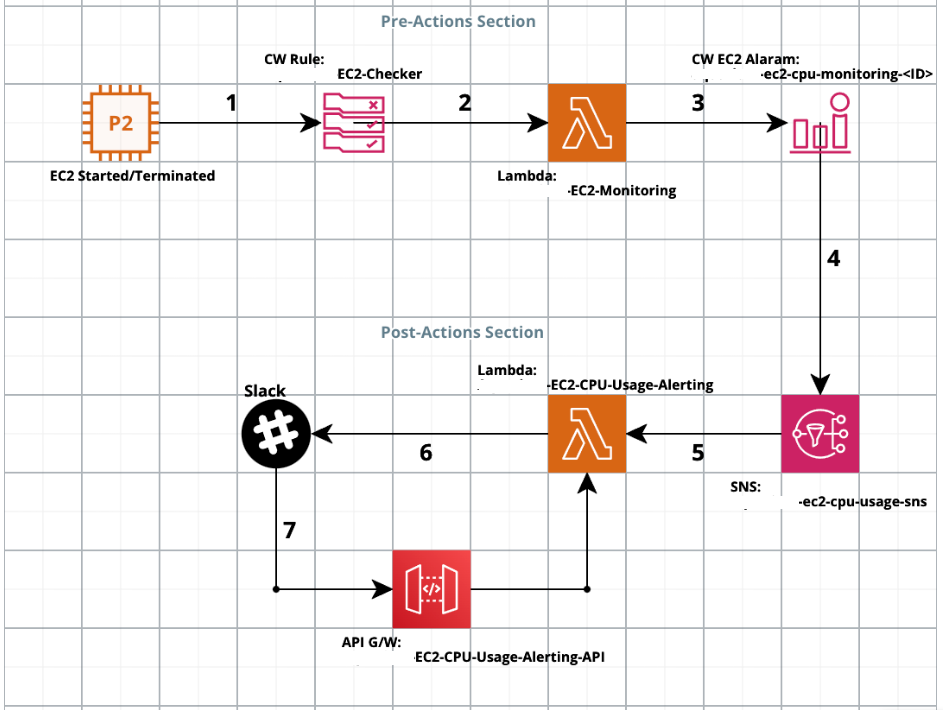
AWS Architecture
AWS Resources Used
- EC2-Monitoring Lambda: This is used to create/delete CW alarms associated with instances based on the instance state (started/terminated) to monitor their CPU usage compared with a given static threshold.
- EC2-Checker CloudWatch Rule: This rule is created to trigger EC2-Monitoring lambda when new EC2s are being launched/terminated
- CloudWatch Alarms (ec2-cpu-monitoring-<InstanceID>): These CW alarms will be dynamically created/deleted by EC2-Monitoring lambda for each required instance created/terminated to monitor their CPU usage compared with a static threshold. These alarms will send a message to the SNS topic if CPU utilization goes beyond the given static threshold for a given period of time as given in the Lambda source code
- EC2-CPU-Usage-Alerting Lambda: This is used to handle actions if any suspected users/instances are found. It will handle slack alerts and also it can terminate suspected instances automatically if
enableAutoTerminationfeature is enabled in the code (disabled by default) - SNS Topic (ec2-cpu-usage-sns): This is used to trigger EC2-CPU-Usage-Alerting lambda for post actions when Red alerts are received from CW EC2 alarms for suspected users
- API Gateway (EC2-CPU-Usage-Alerting-API): This is used to trigger EC2-CPU-Usage-Alerting lambda externally through slack using the user input button
Limitations in AWS Influenced to Adapt this Design Path
- AWS doesn’t allow us to create CW alarms with thresholds inside a custom dashboard which applies to all the required instances at once based on tags. Therefore individual CW alarms need to be created for required instances manually through the lambda to monitor CPU usage per each instance
- CW EC2 rules don’t allow us to apply the rule to a filtered set of instances only based on the tags. Therefore this limitation is handled inside the Lambda manually to filter out required instances
Execution Flow
Pre-actions:
- EC2-Checker CW Rule will trigger EC2-Monitoring lambda along with
instance_idandinstance_statedata when an instance is created/terminated in the required region [Step 1] - EC2-Monitoring lambda will check for the given tags to identify the instances launched by this particular application/platform by fetching the tags associated with the received instance id and it checks the instance state as well [Step 2]
- For each identified instance, the EC2-Monitoring lambda will create a new CW EC2 alarm (based on the given CPU threshold) for each instance launched by the particular application, or else it will delete the existing associated CW EC2 alarm if the instance is terminated [Step 3]
Post-actions:
- CW EC2 alarms will send a notification to the ec2-cpu-usage-sns SNS topic with relevant data if CPU utilization goes beyond the given static threshold for a given period (in alarm) [Step 4]
- EC2-CPU-Usage-Alerting lambda will get triggered through the ec2-cpu-usage-sns SNS topic with relevant data for red alarms(fraud users) [Step 5]
- Then EC2-CPU-Usage-Alerting lambda will process the payload and execute relevant post actions accordingly [Step 6]
- If the
enableAutoTerminationflag is set toTruein the lambda source code (default: False), it will delete the associated Cloudformation stack and send a slack alert to the given channel (). - If the
enableAutoTerminationflag is set toFalsein the lambda source code (default), it will not delete the associated Cloudformation stack and send a slack alert to the given channel with a button to proceed with the stack deletion manually if required. If it is clicked, Then slack will send a request to theResponse URL(API G/W Endpoint URL)which is configured inside slack app configs to trigger the EC2-CPU-Usage-Alerting lambda again to delete the stack. And also the slack message will get updated immediately if a user has clicked the button through the lambda itself. (because slack doesn't disable a button by default if it is clicked once) [Step 7]
Note: Here, Instances are being created through Cloudformation stacks from the application backend. This can be adjusted as per the requirements from the Lambda source code
Functions & Features
- Create new CW EC2 alarms for new required instances to monitor their CPU usage compared with a threshold.
- Delete existing CW EC2 alarms associated with required instances when they are terminated.
- Send slack alerts to a channel if any fraud users are found (for red alarms).
- Capable of deleting the fraud users automatically if that feature is enabled through the source code. If the auto-deletion feature is disabled, Provides an option to delete the fraud instances by clicking a button in the slack alert to delete it manually if the administrator required or else the administrator can ignore the alert as well using the Ignore button. Then the slack message will get updated accordingly.
Note: Slack doesn’t disable a button by default if it is clicked once. Therefore the sent message should be updated again through the Lamba by referring to the unique message timestamp. Once the message is updated, it will be shown as edited in Slack
How to Use?
- Update the following parameters inside the EC2-Monitoring Lambda source code for creating the CW Alarms. Refer here for more explanation on these variables. CPUThreshold (% CPU Threshold) MetricEvaluationPeriod (In Secs, Valid values are 10, 30,multiples of 60) NumberOfPeriods
- Update the parameters inside the EC2-CPU-Usage-Alerting lambda source codes if required enableAutoTermination (False/True, default: False) slack_channel (slack channel ID)
- Set the
enableAutoTerminationflag toTrue/False(default: False/disabled) as required inside the EC2-CPU-Usage-Alerting lambda in order to delete fraud instances (Cloudformation Stacks) automatically without any manual input. - If automatic termination is enabled, a normal slack alert will be sent to the above channel without any input button
- If automatic termination is disabled, a slack alert will be sent with an input button where users can remove the fraud user (delete CF stack) manually if required and the slack message will get updated again accordingly along with CF stack state info once any button is clicked. This function also happens through the lambda itself since slack doesn’t disable a clicked button by default

Sample slack alert

Sample updated alert after pressing a button
Lambda Source Codes
EC2-Monitoring Lambda:
import boto3# Set Parameters for CW Alarm
CPUThreshold = <> # % CPU Threshold
Region = <>
SNSTopic = <>
MetricEvaluationPeriod = <> # In Secs (Valid values are 10, 30, and any multiple of 60)
NumberOfPeriods = <> # Refer: https://docs.aws.amazon.com/cli/latest/reference/cloudwatch/put-metric-alarm.html# AWS Resources
ec2 = boto3.resource('ec2', region_name=Region)
cw = boto3.client('cloudwatch')def is_platform_ec2(instance_id):
ec2instance = ec2.Instance(instance_id)
tags = ec2instance.tags
print(tags)
for tag in ec2instance.tags:
if tag["Value"] == "<>": # required tags to identify the instances
return Truedef message_to_dict(message):
msgDict = {}
for word in message.split(", "):
key, value = word.split("=")
msgDict[key] = value
return msgDictdef lambda_handler(event, context):
print('[INFO] Event: ', event) try:
message = event
msgDict = message_to_dict(message)
instance_id = msgDict["instance_id"]
instance_state = msgDict["state"] if is_platform_ec2(instance_id):
print('[INFO][Platform_EC2] '+ instance_id + ' is an Platform EC2') if msgDict["state"] == "pending":
# Create a Cloudwatch alarm to monitor the CPU usage of the required EC2s & to compare with the threshold
alarmName = 'platform-ec2-cpu-monitoring-' + instance_id
response = cw.put_metric_alarm(
AlarmName=alarmName,
AlarmDescription='Alarm when Platform EC2s CPU exceeds the threshold',
ActionsEnabled=True,
AlarmActions=[SNSTopic],
MetricName='CPUUtilization',
Namespace='AWS/EC2',
Statistic='Average',
Dimensions=[{'Name': 'InstanceId','Value': instance_id}],
Period=MetricEvaluationPeriod,
Unit='Percent',
EvaluationPeriods=NumberOfPeriods,
Threshold=CPUThreshold,
ComparisonOperator='GreaterThanThreshold'
)
print(response) elif msgDict["state"] == "terminated" or msgDict["state"] == "stopped":
# Delete the existing Cloudwatch alarm for terminated/stopped Platform EC2
try:
alarmName = 'platform-ec2-cpu-monitoring-' + instance_id
response = cw.delete_alarms(AlarmNames=[alarmName])
except Exception as e:
print('[ERROR] Cloudwatch Alarm does not exists to delete: ',alarmName)
print(e) else:
print('[ERROR] Invalid Platform instance state found.')
exit() else:
print("[INFO] This is not an Platform EC2")
exit() except Exception as e:
print(e)
exit()EC2-CPU-Usage-Alerting Lambda:
import json
import os
import boto3
from slack import WebClient
from urllib.parse import unquote
# Set Parameters
enableAutoTermination = False # Enable/Disable auto termination of fraud instances
slack_token = os.environ['SLACK_TOKEN']
slack_channel = '' # Slack channel ID
region = ""
client = WebClient(token=os.environ['SLACK_TOKEN'])
ec2 = boto3.resource('ec2', region_name=region)
cloudForm = boto3.client('cloudformation')
def delete_cloud_formation_stack(stack_name):
response = cloudForm.delete_stack(
StackName=stack_name,
)
print('[DEBUG] CF Stack Deletion Repsonse: ',response)
def check_cf_stack_state(stack_name):
try:
data = cloudForm.describe_stacks(
StackName=stack_name
)
print('[DEBUG] CF Describe Stack Repsonse: ',data)
cf_state = data['Stacks'][0]['StackStatus']
if cf_state == 'CREATE_COMPLETE':
print('[INFO] CF Stack is Available to delete | State:', cf_state)
return True
else:
print('[INFO] CF Stack is not Available to delete | State:', cf_state)
return False
except Exception as e:
print(e)
def stack_exists(name, required_status = 'CREATE_COMPLETE'):
try:
data = client.describe_stacks(StackName = name)
except ClientError:
return False
return data['Stacks'][0]['StackStatus'] == required_status
def send_alert(heading,body,slack_channel):
response = client.chat_postMessage(
attachments=[
{
"text": body,
"color": "#DB1122", # Red
"fallback": "Build Alert"
}
],
channel=slack_channel,
text=heading
)
def send_alert_with_button(heading,body,slack_channel,stack_name,stack_url,lab_title,lab_info,user_info,org_country):
data1 = stack_name + "^" + stack_url + "^" + user_info + "^" + "delete"
data2 = stack_name + "^" + stack_url + "^" + user_info + "^" + "ignore"
response = client.chat_postMessage(
attachments=[
{
"text": body,
"color": "#DB1122", #red
"fallback": "Build Alert",
"callback_id": stack_name,
"attachment_type": "default",
"actions": [
{
"name": "delete_stack",
"text": "Remove User",
"style": "danger",
"type": "button",
"value": data1,
"confirm": {
"title": 'Are you sure you want to delete this stack?',
"text": stack_name,
"ok_text": "Yes",
"dismiss_text": "No"
}
},
{
"name": "ignore",
"text": "Ignore",
"type": "button",
"value": data2
}
]
}
],
channel=slack_channel,
text=heading
)
def update_alert(heading,body,slack_channel,msg_ts,context):
response = client.chat_update(
attachments=[
{
"color": "#DB1122", #red
"fallback": "Build Alert",
"blocks": [
{
"type": "section",
"text": {
"type": "mrkdwn",
"text": body
}
},
{
"type": "context",
"elements": [
{
"type": "plain_text",
"text": context
}
]
}
]
}
],
channel=slack_channel,
ts=msg_ts,
text=heading
)
def fetch_tags(instance_id):
ec2instance = ec2.Instance(instance_id)
tags = ec2instance.tags
print('[INFO] Available tags on EC2: ',tags)
for tag in ec2instance.tags:
# Fetch the required tag values required for the slack message
# Update this part accordingly as per the requirement
if tag["Key"] == "aws:cloudformation:stack-name":
stack_name = tag["Value"]
elif tag["Key"] == "aws:cloudformation:stack-id":
stack_id = tag["Value"]
elif tag["Key"] == "user-email":
user_mail = tag["Value"]
else:
continue
return [stack_name,stack_id,user_mail]
def lambda_handler(event, context):
    print('[INFO] Event: ', event)
try:
# For SNS triggers: send slack alerts
if ('Records' in event) and (event['Records'][0]['EventSource'] == 'aws:sns'):
message = event["Records"][0]["Sns"]["Message"]
message = json.loads(message)
print('[INFO] SNS Message: ', message)
instance_id = message["Trigger"]["Dimensions"][0]["value"]
reason = message["NewStateReason"]
stack_info = fetch_tags(instance_id)
print('[INFO] Platform Lab Instance Info: ',stack_info)
stack_name = stack_info[0]
stack_id = stack_info[1]
stack_url = "https://{Region}.console.aws.amazon.com/cloudformation/home?region={Region}#/stacks/stackinfo?stackId={Stack_ID}".format(Region=region, Stack_ID=stack_id)
print('[INFO][Platform] Stack Name: ' + stack_name)
print('[INFO] CW Alarm Reason: '+ reason)
# Update the body with relevant data as required
body = "*User Email:* " + stack_info[2] + "\n" + \
"*Stack Name:* " + '<{}|{}>'.format(stack_url,stack_name) + "\n" + \
"*Reason:* " + reason
if enableAutoTermination:
delete_cloud_formation_stack(stack_name)
send_alert(":alert: *Platform Suspected User Found & Removed*",body,slack_channel)
else:
user_info = stack_info[2]
send_alert_with_button(":alert: *Platform Suspected User Found!*",body,slack_channel,stack_name,stack_url,user_info)
# For API GW triggers: process interactive response to delete stacks
elif ('resource' in event) and (event['resource'] == '/EC2-CPU-Usage-Alerting'):
body = event["body"]
message = json.loads(unquote(body).strip('payload='))
print('[INFO] Slack User Response: ',message)
msg_ts = message['message_ts']
user = message['user']['name']
stack_info = (message['actions'][0]['value']).split('^')
print(stack_info)
stack_name = stack_info[0]
stack_url = stack_info[1]
user_info = stack_info[2].replace("+"," ")
slack_input = stack_info[3]
body = "*User Email:* " + user_info + "\n" + \
"*Stack Name:* " + '<{}|{}>'.format(stack_url, stack_name) + "\n"
if check_cf_stack_state(stack_name):
if slack_input == 'delete':
context = ":white_check_mark: User removed by " + user
update_alert(':rotating_light: *Platform Suspected User Found!*',body,slack_channel,msg_ts,context)
delete_cloud_formation_stack(stack_name)
elif slack_input == 'ignore':
context = ":ballot_box_with_check: Ignored by " + user
update_alert(':rotating_light: *Platform Suspected User Found!*',body,slack_channel,msg_ts,context)
else:
context = ":information_source: Cloudformation stack already deleted"
update_alert(':rotating_light: *Platform Suspected User Found!*',body,slack_channel,msg_ts,context)
else:
print('[DEBUG] Invalid Event/Trigger')
return {'statusCode': 200}
    except Exception as e:
        print(e)
exit()References
- Available services — Boto3 Docs 1.24.14 documentation
- put-metric-alarm — AWS CLI 1.25.15 Command Reference
- https://api.slack.com/web
- Web Client — Python Slack SDK
- How to create EC2 custom metrics with Amazon CloudWatch
- What is cryptojacking?
You are done! Thanks…
메타데이터
- post_id
- 3deaca766bb7
- slug
- fraud-user-tracking-mechanism-on-a-publicly-exposed-platform-hosted-on-aws-3deaca766bb7
- url
- https://medium.com/@hasithperera/fraud-user-tracking-mechanism-on-a-publicly-exposed-platform-hosted-on-aws-3deaca766bb7
- canonical_url
- https://medium.com/@hasithperera/fraud-user-tracking-mechanism-on-a-publicly-exposed-platform-hosted-on-aws-3deaca766bb7
- author_url
- https://medium.com/@hasithperera
- status
- ok
- fetched_at
- 2026-06-29 01:02:39



