How to Combine RAG and LLM Steering for Reliable AI Systems
In this post you’ll learn how two powerful ideas in AI — retrieval-augmented generation (RAG) and LLM steering — can work together to…
How to Combine RAG and LLM Steering for Reliable AI Systems
In this post you’ll learn how two powerful ideas in AI — retrieval-augmented generation (RAG) and LLM steering — can work together to produce more reliable, grounded outputs than either approach on its own. RAG helps your model stay rooted in real data by pulling in relevant information from documents or databases before generating a response. Steering gives you finer control over what the model produces at inference time, guiding its behavior without retraining. Combining them helps tackle two common problems in generative AI: outdated knowledge and uncontrolled responses. Let’s not waste more time and dive into the details.
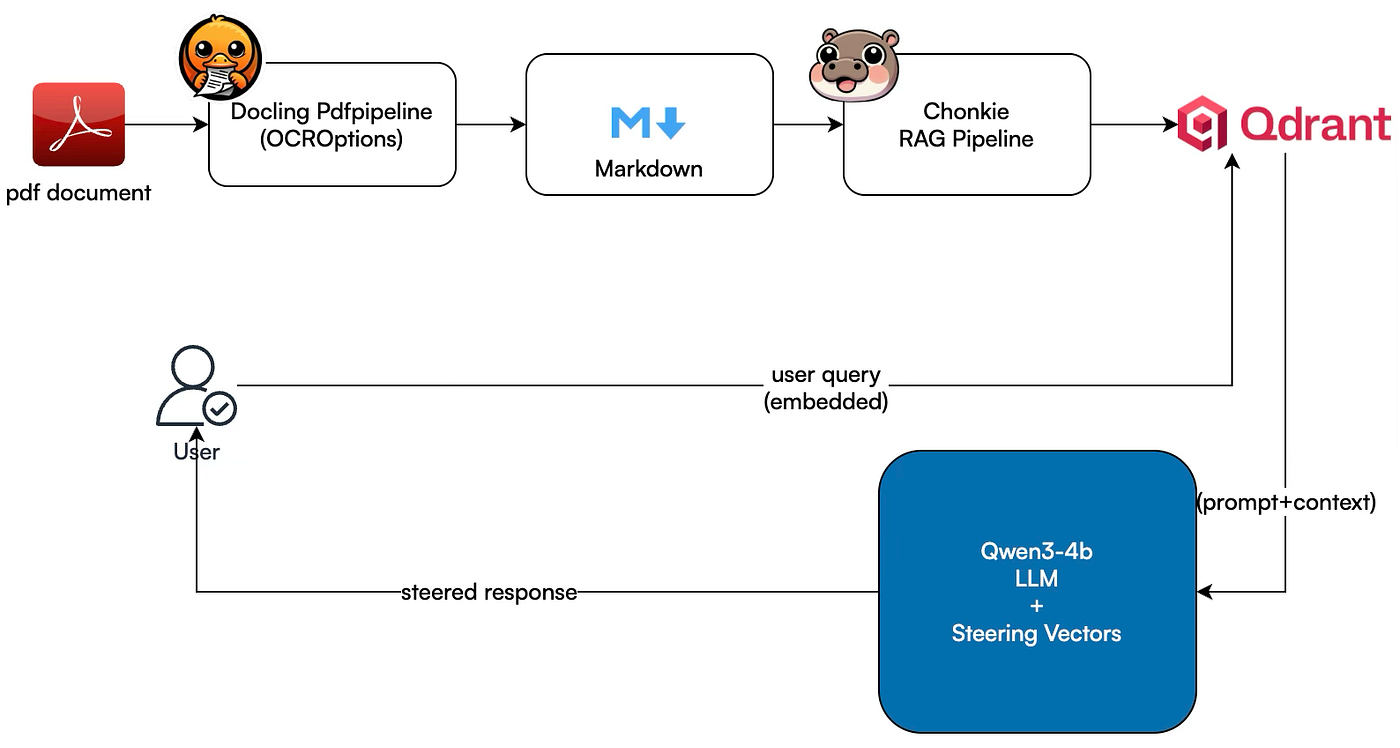
created by author M K Pavan Kumar.
The Architecture
This architecture represents an end-to-end pipeline that combines document ingestion, retrieval-augmented generation, and runtime model steering to produce controlled and knowledge-grounded responses.
The flow starts with a PDF document as the input source. This document is processed using the Docling PDF pipeline with OCR enabled, which allows the system to handle both digitally generated PDFs and scanned documents. Docling extracts the raw text, understands layout structure such as headings and tables, and converts everything into a clean Markdown format. Markdown acts as an intermediate representation that preserves document structure while remaining easy to process downstream.
Once the content is available in Markdown form, it is passed to the Chonkie RAG pipeline. At this stage, the document is split into smaller, meaningful chunks using semantic or structure-aware chunking strategies. Each chunk is then converted into vector embeddings and indexed inside Qdrant. Here, Qdrant functions as a vector search engine, enabling fast similarity-based lookup across large collections of embedded content.
When a user submits a query, the system embeds the query using the same embedding model and sends it to Qdrant. The vector search engine performs nearest-neighbor retrieval to identify the most relevant chunks based on semantic similarity. These retrieved chunks form the contextual knowledge that will be supplied to the language model, ensuring that responses are grounded in the original document content rather than relying purely on the model’s internal knowledge.
The retrieved context is then combined with the user’s prompt and passed to the Qwen3–4B language model. What makes this setup distinctive is the integration of steering vectors alongside the LLM. Steering vectors modify internal activations during inference to guide the model’s behavior. This allows fine-grained control over tone, response style, domain emphasis, and safety constraints without requiring fine-tuning or retraining.
Finally, the language model generates a steered response that is both context-aware and behavior-controlled. This response is delivered back to the user, completing the interaction loop. Overall, the architecture brings together structured document processing, high-performance vector search, and runtime model steering to create a system that is accurate, controllable, and production-ready.
The Implementation
The project is little complex one with multiple files with dedicated functionality with them.
.
├── LICENSE
├── RAG-with-llm-steering.md
├── llm-steering.md
├── pyproject.toml
├── readme.md
├── src
│   ├── __init__.py
│   ├── data
│   │   ├── Gastroesophageal-Reflux-Disease.md
│   │   └── Gastroesophageal-Reflux-Disease.pdf
│   ├── gastroenterology_qa_with_steering_results.csv
│   ├── gastroenterology_qa_without_steering_results.csv
│   ├── generate_steering_vectors.py
│   ├── main.py
│   ├── non_steered_qwen_generation.py
│   ├── pdf_to_markdown.py
│   ├── semantic_ingestion_pipeline.py
│   ├── semantic_retriever.py
│   ├── steered_qwen_generation.py
│   ├── steering_vectors
│   │   ├── all_steering_vectors.pt
│   └── visualise_model_activations.py
└── uv.lock
This is a RAG (Retrieval-Augmented Generation) system with activation steering for medical question answering about GERD (gastroesophageal reflux disease):
Data Pipeline:
pdf_to_markdown.pyconverts medical PDFs to markdown formatsemantic_ingestion_pipeline.pychunks the documents semantically and stores them in a Qdrant vector database with embeddings
Retrieval & Generation:
semantic_retriever.pyqueries the vector database to find relevant context for questionsnon_steered_qwen_generation.pyuses the Qwen language model with retrieved context to answer questions normallysteered_qwen_generation.pyapplies learned "steering vectors" during generation to reduce hallucinations by modifying the model's internal activations
Analysis & Orchestration:
visualise_model_activations.pyextracts and visualizes the model's internal layer activations to understand its representationsgenerate_steering_vectors.pyThis computes the steering vectors by analyzing activation differences between truthful and hallucinated outputsmain.pyruns a batch of 20 GERD-related questions through both steered and non-steered versions, saving comparative results to CSV files
The core innovation is using activation steering — mathematically modifying the model’s hidden states during inference to make it more factual and grounded in the retrieved medical context.
The semantic_ingestion_pipeline.py looks as below, which will push the code to Qdrant vector store
# Chunk with embeddings
from chonkie import Pipeline, SentenceTransformerEmbeddings

docs = (Pipeline()
       .fetch_from("file", dir="./data", ext=[".md"])
       .process_with("text")
       .chunk_with("semantic",
                   threshold=0.5,
                   chunk_size=1024,
                   similarity_window=3)
       .refine_with("overlap", context_size=100)
       .store_in("qdrant",
                 collection_name="gastroenterology",
                 url="http://localhost:6333",
                 api_key="th3s3cr3tk3y",
                 embedding_model=SentenceTransformerEmbeddings("all-MiniLM-L6-v2"))
       .run())

if docs:
    print(f"Ingested {len(docs)} documents")
non_steered_qwen_generation The standard way of generating the response from the Qwen3–4B model
import torch
from transformers import AutoModelForCausalLM, AutoTokenizer, TextStreamer

from src.semantic_retriever import query_vector_search_engine

model_name = "Qwen/Qwen3-4B-Instruct-2507"

tokenizer = AutoTokenizer.from_pretrained(model_name)

# Use MPS (Metal) for M1 Mac GPU acceleration
device = "mps" if torch.backends.mps.is_available() else "cpu"

model = AutoModelForCausalLM.from_pretrained(
    model_name,
    dtype=torch.float16,
    device_map=device,
    low_cpu_mem_usage=True
)

def query(prompt):
    # Run the main demo
    # prompt = "What are the common Symptoms of GERD?"
    context = query_vector_search_engine(query=prompt)

    prompt_template = f"""
        You are an intelligent AI Assistant who can answer the questions based on the context provided to you.
        user_question: {prompt}
        context: {context}
        assistant response:
        """

    # prompt = "Give me a short introduction about you"
    print(prompt_template)

    messages = [
        {"role": "user", "content": prompt_template[:3000]},
    ]

    text = tokenizer.apply_chat_template(
        messages,
        tokenize=False,
        add_generation_prompt=True
    )
    model_input = tokenizer([text], return_tensors="pt").to(device)

    streamer = TextStreamer(tokenizer, skip_prompt=True, skip_special_tokens=True)
    generated_ids = model.generate(
        **model_input,
        max_new_tokens=512,
        streamer=streamer,
        do_sample=True,
        temperature=0.1,
        top_p=0.9,
        pad_token_id=tokenizer.eos_token_id
    )

    output_ids = generated_ids[0][len(model_input.input_ids[0]):].tolist()
    content = tokenizer.decode(output_ids, skip_special_tokens=True)

    # print(f"content: {content}")
    return content
This is how we apply the steering vectors and generate the content from the same Qwen3–4B model
def generate(
            self,
            prompt: str,
            steering_type: Optional[str] = None,
            steering_strength: float = 0.1,
            max_new_tokens: int = 512,
            **generation_kwargs
    ) -> str:
        """
        Generate text with steering applied.
        """
        if self.steering_vectors is None:
            raise ValueError("No steering vectors loaded. Call load_steering_vectors() first.")

        # Select steering vectors
        if steering_type is None:
            if 'default' in self.steering_vectors:
                vectors_to_use = self.steering_vectors['default']
            else:
                steering_type = list(self.steering_vectors.keys())[0]
                vectors_to_use = self.steering_vectors[steering_type]
                print(f"Using steering type: {steering_type}")
        else:
            if steering_type not in self.steering_vectors:
                raise ValueError(f"Steering type '{steering_type}' not found. "
                                 f"Available: {list(self.steering_vectors.keys())}")
            vectors_to_use = self.steering_vectors[steering_type]

        # Prepare input
        messages = [{"role": "user", "content": prompt}]
        text = self.tokenizer.apply_chat_template(
            messages,
            tokenize=False,
            add_generation_prompt=True
        )
        model_input = self.tokenizer([text], return_tensors="pt").to(self.device)
        prompt_length = model_input.input_ids.shape[1]

        print(f"Prompt length: {prompt_length} tokens")
        print(f"Applying steering with strength α={steering_strength}")

        # Apply steering hooks that know about prompt length
        hooks = self.apply_steering_hook(vectors_to_use, steering_strength, prompt_length)

        try:
            # Generate with steering
            with torch.no_grad():
                generated_ids = self.model.generate(
                    **model_input,
                    do_sample=True,
                    temperature=0.1,
                    top_p=0.9,
                    pad_token_id=self.tokenizer.eos_token_id,
                    eos_token_id=self.tokenizer.eos_token_id,
                    streamer=self.streamer,
                    max_new_tokens=max_new_tokens,
                    use_cache=True,
                    **generation_kwargs
                )

            # Decode output
            output_ids = generated_ids[0][len(model_input.input_ids[0]):].tolist()
            content = self.tokenizer.decode(output_ids, skip_special_tokens=True)

        finally:
            # Always remove hooks
            for hook in hooks:
                hook.remove()

        return content
The Results and Evaluation:
From a response quality and user-facing readability perspective, the steering-enabled outputs look better overall. Here’s why, based on the comparison:
1. Clarity and Directness
Steered responses get to the point faster. For example, using “1 in 5 adults (20%)” is more conversational and immediately understandable than only stating percentages with extra justification text.
2. Formatting and Scan-ability
Steered outputs consistently use:
- Bold emphasis for key numbers or facts
- Cleaner line breaks
- Tighter sentence structure
This makes the answers easier to skim, which is important for medical Q&A style content.
3. Reduced Redundancy
Non-steered responses tend to repeat context phrases like “This is supported by the context…” or restate the same idea in slightly different wording. Steered responses avoid this and feel more natural.
4. Consistency of Tone
Steered answers maintain a more uniform, professional tone across questions. Non-steered ones vary more in verbosity and explanation depth.
5. Length Without Noise
While both versions have similar average lengths, steered outputs pack more useful information per sentence and cut filler text. That improves signal-to-noise ratio.

evaluated on the 100 questions dataset for GERD (above is a sample of 20 questions)
Overall Verdict
If your goal is production-style answers, better readability, and a cleaner UX for end users, the steering version is the stronger choice. The non-steered version is more “raw LLM verbose,” whereas steering gives you tighter, more controlled outputs.
If you want, I can also help you define a small automatic scoring rubric (conciseness, readability, medical clarity, formatting) to quantify this comparison instead of relying only on visual inspection.
Note: Results will be produced upon request.
메타데이터
- post_id
- 3e1ca7f21d9e
- slug
- how-to-combine-rag-and-llm-steering-for-reliable-ai-systems-3e1ca7f21d9e
- url
- https://towardsdev.com/how-to-combine-rag-and-llm-steering-for-reliable-ai-systems-3e1ca7f21d9e
- canonical_url
- https://towardsdev.com/how-to-combine-rag-and-llm-steering-for-reliable-ai-systems-3e1ca7f21d9e
- author_url
- https://medium.com/@manthapavankumar11
- status
- ok
- fetched_at
- 2026-06-09 15:37:30