2. Unity Particle System: Evolving Particles with Size & Color Over Lifetime
Learn how to control the size and color of particles over time using Unity’s curve and gradient tools — perfect for smoke, fire, magic…
2. Unity Particle System: Evolving Particles with Size & Color Over Lifetime
Learn how to control the size and color of particles over time using Unity’s curve and gradient tools — perfect for smoke, fire, magic, and more.
A deeper dive into how particles change over time using Unity’s curve and gradient systems.
In Part 1, I covered the core Particle System modules — Emission, Shape, Lifetime, and Speed.
Now it’s time to bring particles to life by making them evolve over time.
In this article, we’ll explore:
- Size Over Lifetime — Shrinking, growing, and pulsing particles
- Color Over Lifetime — Creating fades, glows, and transitions
- How to combine both for more dynamic effects
- Tips on using Unity’s curve editor and color gradient tool
Once you understand these tools, you’ll be able to create effects that feel alive — like smoke that fades naturally or magic particles that flicker and disappear!
Size Over Lifetime — Shrink, Grow, or Pulse Over Time
The Size Over Lifetime module lets you control how big particles are as they age. You can make particles shrink, grow, or even pulse as they move through their lifespan.
- Use it to create smoke that fades away, fireballs that grow, or magic orbs that flicker.
- The curve defines the size of each particle from birth (left side of the graph) to death (right side).
Tip: You can use the curve editor to ease in or ease out the size change, giving your effects a more natural feel.
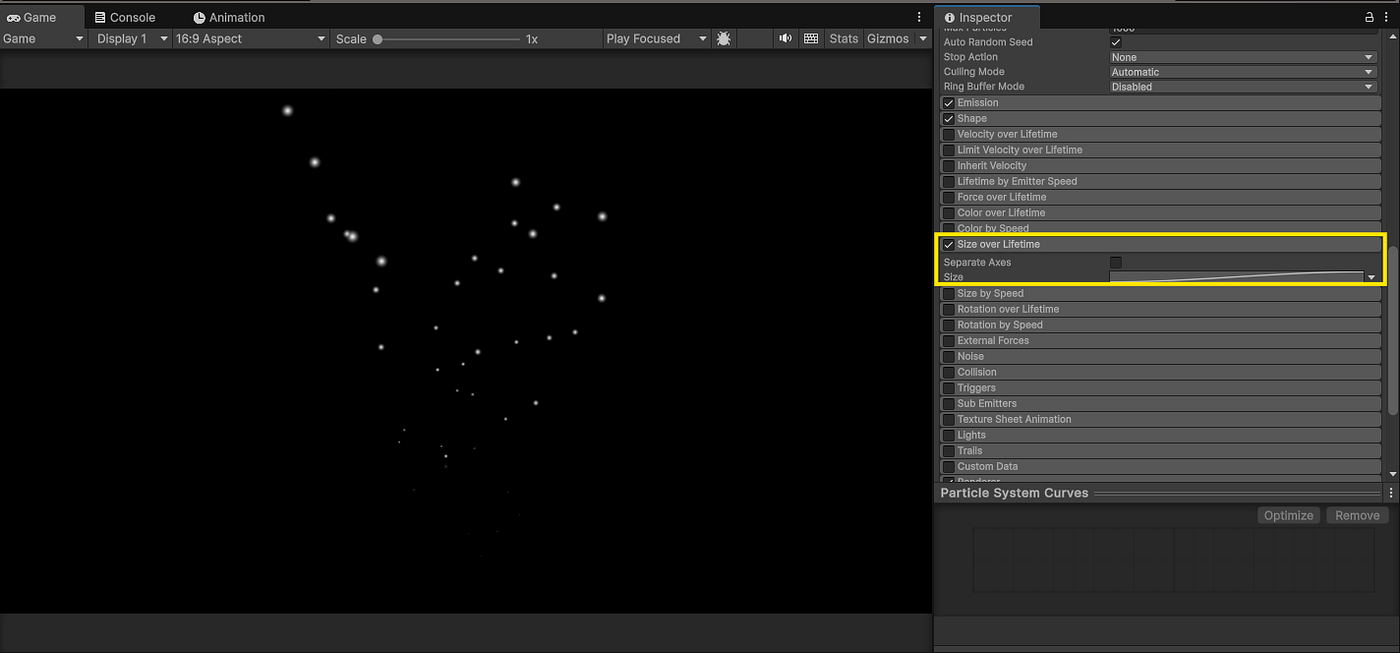
To control particle scaling over time, enable the Size over Lifetime module in the Inspector. This unlocks the curve editor where you define how each particle’s size changes as it ages.

Cycling through Unity’s built-in curve presets for Size Over Lifetime. Each one creates a different visual style — like fading, pulsing, or bursting effects.
Color Over Lifetime — Smooth Fades & Color Transitions
The Color Over Lifetime module lets you apply a gradient to your particles, controlling how their color (and transparency) changes from birth to death.

You can:
- Fade particles in or out using alpha transparency
- Shift from one color to another (e.g., red → orange → yellow)
- Combine with Size Over Lifetime for polished, professional effects
Tip: Even a basic black-to-transparent alpha gradient can make your particles feel way more dynamic and natural.
Alpha Fade (Fade Out Only)

Color Transition (e.g. Fire Colors)

Combined Effect: Size + Color Over Lifetime

What’s Next?
You’ve now learned how to evolve your particles over time using Size Over Lifetime and Color Over Lifetime. These two modules alone can make your effects feel smooth, dynamic, and way more polished.
In the next article, we’ll explore how to give your particles motion using Rotation, Velocity, and Noise modules — perfect for fire, smoke, or chaotic magic effects.
✨ This is part of my Unity Particle System Series. Follow along as I break down every module — one effect at a time.
메타데이터
- post_id
- 3e1dccf6f10c
- slug
- 2-unity-particle-system-evolving-particles-with-size-color-over-lifetime-3e1dccf6f10c
- url
- https://medium.com/@fulton_shaun/2-unity-particle-system-evolving-particles-with-size-color-over-lifetime-3e1dccf6f10c
- canonical_url
- https://medium.com/@fulton_shaun/2-unity-particle-system-evolving-particles-with-size-color-over-lifetime-3e1dccf6f10c
- author_url
- https://medium.com/@fulton_shaun
- status
- ok
- fetched_at
- 2026-07-28 05:13:04





