CVE-2024–48573
Summary
CVE-2024–48573
Summary
This machine is hosting a vulnerable version of aquilaCMS with a public RCE exploit chaining a password reset vulnerability and a plugin upload vulnerability, thus the process is straight forward. but in this post I manually exploited the password reset just for practice and explaining, I skipped the manual exploit of plugin upload because that get into building the plugin which means more coding then actual security work.
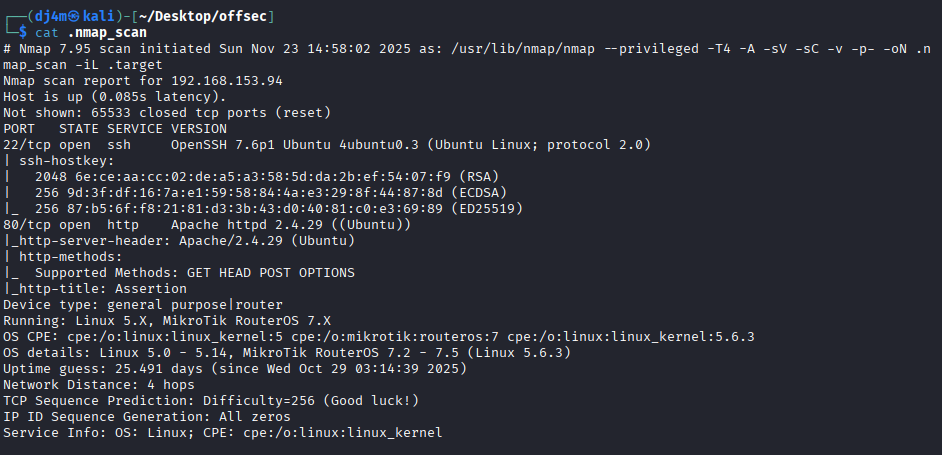
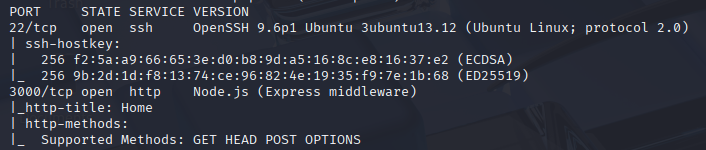
Nmap Scan

Foothold
With only 2 ports open SSH(22) and HTTP(3010) it’s obvious to start with HTTP so I take a look at this website

nothing is showing but I can get some more details looking at wappalyzer extension on my browser

the website is running a Next.js application and using AquilaCMS and a MongoDB database on the backend. In the next part I will be manually exploiting the password reset but this is already done in the automated exploit available on searchsploit so you can unless you want to understand how that works you can just skip to Initial Access here.
the tricky part about javascript based frontend frameworks such as React, Next.js and Angular etc… is that the page source make it hard to see any links but Katana can overcome that and find links in the javascript files.

with a little sort I can make easier to look through the huge amount of urls found

I pass the list to httpx (httpx-toolkit on kali) to be able to filter working pages from those returning a HTTP 404 instead of looking at the whole list

Looking at the results I could see a few pattern

not all pages have the same size but when I try those pages I quickly get redirected to 404 page, the account pages tho do put me on a login page that does not redirect so I will look there first

Trying to create an account results in unknown error, and the same thing for password reset

then looking at the request in burp it seems the frontend is settign the host to localhost:3000

I tried fixing that but still had the same problem, no response was getting back to me, I try the same request through curl and It worked so seeing that it was trying to make a PUT request in the Access-Control-Request-Method, I change the method to PUT in my curl command and now I have some result

comparing results with burp behavious it seems burp will still send the request to localhost:3000 even when I added rule to overwrite the Host header so it’s not just the Host header interfering it the actual URL, this was bit tricky but I was evetually able to configure burpsuite to redirect connection to locahost:3000 to targetIP:3010 by editing the proxy listener

with that I was able to register a new account even tho I still showed the password requirements error I assumed it was residual error that was not hidden after my first try with bad password, I can see the success message in burp even with that

doing further enumeration this time I went for directory bruteforce under /api/v2/


the only thing that stands out as different is the error 500 on user endpoint so back to burp, I make a GET request on the broser to /api/v2/user then move to repeater an turn it in a PUT request, the same thing can be done with curl as showed earlier

the error is complaining that email is required so let’s provided it, at a first step I will provide some random value as the email

then providing the email i registered with earlier i have a different message

Fuzzing a little I found the email field takes regular expressions !


with this I validate that I can use it to enumerate users, first I use it to find my own user

with this request I can go on and fuzz for other users emails, progressively FUZZ@. then found1@FUZZ. then found1@found2.FUZZ

here I found the first part which means there is a user admin@something.somethingelse which should be an admin user, let’s find the rest of the email. the second part took two fussing runs with the list i used which made ‘offsec’

moving to the last part now, what I found is that almost anything would work here so admin@offsec.randomtext would actually go through returning a created HTTP 201 response but what I need here is the message I was getting earlier validating the user exists, instead I have created a bunch of new emails so this required a machine reset at this point.

I have received some HTTP 409 which is what I need but they were returning because the list I am using have the same word in lower and uppercase so one was creating the user and the second was returning the user exists message, the good thing is that I could keep on this track, getting all the 409 from the fuzz then filter the results eliminating any words that are doubled in my list and showing once in the fuzz but i’ll go for reset then move to a a char list to validate the last part since it should be short like .com, .org or something similar
Doing this a letter per run I found the email admin@offsec.lab

the last run did not return any 409 which means the fuzzing stops there

I then try a password rest with this email but I get an error “cannot send email” even tho I receive an error this the password reset request might have gone through, just the send email that happens prior to the reset is failing in this case

I remove the data from the request and send again to get the following response

this response means the endpoint can take a token instead of the email ! how does that work ?
doing some research I figure the most probable process would be :
- send password reset request with email -> get email with single use token
- send password reset request with token and password -> reset the password for account associated with token
Since I cannot get the token with there email error in place I need to find a way to bypass that. I know the site uses MongoDB so a NoSQL injection could work
reading here leads me to a working token validation bypass

now I just add the password and the reset works

lets try to login with the new password. this did not work at first with the authentication path on the UI but it worked for admin specific login path

now I have the JWT token for admin account
Initial Access
I was able to find an aquilaCMS exploit with searchsploit that is worth trying

with my listener open I was able to catch the reverse shell as root already and had access to proof.txt flag

this machine has only one flag for root so I am done here already.
메타데이터
- post_id
- 3e3cc8f25d8e
- slug
- cve-2024-48573-3e3cc8f25d8e
- url
- https://medium.com/@dj4msec/cve-2024-48573-3e3cc8f25d8e
- canonical_url
- https://medium.com/@dj4msec/cve-2024-48573-3e3cc8f25d8e
- author_url
- https://medium.com/@dj4msec
- status
- ok
- fetched_at
- 2026-06-13 07:35:29