Kotlin: Inline Keyword
Why inline exists, how it works internally, when to use it, and common pitfalls, with real-world Android examples.
Kotlin: Inline Keyword
Why inline exists, how it works internally, when to use it, and common pitfalls, with real-world Android examples.
Why Does Kotlin Need inline?
Kotlin embraces functional programming. We use lambdas everywhere:
list.forEach { println(it) }But lambdas are not free.
Behind the scenes:
- A Function object is created
- Memory is allocated
- A virtual function call happens
This leads to:
- Increased memory allocations
- GC pressure
- Runtime overhead
This is especially problematic in:
- UI rendering
- RecyclerView
- Compose
- Coroutines
- Hot loops
👉 Kotlin introduces **inline** to solve this efficiently.
What Does inline Do?
When a function is marked inline, the compiler copies the function body directly into the call site.
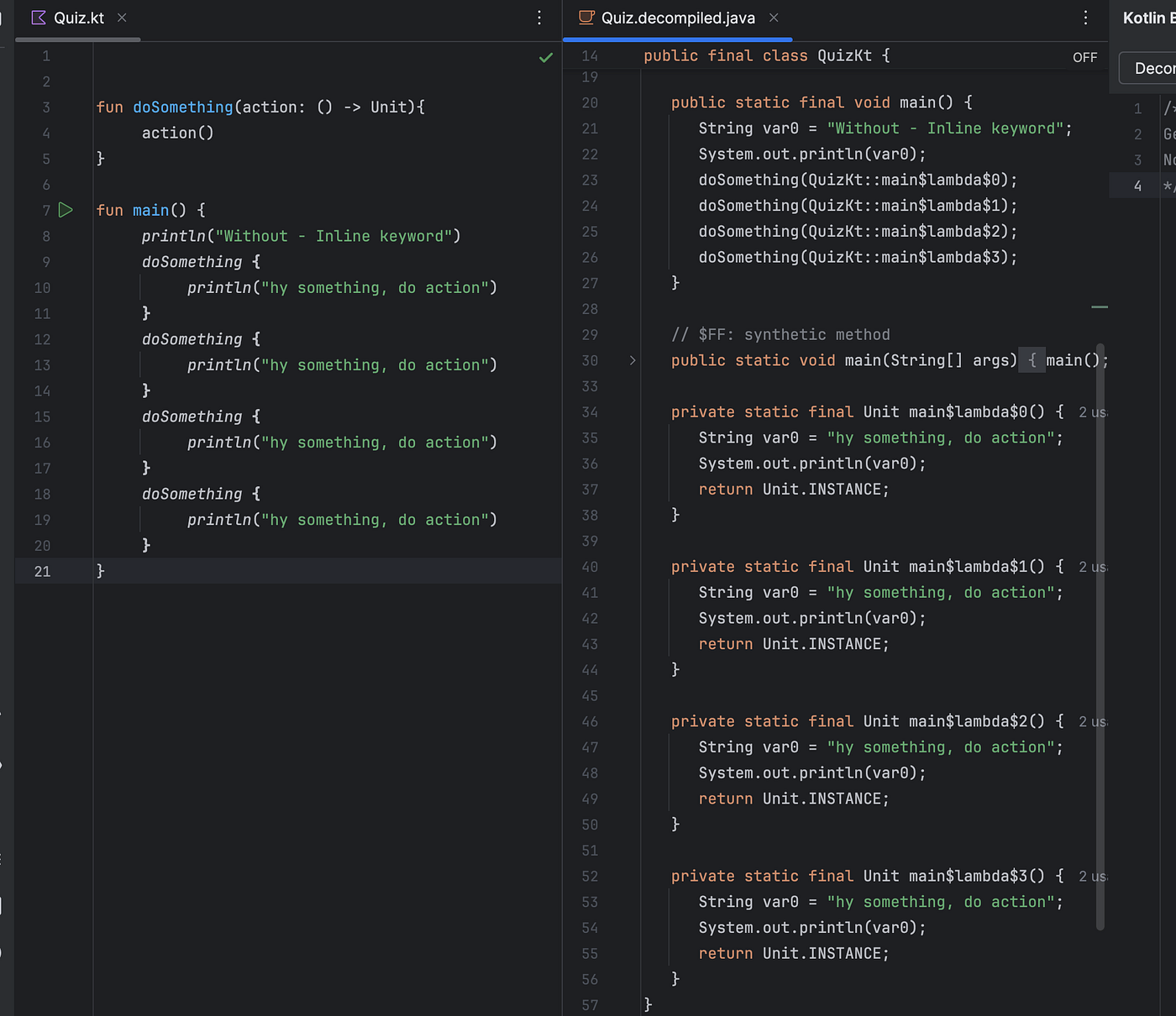
Without inline:
fun doSomething(action: () -> Unit){
     action()
}
Each call:
- Allocates a lambda object
- Performs a function call
With inline:
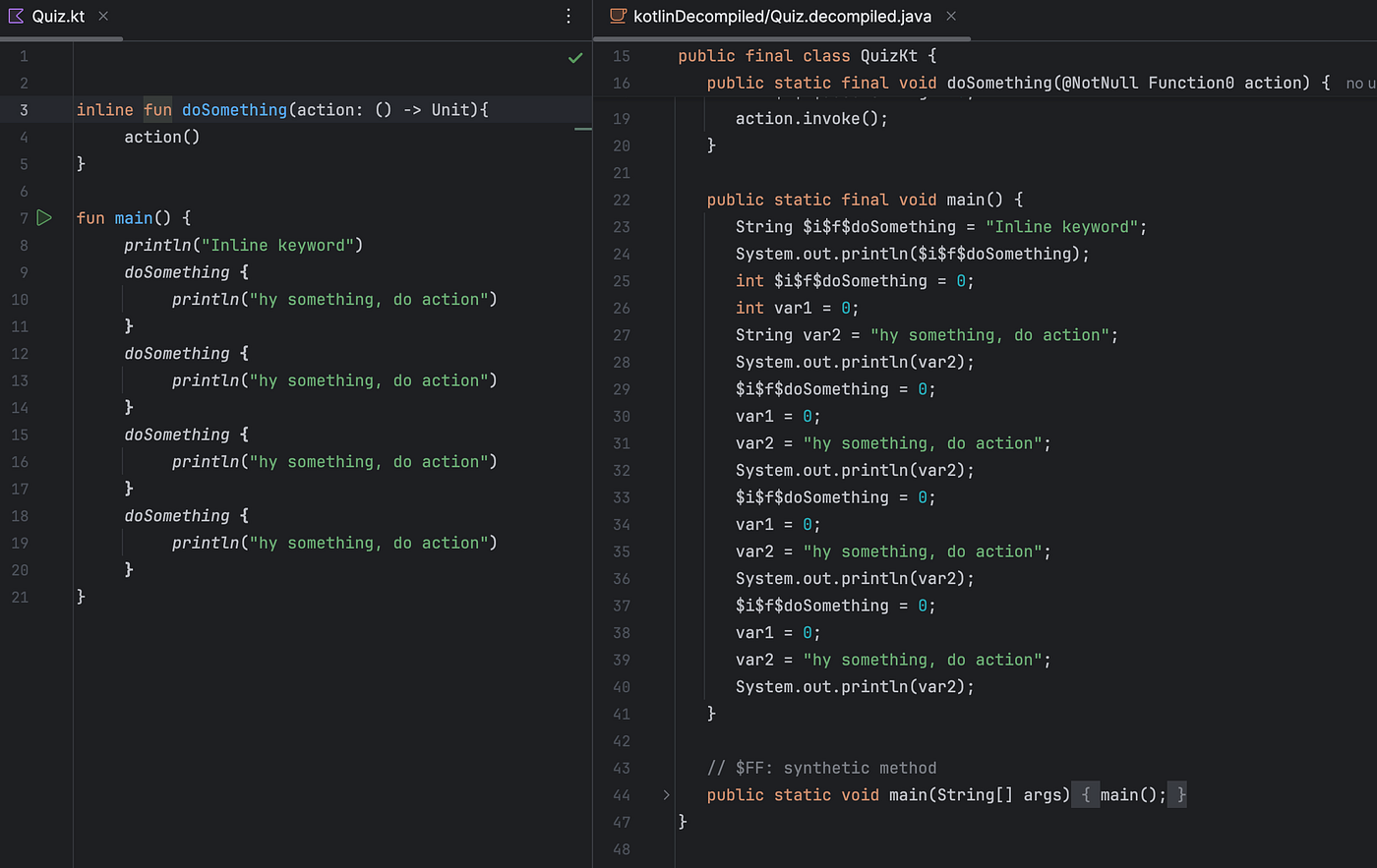
inline fun doSomething(action: () -> Unit){
     action()
}
The compiler expands this:
doSomething { println("hy something, do action") }Into:
println("hy something, do action")👉 No lambda object. 👉 No function call. 👉 Zero-cost abstraction.
How Inline Works Internally
Inlining is compile-time expansion, not runtime optimization.
inline fun greet(name: String, action: () -> Unit) {
    println("Hello $name")
    action()
}

// Calling
greet("Amit") {
    println("Welcome")
}

// Compiles to:
println("Hello Amit")
println("Welcome")
This is literal code substitution.
Performance Impact in Android
Inlining improves:
- Memory usage
- CPU performance
- Frame stability
- GC pressure
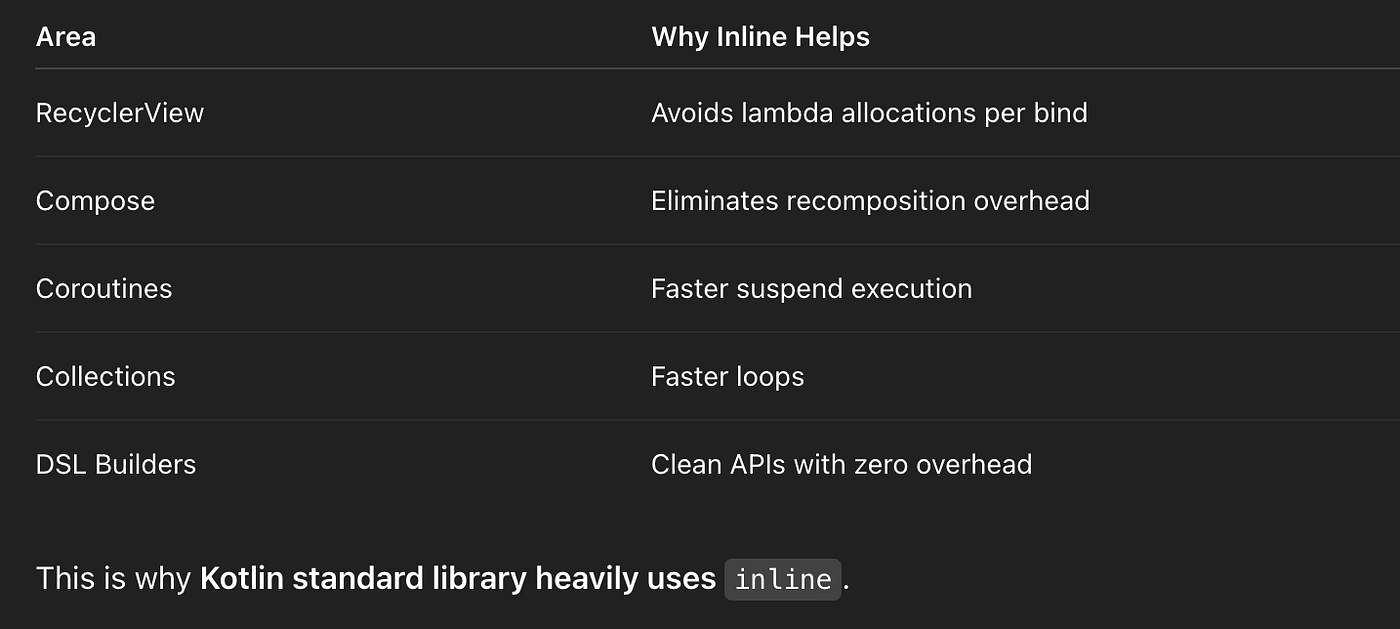
High-impact Android areas:
Understanding noinline
**noinline*: Used within an inline function to mark specific lambda parameters that should not* be inlined. This is useful if you need to store the lambda in a variable or pass it to another non-inline function.
By default, all lambdas are inlined. But sometimes, you must keep lambda as an object.
inline fun process(
    task: () -> Unit,
    noinline callback: () -> Unit
) {
    task()
    executor.execute(callback)
}
Why noinline?
Because:
- Inlined lambdas cannot be stored or passed
- Only real function objects can
👉 Use noinline when:
- Passing lambda to another function
- Storing it
- Returning it
Understanding crossinline
**crossinline: Used within an inline function to ensure that a lambda parameter cannot perform a non-local **return, while still benefiting from other inlining optimizations.
Kotlin allows non-local returns inside inline lambdas:
inline fun runTask(action: () -> Unit) {
    action()
}
fun main() {
runTask {
return // exits main()
}
}This is powerful — but dangerous.
Now:
inline fun runTask(crossinline action: () -> Unit) {
    Runnable { action() }.run()
}
This disallows:
return // ❌ compilation error👉 crossinline prevents unsafe non-local returns.
Reified Type Parameters — The Killer Feature
**reified**: Used with generic type parameters in inline functions to allow accessing the specific type at runtime
Normally:
fun <T> logType() {
    println(T::class)  // ❌ impossible
}
With inline:
inline fun <reified T> logType() {
    println(T::class)
}

logType<String>()   // prints "class kotlin.String"
This enables:
- Type-safe generics
- Cleaner APIs
- Better reflection-free code
Used heavily in:
- Retrofit
- Gson / Moshi
- Navigation
- Dependency Injection
Real Android Examples of Inline
Kotlin Standard Library
inline fun <T> run(block: () -> T): T
inline fun <T> apply(block: T.() -> Unit): T
inline fun <T> let(block: (T) -> R): R
Almost all scope functions are inline.
RecyclerView DSL
inline fun View.onClick(crossinline action: () -> Unit) {
    setOnClickListener { action() }
}
Coroutines
Many coroutine primitives are inline for performance optimization.
Jetpack Compose
Compose heavily relies on inline functions to:
- Minimize recomposition overhead
- Avoid lambda allocations
Common Pitfalls of Inline
1. Code Bloat
Inlining duplicates code at every call site.
inline fun hugeFunction() { ... } // ❌👉 Leads to:
- Larger APK size
- Harder debugging
2. Harder Stack Traces
Inlined functions disappear from stack traces, making debugging tricky.
3. Overusing Inline
Inline is not free magic.
Use it only for:
- Small utility functions
- Hot paths
- DSL builders
Inline + Clean Architecture
Inline is best used in:
- Utility helpers
- UI helpers
- DSL APIs
Avoid in:
- UseCases
- Repositories
- Domain logic
inline = compiler copy-paste + lambda elimination
Final Thoughts
The inline keyword is one of Kotlin’s most powerful performance tools.
Used correctly, it gives:
- Zero-cost abstractions
- Cleaner APIs
- Faster apps
Used incorrectly, it leads to:
- Larger APKs
- Debugging nightmares
Mastering inline puts you well above average Android developers.
Kotlin’s inline keyword enables zero-cost higher-order functions by eliminating lambda allocations and function call overhead, delivering high-performance functional programming.
메타데이터
- post_id
- 3ee87f4418b9
- slug
- kotlin-inline-keyword-3ee87f4418b9
- url
- https://medium.com/@amitdogra70512/kotlin-inline-keyword-3ee87f4418b9
- canonical_url
- https://medium.com/@amitdogra70512/kotlin-inline-keyword-3ee87f4418b9
- author_url
- https://medium.com/@amitdogra70512
- status
- ok
- fetched_at
- 2026-07-13 06:23:13