Understanding Provisioning Profile in iOS Deployment 🚀
Hey Folks 👋,
Understanding Provisioning Profile in iOS Deployment 🚀
Hey Folks 👋,
If you are a Flutter developer working with iOS deployment, you might have faced errors like:
Common Errors:
No provisioning profile found
Signing certificate not found
Profile doesn't include Push Notification entitlement
Most developers fix these issues by changing some Xcode settings, but understanding why this happens is very important.
Today let’s understand one of the most important concepts in iOS deployment: Provisioning Profile
What is a Provisioning Profile?
In simple words:
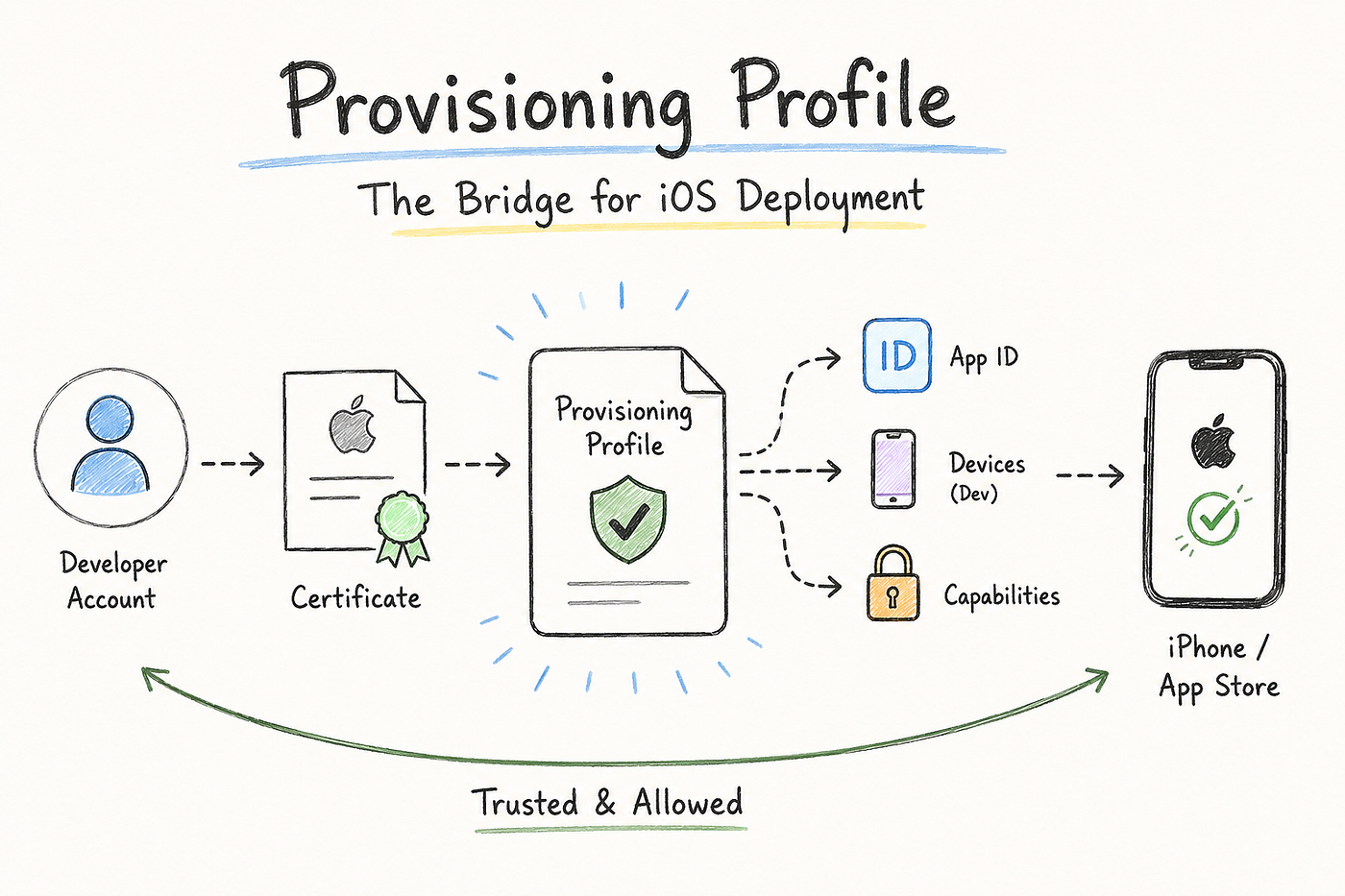
A Provisioning Profile is a bridge between your application, Apple Developer Account, certificates, devices, and app permissions.
It tells Apple:
“This application is created by this developer, signed using this certificate, and it is allowed to run on these devices or App Store.”
Without a valid provisioning profile, iOS will not trust your application.
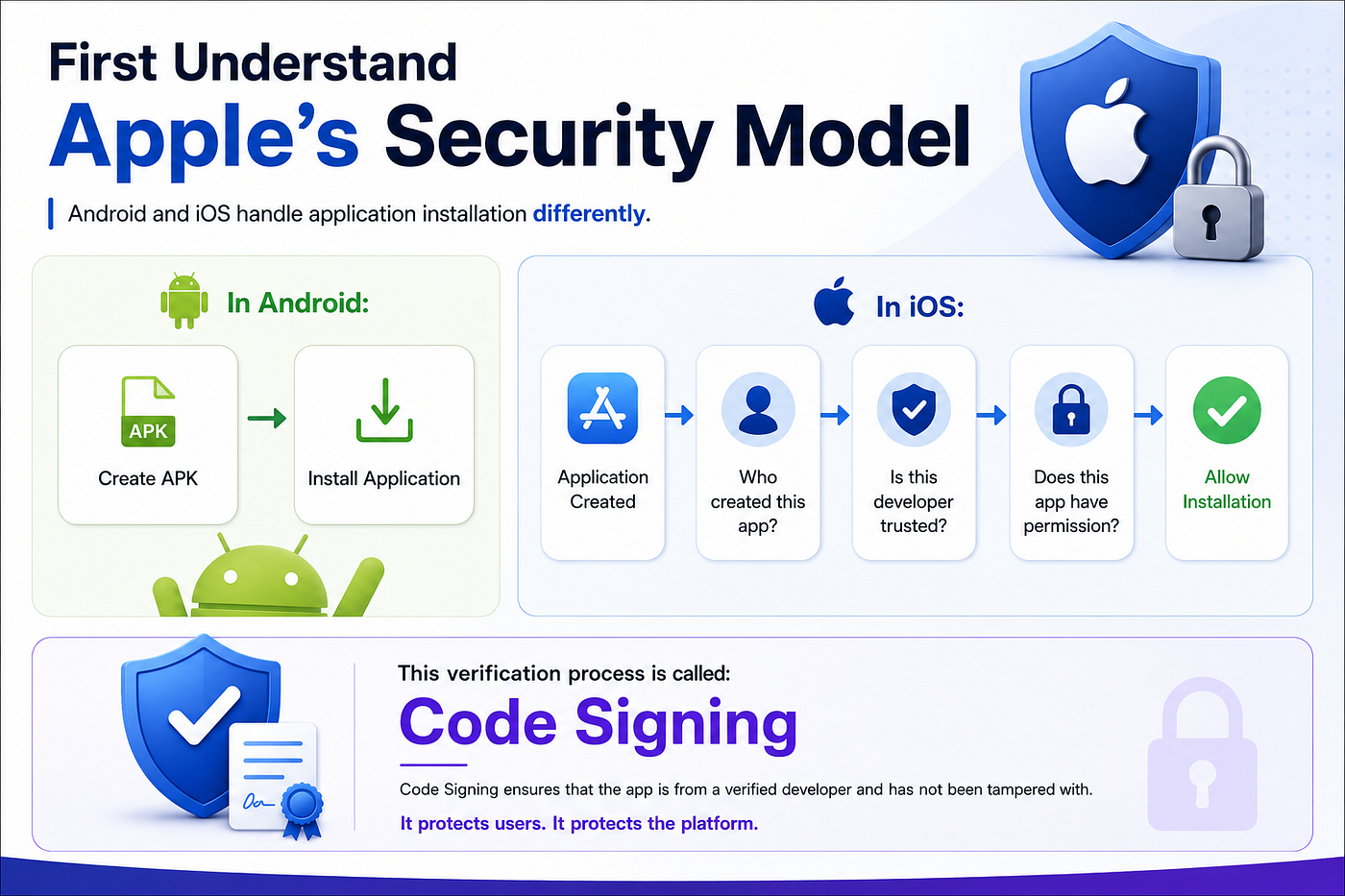
Code Signing Flow in iOS
The complete flow looks like this:
Apple Developer Account ↓Certificate(Who is the developer?) ↓Provisioning Profile(Which app can this developer sign?) ↓Signed IPA ↓App Store / iPhoneWhat Does a Provisioning Profile Contain?
A provisioning profile mainly contains four things:
1. App ID / Budle Identifier 2. Certificates3. Devices4. Entitlements / CapabilitiesLet’s understand one by one.
1. App ID / Bundle Identifier
Every iOS application has a unique Bundle ID.
Example:
com.company.eventsThe provisioning profile is linked with this Bundle ID.
It basically says:
This profile belongs to:
com.company.events
You cannot use the same profile for another application like:
com.company.adminbecause both are different applications.
2. Certificates
Certificate answers one simple question:
Who is signing this application?
Example:
Apple Distribution Certificate:
Developer:
Akash Senthil
Relationship:
Application ↓Certificate ↓Apple Developer AccountThe certificate proves the identity of the developer.
3. Devices
This mainly applies for development builds.
During development, Apple wants to know:
“Which devices can install this app?”
Example:
Allowed Devices:
Akash iPhone
UDID: xxxxx
Tester iPhone
UDID: yyyyyFlow:
Development Build ↓Provisioning Profile ↓Check Device UDID ↓Allow InstallationOnly registered devices can install the app.
For App Store builds, there is no device list because millions of users download through the App Store.
4. Entitlements / Capabilities ⭐
This is one of the most important parts.
Provisioning profiles also store what your app is allowed to use.
Examples:
- Push Notifications
- Sign in with Apple
- Associated Domains
- iCloud
- Keychain Sharing
- App Groups
Example:
You enable Push Notification capability.
Your profile receives:
aps-environment = productionWhen your app launches:
App requests APNs token ↓iOS checks Provisioning Profile ↓Push capability available? ↓Generate APNs tokenWithout this permission, push notifications will fail.
Types of Provisioning Profiles
There are mainly four types.
1. Development Profile
Used while developing the application.
Contains:
Development Certificate + Device UDIDs + Bundle IDExample:
When you click:
Run ▶️from Xcode and install the app on your iPhone.
2. Ad Hoc Profile
Used for testing without App Store or TestFlight.
Contains:
Distibution Certifate + Registered Devices + Bundle IDYou can directly share the IPA with selected devices.
3. App Store Profile ⭐
Used for production deployment.
Contains:
Distibution Certificate

        +
Bundle ID + CapabilitiesFlow:
  Archive App

      ↓
Generate IPA ↓Upload App Store Connect ↓Apple Review ↓Production Release4. Enterprise Profile
Used for internal company applications.
Example:
A company employee-only application.
These apps are distributed privately without the public App Store.
Complete iOS App Store Deployment Flow
When you archive your app:
  Souce Code

      ↓
Compile Application ↓Create Binary ↓Attach Provisioning Profile ↓Sign using Distribution Certificate ↓Generate IPA ↓Upload to App Store Connect ↓Apple verifies ↓Release Application 🚀Interview Question ⭐⭐⭐
What is the use of Provisioning Profile?
A Provisioning Profile is used for iOS code signing. It connects the application’s Bundle ID, certificates, allowed devices, and capabilities.
It tells Apple that this developer is authorized to build and distribute this particular application.
During App Store deployment, the IPA is signed using a Distribution Certificate and an App Store Provisioning Profile before uploading.
Final Summary
Remember this simple relationship:
Certificate
=
Who are you?

Bundle ID
=
Which application?

Provisioning Profile
=
Are you allowed to sign and distribute?

IPA
=
Trusted final application
Understanding certificates and provisioning profiles is very important for Flutter and iOS developers because many production deployment issues happen around code signing.
Akash Senthil
Thank you for taking the time to read this deep dive into iOS Provisioning Profiles! 🚀
If this guide helped you understand Apple’s code signing process more clearly or saved you from certificate and deployment issues, consider showing your support by clapping and following. 🙌
Stay connected with me for more Flutter insights, iOS deployment guides, mobile development tips, and real-world engineering breakdowns.
You can follow me on **LinkedIn** to stay updated with future posts and projects!
Happy Coding 🚀
메타데이터
- post_id
- 3f0aa73aeec6
- slug
- understanding-provisioning-profile-in-ios-deployment-3f0aa73aeec6
- url
- https://medium.com/nammaflutter/understanding-provisioning-profile-in-ios-deployment-3f0aa73aeec6
- canonical_url
- https://medium.com/nammaflutter/understanding-provisioning-profile-in-ios-deployment-3f0aa73aeec6
- author_url
- https://medium.com/@akashprocoder
- status
- ok
- fetched_at
- 2026-08-19 19:37:03