You gotta move it, move it — VB6 Magic :)
This is just a “fun” coding blog, but who knows, maybe you’ll find a good use for it on your projects 🙂
You gotta move it, move it — VB6 Magic :)
This is just a “fun” coding blog, but who knows, maybe you’ll find a good use for it on your projects 🙂
The goal is simple — move the control somewhere else — just like magic 🙂
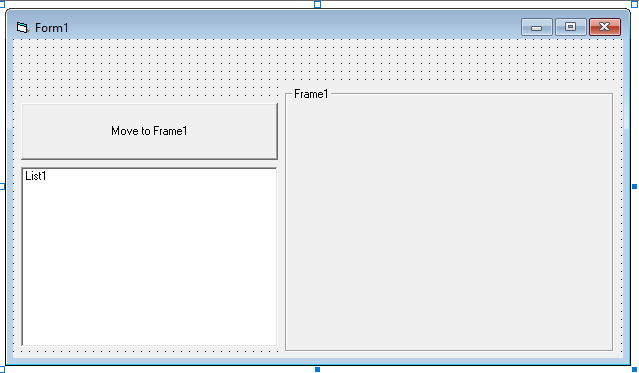
Design (Setup)
Super simple, just add the following to the default form:
- Command Button (to trigger the action)
- List box (the control we’ll move)
- Frame (where the control moves to)
Codes (Setup)
We’re just going to put some content in our list like so:

If you want to use something else, like a picture box — just load an image.
Codes (Action)
It’s actually just one line (where we set the “Container” property).
The last 2 lines are just to move the control to the center — you don’t have to.

Magic Time!
Now let’s try the code 🙂
Before clicking the button
Here’s what you should see when you run the codes:

After clicking the button
And here’s what you’ll see once you click the button:

That’s all folks!
Like I said, just a fun little coding blog 🙂
Originally published at https://coffeewithdennis.com.
메타데이터
- post_id
- 3f18b7833585
- slug
- you-gotta-move-it-move-it-vb6-magic-3f18b7833585
- url
- https://medium.com/@pjonsms/you-gotta-move-it-move-it-vb6-magic-3f18b7833585
- canonical_url
- https://medium.com/@pjonsms/you-gotta-move-it-move-it-vb6-magic-3f18b7833585
- author_url
- https://medium.com/@pjonsms
- status
- ok
- fetched_at
- 2026-06-29 22:44:20






