The Part of Homebuying No One Talks About, and the AI Tool I Built to Survive It
My first working RAG pipeline, what it does, how I built it, and the chunking bug that taught me more than the success did.
The Part of Homebuying No One Talks About, and the AI Tool I Built to Survive It
My first working RAG pipeline, what it does, how I built it, and the chunking bug that taught me more than the success did.
What is RAG, and why does it matter?
RAG stands for Retrieval-Augmented Generation. The idea is simple: instead of asking a language model to answer from memory (which leads to hallucinations), you first retrieve the relevant parts of a document, then feed only those parts to the model to generate an answer.
The pipeline looks like this:
PDF → Parse → Chunk → Embed → Index → Retrieve → Generate Answer
It’s the foundation of every “chat with your documents” product you’ve seen — from legal tech to healthcare to finance. I built one from scratch this week using LlamaIndex, Groq (Llama 3.1 8B), and BAAI/bge-small-en-v1.5 embeddings.
The document: a Lender Fee Worksheet
I used a real mortgage fee worksheet, the kind of dense, table-heavy PDF that makes most people’s eyes glaze over. It’s full of line items like “Orig. Fee,” “PMI,” “PITI,” and “Services You Cannot Shop For.” Exactly the kind of document where an AI assistant would actually save someone time.
I queried it with two questions:
Prompt 1: “What is the total estimated monthly payment?”
Prompt 2: “How much does the borrower pay for lender’s title insurance?”
The build
Embedding model: BAAI/bge-small-en-v1.5
I originally planned to use Google’s text-embedding-004 — it ranks highly on retrieval benchmarks and pairs naturally with the Gemini ecosystem. Then I hit a wall: the Google GenAI SDK kept routing to a deprecated API version (v1beta) that doesn’t support the embedding endpoint.
Rather than fight SDK versioning, I switched to BAAI/bge-small-en-v1.5 from HuggingFace. It’s a top-performing 384-dimension model on the MTEB leaderboard, runs entirely locally (no API quota, no auth issues), and for a structured single-page document, it’s more than sufficient. It retrieved relevant chunks with cosine similarity scores above 0.70 on both queries.
Lesson: the “best” model on paper isn’t always the right model for your environment. Practical constraints are real.
Chunking: SentenceSplitter, 512 tokens, 64 overlap
A fee worksheet is basically a table. Each row has a label, a dollar amount, and sometimes a note. My chunking logic needed to keep those pieces together.
I used chunk_size=512 with chunk_overlap=64 — large enough to capture a full line item with surrounding context, small enough not to bundle unrelated fees into one retrieval unit. The overlap prevents a classic failure mode: the fee label at the end of one chunk, the dollar amount at the start of the next, with neither chunk containing a complete answer.
Retrieval: vector similarity, top_k=5
I chose dense vector retrieval over keyword (BM25) search because the queries are paraphrased — “total estimated monthly payment” doesn’t appear verbatim in the document. The actual text reads something like “Estimated Monthly P&I + Taxes + Insurance.” Vector search handles that semantic gap; keyword search doesn’t.
The failure that taught me the most
I ran an optimization sweep across three chunk sizes (256, 512, 1024) and two top-k values (3, 5). The results surprised me:
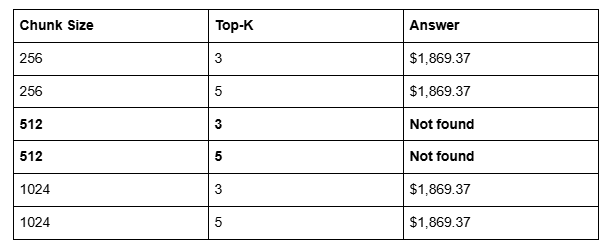
My “standard” chunk size — the one I’d read about in documentation, the one that’s most commonly recommended — was the worst performer. 512 tokens split the monthly payment figure right at a chunk boundary. Neither adjacent chunk had enough context to answer the question.
This is exactly why you can’t just copy default parameters and ship. Chunk size is document-dependent. A fee table has a completely different structure than a legal contract or a research paper. The right chunk size for one document type can be the wrong one for another.
The correct answer, confirmed by the sweep: $1,869.37. And Prompt 2 worked cleanly at every configuration: $650.00 for Lender’s Title Insurance.
What I’d do differently in production
A few things I’d add to a production-grade version of this pipeline:
Hybrid retrieval. Combining BM25 (keyword) with vector search would give better recall on financial abbreviations that embedding models sometimes underweight. For a single-page PDF, pure vector search is fine. For a 200-page loan packet, you’d want both.
Chunk size validation. Before indexing any new document type, run a quick sweep like I did above. Don’t assume 512 is right.
Metadata filtering. A real mortgage system might have hundreds of documents. Adding document-level metadata (loan ID, date, borrower) and filtering before retrieval would dramatically improve precision.
The stack
- Framework: LlamaIndex
- LLM: Groq (Llama 3.1 8B Instant) — free tier, fast, no quota issues
- Embeddings: BAAI/bge-small-en-v1.5 (HuggingFace, local)
- PDF parsing: SimpleDirectoryReader + pypdf
- Environment: Google Colab
Total cost to run: $0.
What’s next
This is week 5 of the externship. I’m continuing to build on this, next up is applying similar retrieval techniques to more complex document types and exploring hybrid retrieval strategies.
If you’re learning AI and haven’t built a RAG pipeline yet, I’d genuinely recommend starting here. It’s one of those projects where you understand why every component exists by the time you finish debugging it.
The chunking bug will make sure of that.
메타데이터
- post_id
- 3f21f4cbcd79
- slug
- the-part-of-homebuying-no-one-talks-about-and-the-ai-tool-i-built-to-survive-it-3f21f4cbcd79
- url
- https://medium.com/@lybasiddiqui02/the-part-of-homebuying-no-one-talks-about-and-the-ai-tool-i-built-to-survive-it-3f21f4cbcd79
- canonical_url
- https://medium.com/@lybasiddiqui02/the-part-of-homebuying-no-one-talks-about-and-the-ai-tool-i-built-to-survive-it-3f21f4cbcd79
- author_url
- https://medium.com/@lybasiddiqui02
- status
- ok
- fetched_at
- 2026-06-09 15:37:30




