The Constructor Is Not a Lifecycle Hook
Reading a parent-bound @Input() inside the constructor?
The Constructor Is Not a Lifecycle Hook
Reading a parent-bound @Input() inside the constructor?
You are not reading the value passed by the parent.
You are reading whatever value the property had before Angular applied the input binding.
export class ProductCardComponent {
  @Input() productId!: string;
constructor() {
console.log(this.productId);
// The parent-bound value has not been assigned yet.
}
}That distinction explains why Angular has lifecycle hooks such as ngOnInit, ngOnChanges, and ngAfterViewInit.
The constructor creates the class instance.
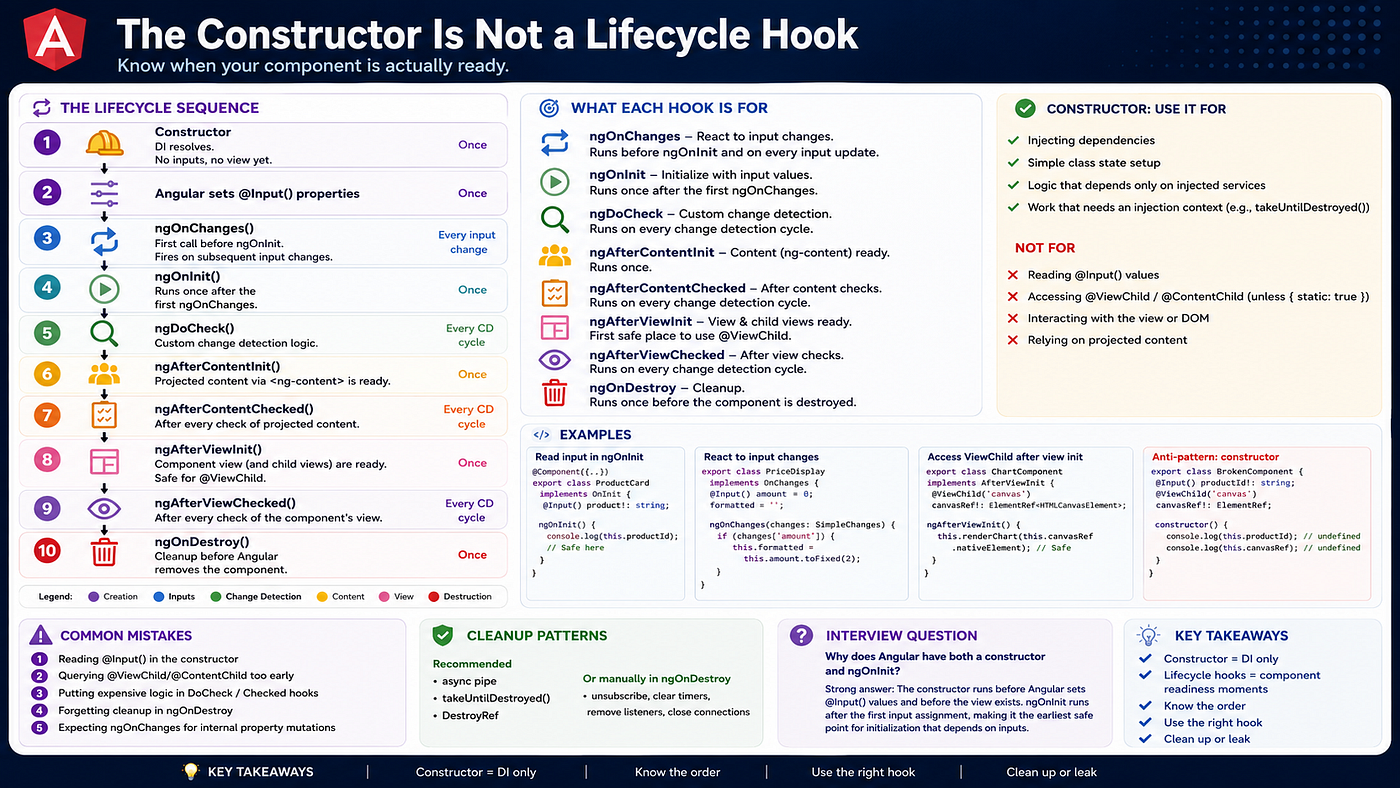
Lifecycle hooks tell you how far Angular has progressed in creating, binding, rendering, checking, and eventually destroying the component.
Constructor vs. ngOnInit
The constructor is a JavaScript and TypeScript class feature — not an Angular lifecycle hook.
When Angular creates a component, the constructor is part of the class-instantiation process. At this point:
- Dependency injection is available.
- Constructor parameters and field-level inject() calls can be resolved.
- Parent-bound inputs have not yet been applied.
- Projected content has not been initialized.
- The component view has not been initialized.
- Dynamic view queries are not available.
Use the constructor for:
- Injecting dependencies.
- Initializing simple class state.
- Logic that depends only on injected services.
- Setup that specifically requires an Angular injection context.
Do not use it for logic that depends on inputs, projected content, or the rendered view.
export class ProductCardComponent implements OnInit {
  @Input({ required: true }) productId!: string;
constructor(private products: ProductService) {
// Dependency injection is available here.
} ngOnInit(): void {
// Angular has completed the initial input assignment.
this.products.loadProduct(this.productId);
}
}An important detail: ngOnInit does not magically guarantee that every input contains meaningful data. It guarantees that Angular has completed its initial input-assignment phase. Optional inputs can still be undefined, and a parent can still pass an undefined value. Angular documents ngOnInit as running once after the component’s inputs have been initialized.
The Lifecycle Sequence
During the component’s initial creation, the important sequence is:
Component class is instantiated
            │
            ▼
constructor
DI available, parent-bound inputs not assigned
            │
            ▼
Angular assigns initial inputs
            │
            ▼
ngOnChanges
Runs if Angular has assigned or changed inputs
            │
            ▼
ngOnInit
Runs once after initial input assignment
            │
            ▼
ngDoCheck
Runs during every check
            │
            ▼
ngAfterContentInit
Projected content initialized
            │
            ▼
ngAfterContentChecked
Projected content checked
            │
            ▼
ngAfterViewInit
Component and child views initialized
            │
            ▼
ngAfterViewChecked
Component and child views checked
            │
            ▼
Component continues living
            │
            ▼
ngOnDestroy
Cleanup before destruction
Angular also provides render callbacks such as afterNextRender and afterEveryRender. These are application-level render callbacks rather than class lifecycle methods, so they are conceptually separate from hooks such as ngOnInit and ngAfterViewInit.
What Each Hook Is Actually For
ngOnChanges
ngOnChanges runs when Angular assigns a new value to one or more component inputs.
On the first initialization, it runs before ngOnInit. It can then run again whenever Angular updates those inputs.
export class PriceDisplayComponent implements OnChanges {
  @Input() amount = 0;
formattedAmount = '0.00'; ngOnChanges(changes: SimpleChanges): void {
const amountChange = changes['amount']; if (amountChange) {
console.log('Previous:', amountChange.previousValue);
console.log('Current:', amountChange.currentValue);
console.log('First change:', amountChange.firstChange); this.formattedAmount = this.amount.toFixed(2);
}
}
}Use ngOnChanges when the component must react not only to the initial input, but also to future input updates.
A subtle but important correction: ngOnChanges is not limited strictly to parent-template bindings. It runs for Angular-managed input updates, including updates made through ComponentRef.setInput() for dynamically created components. Directly mutating the component instance does not provide the same lifecycle behaviour.
// Angular-managed input update:
componentRef.setInput('amount', 500);
// Direct property mutation:
componentRef.instance.amount = 500;The first participates correctly in Angular’s input lifecycle. The second is simply a JavaScript property assignment.
ngOnInit
ngOnInit runs once.
Use it for initialization that depends on the component’s initial inputs.
export class UserProfileComponent implements OnInit {
  @Input({ required: true }) userId!: string;
profile?: UserProfile; constructor(private users: UserService) {} ngOnInit(): void {
this.profile = this.users.getCachedProfile(this.userId);
}
}Do not use ngOnInit when the logic must run every time the input changes. For that, use ngOnChanges, an input setter, or an appropriate signal-based approach.
ngDoCheck
ngDoCheck runs during every change-detection check of the component.
It exists for specialised custom change-detection behaviour that Angular’s normal checks do not cover.
ngDoCheck(): void {
  // This may run extremely frequently.
}
It should be used sparingly.
Placing expensive filtering, API calls, large comparisons, DOM measurements, or logging here can create performance problems because the method may execute far more often than expected.
ngAfterContentInit
ngAfterContentInit runs once after Angular initializes content projected into the component through <ng-content>.
<app-card>
  <app-card-title>Payment Details</app-card-title>
</app-card>
Inside app-card, the projected app-card-title belongs to the component’s content, not its own view.
This is the lifecycle phase associated with content queries such as @ContentChild.
ngAfterContentChecked
This hook runs after Angular checks the projected content.
Unlike ngAfterContentInit, it can run repeatedly, so heavy logic should not be placed here.
ngAfterViewInit
ngAfterViewInit runs once after Angular initializes the component’s own template and its child views.
For the default dynamic @ViewChild query, this is the first reliable lifecycle hook in which the result can be accessed.
export class SalesChartComponent implements AfterViewInit {
  @ViewChild('canvas')
  canvasRef!: ElementRef<HTMLCanvasElement>;
ngAfterViewInit(): void {
this.renderChart(this.canvasRef.nativeElement);
} private renderChart(canvas: HTMLCanvasElement): void {
// Initialise the chart library.
}
}Angular’s query documentation states that dynamic view queries become available before ngAfterViewInit.
There is one important exception:
@ViewChild('canvas', { static: true })
canvasRef!: ElementRef<HTMLCanvasElement>;
A static query can be available earlier — before ngOnInit. Therefore, saying that every @ViewChild is always undefined until ngAfterViewInit is too absolute.
For most conditional or dynamically changing templates, however, the default dynamic query and ngAfterViewInit are the safer mental model.
ngAfterViewChecked
This hook runs after Angular checks the component’s view and child views.
It can run frequently.
Avoid expensive calculations and avoid casually changing template-bound state inside it. Doing so can create repeated checks or expression-changed errors.
ngOnDestroy
ngOnDestroy runs once immediately before Angular destroys the component.
Use it to release resources that will otherwise remain active:
- Long-lived manual RxJS subscriptions.
- setInterval timers.
- WebSocket connections.
- Manually registered global event listeners.
- ResizeObserver or MutationObserver instances.
- Third-party libraries with explicit destruction APIs.
export class DashboardComponent implements OnDestroy {
  private intervalId = window.setInterval(() => {
    this.refreshDashboard();
  }, 30_000);
private handleResize = (): void => {
this.recalculateLayout();
}; constructor() {
window.addEventListener('resize', this.handleResize);
} ngOnDestroy(): void {
window.clearInterval(this.intervalId);
window.removeEventListener('resize', this.handleResize);
} private refreshDashboard(): void {} private recalculateLayout(): void {}
}The cleanup requirement applies to resources that remain active.
Not every subscription automatically creates a memory leak. An observable that completes by itself — such as a normal Angular HttpClient request — does not require manual unsubscription after completion.
Likewise, subscriptions managed through the async pipe or takeUntilDestroyed() are automatically cleaned up.
A Modern Angular Cleanup Pattern
The constructor is not a forbidden zone.
It is valid to perform work there when that work:
- Depends only on injected dependencies.
- Does not depend on inputs or the view.
- Is connected to the component’s destruction lifecycle.
For example:
@Component({
  selector: 'app-video-player',
  template: `...`,
})
export class VideoPlayerComponent {
  private playback = inject(PlaybackService);
constructor() {
this.playback.progress$
.pipe(takeUntilDestroyed())
.subscribe(progress => {
this.updateProgressBar(progress);
});
} private updateProgressBar(progress: number): void {
// Update component state.
}
}This constructor subscription is valid because it depends only on an injected service and uses takeUntilDestroyed().
The operator automatically completes the observable subscription when the component is destroyed. When no DestroyRef is passed explicitly, it must be called from an injection context — commonly a constructor or field initializer.
So the correct rule is not:
Never do anything in the constructor.
The better rule is:
Never use the constructor for work that assumes Angular has already initialized the component’s inputs, content, or view.
Under the Hood
Angular walks the component tree during change detection and invokes lifecycle methods at specific stages of that traversal.
That is why the order matters:
- Inputs must be assigned before ngOnInit.
- Projected content must exist before ngAfterContentInit.
- The component view must exist before dynamic view queries can be used.
- Cleanup must run before the component is removed.
Hooks ending in Checked and ngDoCheck participate in repeated checks. Their cost is multiplied across change-detection runs and across every component instance that implements them.
A method that takes only two milliseconds may not sound expensive. But if it runs repeatedly across dozens of components during user interactions, it can become a visible performance problem.
Lifecycle hooks are therefore not just convenient callbacks.
They are execution points inside Angular’s rendering and change-detection process.
Common Mistakes
1. Reading parent-bound inputs in the constructor
constructor() {
  this.loadProduct(this.productId);
}
Angular has not applied the parent’s bound value yet.
Use ngOnInit for initial input-dependent logic.
2. Using ngOnInit for input changes
ngOnInit(): void {
  this.calculatePrice(this.amount);
}
This runs only once.
When amount can change later, use ngOnChanges, an input setter, or signals.
3. Assuming every input is defined in ngOnInit
Angular has completed input assignment, but an optional input can still be absent or explicitly set to undefined.
Use required inputs, defaults, validation, or appropriate null handling.
4. Accessing dynamic view queries too early
The default @ViewChild query should normally be accessed in ngAfterViewInit, not in the constructor or ngOnInit.
Remember that { static: true } is a deliberate exception, not the default rule.
5. Putting expensive work in frequently executed hooks
Be especially careful with:
- ngDoCheck
- ngAfterContentChecked
- ngAfterViewChecked
These are not one-time initialization hooks.
6. Forgetting to clean up long-lived resources
A component can disappear from the screen while its interval, event listener, observer, WebSocket, or subscription continues running.
Use:
- ngOnDestroy
- DestroyRef
- takeUntilDestroyed()
- The async pipe
- Cleanup APIs provided by third-party libraries
7. Expecting direct property assignments to trigger ngOnChanges
componentRef.instance.amount = 100;That is a normal JavaScript assignment.
For a dynamically created component, use:
componentRef.setInput('amount', 100);This allows Angular to process the update as an input change.
Interview Question
Why does Angular provide both a constructor and ngOnInit?
A strong answer:
The constructor is responsible for creating the class instance and provides an Angular injection context. It runs before Angular completes input binding, content initialization, and view initialization.
Key Takeaways
- The constructor is class instantiation — not an Angular lifecycle hook.
- Dependency injection is available during construction.
- Parent-bound input values are applied after the component instance is created.
- ngOnChanges reacts to Angular-managed input updates.
- ngOnInit runs once after initial input assignment.
- Dynamic @ViewChild queries are normally accessed in ngAfterViewInit.
- { static: true } view queries are an important exception.
- ngDoCheck and the Checked hooks can run frequently.
- Clean up long-lived resources using ngOnDestroy, DestroyRef, or takeUntilDestroyed().
- The constructor does not need to be empty — it simply must not depend on lifecycle state that does not exist yet.
The constructor tells you that the class exists.
Lifecycle hooks tell you how far Angular has progressed in turning that class into a working component.
Have you ever found a timer, event listener, WebSocket, or subscription still running after its Angular component had already disappeared?
메타데이터
- post_id
- 3f2cd1fc53b3
- slug
- the-constructor-is-not-a-lifecycle-hook-3f2cd1fc53b3
- url
- https://medium.com/@pranavrajojha/the-constructor-is-not-a-lifecycle-hook-3f2cd1fc53b3
- canonical_url
- https://medium.com/@pranavrajojha/the-constructor-is-not-a-lifecycle-hook-3f2cd1fc53b3
- author_url
- https://medium.com/@pranavrajojha
- status
- ok
- fetched_at
- 2026-08-02 13:13:03




