Python PYD distribution
Following the the procedure to create a binary wheel which is useful when you want to distribute your python library or module but do not…
Python PYD distribution
Following the the procedure to create a binary wheel which is useful when you want to distribute your python library or module but do not want code to be exposed . This is platform dependent so if you are compiling it on windows then this is going to work on windows only . Procedure is same for Linux however there “.so” files will be created.
I did the compilation on windows .
- Suppose your repository name is “myapprep” and project structure should be as below
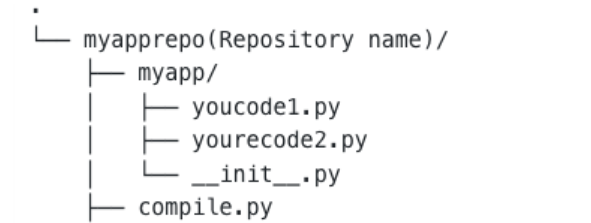
- Make sure you have installed cython and wheel package in your python envionment
python -m pip install cython
python -m pip install wheel
- compile.py will have following contents
*import os import sysconfig
from setuptools import setup, find_packages from setuptools.command.build_py import build_py as _build_py
from Cython.Build import cythonize
EXCLUDE_FILES = [ ] EXCLUDE_DIRS = [ “.git” ]
def get_ext_paths(root_dir, exclude_files, exclude_dirs): “””get filepaths for compilation””” paths = []
for root, dirs, files in os.walk(root_dir): dirs[:] = [d for d in dirs if d not in exclude_dirs] for filename in files: if os.path.splitext(filename)[1] != ‘.py’: continue
file_path = os.path.join(root, filename) if file_path in exclude_files: continue
paths.append(file_path) return paths
noinspection PyPep8Naming
class build_py(_build_py):
def find_package_modules(self, package, package_dir): ext_suffix = sysconfig.get_config_var(‘EXT_SUFFIX’) modules = super().find_package_modules(package, package_dir) filtered_modules = [] for (pkg, mod, filepath) in modules: if os.path.exists(filepath.replace(‘.py’, ext_suffix)): continue filtered_modules.append((pkg, mod, filepath, )) return filtered_modules
setup( name=’myapp<keep your package name>’, version=’1.0.1',
packages=find_packages(),
ext_modules=cythonize( get_ext_paths(‘.’, EXCLUDE_FILES, EXCLUDE_DIRS), compiler_directives={‘language_level’: 3} ), cmdclass={ ‘build_py’: build_py } )*
- Then run the following command to create a wheel.
cd myapprep
python.exe compile.py build_ext — inplace bdist_wheel
Go to build directory and you will have a wheel file of your code which you can install it using pip.
wheel file will looks like this “myapp-1.0.3-cp38-cp38-win_amd64.whl”
Install it using pip .
python -m pip install myapp-1.0.3-cp38-cp38-win_amd64.whl
메타데이터
- post_id
- 3f511f074a43
- slug
- python-pyd-distribution-3f511f074a43
- url
- https://medium.com/@zombiekillerr/python-pyd-distribution-3f511f074a43
- canonical_url
- https://medium.com/@zombiekillerr/python-pyd-distribution-3f511f074a43
- author_url
- https://medium.com/@zombiekillerr
- status
- ok
- fetched_at
- 2026-07-26 23:00:14




