npm v12 Will Break Installs That Trust Hidden Scripts
Your build may depend on code that runs before your app ever starts.
npm v12 Will Break Installs That Trust Hidden Scripts
Your build may depend on code that runs before your app ever starts.
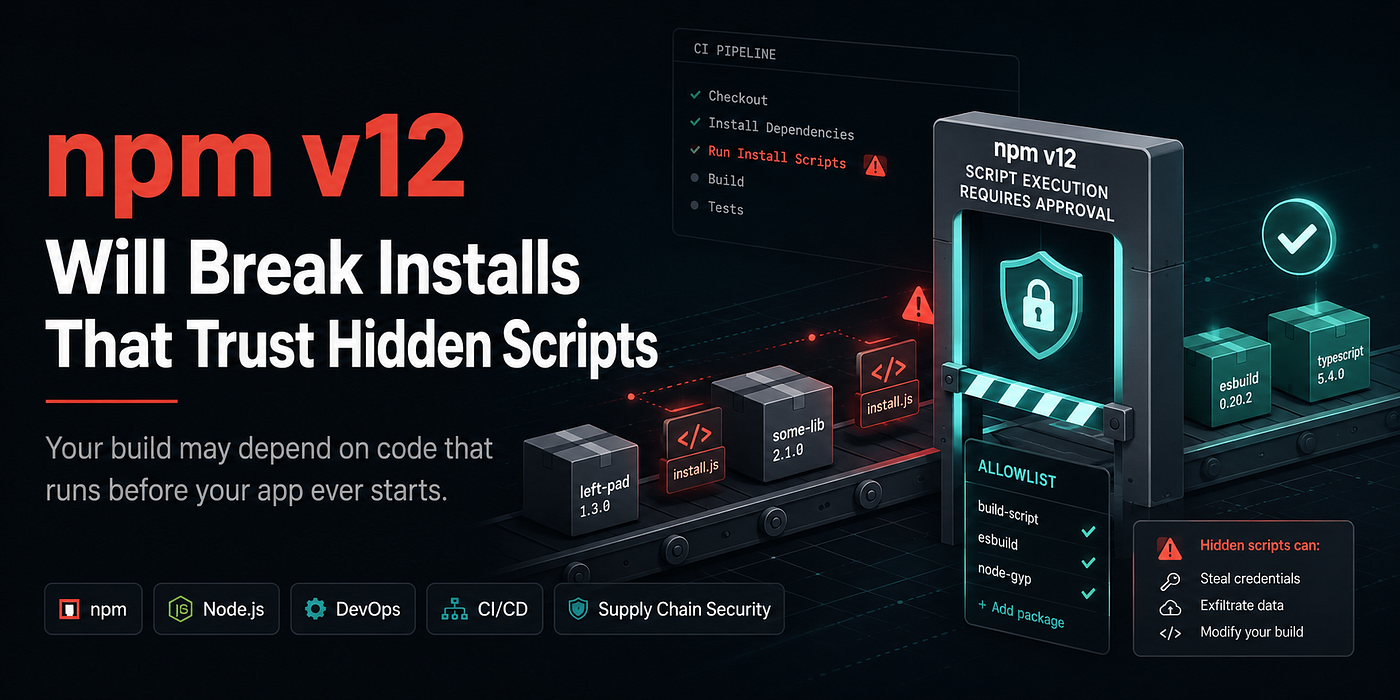
This image was created using an AI image generation program.
npm v12 is about to make that hidden install-time behavior explicit.
That is the useful warning.
GitHub announced on June 9, 2026 that npm v12 is estimated for July 2026 and will introduce security-related default changes to npm install. The changes are already available behind warnings in npm 11.16.0 or newer, which means teams can audit before the major upgrade hits CI.
The practical takeaway:
Do not wait for npm v12 to break your pipeline.
Find the dependency scripts now.
The dangerous part of
npm installis not always what it downloads. Sometimes it is what it runs.
The big change: install scripts stop being automatic
Today, many packages can run lifecycle scripts during installation.
That includes preinstall, install, postinstall, and some prepare scripts. npm v12 changes the default: npm install will no longer execute dependency install scripts unless those packages are explicitly approved in the project. GitHub’s changelog says this also includes implicit native node-gyp builds when a package has a binding.gyp and no explicit install script.
That last detail matters.
Some teams think they do not depend on install scripts.
Then a native dependency quietly compiles during install.
That may be fine.
But after npm v12, “fine” needs to be recorded as policy.
This is not only a frontend problem
It is tempting to file this under frontend tooling.
That is too narrow.
npm install scripts show up in:
- React and Next.js apps,
- Node backends,
- CLIs,
- Electron apps,
- native Node modules,
- monorepos,
- serverless functions,
- Docker builds,
- package publishing workflows,
- internal developer tools.
A backend service can depend on a native package.
A CLI can depend on a postinstall step.
A Docker image can fail during npm ci.
A monorepo can have different approval needs across workspaces.
The install step is infrastructure.
Treat it that way.
The new project policy is allowScripts
npm’s approve-scripts docs say the command manages the allowScripts field in package.json. That field records which dependencies are allowed to run install scripts. In the current npm release, this is advisory: scripts still run by default, but installs print warnings for packages whose scripts have not been reviewed. A future release will block unreviewed install scripts.
The preview command is:
npm approve-scripts --allow-scripts-pendingThat lists packages whose install scripts are not yet covered by policy.
Then you make a decision:
npm approve-scripts sharp
npm deny-scripts suspicious-package
The result belongs in source control because the allowlist is written to package.json and should be committed.
If a dependency can run code during install, approving it should be a code review decision.
Do not approve everything just to make warnings disappear
npm provides npm approve-scripts --all.
That is useful for migration.
It is also easy to misuse.
A package script approval should answer one question:
Why does this package need install-time code?
Common legitimate reasons include native builds, platform-specific binaries, generated assets, or package setup steps.
But “it appeared in the warning list” is not enough.
A safer review asks:
- Is the package direct or transitive?
- Is the script expected?
- Is the package maintained?
- Is the version pinned by the lockfile?
- Does the package download binaries?
- Does it compile native code?
- Does it run network operations?
- Does it touch files outside its package?
- Is there a pure JS alternative?
- Does CI actually need the script?
You do not need a committee for every package.
You do need intent.
Pin approvals when the version matters
The approve-scripts docs say package approvals are pinned by default, such as pkg@1.2.3, which keeps approval narrowed to the specific version reviewed. The docs also allow name-only approvals with --no-allow-scripts-pin, but that allows future versions of the same package too.
This is the tradeoff.
Pinned approval is safer.
Name-only approval is less noisy.
For a dependency with a stable, expected install script, a name-only approval may be acceptable.
For a dependency that downloads binaries, compiles native code, or sits deep in the supply chain, pinned approval is easier to defend.
A good default:
Pin approvals first.
Relax only after you understand the package.
Deny is also a policy
npm’s deny-scripts command writes false entries into allowScripts, recording that a dependency must not run install scripts even if a future version would otherwise be eligible. The docs say deny entries are written name-only because pinning a deny to one version could silently allow scripts from a different version later.
That design is worth noticing.
Allow can be version-specific.
Deny should be broad.
If a dependency should not run scripts, make that explicit.
Do not leave it as an unreviewed warning that somebody else will handle later.
Git dependencies also change
npm v12 is not only about lifecycle scripts.
The GitHub changelog says --allow-git will default to none. That means npm install will no longer resolve Git dependencies, direct or transitive, unless explicitly allowed. The reason: Git dependencies created a code-execution path where a dependency’s .npmrc could override the Git executable, even with --ignore-scripts.
That is a sharp edge.
Search for this in your manifests:
git+
github:
gitlab:
bitbucket:
Git dependencies are not always bad.
But they are not the same as registry dependencies.
They may bypass normal package publishing expectations, provenance expectations, and registry metadata.
npm v12 pushes teams to make that tradeoff explicit.
Remote tarballs change too
The same changelog says --allow-remote will default to none. npm v12 will no longer resolve dependencies from remote URLs, such as HTTPS tarballs, unless explicitly allowed.
Search for:
https://
http://
.tgz
Remote tarballs sometimes exist for good reasons:
- internal packages,
- temporary forks,
- vendor builds,
- release candidates,
- old migration hacks.
But they are also easy to forget.
A remote tarball in package.json is not just a dependency.
It is an availability, integrity, and supply-chain decision.
CI is where this becomes visible
Local installs are noisy.
CI installs are unforgiving.
A developer may miss warnings in a terminal scrollback. A pipeline will eventually fail when the default changes.
Add a preparation job before npm v12 lands:
- run: npm i -g npm@latest
- run: npm --version
- run: npm ci
- run: npm approve-scripts --allow-scripts-pending
Do not copy this blindly into production release workflows.
Use it as an audit job.
The goal is to see what will need approval, not to silently mutate your repo during CI.
For a real repo, the better version belongs in a small script that:
- checks npm version,
- runs install,
- lists pending scripts,
- searches manifests for Git dependencies,
- searches lockfiles for remote tarballs,
- fails only when you choose to enforce policy.
Docker builds need attention
Many teams discover npm changes inside Docker first.
A Dockerfile might have:
RUN npm ci --omit=devThat install happens in a clean environment.
No developer global config.
No local cached approval assumptions.
No manual prompt.
That is exactly where explicit policy helps.
A committed allowScripts field travels with the project.
A developer’s memory does not.
This connects to npm’s broader security shift
npm has been tightening publishing and authentication too.
GitHub’s September 2025 npm security changelog said new write-enabled granular npm access tokens would have a seven-day default expiration and a ninety-day maximum expiration. It also recommended reviewing CI/CD publishing workflows and considering Trusted Publishers with OIDC for GitHub Actions workflows.
Then, on December 9, 2025, GitHub said npm classic tokens were permanently revoked, npm login began using two-hour session tokens, and CLI token management for granular tokens became available.
npm’s CI/CD docs now recommend trusted publishing instead of access tokens for package publishing when supported. Trusted publishing uses OIDC and avoids the security risks of long-lived tokens.
So npm v12 is not an isolated surprise.
It is part of a larger move:
Less silent trust. More explicit policy. Shorter-lived credentials. Fewer default code-execution paths.
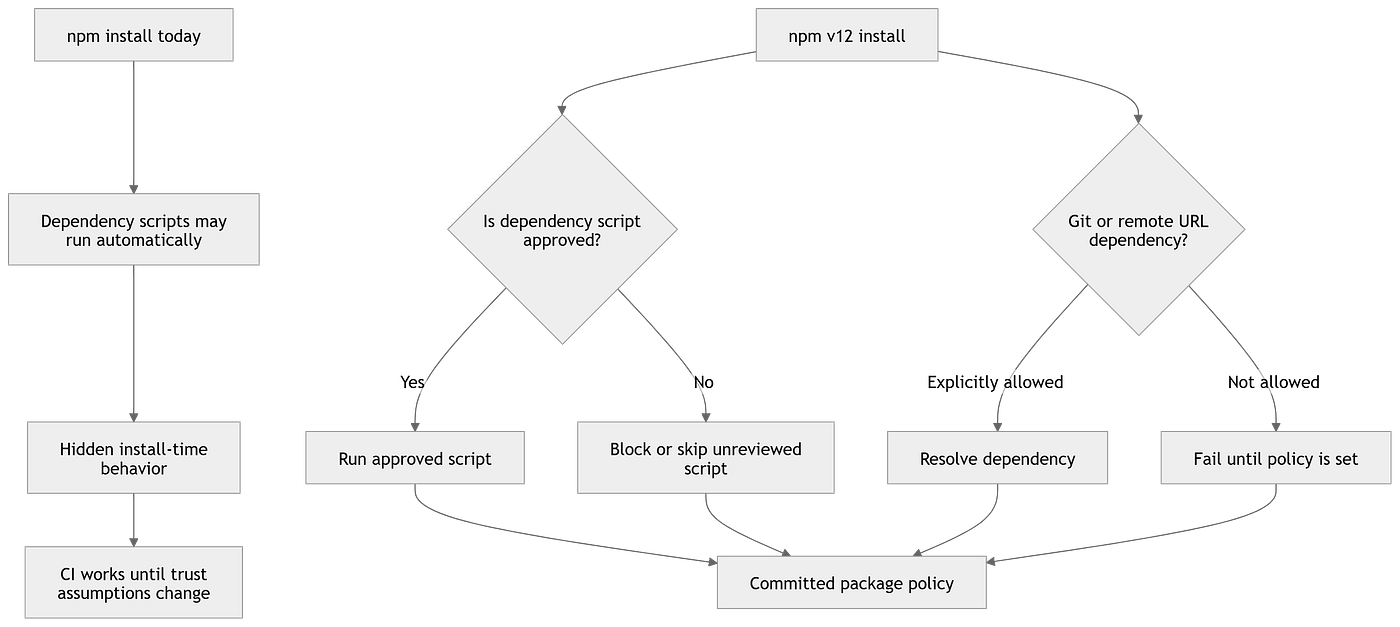
npm v12 changes dependency installation from silent execution to explicit project trust policy.
The practical audit checklist
Start here.
1. Upgrade one test environment to npm 11.16+
GitHub says warnings are available in npm 11.16.0 or newer, so you can prepare before npm v12.
2. Run a normal install
Use the same command your CI uses: npm ci, npm install, Docker build, or your package-manager wrapper.
3. List pending scripts
Run:
npm approve-scripts --allow-scripts-pending4. Review before approving
Separate expected native packages from surprising scripts.
5. Commit allowScripts
Do not leave approvals on one machine.
6. Search for Git dependencies
Look for git+, github:, gitlab:, and bitbucket:.
7. Search for remote tarballs
Look for HTTP(S) tarball dependencies.
8. Add CI visibility
Print npm version and fail intentionally only after the team agrees on policy.
9. Review publishing tokens
If the repo publishes packages, check whether it should use trusted publishing instead of long-lived tokens.
10. Document escape hatches
If a team needs a temporary bypass, document who owns removing it.
The opinion
Do not treat npm v12 as “npm got stricter.”
Treat it as npm making hidden trust visible.
That is the opinion someone could disagree with.
Some developers will see this as friction. They are not completely wrong. Builds may need new approvals. CI may need changes. Old dependency shortcuts may surface.
But the previous default also had a cost.
Install-time code execution happened too quietly.
Git dependencies were too easy to forget.
Remote tarballs were too easy to normalize.
npm v12 makes those choices harder to ignore.
A build that only works because nobody reviewed install-time code was already fragile.
What this changes for teams
The best response is not panic.
It is a small policy.
For example:
Install scripts require review.
Approvals are pinned by default.
Deny entries are explicit.
Git dependencies need a reason.
Remote tarballs need an owner.
Publishing should prefer trusted publishing where available.
CI should show npm version and install policy status.
That fits in a repo doc.
It also fits in a pull request checklist.
This is the real value of npm v12: not just fewer risky defaults, but better conversations around dependency trust.
메타데이터
- post_id
- 3f6cb70af44f
- slug
- npm-v12-will-break-installs-that-trust-hidden-scripts-3f6cb70af44f
- url
- https://medium.com/write-a-catalyst/npm-v12-will-break-installs-that-trust-hidden-scripts-3f6cb70af44f
- canonical_url
- https://medium.com/write-a-catalyst/npm-v12-will-break-installs-that-trust-hidden-scripts-3f6cb70af44f
- author_url
- https://medium.com/@the-ai
- status
- ok
- fetched_at
- 2026-06-15 20:49:13