Introduction to testing Ansible roles with Molecule leveraging Docker inside Docker and Goss.
My purpose is to show a step by step guide on how to prepare a new, simple Ansible role using Molecule, write some basic Goss tests, and…
Introduction to testing Ansible roles with Molecule leveraging Docker within Docker and Goss.
My purpose is to show a step by step guide on how to prepare a new, simple Ansible role using Molecule, write some basic Goss tests, and leave the reader ready to build upon that.
Molecule is an extremely configurable testing framework. It was built to assist with creating high-quality Ansible code and making the whole process simpler. It can be customized to incorporate a wide array of tools to be used at each step, like linting (yamllint, ansible-lint, flake8) or testing (TestInfra, Inspec, Goss).
At the end of 2018, Red Hat officially announced adoption of the Molecule project, making it the default testing engine for Ansible (source).
**Goss** is a YAML based tool for validating a system’s configuration. It is written in Go. It is small, fast and easy to use and to write tests for. You can see a comparison between tests written in Goss and Testinfra here.
In this article, I will describe how to use both Molecule and Goss with Docker within Docker to isolate the testing environment and allow tests to be system independent. This helps especially when, for some reason, you don’t want to install any new pip packages to your system or want to integrate Molecule within a CI/CD pipeline.
All examples are run on macOS Mojave. All you need to have installed is Docker.
- Choose a place where you will want to create a new Ansible role. Initialise new directories structure with default files. At the same time set Molecule to use Goss instead of default testinfra. In this example we will create a role named nginx:
docker run --rm -it -v “$(pwd)”:”${PWD}” -w “${PWD}” \
-v /var/run/docker.sock:/var/run/docker.sock quay.io/ansible/molecule:2.22 \
molecule init role --verifier-name goss --role-name nginx
you should see something similar to this:

- Edit the file nginx/meta/main.yml. We will need to fill some fields here to satisfy the default linter configuration. This is how the bare minimum looks for me:
---
galaxy_info:
  author: Grzegorz Sowinski
  description: example role for Molecule testing
  company: Kainos
  license: GPLv2
min_ansible_version: 1.2platforms:
- name: CentOS
versions:
- 7
- 8galaxy_tags: []
dependencies: []- In the next step we will add new configuration settings to the nginx/molecule/default/molecule.yml file. One will make containers inside Molecule container privileged and the second will allow us to use systemd to manage services.
---
dependency:
  name: galaxy
driver:
  name: docker
lint:
  name: yamllint
platforms:
  - name: instance
    image: centos:7
    privileged: True
    command: "/usr/sbin/init"
provisioner:
  name: ansible
  lint:
    name: ansible-lint
verifier:
  name: goss
  lint:
    name: yamllint
Here is an article with more information about reasons behind that change: https://developers.redhat.com/blog/2014/05/05/running-systemd-within-docker-container.
- These steps should allow us to see the full run of Molecule:
docker run --rm -it -v "$(pwd)":"${PWD}" -w "${PWD}" \
-v /var/run/docker.sock:/var/run/docker.sock quay.io/ansible/molecule:2.22 \
molecule test
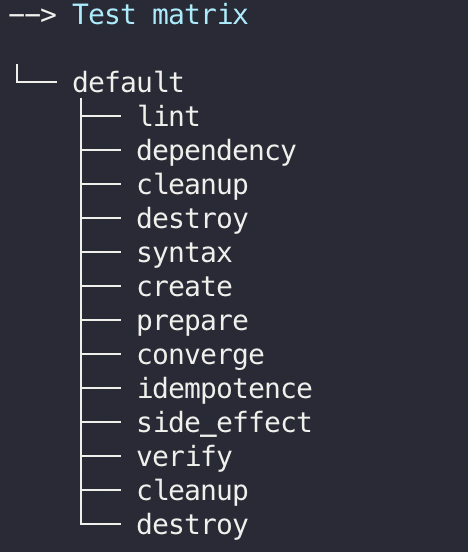
with all thirteen steps:
- We can now start to build upon this configuration. I will add a few simple Ansible statements to nginx/tasks/main.yml:
---
- name: Make sure epel-release repo is present
  yum:
    name: epel-release
    state: present
- name: Make sure nginx package is installed
yum:
name: nginx
state: present- name: Make sure default HTML dir exists
file:
path: /usr/share/doc/HTML
state: directory
mode: '0755'
owner: nginx
group: nginx- name: Make sure index file exists
copy:
content: |
This is an index file.
dest: /usr/share/doc/HTML/index.html
mode: '0644'- name: Make sure nginx service is running
systemd:
name: nginx
state: started
enabled: yes- Another run to see what will happen:
docker run --rm -it -v "$(pwd)":"${PWD}" -w "${PWD}" \
-v /var/run/docker.sock:/var/run/docker.sock quay.io/ansible/molecule:2.22 \
molecule test
Ansible role worked correctly (the “coverage” stage):

Idempotence test passed as well:

- We will now prepare a few Goss tests inside the nginx/molecule/default/tests/test_default.yml file:
---
file:
  /usr/share/doc/HTML/index.html:
    exists: true
    owner: root
    group: root
port:
tcp:80:
listening: true
ip:
- 0.0.0.0service:
nginx:
enabled: true
running: trueprocess:
nginx:
running: truehttp:
http://localhost:
status: 200
timeout: 100
body:
- "This is an index file"- And run molecule test again:
docker run --rm -it -v "$(pwd)":"${PWD}" -w "${PWD}" \
-v /var/run/docker.sock:/var/run/docker.sock quay.io/ansible/molecule:2.22 \
    molecule test
Under the task of “Display details about the Goss results” we can see the results of Goss tests:

That’s it!
I’m sure you can easily take it from here.
메타데이터
- post_id
- 3f73f56dc9b0
- slug
- introduction-to-testing-ansible-roles-with-molecule-leveraging-docker-inside-docker-and-goss-3f73f56dc9b0
- url
- https://medium.com/@g.sowinski/introduction-to-testing-ansible-roles-with-molecule-leveraging-docker-inside-docker-and-goss-3f73f56dc9b0
- canonical_url
- https://medium.com/@g.sowinski/introduction-to-testing-ansible-roles-with-molecule-leveraging-docker-inside-docker-and-goss-3f73f56dc9b0
- author_url
- https://medium.com/@g.sowinski
- status
- ok
- fetched_at
- 2026-07-29 07:04:55