Learn Vocabulary Your Way: Games, Personal Dictionaries & Focus Folders in LangPlay
If you have tried popular language apps, you probably know the pattern: either you follow a fixed lesson path, or you dump words into a big…
Learn Vocabulary Your Way: Games, Personal Dictionaries & Focus Folders in LangPlay
If you have tried popular language apps, you probably know the pattern: either you follow a fixed lesson path, or you dump words into a big personal list and hope the algorithm picks the “right” ones next.
That works for some people. It did not work for how I like to study.
I usually pick a small set of words — often around one topic — practice them for a day or two, then move on to another set. I want short sessions, clear focus, and games that make repetition feel less like homework. That is the gap LangPlay fills for me.
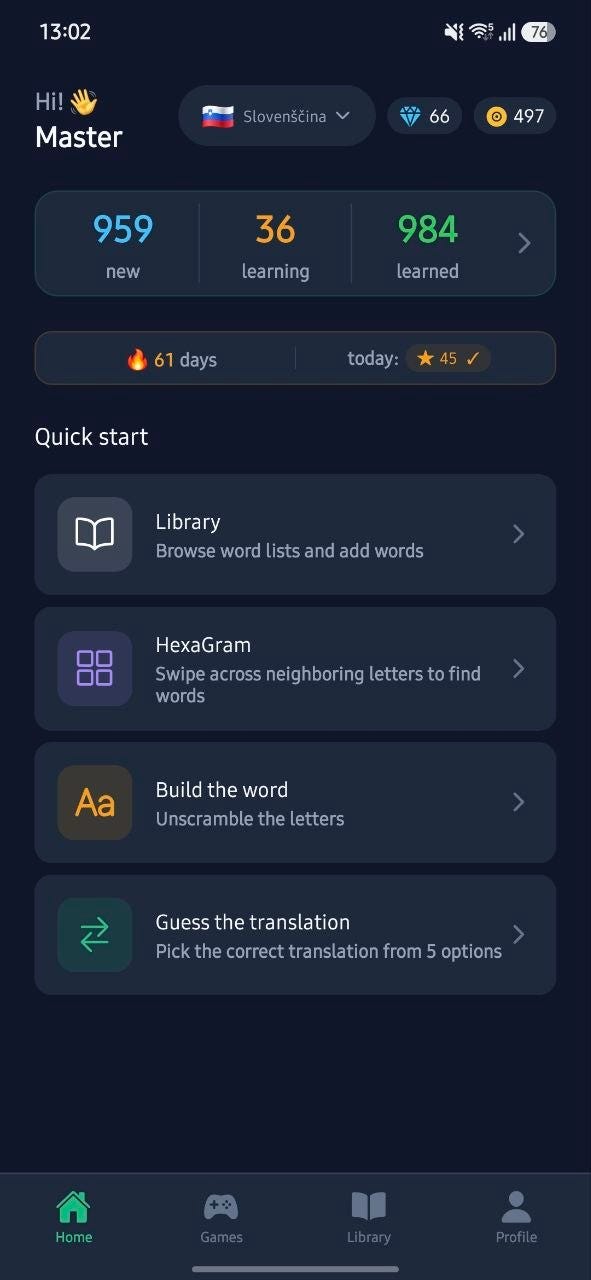
Open the app and start learning right away — no account required
Language learning that starts with play, not a syllabus
LangPlay is built around quick vocabulary games, not long lectures. You practice the same words from different angles:
- Translation Match — train recognition by pairing words with translations
- Word Builder — arrange letters to form the word
- Sentence Builder — practice putting words into sentence structure
- Wordle-style guessing — strengthen memory with a familiar puzzle format
- HexaGram — swipe letter paths and discover vocabulary through play
Sessions are bite-sized. That matters when you only have a few spare minutes: you open the app, play, and leave with more repetitions behind you — not a half-finished 20-minute lesson.

Five mini-games so the same words stick from different angles
Flexible dictionaries: your list, your topics, your pace
LangPlay includes a personal dictionary (“My words”) and a browsable library of word lists. You save the vocabulary you care about, organize it, and review it when you want — not when a course calendar says so.
You can study Slovenian, Russian, and English, practice offline where offline mode is available, and sync progress later if you create a free account. Until then, you can stay anonymous and still learn.
What I value most is control: I choose which words enter my list, and I decide when a topic is “done enough” to switch.

Browse topics in the library, then keep what you study in your personal word list.
The feature most similar apps skip: small word sets with a quick changeover
Here is the approach many learners already use outside apps — and few apps support well:
- Choose a specific set of words (often one topic).
- Focus on that set for one or more days.
- Switch to a different set when you are ready.
Traditional apps usually do one of two things instead:
- Fixed lesson order — you cannot easily isolate “just these kitchen words this week.”
- Auto-selection from a big dictionary — the app mixes your whole list and decides what appears next, without a clean way to extract a small subset for focused practice.
LangPlay’s focus-study folders are built for that workflow. You can create a folder for focused study, put a limited set of words into it, and activate that folder so learning and games use only those words. When you are ready for a new topic, you activate another folder — a quick changeover without deleting your full dictionary.
You can also start from a library category (“Study this category”): the app can turn that word set into a personal folder and use only those words while it is active. Your broader “My words” list stays intact; folders are for focus, not for throwing everything away.

Activate a folder — games use only that small set until you switch.

While a folder is active, practice stays locked to that set — then return to the full dictionary when you want.
That single idea — small sets + fast switch — is why LangPlay fits topic-based, day-by-day vocabulary work better than apps that only offer a pipeline of lessons or a opaque “smart” queue over your entire list.
AI as an aid — not the whole product
Some apps put AI in the center of every screen. LangPlay keeps the core loop on games and your dictionary. AI stays optional help when you want more context: translations when you add words, pronunciation audio, real example phrases, and extras like related words or derivations on a word card.
You still learn by playing and reviewing. AI fills gaps; it does not replace the practice.

Smart help when you need it — meaning, sound, and real usage — without turning study into a chatbot session.
Who this fits
LangPlay suits you if you want:
- Vocabulary practice through games, not a rigid course path
- A personal dictionary you control
- Topic-sized focus with folders you can activate and swap
- Offline practice when you are on the go
- Optional AI for translation, audio, and examples — not as the only method
Whether you are learning Slovenian, expanding Russian vocabulary, or practicing English words in short daily sessions, the idea is the same: play a little, focus on a clear set, then change sets when you decide — not when an algorithm or a fixed curriculum does.
Try it: LangPlay on Google Play — quick vocabulary games, your own dictionary, and focus folders for the way many of us already learn.
Pro tip: The app is actively developing, and the developer responds quickly to requests and suggestions. It’s worth sending him a request for a promo code to try out all the program’s features.
메타데이터
- post_id
- 3f9130b7914f
- slug
- learn-vocabulary-your-way-games-personal-dictionaries-focus-folders-in-langplay-3f9130b7914f
- url
- https://medium.com/@alekpikinlitva/learn-vocabulary-your-way-games-personal-dictionaries-focus-folders-in-langplay-3f9130b7914f
- canonical_url
- https://medium.com/@alekpikinlitva/learn-vocabulary-your-way-games-personal-dictionaries-focus-folders-in-langplay-3f9130b7914f
- author_url
- https://medium.com/@alekpikinlitva
- status
- ok
- fetched_at
- 2026-07-28 13:47:05




