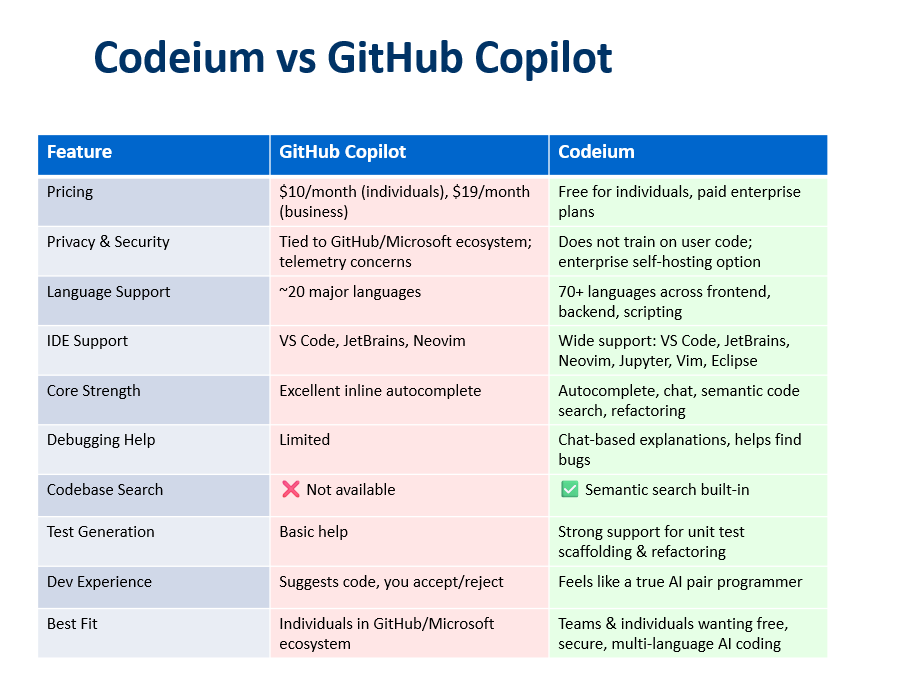
Codeium for every coding style
You can customize Codeium’s suggestions to fit your coding style through several built-in settings and feedback mechanisms.
TechieBot
in
Codeium, your own AI Pair Programmer
· 2025-06-14 22:29
· 0 claps
· 1.4 min read
paywalled
Codeium for every coding style

You can customize Codeium’s suggestions to fit your coding style through several built-in settings and feedback mechanisms.
1. Access Codeium’s Settings in Your IDE
2. Adjust Suggestion Parameters -
such as number of suggestions, trigger conditions and suggestion sensitivity.
- Trigger Conditions: Customize when suggestions appear — after a certain number of keystrokes, specific characters, or only on demand. This helps you get suggestions at the right moments.
- Suggestion Sensitivity: Fine-tune how aggressive Codeium is in offering completions, so you get suggestions that match your workflow and avoid interruptions.
- Number of Suggestions: Set how many code completions Codeium displays at once. Choose more if you like options, fewer for a cleaner workspace.
3. Language-Specific Customization
- Enable/Disable per Language: Turn Codeium on or off for specific languages you use or adjust how it behaves in each.
- Prioritize Patterns/Keywords: For languages like JavaScript, you can define keywords or code patterns you use frequently, helping Codeium prioritize those in its suggestions.
4. Filter and Refine Suggestions
- Suggestion Filtering: Exclude certain types of suggestions or repetitive code patterns you don’t want to see.
- Documentation Settings: Control how much inline documentation Codeium includes with its suggestions — if you want more context or prefer less clutter.
5. Provide Feedback and Iterate
- Accept or Modify Suggestions: Codeium learns from your choices. Accepting, editing, or rejecting suggestions helps it adapt to your coding style over time.
- Continuous Updates: Keep Codeium updated and explore new features as they’re released to further refine your experience.
6. Advanced Customization
- Performance Tweaks: For large projects, adjust performance-related settings to ensure Codeium runs smoothly without slowing your editor.
- API and Endpoint Settings: If you’re using a self-hosted or enterprise version, configure API keys and endpoints for more advanced control.
By exploring and adjusting these settings in Codeium’s extension menu, you can make its AI suggestions closely match your coding style and project needs, resulting in a more efficient and personalized development experience.
메타데이터
- post_id
- 3faaf1d366d8
- slug
- codeium-for-every-coding-style-3faaf1d366d8
- url
- https://medium.com/why-and-how-to-switch-to-ai-pair-programming-with/codeium-for-every-coding-style-3faaf1d366d8
- canonical_url
- https://medium.com/why-and-how-to-switch-to-ai-pair-programming-with/codeium-for-every-coding-style-3faaf1d366d8
- author_url
- https://medium.com/@nehag16
- status
- ok
- fetched_at
- 2026-06-09 15:37:30