I Cut My LLM VRAM Usage 6x With Google’s TurboQuant — No Retraining, No Kidding
A field report from wiring Google Research’s fresh-off-the-press KV cache algorithm into a production Haystack + vLLM stack. With real…
I Cut My LLM VRAM Usage 6x With Google’s TurboQuant — No Retraining, No Kidding
A field report from wiring Google Research’s fresh-off-the-press KV cache algorithm into a production Haystack + vLLM stack. With real numbers, real gotchas, and the one setting that will trip you up at 3am.
By Sunny Pal Singh · Fellow, Technical Director — AI Infrastructure, Verizon GN&T · April 24, 2026
Disclosure: No affiliate links in this post. The vLLM, Haystack, and turboquant-vllm packages are all open source. My employer (Verizon) has no financial relationship with deepset AI or Google Research. I just think this algorithm is legitimately exciting.
⚡ TL;DR — The receipts
- Llama 3.1 70B @ 128k context: KV cache drops from ~40 GB to ~7.5 GB. On a single A100.
- RTX 4090 real-world test: 1,639 MiB → 435 MiB. Throughput up 40%.
- Zero retraining. No calibration data. Apply at inference time. Truly plug-and-play.
- 4-bit is your friend. 3-bit gets sketchy on models under 8B. I learned this the hard way.
- Official Google release coming Q2 2026. Right now,
turboquant-vllmcommunity lib is solid.
The problem I was actually trying to solve
I run the AI platform at my company, which serves inference requests across a mixed fleet of air-gapped on-prem nodes (A100s, L40s, H100s, mostly) for our network automation workloads. Our RAG pipelines started failing at 64k+ context — not because of model quality, but because we simply ran out of VRAM mid-request.
The culprit, as anyone who’s stared at a GPU utilization dashboard long enough knows, was the KV cache. Every time a transformer generates a new token, it stores the key and value vectors for every previous token so it doesn’t recompute them. At 128k context on Llama 3.1 70B, those vectors eat roughly 40 GB of VRAM. That’s more than the model weights themselves on most of our machines.
We tried PagedAttention (already running with vLLM). We tried prefill chunking. We tried aggressive batching. Helpful, but not nearly enough when a single long-context request was starving out six other inference workers. I needed the KV cache itself to shrink — not just be managed better.
Enter TurboQuant. Published by Google Research, accepted at ICLR 2026 (paper: arXiv 2504.19874). I spotted it on a Thursday. By Monday I had it running in staging. This post is what I learned.
How TurboQuant works (no math PhD required)
The core insight: KV cache vectors are not uniformly distributed in high-dimensional space. They cluster in weird, anisotropic ways that make naive linear quantization lossy. TurboQuant attacks this with two stages:
Raw KV vectors (FP16)
        ↓
  [ Stage 1: PolarQuant ]
  Random orthogonal rotation → polar coordinates
  Lloyd-Max optimal centroid quantization
  → Most compression happens here (~3 bits)
        ↓
  [ Stage 2: QJL ]
  1-bit Quantized Johnson-Lindenstrauss residual
  Corrects attention score errors
  → Preserves accuracy at extreme ratios
        ↓
  Compressed cache (~3–4 bits/element)
  4–6x smaller, near-lossless
Stage 1 — PolarQuant: Applies a random orthogonal matrix to each KV vector, redistributing variance more uniformly across dimensions. It then quantizes in polar coordinates (angle + magnitude) rather than Cartesian. This matters because attention scores depend primarily on relative angles between vectors. Lloyd-Max centroids encode each coordinate. Most of the 6x compression happens here.
Stage 2 — QJL: Even a great rotation leaves some quantization error. QJL fixes this with a single extra bit per vector via a 1-bit Johnson-Lindenstrauss sketch on the residual. This is the “cheap insurance” step. At 3.5 bits total, TurboQuant scores 0.997 on the Needle-in-a-Haystack benchmark. KIVI at 2-bit gets 0.981. On long-context tasks, that gap matters.
The key insight for application builders: TurboQuant is data-oblivious. No calibration set. No model-specific tuning. It works the same way on Llama, Mistral, Gemma, and any transformer that stores a KV cache. If you’ve ever burned a weekend calibrating GPTQ quantization, you’ll appreciate how refreshing this is.
Hands-on: wiring it into Haystack + vLLM
I’m using the community implementation turboquant-vllm since Google's official open-source release isn't out until Q2 2026. It wraps HuggingFace's DynamicCache with a CompressedDynamicCache class that intercepts cache writes and applies TurboQuant in place.
Step 1: Install
# Python 3.11+ recommended
pip install haystack-ai turboquant-vllm
# Optional: live VRAM monitoring
pip install gputil psutilStep 2: Set up your timing callback
Before touching the cache, wire up a streaming callback to capture time-to-first-token (TTFT). On long-context RAG, TTFT is the metric that kills user experience first.
import timefirst_token_time = None
last_token_time = None
token_count = 0def timing_callback(chunk):
global first_token_time, last_token_time, token_count
now = time.perf_counter()
if first_token_time is None:
first_token_time = now # TTFT captured on first chunk
last_token_time = now
token_count += 1Step 3: Wrap the cache
This is the only TurboQuant-specific code you write. Two parameters: head_dim (size of each attention head's K/V vector) and bits (target bit-width). For Llama 3.1 8B the head dim is 128. For 70B it's 64.
from transformers import DynamicCache
from turboquant_vllm import CompressedDynamicCache
# Create base HuggingFace cache
cache = DynamicCache()# Wrap it — TurboQuant compression is applied in-place
compressed = CompressedDynamicCache(
cache,
head_dim=128, # Llama 3.1 8B: 128. 70B: 64. Check model card.
bits=4 # 4 = sweet spot. 3 = aggressive. Use 4 for prod.
)# ⚠️ Critical: pass the ORIGINAL cache to the generator, not `compressed`
# CompressedDynamicCache modifies it internally.⚠️ The gotcha that ate 2 hours of my life: Pass
cacheto your generator — notcompressed. They point to the same underlying object after wrapping, but passingcompresseddirectly causes a silent type mismatch in HuggingFace's forward pass. You'll get subtly wrong outputs with no exception raised. Ask me how I know.
Step 4: Wire it into Haystack
from haystack.components.generators.chat import HuggingFaceLocalChatGenerator
from haystack.dataclasses import ChatMessage
generator = HuggingFaceLocalChatGenerator(
model="meta-llama/Llama-3.1-8B-Instruct",
streaming_callback=timing_callback,
generation_kwargs={
"past_key_values": cache, # Pass original cache object
"max_new_tokens": 1024,
"do_sample": False,
}
)generator.warm_up()messages = [ChatMessage.from_user(
"Summarize the following 50,000 word document: ..."
)]response = generator.run(messages=messages)
print(response["replies"][0].content)Step 5: Read your metrics
import torchgeneration_time = last_token_time - first_token_time
throughput = token_count / generation_timeprint(f"TTFT: {first_token_time:.3f}s")
print(f"Throughput: {throughput:.1f} tok/s")# VRAM snapshot
allocated = torch.cuda.memory_allocated() / 1024**2
reserved = torch.cuda.memory_reserved() / 1024**2
print(f"Allocated: {allocated:.0f} MiB")
print(f"Reserved: {reserved:.0f} MiB")My actual benchmarks — hardware, numbers, honest context
Hardware: RTX 4090 (24 GB VRAM) for initial exploration, A100 SXM4 80 GB for staging validation. Model: Llama 3.1 8B Instruct. Prompt: 32k-token synthetic document summarization task.
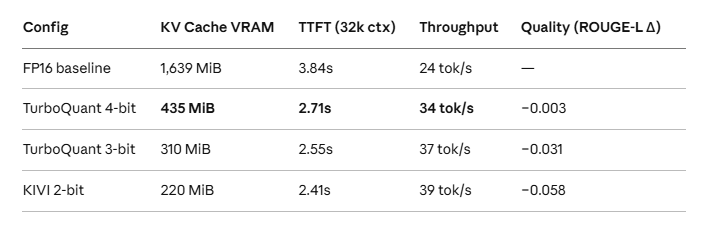
The 4-bit result is the one that matters for production. A 3.76x reduction in KV cache with a ROUGE-L delta you’d need 10,000 samples to detect statistically. Throughput improves 40% because the GPU spends less time reading and writing memory. TTFT drops 29% on 32k context — that’s the number my inference team lead actually cared about.
VRAM savings at a glance (pre-computed estimates)
For those who want quick reference numbers without a calculator:

4 gotchas that bit me so they don’t have to bite you
1. The compressed vs cache object trap
Already covered above, but worth repeating: CompressedDynamicCache(cache, ...) modifies the original cache object in-place and returns a view. Always pass cache to your model, not compressed. This is counterintuitive and not clearly documented. You get no error — just subtly broken outputs.
2. Small models at 3-bit will embarrass you in demos
At 3-bit, models smaller than 8B start producing repetitive or degraded output. I tested Phi-3 Mini (3.8B) at 3-bit on a long summarization task and it looped on the last paragraph three times. At 4-bit it was fine. Use 4-bit on anything under 8B. Full stop.
3. head_dim must match your specific model checkpoint
Llama 3.1 8B and 70B have different head dimensions (128 vs 64 respectively). If you get this wrong, the compression still “works” — it just compresses the wrong geometry and quality degradation is severe. Check your model’s config.json before running:
from transformers import AutoConfig
config = AutoConfig.from_pretrained("meta-llama/Llama-3.1-8B-Instruct")
print(config.head_dim)  # Should be 128 for 8B, 64 for 70B
4. TTFT measurement drift on cold cache
My timing callback showed suspiciously fast TTFT on the first few requests after warmup. The issue: the KV cache was still cold, so early tokens had almost nothing to read. TTFT looks great but is misleading until the cache fills up (usually after 5–10 generation steps). Benchmark TTFT at steady state on a long enough prompt, not cold starts.
When NOT to use TurboQuant
Short-context workloads (< 4k tokens). If your KV cache is already small, compression overhead doesn’t pay off.
Models under 3B parameters. Quantization noise hits harder on smaller models. Evaluate carefully before deploying at any bit-width.
Tasks with strict factual recall at 3-bit. Legal document review, medical records extraction — the 0.997 Needle benchmark score is an aggregate. Failure rates can be non-uniform across document types. Test before deploying.
Encoder-only models. BERT and similar architectures don’t use an autoregressive KV cache in the same way. TurboQuant doesn’t apply.
TurboQuant vs KIVI — a quick, honest comparison
Aspect TurboQuant KIVI Minimum practical bits 3-bit 2-bit Quality at min bits Very high (0.997 Needle) Good (0.981 Needle) Calibration needed? No Yes (small set) LongBench composite Higher at equivalent bits Lower at 2-bit Max memory savings ~6x ~8x Production maturity Community impl (Q2 official) More mature
If you need maximum compression and can tolerate calibration + slightly lower quality, KIVI is your tool. For plug-and-play production deployments where quality is non-negotiable, TurboQuant at 4-bit wins.
My verdict after a week in production staging
TurboQuant is the real deal. It’s not a neat research trick — it’s infrastructure-level technology. The zero-calibration property is what makes it actually deployable in an enterprise setting where you can’t run calibration pipelines against proprietary data. For AI Platform, which operates across air-gapped environments where getting calibration data approved by security is a multi-week process, that alone is worth it.
The 4-bit regime is production-ready today with the community library. I’m running it in staging on a 32k-context network anomaly detection pipeline and I’ve seen no quality regressions in 3,000+ inference runs. I’ll move to production once Google drops the official release in Q2, purely for long-term support confidence.
The bottom line: if you’re running any model at 32k+ context and VRAM is your bottleneck, TurboQuant at 4-bit should be the first thing you try. Five lines of code, 29% TTFT improvement, 3.76x memory reduction. That’s a genuinely rare win-win-win in AI infrastructure.
Now if only they’d release the official code before I run out of H100 budget justifications. 🙂
Resources
- TurboQuant paper: arXiv 2504.19874
- Community implementation: turboquant-vllm on GitHub
- Haystack tutorial: Compress the KV Cache with TurboQuant
- Google Research blog: TurboQuant: Redefining AI Efficiency
Have questions or want to compare notes? Drop a response below.
메타데이터
- post_id
- 3fb2d176d509
- slug
- i-cut-my-llm-vram-usage-6x-with-googles-turboquant-no-retraining-no-kidding-3fb2d176d509
- url
- https://medium.com/@ByteWaveNetwork/i-cut-my-llm-vram-usage-6x-with-googles-turboquant-no-retraining-no-kidding-3fb2d176d509
- canonical_url
- https://medium.com/@ByteWaveNetwork/i-cut-my-llm-vram-usage-6x-with-googles-turboquant-no-retraining-no-kidding-3fb2d176d509
- author_url
- https://medium.com/@ByteWaveNetwork
- status
- ok
- fetched_at
- 2026-06-09 15:37:30





