302.AI custom model: support access to third-party model APIs, expand the new capabilities of the…
Recently, 302.AI brought a new update — Custom Models. The launch of the custom model is to create a more open, convenient and practical…
302.AI custom model: support access to third-party model APIs, expand the new capabilities of the model, and build an open ecological platform.
302AI custom model function
Recently, 302.AI brought a new update — Custom Models. The launch of the custom model is to create a more open, convenient and practical platform for users.
Specifically, the custom model feature enables the integration of third-party model APIs to 302.AI (OpenRouter, SiliconFlow, etc.), which adds the following advantages to third-party models:
-
Quickly generate chatbots: Users can access third-party large model APIs according to their own needs, without being limited by the resources in the platform. The whole access process is extremely convenient, just a few simple steps to quickly complete the configuration and deploy chatbots online.
-
Solve regional restrictions: model API access can choose the transit region, to solve the problem of regional restrictions on some model providers.
-
One-click function expansion: The accessed model API can unlock 302.AI’s self-developed ‘ability bonus’, such as network search, long-term memory, etc.,and realize function expansion with one click.
Custom model price: Whether it is a custom model to generate a chatbot or call a custom model API, it is only $1.5 per month at $0.05/day, which is much lower than the cost of maintaining a server.
How to do it in 302.AI custom model to generate chatbots
1. Set up a custom model
Enter 302.AI, tap Use bot → chatbot→ Model

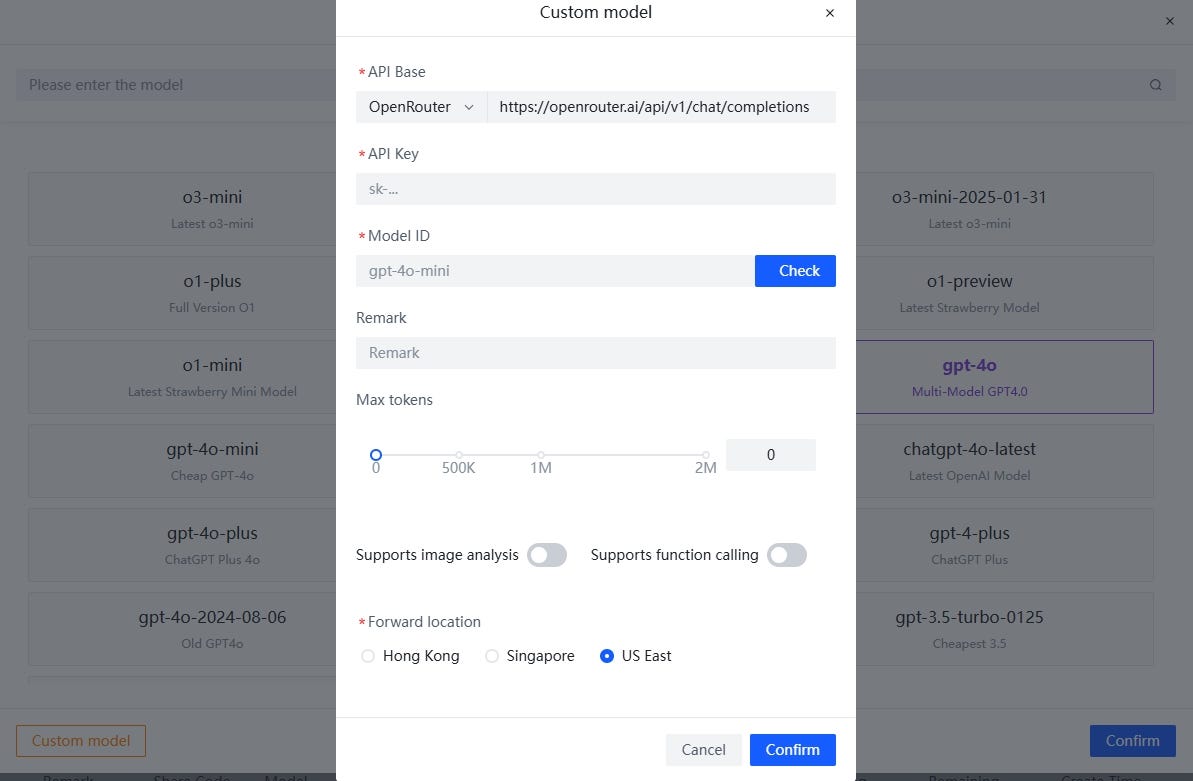
Click Custom Model in the lower-left corner and fill in the relevant configuration information.

(1) Provide a preset API base
We have preset API bases for OpenRouter and Siliconflow, which can be selected directly by users of these two services, and the system will automatically fill them.

(2) Support transit region selection
In particular, we have added support for transit region selection, which solves the problem of some model providers restricting access due to IP regions. For example, the HK region is often restricted from accessing the model API, so we can switch to the US region.

(3) You can check the configuration information with one click
Equipped with a [Check] button, it can detect whether the information is filled in correctly

- Take access to OpenRouter’s model API as an example:
Example model: meta-llama/llama-3.3–70b-instruct:free
API Base Select OpenRouter and enter the API key and model ID. For example, if the model itself has image analysis, select “Model supports image analysis”, otherwise it is unchecked. After all the settings are complete, click Confirm;

2. Take the model of silicon-based flow as an example
Example model: DeepSeek-R1-Distill-Qwen-7B deployed on Siliconflow
Select Siliconflow for API base, fill in information such as API Key and model ID, select the transit region as needed, and click Confirm.

2. Create a chatbot
(1) After successful access, the model will be displayed in the custom model classification, select the model and click [Confirm];

(2) Click the [Create Chatbot] button:

(3) After entering the chatbot, send a message to start the conversation;

3. One-click implementation of functional extensions for post-access models
After the chatbot is connected to the model, it can also realize the expansion of functions such as image analysis, online search, and reasoning with one click.
1.Image analysis ability:
Take the connected Llama-3.3–70b-instruct as an example, which is originally a large plain text model, which can be connected to the 302.AI to unlock the “model fusion” capability and enable image analysis.
(Note: no special settings are needed for the image analysis feature, which is enabled by default on the chatbot page)

2. One-click superimposed network search + reasoning function:
In addition, you can use features overlay, such as enabling both networked search and reasoning, by lighting up both buttons at the bottom of the dialog box:

The results are as follows:
Original Answer: Information lags.

After overlaying the online search + reasoning function, the answer: is correct

4. Manage custom models
(1) Edit: After the custom model is completed, if there is any information that needs to be modified, you can click the edit symbol on the right side of the model name

(2) Copy: After clicking Edit to enter, you can quickly copy the configured custom model.

Post-copying:

(3) Delete: Custom models that are not commonly used also can be deleted.

How to use 302. AI calls for API to customize models
1.Create an API Key First, we need to create an API key that supports transiting custom models.
Detailed steps: Use API → API Keys→ Enter an API name→ Enable custom model transfer→ Add API KEY

Copy the API Key you just generated as a standby.

View the name of the custom model after the transfer for easy calling:

2. Custom model for API calls You can use the API Market to add functionality to the custom model API or call the custom model in the tool API
(1)Add new capabilities to the model: Find the documentation: Using API → API market → LLM→302AI → view the document

Take adding the online search capability of a custom model as an example:
After entering the relevant documentation, click the [Try it out] button:

Click “go to set value”, paste the generated API Key, fill in the generated API Key, and click [Save].
(Note: The custom model transfer function must be enabled manually, so you need to paste the API Key manually)

According to the documentation, add the suffix “-web-search” to the custom model (for example, fill in the name of the model after transit: meta-llama/llama-3.3–70b-instruct:free-2-web-search ), enter the prompt word, and click [Send] to increase the network search capability

If you want to learn more about adding large model capabilities, you can refer to previous articles:
[embed]
(2) Tool API calls custom models Related Documentation: Use API → API Market → Tools API → select tools on demand → view documentation

Take the AI Answer Machine tool API call custom model as an example:

After clicking [try it out], set the API Key, the steps are roughly similar to the above, and I will not expand on them in detail here:

After the API Key is set, fill in the name of the custom model to be called, enter the prompt word, and click Send.
summary
302.AI is committed to building a more open and inclusive AI integrated platform for all users. Through this platform, users can not only enjoy a more convenient and smooth user experience, but also unlock more powerful and rich functions to truly maximize benefits.
*Join the AI technology group and get more technical information*
메타데이터
- post_id
- 3fde35a2be42
- slug
- 302-ai-custom-model-support-access-to-third-party-model-apis-expand-the-new-capabilities-of-the-3fde35a2be42
- url
- https://medium.com/@302.AI/302-ai-custom-model-support-access-to-third-party-model-apis-expand-the-new-capabilities-of-the-3fde35a2be42
- canonical_url
- https://medium.com/@302.AI/302-ai-custom-model-support-access-to-third-party-model-apis-expand-the-new-capabilities-of-the-3fde35a2be42
- author_url
- https://medium.com/@302.AI
- status
- ok
- fetched_at
- 2026-07-14 10:49:49