How AI Text to Speech Is Finally Ending Your Mic Dread
What if recording your voice no longer slows you down?
How AI Text to Speech Is Finally Ending Your Mic Dread
What if recording your voice no longer slows you down?
You know the moment.
Your script is finally done. Every sentence carries the right weight; every transition feels earned. You wait for the house to go quiet, set up your microphone, and take a deep breath.
Then, right as you hit the climax of your narration — the “money shot” of your script — the world conspires against you. A neighbor’s dog barks. A car honks. Your voice cracks on a word you’ve said a thousand times.
An hour later, you’re staring at a screen full of jagged, half-usable audio waves. Your throat is sore, your energy is spent, and the “final” version still doesn’t capture the spark you had in your head.
If this feels familiar, it’s not a reflection of your talent. It’s because recording your own voice was never the easy part of creating.
You’re Not Bad at Recording—Voice Production is Just Broken
In the modern creator economy, writing is supposed to be the hard part. But lately, it isn’t.
With modern tools, you can outline ideas and polish prose faster than ever. The real bottleneck happens the moment the writing ends and the “audio labor” begins. Suddenly, your productivity is held hostage by the following:
- Your Environment: Is the room too “echoey”? Is the fridge humming?
- Your Biology: Do you have the “radio energy” today? Is your seasonal allergy acting up?
- The Edit Spiral: Spending three minutes fixing every one minute of raw audio.
For solo creators, educators, and non-native speakers, this isn’t just a hurdle — it’s a wall. This is where momentum dies. Not because the idea isn’t good, but because the text to speech friction has become too high to justify the output.
Why Recording Your Own Voice Slows Down Content Creation
Recording sounds simple until you actually do it.
You need silence.
You need energy.
You need your voice to sound “right” every time.
And when it doesn’t, you rerecord. And re-record.
Voiceover becomes a bottleneck—not a creative act, but a technical obstacle standing between you and publishing. For solo creators and small teams, this friction adds up fast.
At some point, you start delaying projects—not because you don’t care, but because you don’t want to deal with the mic.
Why Modern AI Text to Speech No Longer Sounds Robotic
You’ve probably tried text to speech before.
And honestly?
It didn’t sound great.
Flat. Robotic. Distracting.
That’s why you stopped considering it.
But modern AI text to speech works differently. It’s no longer about reading text word by word—it’s about delivering meaning. These systems are trained on real speech patterns: pauses, emphasis, rhythm, and emotional flow.
When it works, something changes.
You stop thinking, “This sounds fake.” You start thinking, “This actually works.”
That’s the moment text-to-speech becomes a creative tool rather than a backup option.
And once you accept that modern AI text to speech can actually sound natural, a more practical question appears:
Where does this fit into the way you already create?
This is exactly where FineVoice starts to make sense — not as a new habit you have to learn, but as a missing piece that quietly snaps into place.
Where FineVoice Text to Speech Fits Into Your Content Creation
You don’t wake up wanting to experiment with new tools.
You wake up wanting to finish something—and publish it without friction.
FineVoice fits into that exact gap between writing and sharing. When recording starts to feel like a chore, an AI voice generator becomes the easiest way to keep moving.
You don’t have to think like a sound engineer. With FineVoice text to speech, it’s as simple as pasting your text, choosing a voice, and listening. The interface stays out of the way so your attention stays on the content itself.
The difference is in how natural it sounds. FineVoice offers a large library of realistic text-to-speech voices across multiple languages, accents, and styles. These voices aren’t robotic or exaggerated — they’re expressive, professional, and ready to use for real content.
And if you want more control, it’s there: you can adjust speed, pitch, emphasis, and emotional tone, whether you’re explaining a concept, telling a story, or giving instructions.
Once voice stops being a hurdle, you stop thinking about how to make audio—and start thinking about what you want it to sound like. That’s when turning text into audio stops being a technical task and starts feeling intuitive.
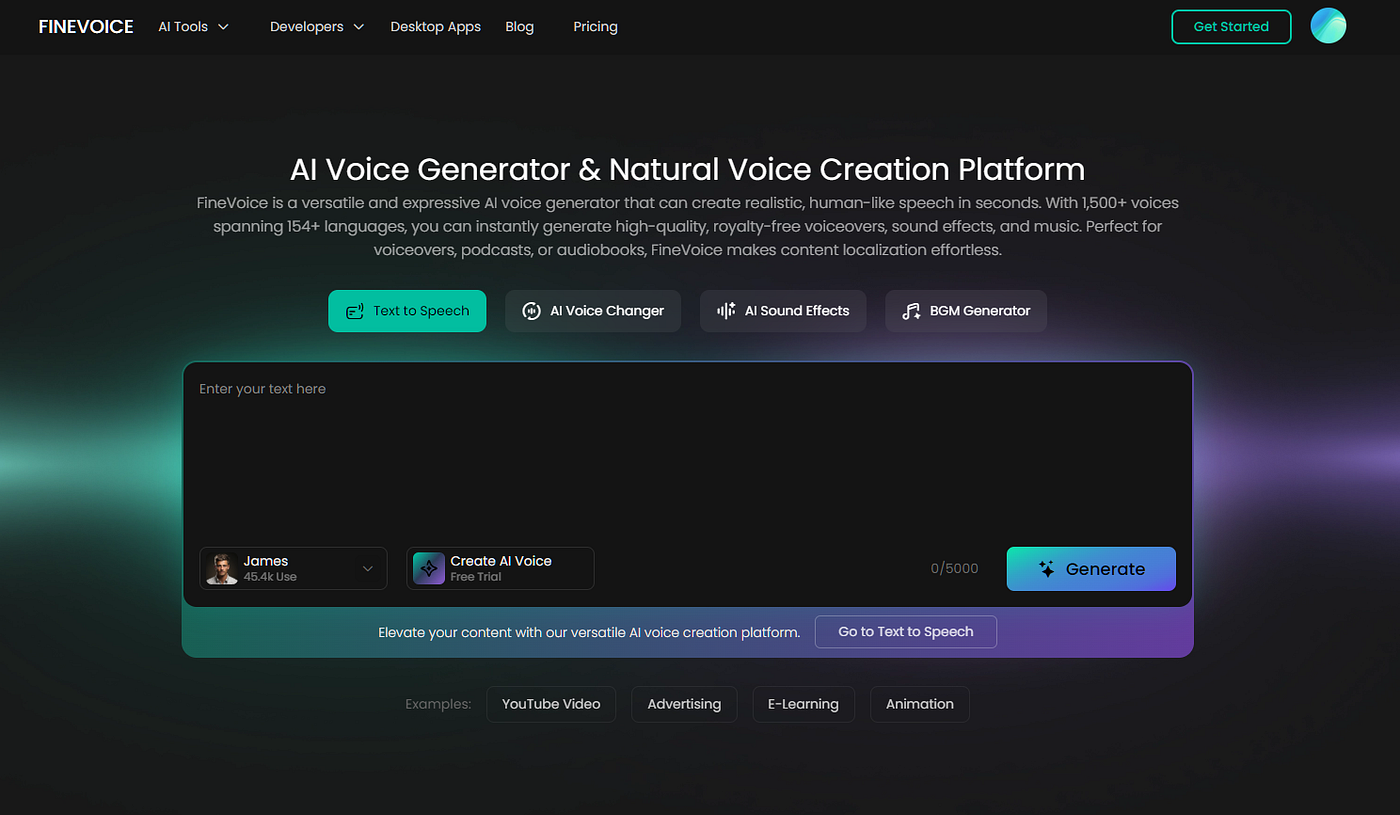
FineVoice
How to Use FineVoice to Turn Text into Natural-Sounding Audio
Using FineVoice online text to speech is simple, even if you’ve never worked with AI voices before. Just follow these three steps:
1️⃣ Enter Your Text ✍️
Type, paste, or import a pre-written script. You can also explore example scripts provided by FineVoice to see how text flows naturally as audio. This helps you get started quickly without guesswork.

Enter Your Text
2️⃣ Select & Customize an AI Voice 🎧
Choose an AI voice from the FineVoice library that fits your content.
- Filter by language, gender, age, or use case (Podcast, Narration, Character, etc.)
- Fine-tune pitch, speed, and emotion tags to match your desired tone — whether calm, energetic, or storytelling.
Preview your selection and make small adjustments to emphasis, pauses, and pacing to ensure your script sounds polished and natural.

Select an AI Voice
3️⃣ Generate Your Audio ▶️
Click “Generate” to convert your text into speech.
- Processing usually takes only a few seconds.
- Your output is ready in MP3 or WAV format, perfect for podcasts, videos, courses, or marketing content.

Generate Audio
With FineVoice, the old “record → re-record → edit” cycle is gone — your words instantly become professional, ready-to-use audio.
💡 Pro Tips for Best Results:
- Keep paragraphs short to maintain natural pauses.
- Use emotion tags subtly; small tweaks make narration more alive.
- Try different voices to find the one your audience connects with most.
Why Trying Text to Speech Online Free Changes How You Create
You might hesitate to rely on voice tools because you’re unsure:
- Will this sound natural enough?
- Will it fit my audience?
- Will it actually save time?
That’s why text to speech online free access matters.
It lets you experiment without pressure. You can test tone, pacing, and realism before committing. Many creators start casually, using text to speech for free, and then notice something unexpected:
They publish faster.
They experiment more.
They feel less tension around the voice.
Once that happens, it’s hard to go back.
Who Can Benefit from FineVoice AI Text to Speech?
If you create content regularly, you’ve probably felt the limitations of your own voice—or the time it takes to produce professional audio. That’s exactly why AI text to speech tools like FineVoice exist: to remove friction and help your ideas reach your audience faster.
FineVoice works well for a variety of creators and professionals, including:
- YouTubers and video creators: Turn scripts, articles, or faceless content into polished voiceovers in minutes, without hiring voice actors.
- Course creators and educators: Transform long PDFs, lecture notes, or tutorials into engaging audio lessons for students who prefer listening over reading.
- Podcasters and storytellers: Record episodes or narration without worrying about background noise, mic quality, or retakes.
- Small businesses and marketers: Produce professional phone system greetings, explainer videos, or localized ads with studio-quality voices.
- Multilingual teams and global content creators: Reach audiences in multiple languages effortlessly, with realistic AI voices across 154+ languages and accents.
Using FineVoice isn’t just about saving time — it’s about expanding what you can do with your words. You can quickly test new ideas, produce more content consistently, and scale your reach without being limited by recording constraints.
In short: if you write, teach, narrate, or create content in any form, FineVoice fits into your workflow. It turns text into natural, professional audio — instantly — so your audience can hear your message exactly as you intended, anywhere, in any language.
Let Your Ideas Speak for You
The biggest shift isn’t technical.
It’s emotional.
When voice becomes easy, you stop dreading it. You stop postponing projects. You stop feeling like publishing requires the perfect setup.
Your ideas move from text to audio without resistance.
The right voice doesn’t have to be yours.
It just has to serve what you’re trying to say.
If you’re curious, the best way to understand the difference is to hear it for yourself. Try generating your first audio with FineVoice and experience how natural AI text to speech can feel—no microphone, no pressure.
메타데이터
- post_id
- 3fe5dc8e22f9
- slug
- how-ai-text-to-speech-is-finally-ending-your-mic-dread-3fe5dc8e22f9
- url
- https://medium.com/@evelyn_44600/how-ai-text-to-speech-is-finally-ending-your-mic-dread-3fe5dc8e22f9
- canonical_url
- https://medium.com/@evelyn_44600/how-ai-text-to-speech-is-finally-ending-your-mic-dread-3fe5dc8e22f9
- author_url
- https://medium.com/@evelyn_44600
- status
- ok
- fetched_at
- 2026-07-10 20:36:43