Which Novel Writing Software Is Write for You? A Writer’s Guide to the Best Tools
If you’re a writer, then chances are you’ve heard the same advice more than once: Just write.
Which Novel Writing Software Is Write for You? A Writer’s Guide to the Best Tools
Photo by Dan Counsell on Unsplash
If you’re a writer, then chances are you’ve heard the same advice more than once: Just write.
And while that’s true, the software you choose can make the writing process smoother — or more frustrating. The right writing app won’t magically finish your novel, but it can help you stay organized, reduce distractions, and keep your story from turning into a folder full of random documents.
I’ve tried numerous writing programs over the years and I’ve learned that no single app is perfect for everyone. The best choice depends on your writing style, budget, and workflow.
Here’s a comparison of some of the most popular novel writing software that’s available today.
Scrivener
Best for: plotters and long-form writers
Scrivener has become the industry standard for many writers, and for good reasons. Instead of working in one massive document, you can divide your manuscript into chapters and scenes, then rearrange them with a simple drag and drop.
Pros:
Excellent organization tools.
Cork board and outlining features.
Character, location, and research folders.
Goal tracking.
One-time purchase (no subscription).
Cons:
Steep learning curve.
Interface can feel overwhelming.
Syncing between devices requires some setup.
Ideal for: writers who enjoy planning and organizing every aspect for their novel.
Ellipsus
Best for: collaborative writers.
Ellipsus is one of the newer writing platforms that’s designed specifically with authors in mind. Think of it as a modern cloud-based writing environment that emphasizes collaboration.
Pros:
Beautiful minimalist interface that’s customizable.
Real-time collaboration.
Version history.
Automatic cloud saving.
No Software installation required.
Free, but there’s a pro version you can purchase.
Cons:
Requires an internet connection for the best experience.
Few planning features than Scrivener.
Still adding advanced features.
Ideal for: co-authors, critique partners, editors, and writers who work across multiple devices.
Atticus
Best for: Writers who also self-publish.
Pros:
Writing and formatting in one platform.
Works on Windows, Mac, Linux, and Chromebooks.
Cloud syncing.
Clean interface.
One-time purchase.
Cons:
Outlining isn’t as robust as Scrivener.
Limited research management.
Relatively new compared to its competitors.
Ideal for: indie authors who want to simplify the publishing process.
Microsoft Word
Best for: writers who prefer simplicity.
Word remains one of the most commonly used writing tools because almost everyone already knows how to use it.
Pros:
Familiar interface.
Strong editing tools.
Excellent tracking changes.
Works offline.
Cons:
Poor organization for large novels.
Difficult to rearrange scenes.
Can become sluggish with very long manuscripts.
Ideal for: writers who prefer straightforward work processing.
Google Docs
Best for: Budget-conscious writers.
Google Docs has become incredibly popular because it’s free, cloud based, and accessible anywhere.
Pros:
Free.
Automatic cloud backups.
Excellent collaboration.
Accessible from almost any device.
Cons:
Limited outlining.
Large manuscripts can become slow.
Fewer specialized writing features.
Idea for: beginners, collaborative teams, and writers who need access from multiple devices.
Ulysses
Best for: Apple users.
Ulysses offers a distraction-free writing experience with excellent organization and markdown support.
Pros:
Beautiful interface.
Excellent focus mode.
Strong organizational tools.
Seamless Apple ecosystem integration.
Cons:
Apple devices only.
Subscription pricing.
Limited collaboration.
Ideal for: writers fully invested in the Apple ecosystem.
Dabble
Best for: Writers who want simplicity with structure.
Dabble combines many of Scrivener’s organizational strengths with a much gentler learning curve.
Pros:
Easy to learn.
Plot grid feature.
Cloud backup.
Goal tracking.
Cons:
Subscription required.
Fewer advanced customization options.
Ideal for: writers who want organization without complexity.
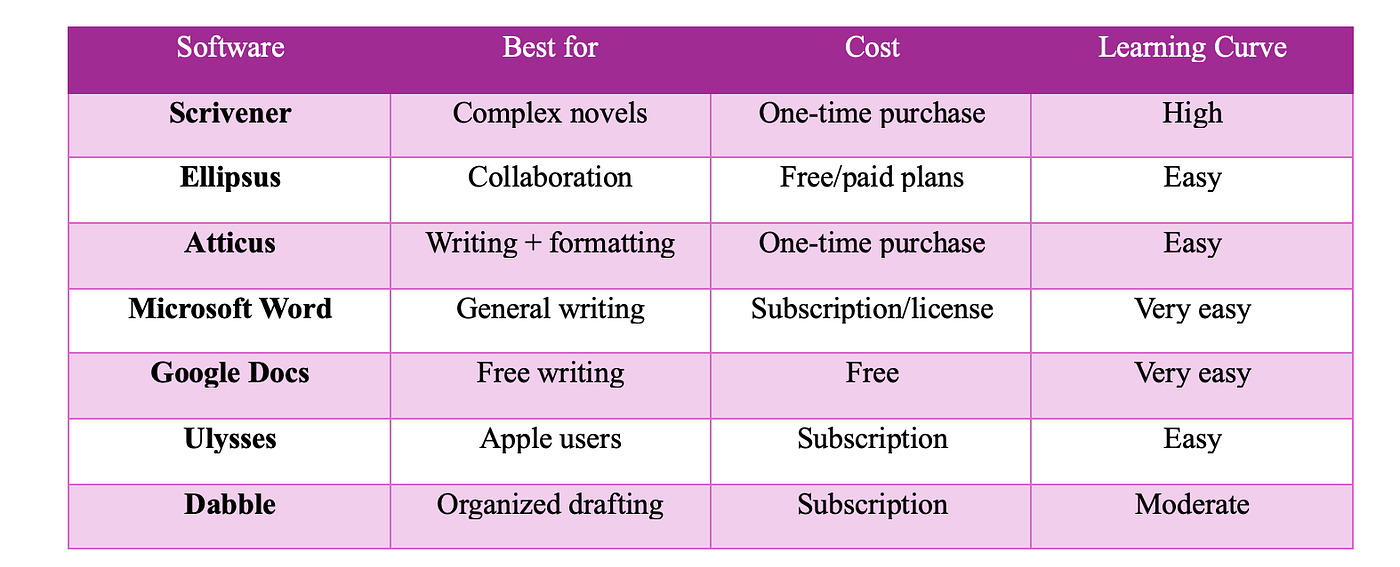
Quick Comparison
Which One Should You Choose?
There isn’t a universal “best” writing software.
If you’re writing an epic fantasy with dozens of characters and timelines, Scrivener is hard to beat.
If you frequently collaborate with editors and co-authors, Ellipsus offers one of the smoothest cloud-based experiences.
If you self-publish regularly, Atticus can save time by combining writing and formatting.
If you just want to write without learning a new system, Word or Google Docs remain excellent choices.
If you’re an Apple-only writer who values aesthetics and focus, Ulysses is worth considering.
If you want organization without spending weeks learning software, Dabble strikes a nice balance.
At the end of the dal, your readers don’t care what software you used to write your novel. They care about compelling characters, unforgettable stories, and satisfying endings.
The best writing software is simply the one that keeps you writing consistently.
All my love,
✨Esmeralda.
메타데이터
- post_id
- 3fecf1d5d1bb
- slug
- which-novel-writing-software-is-write-for-you-a-writers-guide-to-the-best-tools-3fecf1d5d1bb
- url
- https://medium.com/@esmeraldahawkinswriter/which-novel-writing-software-is-write-for-you-a-writers-guide-to-the-best-tools-3fecf1d5d1bb
- canonical_url
- https://medium.com/@esmeraldahawkinswriter/which-novel-writing-software-is-write-for-you-a-writers-guide-to-the-best-tools-3fecf1d5d1bb
- author_url
- https://medium.com/@esmeraldahawkinswriter
- status
- ok
- fetched_at
- 2026-07-07 14:47:14