Siri Started Writing AppleScript Behind My Back
In the Golden Gate beta, when Shortcuts can’t do something, Siri quietly writes an AppleScript that can. I spent a weekend trying to catch…

Siri Started Writing AppleScript Behind My Back
In the Golden Gate beta, when Shortcuts can’t do something, Siri quietly writes an AppleScript that can. I spent a weekend trying to catch it in the act — and learning where it lies.
The first time it happened, I thought I’d misread the screen.
I’d asked Siri to move a selected email into a folder — a small, stupid thing the Shortcuts app still can’t do on its own in 2026 — and braced for the usual apology. Instead the screen paused. Something was working behind the glass. A second later the email was filed exactly where I wanted it, and there, in the transcript, sat a line I hadn’t asked for: it had written an AppleScript to do the job.
I never said the word “AppleScript.” Almost nobody has, on purpose, since about 2015 — it’s the automation language you’re supposed to have outgrown. But the machine had reached past a decade of modern Shortcuts actions, down into the thirty-year-old scripting layer still wired underneath macOS, decided that was the right tool for a job the new catalog couldn’t do, and written the code itself. In seconds. From a sentence.
That is a compiler. Apple shipped a natural-language-to-AppleScript compiler in the Golden Gate beta and, as far as I can find, mentioned it nowhere on stage. It’s a sentence in a hands-on review. A footnote. So I did what you do with a footnote that might be load-bearing: I spent a weekend trying to make it fall over.
Before another line, the caveat that colors all of this — and it turns out to be the most important thing in the piece, not a disclaimer bolted to the front. This is beta behavior, thinly documented, and I have watched it answer the same sentence differently a day apart. Apple could change it, gate it, or sand off its edges before the fall release. Everything here is the beta as it stands in July, and you should reproduce each step on your own machine before you trust it. Hold that thought. The reason it matters is the whole back half of this story.
Summoning it
It doesn’t announce itself. There’s no “AppleScript mode,” no toggle. The fallback fires when you ask for something specific enough that the Shortcuts catalog can’t satisfy it — and the trick to triggering it on purpose is to ask like you mean it. Name the app. Name the object. Name the exact outcome.
Vague requests got me vague help all weekend. The sentences that reliably pushed it down into writing a script had a shape:
- “Move the selected message in Mail to my Archive folder.”
- “In Finder, rename the selected files to invoice-01, invoice-02, and so on.”
- “Put my Safari window on the left half of the screen and Notes on the right.”
None of those maps to a stock Shortcuts action, which is exactly the point — you’re asking for the thing the catalog doesn’t have, and that’s the doorway. When it hesitated and tried to assemble an ordinary shortcut instead, I learned to push once, directly: “write a script to do it if there’s no built-in action.” On the beta, that phrasing tipped it over almost every time.
One thing worth flagging before you try: the full Golden Gate Siri intelligence is the newer, heavier tier, and the reporting suggests it leans on recent Apple silicon. If the fallback never fires for you, look at your chip and your Siri settings before you blame your phrasing.
Three things it built that Shortcuts refuses to
By Saturday afternoon I had a small pile of scripts it had written for me — each one a task the modern automation catalog simply won’t do. These are the trophies. Each is a block you can save and keep, which becomes the point shortly.
The one that started it — moving a selected message.
tell application "Mail"
  set theMessages to selection
  set destBox to mailbox "Archive" of account "Gmail"
  repeat with m in theMessages
    set mailbox of m to destBox
  end repeat
end tell
Setting a message’s mailbox property moves it. Swap in your real mailbox and account names. (Gmail's label model means a moved message can still linger in All Mail — a quirk of Gmail, not the script.)
The one with a brain — batch-renaming with actual logic.
tell application "Finder"
  set sel to selection
  set n to 1
  repeat with f in sel
    set ext to name extension of f
    set base to "invoice-" & (text -2 thru -1 of ("0" & n))
    if ext is "" then
      set name of f to base
    else
      set name of f to base & "." & ext
    end if
    set n to n + 1
  end repeat
end tell
Shortcuts can rename. It can’t do this — zero-pad the counter so the files sort correctly, and preserve each extension while it’s at it. The small conditional logic that Shortcuts makes painful is what AppleScript was born for.
The one that felt like a magic trick — choreographing windows.
tell application "System Events"
  tell process "Safari"
    set frontmost to true
    set position of window 1 to {0, 25}
    set size of window 1 to {1200, 900}
  end tell
  tell process "Notes"
    set position of window 1 to {1200, 25}
    set size of window 1 to {512, 900}
  end tell
end tell
A two-app layout, snapped into place from one sentence. It drives windows through System Events, which needs Accessibility permission — the first run stops and asks for it. That pause, that permission prompt, is where the weekend turned.
The morning it lied to me
Sunday, I asked for the Mail move again — same request, fresh session — and it wrote me a script that was beautiful and wrong.
Clean indentation. Correct syntax. Every keyword in place. And it targeted a mailbox named "Archived". My folder is called "Archive". That script would have run without error and quietly done nothing — or failed halfway and left me believing it had worked. There was no warning, no flicker of doubt in it. The broken code looked exactly as confident as the code that had worked flawlessly an hour earlier, because to the machine there is no difference between the two. Both are plausible AppleScript. Plausible is the only thing it is optimizing for.

That’s the moment the feature rearranged itself in my head. Friday’s shock was that Siri writes AppleScript. Sunday’s shock — the real one — was that Siri writes AppleScript with no idea whether it’s correct. Apple didn’t ship an assistant that automates your Mac. It shipped a translator from English into a scripting language: a compiler with no conscience, a very fast junior engineer who has never once said “I’m not sure.” It will hand you working code and broken code in the same even tone, and the tone tells you nothing.
You can take that as a reason to avoid the feature or as its operating manual. I take it as the operating manual: treat every generated script as a draft by someone talented and careless, and never run one you haven’t read. I caught the "Archived" bug because I read the script first. That habit is the whole safety system. There isn't a second one.
Keeping what’s good, surviving what isn’t
Here’s the trouble with a script Siri writes in the moment: it runs, and then it’s gone. You got the outcome; you didn’t get the tool. Ask again next week and you’ll get a slightly different script — maybe the good one, maybe the "Archived" one. Fine for a one-off. For anything you do twice, you want to catch the good version and bolt it down.
So the move is to promote a script it improvised into something permanent you control. When it generates one you’ve read and trust, lift the code into a Shortcuts action called Run AppleScript — which exists on the Mac precisely to hold a block of AppleScript inside a shortcut. Save the shortcut, open its Details, switch on Use as Quick Action, and allow it in Finder. The thing Siri invented on Saturday becomes a permanent right-click command by Sunday night — code you audited once and can trust from then on.
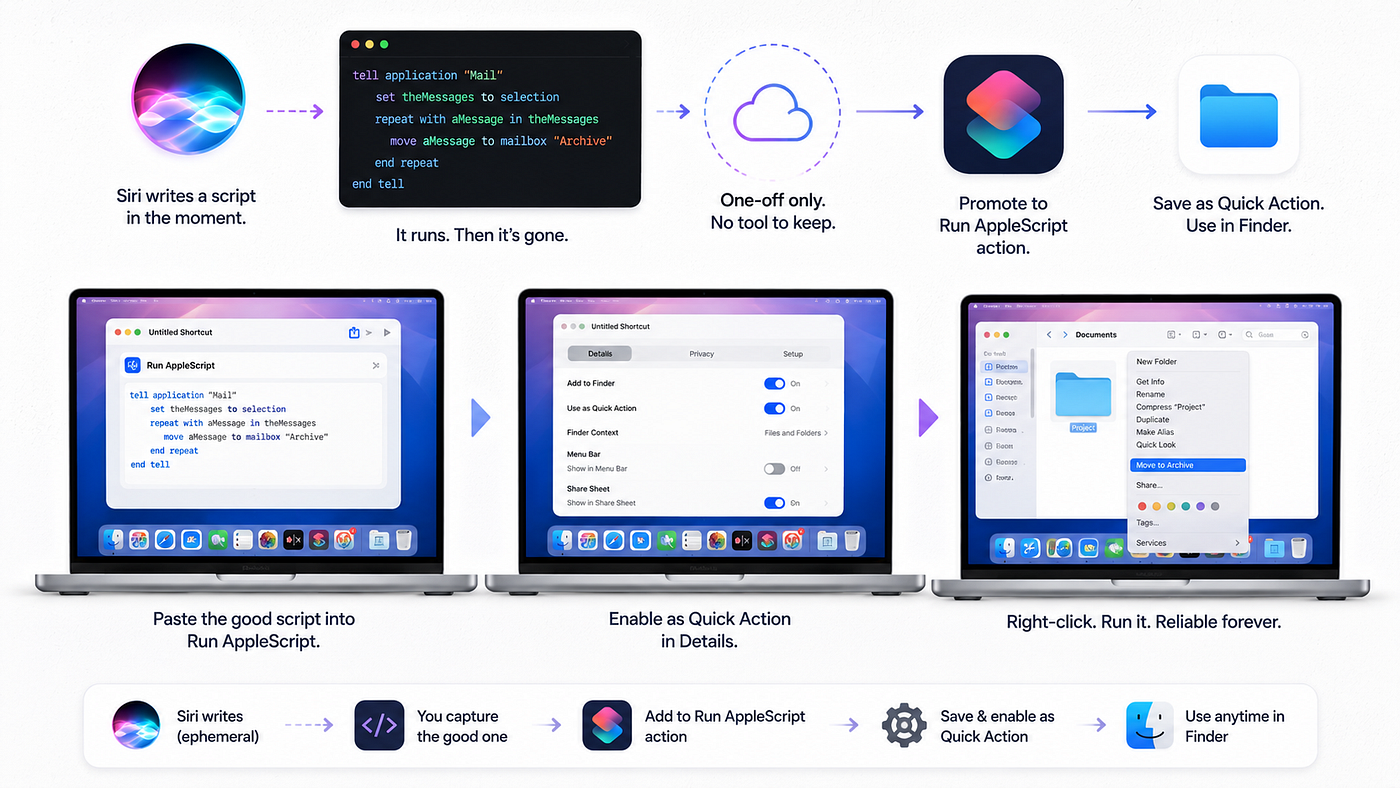
This is also the honest hedge for the whole feature, and the reason that beta caveat up top was load-bearing instead of defensive. Even if the natural-language fallback is unreliable on your machine — even if Apple changes it next build — the Run AppleScript action and the three scripts above are stable, shipping macOS. Paste them in yourself and you get the Quick Actions regardless of whether Siri ever plays along. Let the fallback be the author when it’s in the mood. Let the saved shortcut be the thing you actually depend on.
What it means that Apple buried this
Step back and the scale of it is a little absurd. Apple built a system that turns plain English into executable AppleScript, reaching into the oldest automation layer on the Mac to do what the newest one can’t — and let it out as a line in a beta. It is the most capable Mac automation feature in years, and it arrived without a name.
It is also the most dangerous, for precisely the reason it’s impressive: it generates code that runs on your machine, and it cannot tell you when that code is wrong. Those are the same sentence. The power and the hazard are one feature seen from two sides, and the only thing standing between them is whether you read what it wrote.
So spend an afternoon the way I spent a weekend. Ask Golden Gate’s Siri for the one thing Shortcuts always refused you. Watch it reach past a decade of modern automation and write the script by hand. Then read every line it gives back — every line — and when it’s right, promote it to a Quick Action that’s yours. Treat the machine as a brilliant intern with no judgment: let it draft, and never let it commit unread. The day you catch it filing your mail into a folder that doesn’t exist, you’ll understand why that’s the only rule worth keeping.
🔗 Resources
- Windows News — Siri Can Now See Your Screen and Automate Your Mac (Golden Gate public beta hands-on)
- MacRumors — macOS 27 Golden Gate Hands-On: Every Major New Feature
- Apple Support — Run a shortcut while working on your Mac (Quick Actions & menu bar)
- Matthew Cassinelli — Shortcuts has its own suite of AppleScript commands
- Six Colors — Shortcuts, AppleScript, Terminal: working around automation roadblocks
- MacScripter — moving Mail messages with AppleScript
메타데이터
- post_id
- 3ffb158237fe
- slug
- siri-started-writing-applescript-behind-my-back-3ffb158237fe
- url
- https://medium.com/macoclock/siri-started-writing-applescript-behind-my-back-3ffb158237fe
- canonical_url
- https://medium.com/macoclock/siri-started-writing-applescript-behind-my-back-3ffb158237fe
- author_url
- https://medium.com/@anup.karanjkar08
- status
- ok
- fetched_at
- 2026-07-30 23:41:35