One Size Doesn’t Fit All: Comparing 3 Knowledge Base Tools for Different Use Cases
A few months ago, I was put in charge of choosing a knowledge base (KB) solution for the mid-sized company I work for. On the surface, it…
One Size Doesn’t Fit All: Comparing 3 Knowledge Base Tools for Different Use Cases
A few months ago, I was put in charge of choosing a knowledge base (KB) solution for the mid-sized company I work for. On the surface, it seemed like a pretty straightforward task: compare a few platforms, pick the best one, and get it implemented.
But as I started digging in, I quickly realized just how many variables there are: Internal vs. external audiences, customization needs, branding, access control, content workflows, analytics, integrations… the list kept growing. Comparing the available tools in a meaningful way turned out to be a lot more time-consuming than I expected.
If you’re in a similar position, trying to figure out which KB platform is actually right for your team, I hope this guide saves you some of the time I spent researching, testing, and second-guessing.
In this article, I’ll walk through the three tools I considered most seriously:
- ProProfs Knowledge Base — a practical, all-in-one solution for both internal and external use.
- Notion + HelpKit — a clean, modern approach to public-facing documentation.
- Document360 — a feature-rich platform designed for scale and complexity.
Each of these tools has strengths that make it the right choice for the right use case. My goal is to break down where each one shines (and where it doesn’t) so you can make the most informed choice for your specific needs.
TL;DR: Quick Comparison
If you’re short on time, here’s the snapshot version:
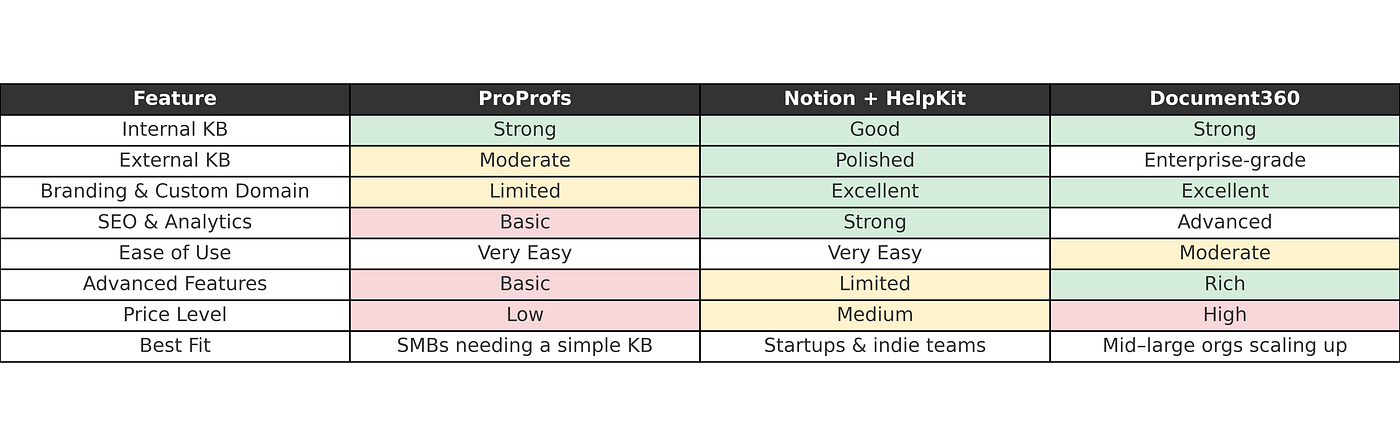
Knowledge Base Solutions Comparison Table
On mobile? Here’s a version that’s easier to read on a phone screen:

Knowledge Base Solutions Comparison Table Mobile Version
Why Notion Alone Isn’t Enough For an External KB
Notion is a fantastic tool for internal documentation. Wikis, SOPs, project notes, and team knowledge all thrive there. It’s flexible, easy to update, and already familiar to many teams.
But when it comes to running a public-facing knowledge base, Notion falls short. There’s no support for custom domains, so your docs will always sit on a notion.site address. Branding is minimal and everything still looks distinctly “Notion-y.” SEO is weak, which means your help articles won’t easily show up in Google searches. There are no built-in analytics or feedback loops to see what’s working. Navigation also isn’t really designed for external audiences.
That’s why I don’t consider Notion by itself a serious KB solution. If you’re already using Notion and want to build a customer-facing knowledge base, you’ll almost certainly need an add-on like HelpKit to make it viable.
Notion + HelpKit: A Lightweight but Powerful Combination
With that out of the way, let’s look at the Notion + HelpKit combo, which is a strong contender for the best knowledge base solution in many situations. What makes this pairing so appealing is the balance: you keep the simplicity and speed of writing in Notion, while HelpKit takes care of everything that makes a knowledge base professional and customer-ready.
The strengths here are obvious as soon as you try it. Updating content is effortless, because you’re still working inside Notion’s editor. Publishing new articles or fixing a typo takes seconds. The public-facing side, however, looks nothing like a raw Notion page. HelpKit gives you a polished, branded interface on your own custom domain. It also layers in SEO, analytics, and a clean navigation system, which means customers can actually find and use your help articles. For a startup or indie SaaS team, this is exactly the kind of “fast but credible” solution you need.
Of course, the trade-offs start to show if you try to push it into heavier use cases. Notion itself isn’t built to manage sprawling documentation, so very large or complex knowledge bases can feel cramped. Access control is fairly basic, which can be tricky if you want to serve different versions of your KB to different groups. Workflows like content approvals or versioning aren’t really there either, so bigger organizations may find it limiting.
That said, for small and mid-sized teams, the fit is excellent. If you’re already using Notion and don’t want to uproot your workflow, HelpKit turns it into a professional knowledge base almost overnight. It’s fast, clean, and affordable, and it punches far above its weight for early-stage companies that just need a slick, reliable help site.
ProProfs: Simple and Practical
ProProfs takes a very different approach. It’s a more traditional all-in-one knowledge base platform that works out of the box for both internal and external use. You don’t have to think much about integrations or workarounds — most of the basics are already built in.
The main advantage is simplicity. Setting up a ProProfs knowledge base is fast, and the interface is straightforward enough that almost anyone on your team can manage it. It comes with role-based access control, which makes it easy to separate internal and external content. It also ties into common customer support tools like Zendesk and Freshdesk, so you can connect it into your existing workflow without much effort. Pricing is generally accessible for small and mid-sized teams, which makes it an appealing option for companies that just need something reliable without bells and whistles.
The downsides show up mostly in design and depth. The user interface looks a little dated, and branding options are fairly limited. Search and analytics are present, but basic compared to what more modern or enterprise-focused tools offer. If you’re dealing with highly technical documentation, or you want a lot of customization, ProProfs will probably feel restrictive.
In practice, though, it does what it promises. For many small and mid-sized businesses that just want a straightforward knowledge base without a steep learning curve, ProProfs is an easy win.
Document360: Built for Scale
If ProProfs is about simplicity, Document360 is about depth. This platform is designed for organizations that take documentation seriously and need a feature set that can scale with them.
The first thing that stands out is the range of advanced features. You get full version control, approval workflows, localization support, and granular access permissions. Document360 is also developer-friendly, with Markdown support and options for embedding custom HTML or CSS. For larger companies or technical teams, that flexibility makes a big difference.
Analytics and customer feedback are also much more detailed here. You can see how articles are performing, what users are searching for, and where they’re getting stuck. Combined with its strong navigation and performance tracking, this makes Document360 a tool that not only delivers content but also helps you improve it over time.
The trade-offs are predictable. There’s a steeper learning curve, and the platform is more expensive than lighter-weight solutions. For a startup with a small support footprint, it would almost certainly feel like overkill. But for mid-sized and larger organizations, especially those with multiple product lines or multilingual audiences, the investment is easy to justify.
In short, Document360 is the powerhouse of the group. If your company needs enterprise-grade control and scalability, this is where you’ll find it.
Final Recommendations
So which tool should you choose? The honest answer is that it depends on your situation. Each of these platforms shines in a different context, and the “best” one is really the one that matches your team’s needs.
If you’re a startup or small SaaS company, Notion + HelpKit is hard to beat. It gives you a beautiful, branded knowledge base with very little setup, and you get to keep the familiar Notion editing experience your team already knows. For early-stage teams that value speed and simplicity, this pairing is the sweet spot.
If you’re running a small or mid-sized business and just want something practical, ProProfs is the safe choice. It’s not flashy, but it covers the basics well, works for both internal and external documentation, and won’t demand much technical know-how to maintain.
And if you’re at the other end of the spectrum — an organization with complex documentation, multiple product lines, or a large customer base — Document360 is the platform designed for you. It’s more expensive and takes more time to learn, but it gives you the enterprise-grade tools you’ll need as your knowledge base scales.
In the end, I chose Notion + HelpKit for my company. We wanted something that looked professional without a long rollout, and the combination gave us exactly that. It may not be the most feature-packed solution, but for our stage and our needs, it struck the right balance.
메타데이터
- post_id
- 40181dcfa57e
- slug
- one-size-doesnt-fit-all-comparing-3-knowledge-base-tools-for-different-use-cases-40181dcfa57e
- url
- https://medium.com/@martijn_21817/one-size-doesnt-fit-all-comparing-3-knowledge-base-tools-for-different-use-cases-40181dcfa57e
- canonical_url
- https://medium.com/@martijn_21817/one-size-doesnt-fit-all-comparing-3-knowledge-base-tools-for-different-use-cases-40181dcfa57e
- author_url
- https://medium.com/@martijn_21817
- status
- ok
- fetched_at
- 2026-06-23 03:48:11



