PineGen AI vs Claude: Which Pine Script AI Wins in 2026?
You describe an ICT strategy to Claude, covering SMT divergence, Fair Value Gaps, multi-timeframe bias, ATR stop-loss, a session filter for…
PineGen AI vs Claude: Which Pine Script AI Wins in 2026?

You describe an ICT strategy to Claude, covering SMT divergence, Fair Value Gaps, multi-timeframe bias, ATR stop-loss, a session filter for the New York AM window, and alerts → Claude delivers code in thirty seconds → It compiles → You add it to TradingView and run the Strategy Tester → The numbers look usable → You go live.
Then again…
The live results do not match the backtest → You look at the code again. barstate.isconfirmed is not applied to the entry conditions. The request.security()call for the higher-timeframe bias has no lookahead parameter → The session filter is present but the timezone is not specified → TradingView defaults to exchange time, not Eastern, where none of this threw a compiler error according to Claude → But all of it created a gap between what the backtest showed and what the strategy would have produced in real time.
This is not a Claude failure in the conventional sense. Claude did exactly what it was designed to do: Generate code.
This is gap is between a tool that generates and a tool that validates.
That is the single-most important comparison that matters when choosing a Pine Script AItool for production deployment.
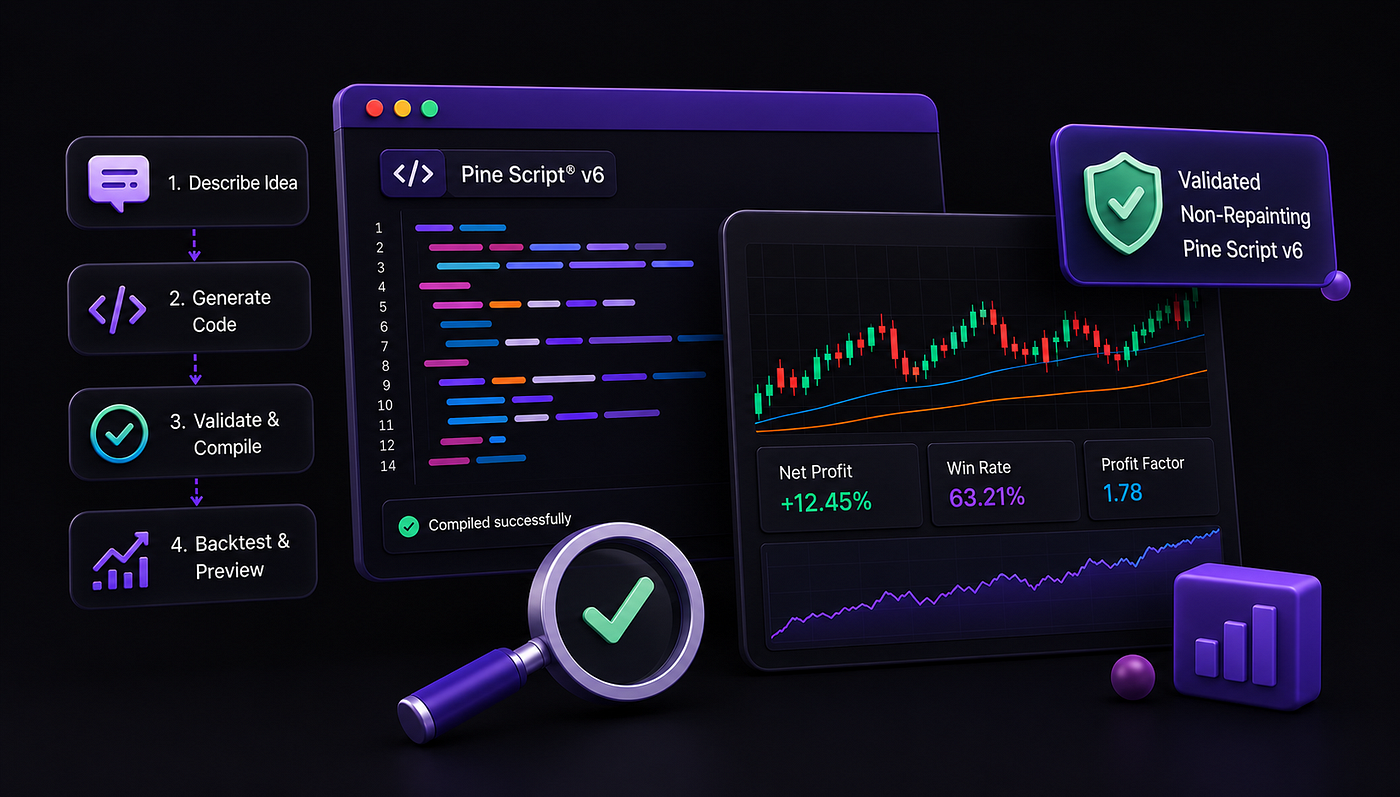
Claude generates syntactically plausible Pine Script from plain-English prompts but does not validate output through a dedicated Pine Script version 6 compiler, does not screen for repainting, and has no built-in Prompt Builder, backtesting summary, or chart preview. PineGen AI is purpose-built for Pine Script version 6 and runs every generated script through a structured seven-step pipeline:
Requirements Extraction → Requirements Analysis → Pine Script version 6 Generation → Requirements Coverage Validation (95%+) → Compiler Validation → Backtest → Delivery to User.
The 4 feature comparison below covers every point in PineGen AI’s and Claude’s pipeline:
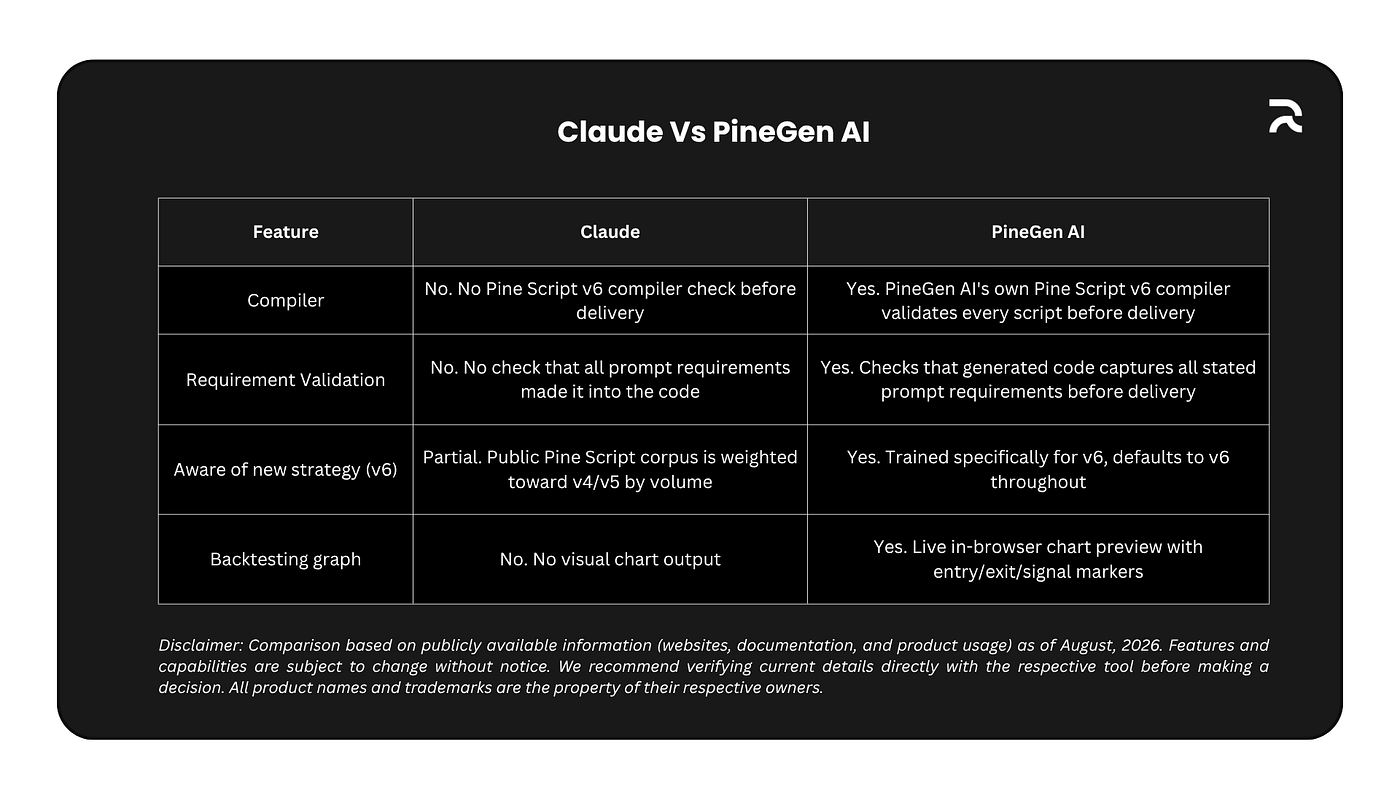
Comparison between Claude Vs PineGen AI
A Pine Script AI that skips validation can hand you code with repainting bugs, it uses future bar data your backtest won’t flag but live trading will punish. Validated code catches that before it reaches your chart, so the Strategy Tester result actually matches how the strategy behaves live.
As a specialized Pine Script generator, PineGen AI covers each step of the journey from prompt to deployed strategy through compilation, validation, repainting detection, backtesting summary, and equity curve preview, while Claude handles the generation step alone. Every claim in this comparison is drawn from verified feature documentation for both tools.
Why This Comparison Is About Workflow, Not Intelligence
The traders who ask “which is better?” “PineGen AI or Claude?” are almost always asking the wrong question. Claude is one of the most capable general-purpose AI tools available. Its reasoning, its ability to process complex descriptions, and its code generation quality across many languages are well-documented and widely respected. The question is not which tool is more intelligent. The question is which tool is built for this Pine Script code generation?
Building a TradingView strategy from a plain-English description is not a single-step task. The workflow from idea to deployed strategy includes a sequence of distinct stages:
Understanding The Prompt → Generating Code → Compiling Against Tradingview’s version 6 Rules → Detecting Bugs → Re-Attempting Failed Generations → Catching Repainting Logic → Summarising Backtest KPIs → Previewing The Strategy On A Live Chart.
Claude handles one of those stages. A purpose-built Pine Script AI tool handles all of them.
The cost of handling only one stage shows up at a specific moment: when the backtest results diverge from live performance. By that point, real capital may already be committed. The gap between what the backtest showed and what the strategy actually did is not random. It is traceable to specific structural failures in the generated code that a validation step would have caught before the code reached TradingView’s Strategy Tester. The difference between a pine script AI and manual coding comes down to how much of the workflow each tool covers, and that is the lens for every feature in this comparison.
Claude wins because users feel like they’re working with an experienced developer, not just a code generator. If PineGen AI combines its specialized Pine Script capabilities with stronger reasoning, clearer explanations, transparent validation, and guided strategy refinement, it can offer something Claude can’t: an AI built specifically for taking a trading idea all the way to a validated TradingView strategy, rather than simply generating code.
That distinction, all the way to validated, is the thread running through every feature below.
What Each Tool Was Built to Do
Claude is a general-purpose conversational AI built by Anthropic. Its design goal is broad reasoning across domains: writing, analysis, coding, mathematics, research, and conversation.
- Pine Script is one of hundreds of programming and scripting languages Claude can work with. It is not a language Claude was specifically trained or optimized for.
- Claude has no live connection to TradingView’s Pine Script compiler.
- Claude has no built-in backtesting engine. It generates code from language model inference, producing text that statistically resembles correct Pine Script based on patterns in training data.
Understanding this distinction between a general AI and a purpose-built pine script generator is what makes the rest of this comparison meaningful.
This is not a criticism of Claude. It is a design fact. A general-purpose tool that does many things well will, by definition, not be specifically optimized for any coding language.
PineGen AI is built specifically for Pine Script. It is not a general coding assistant. It does not write Python, JavaScript, MQL5, or any other language. Every feature in its pipeline exists to serve one goal: taking a plain-English trading strategy description all the way to a validated, deployment-ready Pine Script version6. Its training, its validation layer, its compiler connection, its Prompt Builder, its Smart AI Debugger and its backtesting summary are all Pine Script-specific.
The 4 features below are where those two design philosophies produce measurably different outcomes for a trader who wants to build and deploy a real TradingView strategy.
Feature 1: Compiler
The first question for any generated Pine Script is whether it passes a strict Pine Script version 6 compiler check. A script that fails at the compiler level cannot be added to a TradingView chart. A script that passes but contains logic errors will run but produce results the trader cannot trust.
Here is something most traders do not know: Pine Script does not have an open source compiler. TradingView’s Pine Script compiler is proprietary and closed, which means no general purpose AI tool has access to it. Claude, ChatGPT, and any other general purpose AI cannot run generated Pine Script through a real compiler check because there is no publicly accessible Pine Script compiler to connect to. Their output is text produced by language model inference, not code that has been validated against any Pine Script compilation standard.
PineGen AI solved this by building its own Pine Script version 6 compiler.
This was not a fast process. It required years of experience working specifically with Pine Script, training on thousands of real Pine Script examples, and deep understanding of how TradingView’s language behaves at the syntax, semantic, and logical level. The result is a proprietary compiler that PineGen AI owns and runs as part of every single code generation. This is the capability gap that no general purpose AI tool can close simply by being smarter or faster: they do not have a Pine Script compiler, and building one requires the kind of Pine Script-specific investment that only a purpose-built platform has made.
Claude does not run generated code through any Pine Script version 6 compiler check as part of generating a response.
It produces text output based on language model inference. Whether that output is valid Pine Script version 6 is not verified during generation. The trader discovers compile errors by pasting the code into TradingView’s Pine Script Editor and reading the error output, which may include scope violations, deprecated function usage, incorrect parameter types, or namespace errors introduced in version 6’s stricter type system.
PineGen AI runs every generated script through its own Pine Script version 6 compiler before delivery.
This is a dedicated compiler that strictly validates Pine Script version 6 code, built into the generation pipeline rather than a post-delivery check. When the compiler identifies an issue, PineGen AI does not stop there. The Smart AI Debugger automatically fixes the identified errors and re-attempts generation internally until the code is clean. Only after the compiler confirms the fixed output passes validation is the script returned to the user. The trader never sees a broken version, a partially fixed version, or an error message asking them to re-describe the problem. What arrives is bug-free, compiler-verified code ready to add to TradingView.
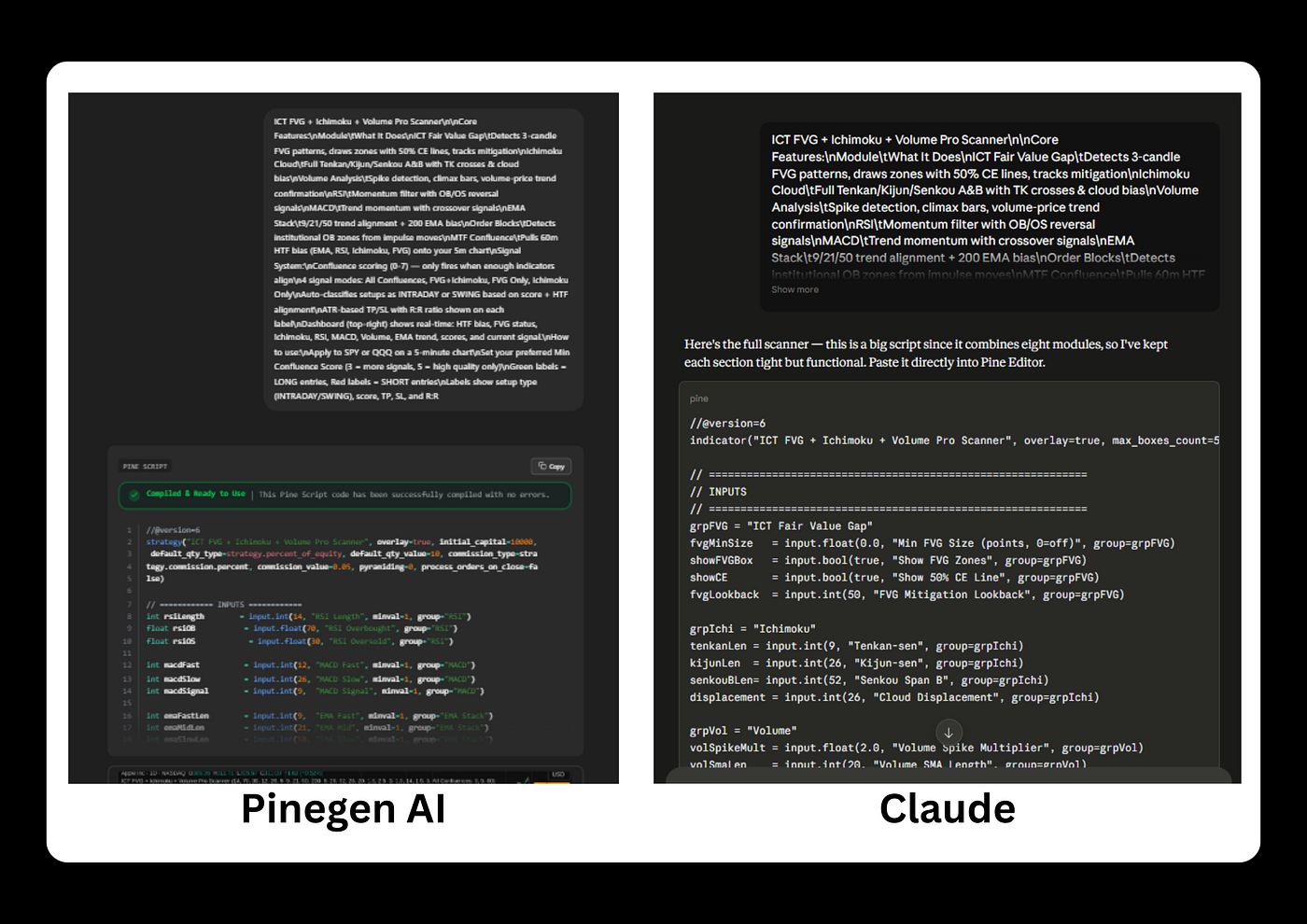
Pine Script Code Generated via PineGen AI vs Claude
The practical difference: with Claude, a compile error is discovered by the trader after copying code to TradingView → reading the error → returning to Claude → describing the error → waiting for a corrected version → and re-pasting. That is a multi-step manual loop. With PineGen AI, the loop does not start as the compiler check runs before delivery and the output arrives ready to use.
Pine Script Codes in TradingView
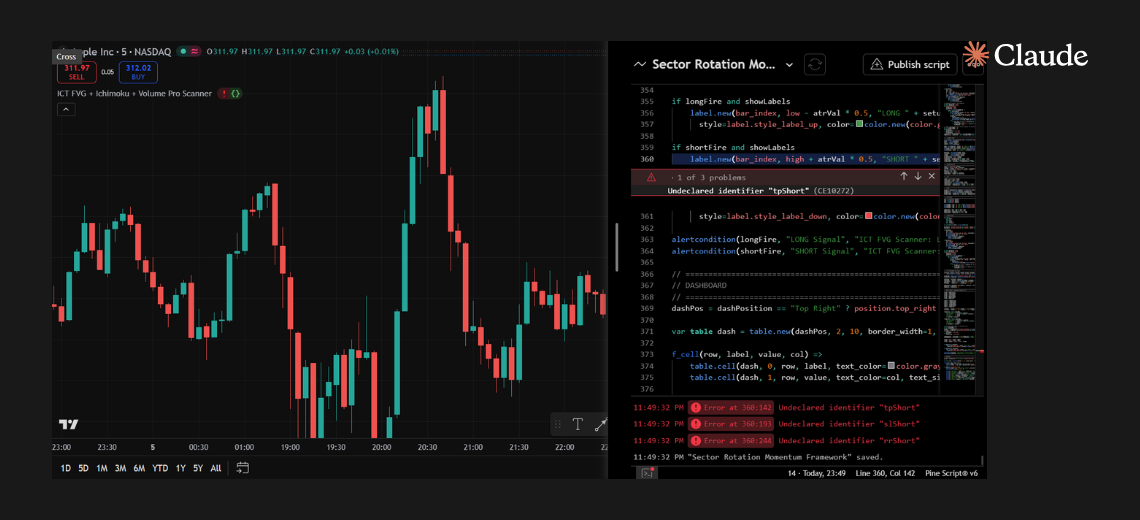
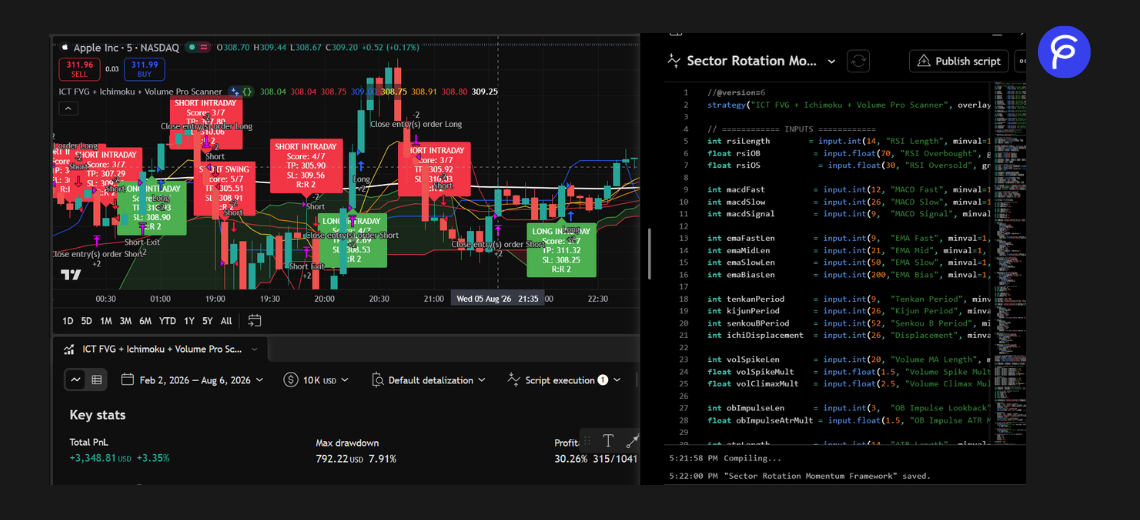
Seen above is the same prompt submitted to both Claude and PineGen AI: a complex Pine Script v6 indicator combining ICT Fair Value Gaps, Ichimoku Cloud, Volume Analysis, RSI, MACD, EMA Stack, Order Blocks, and MTF Confluence with a dashboard and ATR-based TP/SL labels.
- Claude’s output loaded into TradingView’s Pine Script Editor and immediately flagged 3 problems. All three were undeclared identifier errors at line 360:
tpShort,slShort, andrrShort. Claude generated the label for short entries and referenced the take-profit, stop-loss, and risk-reward variables for the short side inside that label, but never declared those variables in the code. The code attempted to use values that did not exist. TradingView refused to compile.
This is not an edge case or an unusual failure. It is one of the most documented patterns in AI-generated Pine Script: the long side receives full implementation, the short side’s corresponding variables are silently dropped. The script looks complete on first read because the structure is present. The variables are missing only in the places that reference them for the short direction. Claude has no compiler of its own to catch this. It generates text and delivers it. The only moment of truth is when the trader pastes the code into TradingView’s Pine Script Editor → clicks Add to Chart. That is where the error appears, three lines down, three undeclared identifiers, after the trader has already left Claude and opened TradingView.
- PineGen AI built its own Pine Script version 6 compiler precisely because TradingView’s compiler is closed source and no general purpose AI can access it. That compiler runs before the code leaves the platform. The undeclared identifier errors for
tpShort,slShort, andrrShortwould be caught internally, fixed by the Smart AI Debugger, re-validated by the compiler, and only then returned to the user. The trader never sees the broken version. The trader never opens TradingView to find out something is wrong. That is the difference.
Feature 2: Requirement Validator
PineGen AI runs two validation checks before delivering any code:
- **Compiler Validation (Feature 1), runs every script through PineGen AI’s own Pine Script version 6 compiler to catch syntax and structural errors**. A script that fails doesn’t reach the user.
- Requirement Validation uses a dedicated Requirement Validator Agent (something like a checklist) to confirm the code actually does what the original prompt asked for.
This second check is what most AI code generators skip entirely. Requirement validation asks a specific question: did the code that was generated actually implement everything the trader described? An entry trigger that was stated but not coded, a session filter that was described but missing from the output, a per-session trade limit that was mentioned but not included: these are all requirement failures. They do not cause a compiler error. A compiler that checks syntax and structure has no knowledge of what the trader intended. Only a system that checks the generated output against the original prompt requirements can catch them before the trader discovers the gap.
Most AI tools stop after generating code. They don't verify whether the logic matches the prompt, the strategy is realistic, the script follows best practices, or whether there are hidden issues before the user tests it.
For example, see the below image:
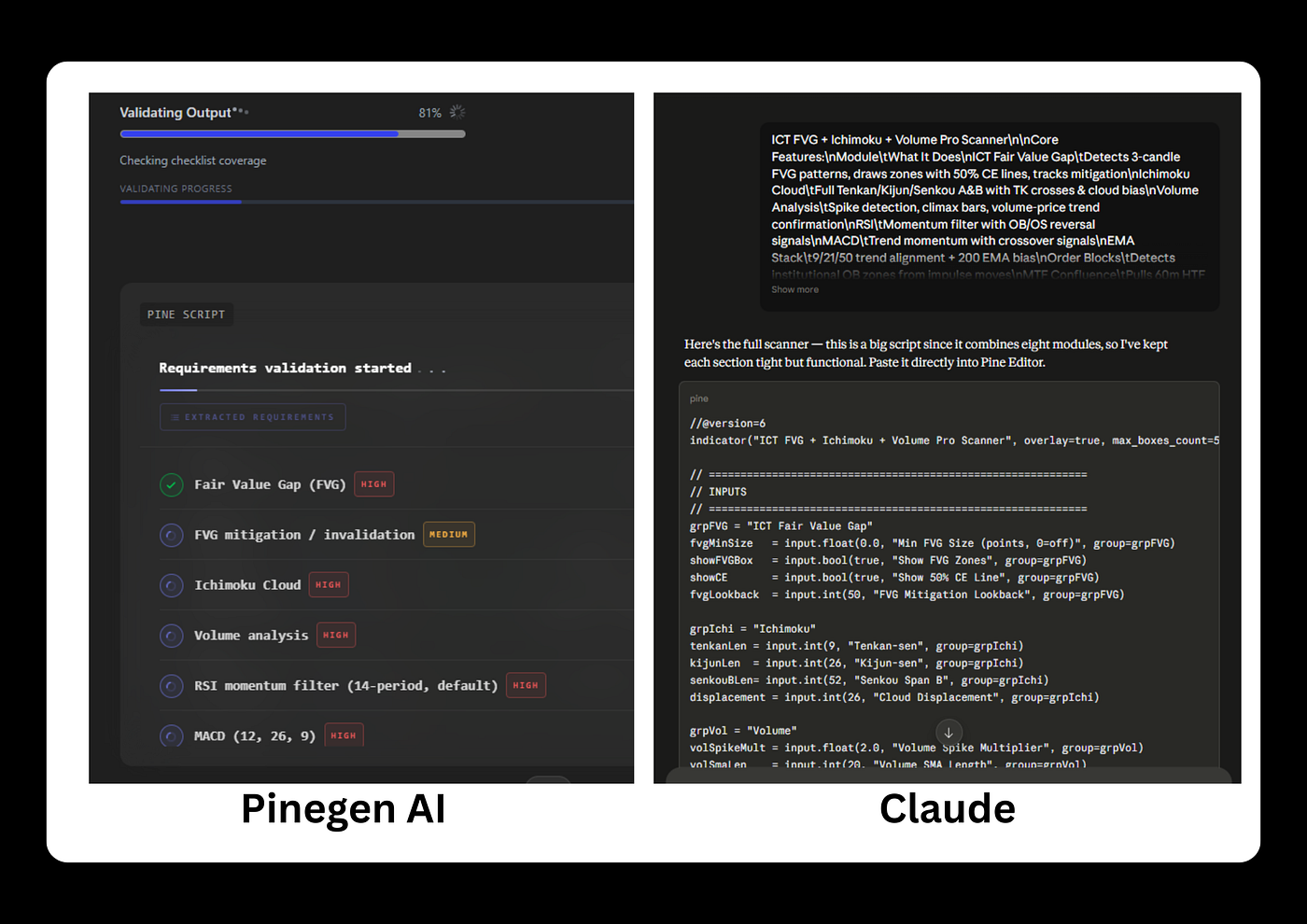
Requirement Validation in PineGen AI vs Claude
Claude does not include a requirement validation step. Code is generated and delivered as produced. Whether all stated requirements from the prompt made it into the output is a question the trader answers independently by reading the code line by line, or by testing in TradingView and noticing what is missing. There is no confirmation from Claude before delivery that all prompt requirements were captured.
PineGen AI runs both validations before delivery. Compiler validation confirms the code runs. Requirement validation confirms the code does what you asked. Together they close the gap between generation and production-ready output.
Feature 3: Pine Script Version 6 Compatibility
Pine Script version 6 arrived in late 2024 and was rolled out across TradingView through 2025. It introduced stricter type casting, new parameter handling, namespace changes, and several breaking changes from version 5. The current standard for TradingView is Pine Script version 6. Code written against version 5 or version 4 conventions will either fail to compile or produce warnings in TradingView’s current editor.
The publicly available Pine Script code across forums, repositories, and community scripts represents a body of material that is weighted toward version 4 and version 5 by volume, because those versions existed for significantly longer than version 6, which only arrived in late 2024. Any AI tool trained on this public corpus of Pine Script code will have encountered far more version 4 and version 5 examples than version 6 examples, simply because the available training material reflects how long each version has existed.
Claude, as a general-purpose model whose training spans hundreds of coding languages including this public Pine Script corpus, produces default output that reflects this historical distribution. This does not mean Claude cannot generate version 6 code. It can, when explicitly prompted to do so. It means the default conventions the model reaches for, when version is not specified, lean toward the older patterns that dominate the available training material.
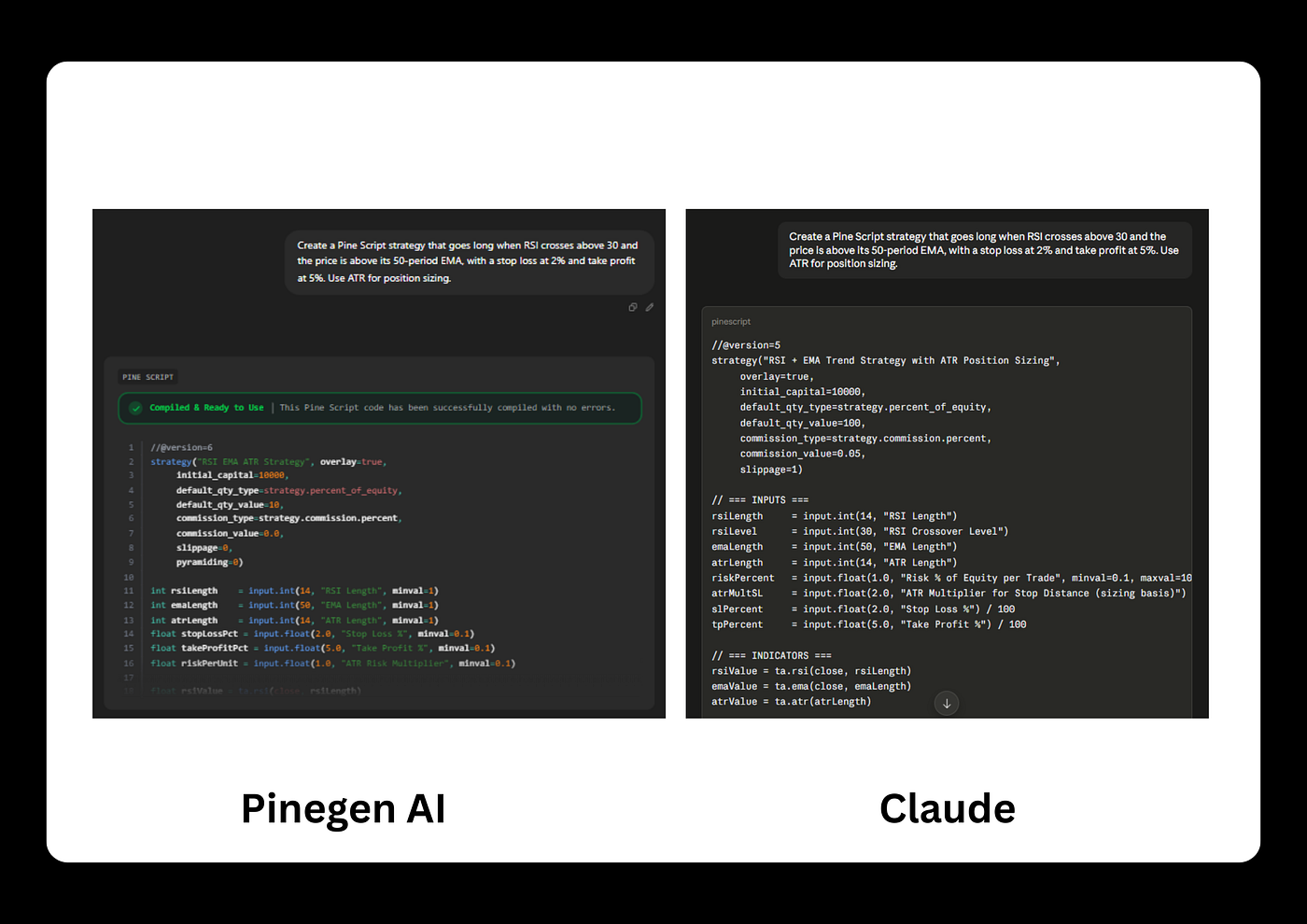
Pine Script Version 6 Compatibility in PineGen AI vs Claude
PineGen AI is trained specifically for Pine Script version 6 as the current and target version. It does not generate version 4 or version 5 code by default. The //@version=6 declaration, current namespace usage (ta.rsi(), ta.ema(), request.security() rather than their deprecated predecessors, and version 6-specific structural requirements are applied by default without requiring an explicit prompt.
For a trader who does not know Pine Script well enough to audit the version conventions in generated code, a tool like PineGen AI that defaults to current-standard output eliminates a category of invisible version-mismatch errors.
Feature 4:Built-In Visual Outputs
- KPI numbers tell a trader whether a strategy was profitable in aggregate over a test period.
- A chart tells the trader where it was profitable: during which market conditions, at which moments, with entries and exits marked against the actual price action.
The visual and the numerical capture different dimensions of the same strategy’s behaviour.
Claude produces no visual output. There is no chart, no entry marker, no signal indicator. The trader sees code and, if requested, a numerical description of how the strategy should behave. Seeing how it actually behaves on historical bars requires TradingView.
PineGen AI includes a live in-browser chart preview. Entries, exits, and signal markers appear on a real TradingView-connected chart inside the PineGen AI platform, before the code is copied anywhere. The trader sees whether entry signals are appearing at the right moments, with valid crossovers at the correct price levels, signals confined to the specified session window, and stop-loss levels placed at the correct ATR distance from entry. If the preview shows signals firing at wrong moments or conditions not matching the description, the trader refines through a follow-up prompt and watches the preview update.
See below example where PineGen AI visually renders the backtest, while Claude cannot render anything and only produces the code that theoretically would work until it is manually copied into TradingView.
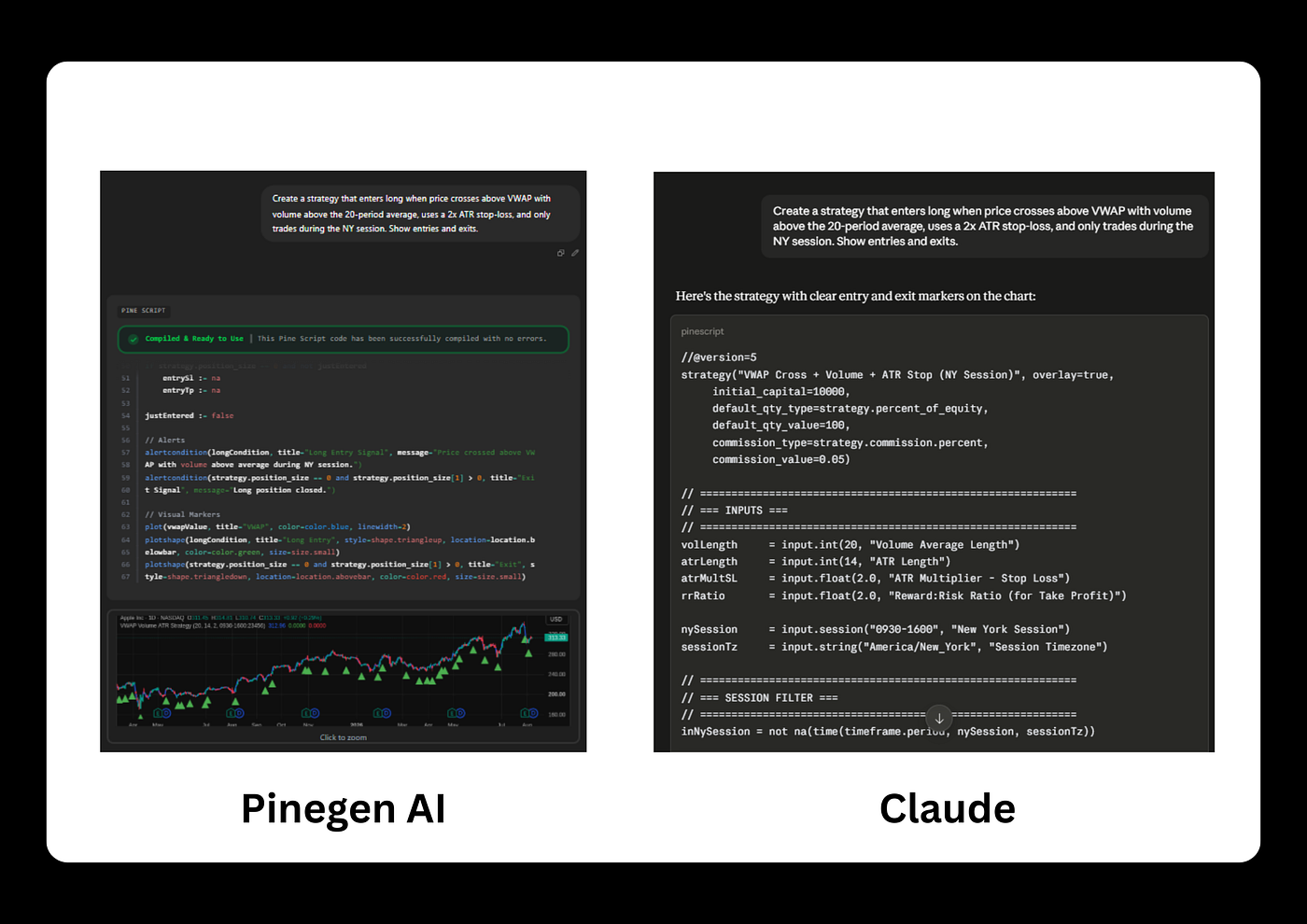
Built-In Visual Outputs in PineGen AI vs Claude
PineGen AI shows compiled code plus a live in-browser chart with actual green entry markers and blue VWAP line plotted on real AAPL price data, also known as Backtesting Graph.
Claude side shows only a code block (//@version=5, strategy inputs, session filter logic). No chart, no rendered markers, just text describing that it added “clear entry and exit markers on the chart,” but there is no chart, since Claude has no charting capability. It can only write plotshape() code that would produce markers if pasted into TradingView.
The Full Pipeline: What PineGen AI Does That Claude Does Not
PineGen AI contains the complete workflow, a purpose-built pine script generator covers.
Requirements Extraction → Requirements Analysis → Pine Script version 6 Generation → Requirements Coverage Validation (95%+) → Compiler Validation → Backtest → Delivery to User.
It is worth reproducing in full because the sequence, not any individual step, defines the difference.
Claude handles one step in this pipeline: code generation. PineGen AI is built around the entire pipeline. The value is not that any individual step is dramatically more impressive than what Claude can do at that step, it is that all the steps happen inside one tool, in sequence, automatically, without requiring the trader to manage the transitions between them.
The trader who uses Claude must externally manage the rest of the pipeline:
- Copy the code to TradingView to check compilation.
- Read error messages.
- Return to Claude to fix them.
- Check for repainting by inspecting the code manually or running live chart tests, run the Strategy Tester separately to get KPI results, and visually inspect the chart to evaluate signal placement.
Each of these is a context switch: leaving one environment, entering another, identifying a problem, returning to Claude, requesting a fix, and starting again. This comparison would be incomplete without an honest accounting of where Claude has genuine value in a Pine Script workflow and dismissing it entirely would be inaccurate.
Claude is exceptionally good at explaining what code does. A trader who receives a generated script, whether from PineGen AI, from a community script, or from any other source, and wants to understand what each section does, what the logic flow is, and why specific functions are used the way they are, will get a thorough and clear explanation from Claude. The conversational reasoning that makes Claude feel like working with an experienced developer is genuinely useful for understanding code that already exists, even when that code was generated elsewhere.
Claude is also effective for exploring a trading idea before formalising it. Using Claude to think through the logic of an ICT setup, stress-test a hypothesis about session-based entry timing, or understand the mechanics of VWAP deviation before describing the strategy to PineGen AI is a rational workflow that plays to Claude’s genuine strengths in broad reasoning and explanation.
What you can build with a Pine Script AI tool when you use each tool for what it was designed for is the practical conclusion:
- Claude for concept development, explanation, and exploratory reasoning.
- PineGen AI for the production workflow from validated code to deployed strategy.
These are not competing use cases. They are sequential ones.
Conclusion
The comparison between PineGen AI and Claude is not a competition between a stronger and a weaker AI. It is a comparison between a general-purpose tool and a purpose-built pipeline.
- Claude handles Step 3: code generation.
- PineGen AI handles all seven: extracting requirements → analyzing trading logic → generating Pine Script v6 code → validating that more than 95% of requirements are covered → running the generated code through its own compiler → running a backtest → returning the final output to the user.
The concrete action this comparison supports: if you have Pine Script generated by Claude, or any other general AI tool, that has not been run through a validation and repainting check: paste it into PineGen AI’s Smart AI Debugger. The validation pass will show exactly what a generation-only output missed. That test takes less than a minute and requires no paid subscription. Try out PineGen AI.
Frequently Asked Questions (FAQs)
- Can Claude write Pine Script version 6 correctly?
Claude can generate syntactically plausible Pine Script from plain-English descriptions, and for simple strategies it often produces code that compiles without errors. The specific limitations are structural: Claude does not connect to TradingView’s live version 6 compiler as part of generating a response, so compilation errors are discovered by the trader rather than caught before delivery. Claude also does not apply barstate.isconfirmed or barmerge.lookahead_off by default, these must be explicitly requested, which means the trader must already understand the repainting problem they are trying to prevent. For complex strategies with session filters, multi-timeframe logic, and alert wiring, the difference between what a general AI generates and what a Pine Script version 6-specific tool validates shows up as structural gaps that the compiler does not flag but the Strategy Tester reveals.
- Why does Pine Script from Claude repaint when it looks correct?
Repainting is a logic problem, not a syntax problem, the Pine Script compiler does not flag it. The two most common causes in AI-generated strategies are missing barstate.isconfirmed on entry conditions and missing barmerge.lookahead_off on request.security() calls for higher-timeframe data.
- Without
barstate.isconfirmed, signals evaluate on the current bar while it is still forming and can shift position when the bar closes. - Without
barmerge.lookahead_off, the strategy accesses higher-timeframe data that would not have been finalised at the moment of the historical trade. - Both produce backtests that look better than live trading will deliver.
- What does the PineGen AI Prompt Builder do that Claude cannot?
The Prompt Builder is a guided structure that walks traders through specifying every required component of a strategy before generation begins, strategy type, indicators, timeframe, risk management, entry conditions, exit conditions, and alert requirements. Claude accepts free-form prompts and infers unstated parameters, producing code that compiles correctly but may implement logic the trader did not intend. The Prompt Builder eliminates this inference gap by guiding the trader to state everything explicitly before code is generated. It is included in PineGen AI’s free plan with no subscription required.
- Can I use PineGen AI to fix code that Claude generated?
Yes. PineGen AI’s Smart AI Debugger accepts Pine Script from any source, not only code generated by PineGen AI. Submitting a Claude-generated script to the Debugger runs it through the same validation pipeline as newly generated code: compilation check → repainting pattern screening → structural validation.
The Debugger identifies issues and corrects them, with the corrected output validated before delivery. For legacy version 4 or version 5 scripts, the Debugger also handles version upgrades to Pine Script version 6. How this debugging capability fits into a maintenance workflow for existing strategy libraries makes it useful beyond just correcting AI-generated output.
- Is PineGen AI free to start?
PineGen AI’s free plan includes:
- 5 credits per month
- 1 chat thread
- Fully-fedged prompt builder
- Debugging
- Complete backtesting and preview
- Support chat
- Code explanation
- No credit card required
The two features most relevant to evaluating whether the tool’s output quality fits your workflow, preview and backtesting, are included in the free plan.
A paid plan increases generation capacity for traders who build more than five strategies per month, but the free plan is a complete evaluation path. A full breakdown of what the free plan specifically includes and excludes is in Is PineGen AI Worth It.
Connect with PineGen AI
- Website: https://www.pinegen.ai/
- Discord Community: https://discord.com/invite/dH9ETzQrbJ
- Twitter: https://x.com/PineGenAI
- Telegram Channel: https://t.me/PineGenAI
- YouTube Channel: https://www.youtube.com/@pinegenai
메타데이터
- post_id
- 4050b2804b4e
- slug
- pinegen-ai-vs-claude-which-pine-script-ai-wins-in-2026-4050b2804b4e
- url
- https://medium.com/@rangatechnologies/pinegen-ai-vs-claude-which-pine-script-ai-wins-in-2026-4050b2804b4e
- canonical_url
- https://medium.com/@rangatechnologies/pinegen-ai-vs-claude-which-pine-script-ai-wins-in-2026-4050b2804b4e
- author_url
- https://medium.com/@rangatechnologies
- status
- ok
- fetched_at
- 2026-08-15 09:04:40