Hallmark: The Open-Source Design Skill That Makes AI-Generated UIs Actually Look Good
AI can write code fast. But there’s still one big problem: Most AI-generated websites look the same.
Hallmark: The Open-Source Design Skill That Makes AI-Generated UIs Actually Look Good
AI can write code fast. But there’s still one big problem: Most AI-generated websites look the same.
You’ve probably seen them:
- Giant centered hero section
- Gradient background
- Rounded buttons
- Generic “Built for modern teams” headline
- The exact same SaaS layout repeated forever
That’s the problem Hallmark is trying to solve.
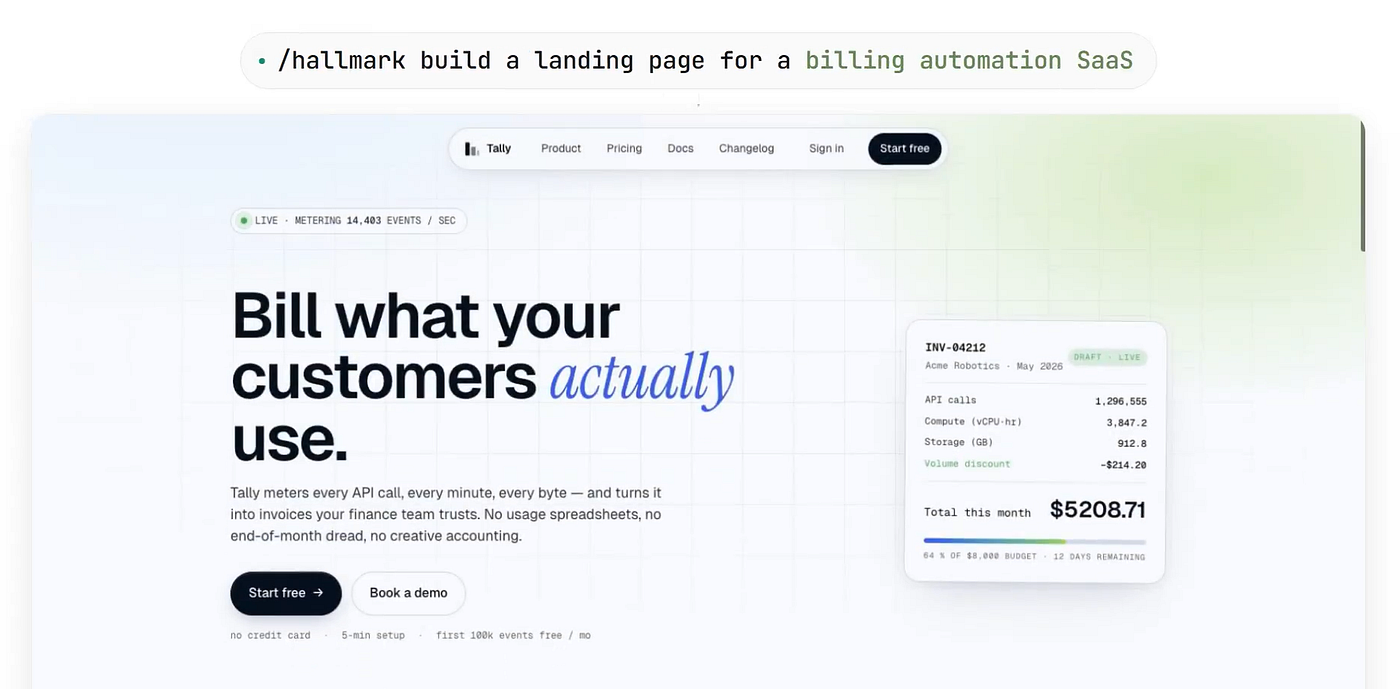
Hallmark is an open-source design skill that works with tools like Claude Code, Cursor, and OpenAI Codex to generate beautiful, unique landing pages and UI designs by default.
Instead of producing “AI slop,” Hallmark focuses on:
- Design systems
- Layout diversity
- Typography discipline
- Visual personality
- Real UI craftsmanship
And the best part?
You install it with one command:
npx skills add nutlope/hallmarkWhy Hallmark Exists
Most AI coding tools are amazing at generating functionality. But design quality usually falls apart. For example, if you ask an AI:
Build me a SaaS landing pageYou often get:
- identical layouts
- overused gradients
- generic copy
- fake testimonials
- bad spacing
- poor typography
- weak visual hierarchy
Hallmark attacks this issue directly.
Instead of treating design as “some CSS,” it treats design as a structured system.
Hallmark Works Like a Design Brain
Hallmark introduces four powerful commands:
| Command  | Purpose                                          |
| -------- | ------------------------------------------------ |
| Build    | Creates a brand-new UI                           |
| Study    | Extracts design DNA from screenshots or URLs     |
| Redesign | Rebuilds an existing site with a fresh structure |
| Audit    | Detects AI-generated design patterns             |
This is what makes Hallmark different from most UI generators.
It doesn’t just generate components.
It thinks about:
- visual rhythm
- macrostructure
- typography
- layout identity
- interaction behavior
- design consistency
1. Build: Generate Better Landing Pages
The default mode asks three questions:
- Who is the audience?
- What does the product do?
- What tone should the design have?
Then Hallmark builds an entirely custom layout.
Example:
Audience: Developers
Product: AI observability platform
Tone: Technical and minimal
Hallmark might generate:
- terminal-inspired UI
- mono typography
- asymmetric layout
- dark atmospheric theme
- developer-focused information density
But if your brief changes:
Audience: Coffee lovers
Product: Monthly coffee subscription
Tone: Warm and editorial
You get something completely different:
- paper textures
- serif typography
- handcrafted spacing
- magazine-style composition
This is possible because Hallmark uses 21 distinct macrostructures rather than a single repeated template.
Example of Macrostructure Thinking
Traditional AI UI generation:
<header>
  <h1>Built for modern teams</h1>
  <button>Get Started</button>
</header>
Hallmark-style generation:
<section class="editorial-hero">
  <div class="issue-number">Issue 04</div>

  <h1>
    Small batch coffee
    roasted for quiet mornings
  </h1>

  <p>
    Subscription coffee sourced from rotating
    mountain farms across South America.
  </p>
</section>
Notice the difference?
The second example has:
- voice
- personality
- narrative structure
- visual direction
That’s what Hallmark optimizes for.
2. Study: Hallmark’s Most Powerful Feature
This is where Hallmark becomes truly interesting.
The study command lets you analyze:
- screenshots
- existing websites
- visual references
Example:
hallmark study https://stripe.comOr:
hallmark study screenshot.pngInstead of cloning designs, Hallmark extracts what it calls:
“Design DNA”
It studies:
- typography pairing
- color behavior
- layout rhythm
- spacing systems
- archetypes
- visual hierarchy
Then it can:
- Explain the design system
- Rebuild your own content using similar DNA
- Export a reusable
design.md
Image Mode vs URL Mode
Hallmark has two different study systems.
| Mode       | What It Extracts           |
| ---------- | -------------------------- |
| Screenshot | Visual roles and structure |
| URL        | Exact fonts and CSS tokens |
Example of URL extraction:
:root {
  --background: #0A0A0A;
  --accent: #7C3AED;
  --font-primary: "Inter";
}
Example of screenshot extraction:
Typography:
- High-contrast serif heading
- Neutral sans-serif body

Layout:
- Magazine-inspired asymmetry
- Dense editorial spacing
This is much safer than pixel copying.
Hallmark specifically refuses:
- paid templates
- competitor cloning
- direct copying
It extracts systems, not pixels.
3. Redesign: Keep Content, Replace Structure
This mode is extremely useful for startups.
You can keep:
- branding
- copy
- information architecture
But completely rebuild the visual system.
Example:
hallmark redesign ./landing-pageOr:
hallmark redesign ./landing-page --mood editorialHallmark intentionally changes:
- page flow
- hero composition
- navigation style
- typography direction
- spacing logic
This avoids the “same design forever” problem.
4. Audit: Detect AI Design Slop
One of the smartest features is the audit system.
Hallmark runs a 65-gate slop test.
It checks for things like:
- generic AI copy
- fake metrics
- repetitive layouts
- bad hover states
- poor accessibility
- centered-everything syndrome
- emoji feature icons
- broken responsive design
Example:
hallmark audit ./sitePossible output:
FAIL:
- Hero uses centered-everything layout
- CTA lacks hierarchy
- Too many font families
- Hover interaction feels decorative
- Footer matches common AI SaaS fingerprint
This is incredibly useful because AI-generated design often looks technically correct but emotionally generic.
Hallmark tries to fix that.
Macrostructures
Most AI tools think in components.
Hallmark thinks in page identities.
Instead of saying:
Add hero section
Add features
Add CTA
It chooses entire page architectures.
Examples include:
- Manifesto
- Bento Grid
- Editorial
메타데이터
- post_id
- 40a954393ffa
- slug
- hallmark-the-open-source-design-skill-that-makes-ai-generated-uis-actually-look-good-40a954393ffa
- url
- https://medium.com/@codebun/hallmark-the-open-source-design-skill-that-makes-ai-generated-uis-actually-look-good-40a954393ffa
- canonical_url
- https://medium.com/@codebun/hallmark-the-open-source-design-skill-that-makes-ai-generated-uis-actually-look-good-40a954393ffa
- author_url
- https://medium.com/@codebun
- status
- ok
- fetched_at
- 2026-06-09 15:37:30