Document Parsing in the Age of AI: From Static Extraction to Intelligent Understanding
Document parsing has evolved from simple text extraction into a critical infrastructure layer for modern AI systems. As documents grow more…
Document Parsing in the Age of AI: From Static Extraction to Intelligent Understanding

Document parsing has evolved from simple text extraction into a critical infrastructure layer for modern AI systems. As documents grow more complex — mixing tables, scanned images, multi-column layouts, and embedded charts — and as AI applications demand higher-quality structured inputs, a single parsing strategy is rarely enough.
This article walks through each generation of document parsing tools, explains when to use them, and provides fully runnable Python examples you can drop into your own pipelines.
Prerequisites
Before running any of the examples below, make sure you have Python 3.8+ and install dependencies per section:
# Core PDF reading (used in almost every example)
pip install pymupdf
# RAG-optimized parsing
pip install "unstructured[pdf]"
# Vision-based parsing (requires an OpenAI API key)
pip install openai
# Chunking for AI pipelines
pip install langchain-text-splitters
The First Generation: Traditional Parsers
Tools like PyMuPDF (fitz) and PyPDF2 focus on fast, local text extraction directly from the PDF byte stream. They operate without network calls, without AI models, and without significant memory overhead. The trade-off is that they are purely structural — they read characters and positions, not meaning.
When to Use
- Simple, digitally-created PDFs with no images or complex tables
- High-throughput pipelines where latency matters (thousands of documents/hour)
- Fully local, air-gapped environments
- Pre-processing step before a heavier parser
Example — PyMuPDF
# pip install pymupdf
import fitz  # PyMuPDF

def extract_text_pymupdf(file_path: str) -> str:
    """
    Extracts plain text from every page of a PDF using PyMuPDF.
    Fast and local - no API calls required.
    """
    full_text = []
    with fitz.open(file_path) as doc:
        print(f"[PyMuPDF] Opened '{file_path}' - {doc.page_count} page(s)")
        for page_num, page in enumerate(doc, start=1):
            text = page.get_text("text")  # plain text, strips layout
            if text.strip():
                full_text.append(f"--- Page {page_num} ---\n{text}")
    return "\n".join(full_text)

def extract_text_with_blocks(file_path: str) -> list[dict]:
    """
    Returns each text block with its bounding box - useful for
    downstream layout analysis or complexity detection.
    """
    blocks_data = []
    with fitz.open(file_path) as doc:
        for page_num, page in enumerate(doc, start=1):
            blocks = page.get_text("blocks")  # (x0, y0, x1, y1, text, block_no, block_type)
            for block in blocks:
                if block[6] == 0:  # block_type 0 = text (1 = image)
                    blocks_data.append({
                        "page": page_num,
                        "bbox": block[:4],
                        "text": block[4].strip(),
                    })
    return blocks_data

if __name__ == "__main__":
    # Replace with your own PDF path
    FILE = "sample.pdf"
    plain_text = extract_text_pymupdf(FILE)
    print(plain_text[:1500])
    print("\n--- Block-level extraction ---")
    blocks = extract_text_with_blocks(FILE)
    for b in blocks[:5]:
        print(b)
Key limitation: PyMuPDF cannot understand table structure — it returns table cells as scattered text fragments. For tables, move to the second or third generation.
The Second Generation: RAG-Optimized Parsing
Tools like Unstructured and LlamaParse are purpose-built for AI pipelines. Instead of returning a flat string, they identify semantic elements — titles, narrative text, list items, tables — and return them as typed objects or clean Markdown. This structure dramatically improves chunking quality and retrieval relevance in RAG systems.
When to Use
- Documents with tables, headers, and multi-section layouts
- Building a vector search index or knowledge base
- You need output that maps cleanly to Markdown for LLM context windows
- A mix of document types (Word, PDF, HTML) that need a unified output format
Example — Unstructured
# pip install "unstructured[pdf]"
# On macOS/Linux you may also need: brew install poppler tesseract
# On Ubuntu: apt-get install poppler-utils tesseract-ocr
from unstructured.partition.pdf import partition_pdf
from unstructured.documents.elements import Table, Title, NarrativeText, ListItem

def parse_with_unstructured(file_path: str) -> str:
    """
    Parses a PDF using Unstructured, preserving semantic element types.
    Returns a Markdown-style string ready for LLM ingestion.
    """
    # strategy options: "fast", "hi_res", "ocr_only"
    # Use "hi_res" for scanned docs or complex layouts (requires Tesseract)
    elements = partition_pdf(filename=file_path, strategy="fast")
    output_lines = []
    for el in elements:
        if isinstance(el, Title):
            output_lines.append(f"## {el.text}")
        elif isinstance(el, Table):
            output_lines.append(f"[TABLE]\n{el.text}\n[/TABLE]")
        elif isinstance(el, ListItem):
            output_lines.append(f"- {el.text}")
        elif isinstance(el, NarrativeText):
            output_lines.append(el.text)
        elif el.text.strip():
            output_lines.append(el.text)
    return "\n\n".join(output_lines)

def parse_and_show_element_types(file_path: str) -> None:
    """
    Diagnostic helper - shows how Unstructured classifies each element.
    Useful when tuning your pipeline for a new document type.
    """
    elements = partition_pdf(filename=file_path, strategy="fast")
    type_counts: dict[str, int] = {}
    for el in elements:
        el_type = type(el).__name__
        type_counts[el_type] = type_counts.get(el_type, 0) + 1
        print(f"[{el_type:20s}] {el.text[:80]}")
    print("\n--- Element type summary ---")
    for el_type, count in sorted(type_counts.items(), key=lambda x: -x[1]):
        print(f"  {el_type}: {count}")

if __name__ == "__main__":
    FILE = "sample.pdf"
    print("=== Structured Markdown Output ===")
    result = parse_with_unstructured(FILE)
    print(result[:2000])
    print("\n=== Element Type Breakdown ===")
    parse_and_show_element_types(FILE)
Tip: Use
strategy="hi_res"for scanned or image-heavy PDFs — it activates OCR via Tesseract. This is slower but significantly more accurate for non-digital documents.
The Third Generation: Agentic and Vision-Based Parsing
Modern multimodal models treat each page as an image rather than a byte stream. They understand visual layout, read handwriting, interpret diagrams, and reason about tables as a human would. This generation trades cost and latency for a level of semantic understanding that rule-based tools simply cannot reach.
When to Use
- Scanned PDFs with no embedded text layer
- Documents with complex layouts: multi-column, mixed text/image, nested tables
- Forms, invoices, or receipts where structure matters as much as text
- Cases where you need the model to reason about content, not just extract it
Choosing the Right Vision Model
The original version of this article defaulted to GPT-4o — a sensible choice in 2023, but no longer the obvious pick. The vision model landscape has shifted considerably, and the right choice now depends on your accuracy requirements, cost sensitivity, and document type.
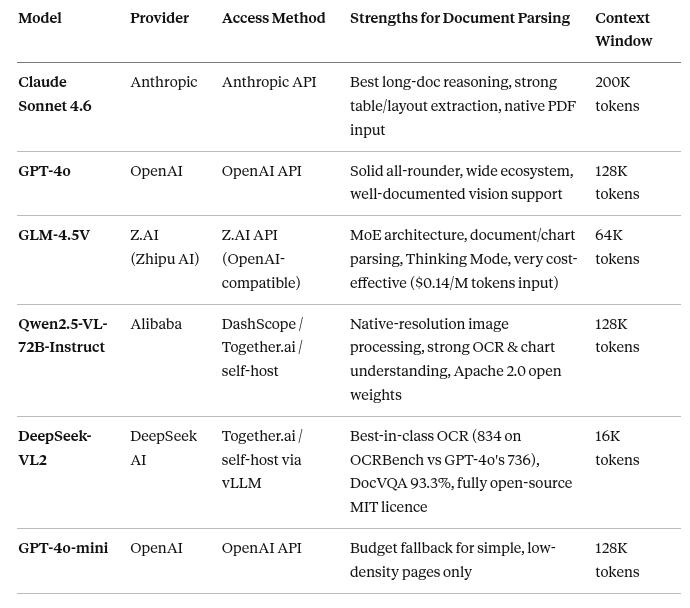
Practical guidance by use case:
- General production pipeline → Claude Sonnet 4.6. Its 200K context processes entire contracts in one shot and the API accepts raw PDF bytes natively, skipping rasterization entirely.
- OpenAI-integrated systems → GPT-4o. Drop-in for existing pipelines.
- Cost-sensitive, high-volume cloud workloads → GLM-4.5V. At $0.14/M input tokens it is one of the cheapest hosted vision APIs. Its optional Thinking Mode gives a quality boost on dense charts without switching models.
- Privacy-first or air-gapped deployments → Qwen2.5-VL-72B-Instruct. Open weights under Apache 2.0, runs locally via vLLM or Ollama, and processes images at native resolution rather than fixed crops — critical for OCR accuracy on dense documents.
- OCR-heavy pipelines and scanned archives → DeepSeek-VL2. It outscores GPT-4o on both OCRBench (834 vs 736) and DocVQA (93.3% vs 92.8%). Fully open-source, commercially licensed, and self-hostable on an A100 for zero per-call cost at scale.
Shared Utility — PDF Page to Base64
Both examples below use this shared helper to rasterize PDF pages:
# pip install pymupdf
import base64
import tempfile
from pathlib import Path
import fitz  # PyMuPDF

def pdf_page_to_base64(pdf_path: str, page_number: int = 0, dpi: int = 150) -> str:
    """
    Rasterizes a single PDF page to PNG and returns it as a base64 string.
    DPI=150 is a good balance between quality and token cost.
    Use DPI=200+ for small fonts or dense tables.
    """
    with fitz.open(pdf_path) as doc:
        page = doc[page_number]
        mat = fitz.Matrix(dpi / 72, dpi / 72)  # PDF default is 72 DPI
        pix = page.get_pixmap(matrix=mat)
        with tempfile.NamedTemporaryFile(suffix=".png", delete=False) as tmp:
            pix.save(tmp.name)
            tmp_path = tmp.name
    with open(tmp_path, "rb") as f:
        encoded = base64.b64encode(f.read()).decode("utf-8")
    Path(tmp_path).unlink(missing_ok=True)
    return encoded
Example A — Claude Sonnet 4.6 (Recommended)
# pip install anthropic pymupdf
# Requires: ANTHROPIC_API_KEY environment variable
import os
import anthropic
# pdf_page_to_base64() defined above - include it in your script

EXTRACTION_PROMPT = (
    "Extract all text and structure from this document page. "
    "Preserve headings, bullet points, and table structure using Markdown. "
    "Format any tables as proper Markdown tables. "
    "Return only the extracted content - no commentary or preamble."
)

def parse_page_with_claude(pdf_path: str, page_number: int = 0) -> str:
    """
    Sends a rasterized PDF page to Claude Sonnet 4.6 for structured extraction.
    Returns clean Markdown. Recommended for complex layouts and scanned documents.
    """
    client = anthropic.Anthropic(api_key=os.environ.get("ANTHROPIC_API_KEY"))
    print(f"[Claude] Encoding page {page_number} of '{pdf_path}'...")
    base64_image = pdf_page_to_base64(pdf_path, page_number)
    message = client.messages.create(
        model="claude-sonnet-4-6",
        max_tokens=2048,
        messages=[
            {
                "role": "user",
                "content": [
                    {
                        "type": "image",
                        "source": {
                            "type": "base64",
                            "media_type": "image/png",
                            "data": base64_image,
                        },
                    },
                    {
                        "type": "text",
                        "text": EXTRACTION_PROMPT,
                    },
                ],
            }
        ],
    )
    return message.content[0].text

def parse_full_pdf_with_claude(pdf_path: str) -> str:
    """
    Processes every page of a PDF through Claude Sonnet 4.6.
    Claude's 200K context window means you can pass many pages in a single call
    if needed - but per-page calls keep error recovery simpler.
    """
    with fitz.open(pdf_path) as doc:
        page_count = doc.page_count
    print(f"[Claude] Processing {page_count} page(s)...")
    all_pages = []
    for i in range(page_count):
        page_text = parse_page_with_claude(pdf_path, page_number=i)
        all_pages.append(f"<!-- Page {i + 1} -->\n{page_text}")
    return "\n\n---\n\n".join(all_pages)

if __name__ == "__main__":
    import fitz  # ensure import is available at top level
    FILE = "sample.pdf"
    result = parse_page_with_claude(FILE, page_number=0)
    print(result)
Example B — GPT-4o (OpenAI)
Use this if you are already in the OpenAI ecosystem or need GPT-4o specifically.
# pip install openai pymupdf
# Requires: OPENAI_API_KEY environment variable
import os
from openai import OpenAI
# pdf_page_to_base64() defined above - include it in your script

def parse_page_with_gpt4o(pdf_path: str, page_number: int = 0) -> str:
    """
    Sends a rasterized PDF page to GPT-4o for structured extraction.
    Solid choice for OpenAI-integrated pipelines.
    """
    client = OpenAI(api_key=os.environ.get("OPENAI_API_KEY"))
    print(f"[GPT-4o] Encoding page {page_number} of '{pdf_path}'...")
    base64_image = pdf_page_to_base64(pdf_path, page_number)
    response = client.chat.completions.create(
        model="gpt-4o",         # Use "gpt-4o-mini" for budget pipelines on simple pages
        messages=[
            {
                "role": "user",
                "content": [
                    {
                        "type": "text",
                        "text": (
                            "Extract all text and structure from this document page. "
                            "Preserve headings, bullet points, and table structure using Markdown. "
                            "Format any tables as proper Markdown tables. "
                            "Return only the extracted content - no commentary."
                        ),
                    },
                    {
                        "type": "image_url",
                        "image_url": {
                            "url": f"data:image/png;base64,{base64_image}",
                            "detail": "high",   # "low" is faster and cheaper but less accurate
                        },
                    },
                ],
            }
        ],
        max_tokens=2000,
    )
    return response.choices[0].message.content

if __name__ == "__main__":
    import fitz  # ensure import is available at top level
    FILE = "sample.pdf"
    result = parse_page_with_gpt4o(FILE, page_number=0)
    print(result)
Cost note: Each high-detail page image costs roughly 800–1,500 input tokens on top of your prompt regardless of provider. For large document sets, route to vision models only on pages flagged as complex by a cheaper pre-screening step — exactly what the hybrid pipeline below does.
Example C — GLM-4.5V (Z.AI API)
GLM-4.5V is built by Zhipu AI on a Mixture-of-Experts architecture (106B total, 12B active). It is one of the most cost-efficient hosted vision APIs at $0.14/M input tokens and includes a Thinking Mode that engages deeper chain-of-thought reasoning for complex charts or multi-image layouts — without switching models.
Access is through Z.AI’s cloud API, which is fully OpenAI-compatible. Get your API key at platform.z.ai.
# pip install openai pymupdf
# Requires: ZAI_API_KEY environment variable (from platform.z.ai)
import os
from openai import OpenAI
# pdf_page_to_base64() defined in the shared utility above - include it in your script

def parse_page_with_glm(
    pdf_path: str,
    page_number: int = 0,
    thinking: bool = False,
) -> str:
    """
    Sends a rasterized PDF page to GLM-4.5V via Z.AI's OpenAI-compatible API.
    Args:
        pdf_path:    Path to the PDF file.
        page_number: Zero-indexed page to process.
        thinking:    Set True for complex charts/tables to enable chain-of-thought
                     reasoning. Adds latency but improves accuracy on hard layouts.
    """
    client = OpenAI(
        api_key=os.environ.get("ZAI_API_KEY"),
        base_url="https://api.z.ai/api/paas/v4",   # Z.AI OpenAI-compatible endpoint
    )
    print(f"[GLM-4.5V] Encoding page {page_number} of '{pdf_path}'...")
    base64_image = pdf_page_to_base64(pdf_path, page_number)
    # Build the request - thinking mode is passed as an extra body parameter
    extra_body = {"thinking": {"type": "enabled"}} if thinking else {}
    response = client.chat.completions.create(
        model="glm-4.5v",
        messages=[
            {
                "role": "user",
                "content": [
                    {
                        "type": "image_url",
                        "image_url": {
                            "url": f"data:image/png;base64,{base64_image}",
                        },
                    },
                    {
                        "type": "text",
                        "text": (
                            "Extract all text and structure from this document page. "
                            "Preserve headings, bullet points, and table structure using Markdown. "
                            "Format any tables as proper Markdown tables. "
                            "Return only the extracted content - no commentary."
                        ),
                    },
                ],
            }
        ],
        max_tokens=2000,
        extra_body=extra_body,
    )
    return response.choices[0].message.content

if __name__ == "__main__":
    import fitz
    FILE = "sample.pdf"
    # Standard mode - fast and cheap
    print("=== GLM-4.5V Standard Mode ===")
    result = parse_page_with_glm(FILE, page_number=0, thinking=False)
    print(result)
    # Thinking mode - better on complex tables or dense charts
    print("\n=== GLM-4.5V Thinking Mode ===")
    result_thinking = parse_page_with_glm(FILE, page_number=0, thinking=True)
    print(result_thinking)
Example D — Qwen2.5-VL via Ollama (Fully Free, Local)
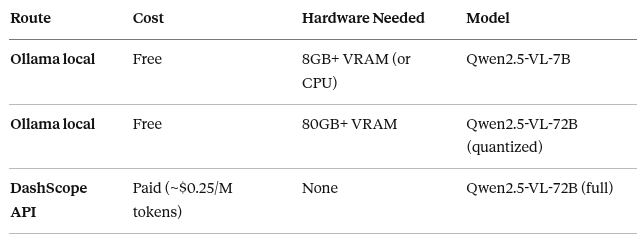
A note on “free” vs “paid” for this model: Qwen2.5-VL is open-source (Apache 2.0) so the weights are free — but the 72B variant requires 80GB+ VRAM, which puts it out of reach of consumer hardware without paying for cloud GPUs. The genuinely free path is Ollama with the 7B variant, which runs on any machine with 8GB+ VRAM or even on CPU (slowly). The 7B still produces high-quality structured extraction for most document types.
If you specifically need the 72B model and are willing to pay, the cleanest approach is Alibaba’s own DashScope API — see the inline comments for a one-line swap.
Setup (one-time):
# Install Ollama from https://ollama.com
# Then pull the model — ~5GB download
ollama pull qwen2.5vl:7b
# For 72B on high-VRAM machines (optional):
ollama pull qwen2.5vl:72b
# pip install openai pymupdf
# Requires: Ollama running locally (ollama serve)
# Free and fully offline — no API key needed.
import os
from openai import OpenAI
# pdf_page_to_base64() defined in the shared utility above - include it in your script
# Choose your variant based on available hardware:
# "qwen2.5vl:7b" - 8GB VRAM, fast, good quality
# "qwen2.5vl:72b" - 80GB VRAM, best quality (if available)
QWEN_MODEL = "qwen2.5vl:7b"
def parse_page_with_qwen_local(pdf_path: str, page_number: int = 0) -> str:
"""
Sends a rasterized PDF page to Qwen2.5-VL running locally via Ollama.
Completely free - no API key, no network calls, no per-token cost.
Ollama exposes an OpenAI-compatible endpoint at http://localhost:11434/v1,
so the same openai SDK works with just a base_url swap.
--- TO USE ALIBABA'S DASHSCOPE INSTEAD (paid, 72B full model) ---
Replace the client constructor with:
client = OpenAI(
api_key=os.environ.get("DASHSCOPE_API_KEY"),
base_url="https://dashscope.aliyuncs.com/compatible-mode/v1",
)
And set model="qwen-vl-max" (DashScope's alias for Qwen2.5-VL-72B).
----------------------------------------------------------------
"""
# Ollama's OpenAI-compatible endpoint - no real key needed, "ollama" is a placeholder
client = OpenAI(
base_url="http://localhost:11434/v1",
api_key="ollama",
)
print(f"[Qwen2.5-VL / Ollama] Encoding page {page_number} of '{pdf_path}'...")
base64_image = pdf_page_to_base64(pdf_path, page_number, dpi=200)
response = client.chat.completions.create(
model=QWEN_MODEL,
messages=[
{
"role": "user",
"content": [
{
"type": "image_url",
"image_url": {
"url": f"data:image/png;base64,{base64_image}",
},
},
{
"type": "text",
"text": (
"Extract all text and structure from this document page. "
"Preserve headings, bullet points, and table structure using Markdown. "
"Format any tables as proper Markdown tables. "
"Return only the extracted content - no commentary."
),
},
],
}
],
max_tokens=2048,
temperature=0.1,
)
return response.choices[0].message.content
if __name__ == "__main__":
import fitz
FILE = "sample.pdf"
result = parse_page_with_qwen_local(FILE, page_number=0)
print(result)Performance note: On a machine without a GPU, Ollama will run the model on CPU using llama.cpp. The 7B Q4 model produces around 3–8 tokens/sec on a modern 8-core CPU — slow but workable for offline batch processing. For real-time pipelines without GPU, use the paid DashScope API instead.
Example E — DeepSeek-VL2 (Self-Hosted, Free)
A note on access for this model — please read before running:
DeepSeek-VL2 has no free hosted API. The official api.deepseek.com endpoint is text-only and explicitly does not support image input. It is not available on Ollama. The only genuinely free way to run it is to self-host it from DeepSeek's GitHub repository — which requires serious GPU hardware.
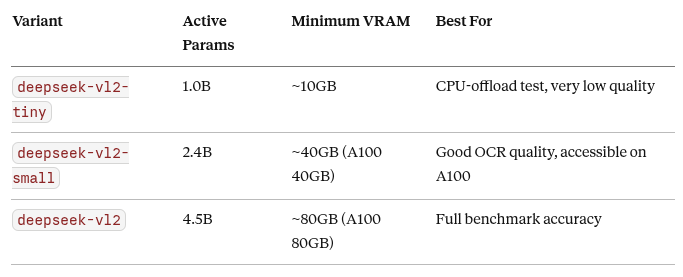
If you do not have access to this hardware locally, the only paid option that currently hosts VL2 is Together.ai — the connection string is preserved in inline comments below so you can switch with one line.
Setup (one-time, self-hosted path):
# 1. Clone DeepSeek's repository
git clone https://github.com/deepseek-ai/DeepSeek-VL2.git
cd DeepSeek-VL2
# 2. Install dependencies
pip install -e .
pip install torch transformers Pillow einops timm
# 3. Model weights download automatically on first run from HuggingFace
#    deepseek-ai/deepseek-vl2-small (~32GB) or deepseek-ai/deepseek-vl2 (~55GB)
# Self-hosted DeepSeek-VL2 using the transformers-style native library.
# Requires: GPU with 40GB+ VRAM and the setup steps above.
# Tested with: deepseek-vl2-small on a single A100 40GB.
#
# NO API KEY NEEDED — runs entirely locally, completely free.
#
# --- IF YOU WANT TO USE TOGETHER.AI INSTEAD (paid, no GPU needed) ---
# pip install openai pymupdf
# Then use the function parse_page_with_deepseek_vl2_paid() below.
# -----------------------------------------------------------------------
import torch
from PIL import Image
from transformers import AutoModelForCausalLM
# DeepSeek's custom processor (installed from their repo)
from deepseek_vl2.models import DeepseekVLV2Processor, DeepseekVLV2ForCausalLM
import fitz # PyMuPDF - for PDF rasterization
# Choose your variant - small is recommended unless you have 80GB VRAM
MODEL_PATH = "deepseek-ai/deepseek-vl2-small" # Or "deepseek-ai/deepseek-vl2" for full
def load_deepseek_vl2():
"""
Loads the processor and model. Cache this in your application - loading
takes ~30 seconds and ~32GB VRAM for the small variant.
"""
processor: DeepseekVLV2Processor = DeepseekVLV2Processor.from_pretrained(MODEL_PATH)
model: DeepseekVLV2ForCausalLM = AutoModelForCausalLM.from_pretrained(
MODEL_PATH,
trust_remote_code=True,
torch_dtype=torch.bfloat16,
)
model = model.cuda().eval()
return processor, model
def pdf_page_to_pil(pdf_path: str, page_number: int = 0, dpi: int = 200) -> Image.Image:
"""Rasterizes a PDF page to a PIL Image for DeepSeek-VL2."""
with fitz.open(pdf_path) as doc:
page = doc[page_number]
mat = fitz.Matrix(dpi / 72, dpi / 72)
pix = page.get_pixmap(matrix=mat)
# Convert PyMuPDF pixmap to PIL
img = Image.frombytes("RGB", [pix.width, pix.height], pix.samples)
return img
def parse_page_with_deepseek_vl2_local(
pdf_path: str,
page_number: int = 0,
processor=None,
model=None,
) -> str:
"""
Parses a PDF page using locally hosted DeepSeek-VL2.
Pass pre-loaded processor and model to avoid reloading on every call.
Temperature is capped at 0.5 (DeepSeek's own recommendation: keep <= 0.7).
"""
if processor is None or model is None:
print("[DeepSeek-VL2] Loading model - this takes ~30s on first call...")
processor, model = load_deepseek_vl2()
print(f"[DeepSeek-VL2] Processing page {page_number} of '{pdf_path}'...")
image = pdf_page_to_pil(pdf_path, page_number)
prompt = (
"Extract all text and structure from this document page. "
"Preserve headings, bullet points, and table structure using Markdown. "
"Format any tables as proper Markdown tables. "
"Return only the extracted content - no commentary."
)
# DeepSeek-VL2 uses its own conversation format
conversation = [
{
"role": "<|User|>",
"content": f"<image>\n{prompt}",
"images": [image],
},
{"role": "<|Assistant|>", "content": ""},
]
# Tokenize
inputs = processor(
conversations=conversation,
images=[image],
force_batchify=True,
).to(model.device)
# Generate
with torch.no_grad():
outputs = model.generate(
**inputs,
max_new_tokens=2048,
temperature=0.5, # <= 0.7 is DeepSeek's recommendation for VL2
do_sample=True,
)
# Decode - skip the input tokens to get only the generated text
generated = outputs[0][inputs["input_ids"].shape[1]:]
return processor.tokenizer.decode(generated, skip_special_tokens=True)
# --- PAID ALTERNATIVE: Together.ai (no GPU needed) ---
def parse_page_with_deepseek_vl2_paid(pdf_path: str, page_number: int = 0) -> str:
"""
Uses Together.ai to call DeepSeek-VL2 without a local GPU.
Requires: TOGETHER_API_KEY environment variable and pip install openai.
Cost: check Together.ai pricing at https://api.together.ai/models
"""
import os, base64, tempfile
from pathlib import Path
from openai import OpenAI
client = OpenAI(
api_key=os.environ.get("TOGETHER_API_KEY"),
base_url="https://api.together.xyz/v1",
)
b64 = pdf_page_to_base64(pdf_path, page_number, dpi=200) # helper defined earlier
response = client.chat.completions.create(
model="deepseek-ai/DeepSeek-VL2",
messages=[
{
"role": "user",
"content": [
{"type": "image_url", "image_url": {"url": f"data:image/png;base64,{b64}"}},
{"type": "text", "text": "Extract all text and structure as Markdown. Tables as Markdown tables. No commentary."},
],
}
],
max_tokens=2048,
temperature=0.5,
)
return response.choices[0].message.content
if __name__ == "__main__":
FILE = "sample.pdf"
# Local path (free, needs GPU)
proc, mdl = load_deepseek_vl2()
result = parse_page_with_deepseek_vl2_local(FILE, page_number=0, processor=proc, model=mdl)
print(result)
# Paid cloud path (uncomment if no local GPU):
# result = parse_page_with_deepseek_vl2_paid(FILE, page_number=0)
# print(result)Honest assessment: DeepSeek-VL2’s OCR benchmark scores are exceptional, but its deployment story is the hardest of all models in this article. If you do not have access to A100-class hardware, the practical options are (a) use the paid Together.ai function above, or (b) substitute with Qwen2.5-VL-7B via Ollama which is genuinely free and much easier to run, at the cost of some accuracy on the most complex documents.
Running All Five Models Side-by-Side
This utility runs all five vision parsers against the same PDF page and prints a comparison, which is useful for benchmarking against your specific document corpus before committing to one model in production.
# pip install openai anthropic pymupdf
# Requires: ANTHROPIC_API_KEY, OPENAI_API_KEY, ZAI_API_KEY, TOGETHER_API_KEY
import os
import time
# pdf_page_to_base64() and all parse_page_with_* functions defined above

def compare_all_models(pdf_path: str, page_number: int = 0) -> None:
    """
    Runs all five vision parsers against the same page and prints
    extracted content with timing, for side-by-side comparison.
    """
    # Pre-load DeepSeek-VL2 model once to avoid reloading per call
    # Comment this out if you don't have local GPU hardware
    ds_proc, ds_mdl = load_deepseek_vl2()
    parse_deepseek = lambda p, n: parse_page_with_deepseek_vl2_local(p, n, ds_proc, ds_mdl)
    runners = [
        ("Claude Sonnet 4.6",          parse_page_with_claude),
        ("GPT-4o",                     parse_page_with_gpt4o),
        ("GLM-4.5V",                   parse_page_with_glm),
        ("Qwen2.5-VL-7B (Ollama)",     parse_page_with_qwen_local),
        # For DeepSeek, use local if GPU available, otherwise paid:
        ("DeepSeek-VL2 (local GPU)",   parse_deepseek),
        # ("DeepSeek-VL2 (Together.ai)", parse_page_with_deepseek_vl2_paid),
    ]
    results = {}
    for name, fn in runners:
        print(f"\n{'='*60}")
        print(f"Running: {name}")
        print('='*60)
        try:
            start = time.time()
            output = fn(pdf_path, page_number)
            elapsed = time.time() - start
            results[name] = {"output": output, "time": elapsed, "error": None}
            print(f"[{elapsed:.1f}s]\n{output[:800]}")
        except Exception as e:
            results[name] = {"output": None, "time": None, "error": str(e)}
            print(f"[ERROR] {e}")
    # Summary table
    print(f"\n{'='*60}")
    print("SUMMARY")
    print('='*60)
    print(f"{'Model':<32} {'Time':>8}  {'Status'}")
    print("-" * 55)
    for name, r in results.items():
        if r["error"]:
            print(f"{name:<32} {'-':>8}  ❌ {r['error'][:40]}")
        else:
            print(f"{name:<32} {r['time']:>7.1f}s  ✅ {len(r['output'])} chars")

if __name__ == "__main__":
    import fitz
    compare_all_models("sample.pdf", page_number=0)
The Real Power: Hybrid Parsing Pipeline
No single method wins across all document types. The most production-ready systems route each page to the cheapest parser that can handle it correctly. The key insight: complexity detection is cheap. Parsing decisions are not.
Routing Strategy
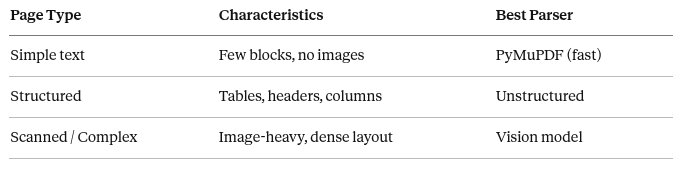
Simple Text pages are digitally-created PDFs where the text layer is clean and the layout is linear — think reports, articles, or plain contracts. There are no embedded images, minimal formatting, and the reading order maps directly to the byte stream. PyMuPDF handles these in milliseconds with zero API cost, making it the default first choice for high-volume pipelines.
Structured pages contain meaningful layout elements that plain text extraction would destroy: multi-column sections, header hierarchies, bullet lists, or tables where cell boundaries carry semantic meaning. A flat string of extracted characters would lose the relationship between a table header and its values, or collapse a two-column layout into an unreadable mix. Unstructured preserves these relationships by returning typed element objects — titles, tables, list items — that map cleanly into Markdown for LLM consumption.
Scanned / Complex pages have no embedded text layer at all (scanned documents, photographed invoices, hand-annotated forms) or contain a combination of diagrams, charts, and dense mixed content where spatial reasoning is required. Rule-based tools have no way to interpret pixels — they can only read the text stream. Vision models receive the page as an image and apply the same visual understanding a human would, correctly reading tables, inferring structure from whitespace, and handling handwritten annotations that OCR alone would mangle.
Example — Hybrid Router
# pip install pymupdf "unstructured[pdf]" anthropic
import os
from dataclasses import dataclass
from enum import Enum
import fitz
import anthropic
from unstructured.partition.pdf import partition_pdf

class Complexity(Enum):
    SIMPLE = "simple"
    STRUCTURED = "structured"
    COMPLEX = "complex"

@dataclass
class PageResult:
    page_number: int
    complexity: Complexity
    parser_used: str
    content: str

def classify_page(page: fitz.Page) -> Complexity:
    """
    Heuristically classifies a page's complexity to choose the right parser.
    Runs entirely locally using PyMuPDF - zero API cost.
    """
    blocks = page.get_text("blocks")
    text_blocks = [b for b in blocks if b[6] == 0]  # block_type 0 = text
    image_blocks = [b for b in blocks if b[6] == 1]  # block_type 1 = image
    total_text = page.get_text("text").strip()
    word_count = len(total_text.split())
    has_images = len(image_blocks) > 0
    is_dense = len(text_blocks) > 25
    is_sparse = word_count < 50 and not has_images
    # Scanned/image-dominated pages or extremely sparse pages -> vision
    if has_images and word_count < 100:
        return Complexity.COMPLEX
    # Many layout blocks or image + text mix -> structured parser
    if is_dense or (has_images and word_count >= 100):
        return Complexity.STRUCTURED
    # Low block count, plain text, no images -> fast local parser
    return Complexity.SIMPLE

def parse_simple_page(page: fitz.Page) -> str:
    return page.get_text("text").strip()

def parse_structured_page(pdf_path: str, page_number: int) -> str:
    """Uses Unstructured on a single-page subset (saves processing time)."""
    elements = partition_pdf(
        filename=pdf_path,
        strategy="fast",
        starting_page_number=page_number + 1,  # Unstructured is 1-indexed
        max_partition=page_number + 1,
    )
    return "\n".join(el.text for el in elements if el.text.strip())

def parse_complex_page_with_vision(pdf_path: str, page_number: int) -> str:
    """
    Falls back to Claude Sonnet 4.6 for image-heavy or scanned pages.
    Claude is the recommended vision parser for document extraction in 2026:
    its 200K context window, strong table extraction, and layout understanding
    outperform GPT-4o-mini for genuinely complex pages.
    Set ANTHROPIC_API_KEY in your environment before calling this.
    """
    import base64
    import tempfile
    from pathlib import Path
    import anthropic
    client = anthropic.Anthropic(api_key=os.environ.get("ANTHROPIC_API_KEY"))
    with fitz.open(pdf_path) as doc:
        page = doc[page_number]
        mat = fitz.Matrix(150 / 72, 150 / 72)
        pix = page.get_pixmap(matrix=mat)
        with tempfile.NamedTemporaryFile(suffix=".png", delete=False) as tmp:
            pix.save(tmp.name)
            tmp_path = tmp.name
    with open(tmp_path, "rb") as f:
        b64 = base64.b64encode(f.read()).decode("utf-8")
    Path(tmp_path).unlink(missing_ok=True)
    message = client.messages.create(
        model="claude-sonnet-4-6",
        max_tokens=2048,
        messages=[
            {
                "role": "user",
                "content": [
                    {
                        "type": "image",
                        "source": {
                            "type": "base64",
                            "media_type": "image/png",
                            "data": b64,
                        },
                    },
                    {
                        "type": "text",
                        "text": (
                            "Extract all text and structure from this document page as Markdown. "
                            "Preserve headings, tables (as Markdown tables), and bullet points. "
                            "Return only the extracted content."
                        ),
                    },
                ],
            }
        ],
    )
    return message.content[0].text

def hybrid_parse(pdf_path: str) -> list[PageResult]:
    """
    Main entry point: classifies each page and routes to the appropriate parser.
    Returns a list of PageResult objects with content and metadata.
    """
    results = []
    stats = {c: 0 for c in Complexity}
    with fitz.open(pdf_path) as doc:
        for page_num, page in enumerate(doc):
            complexity = classify_page(page)
            stats[complexity] += 1
            if complexity == Complexity.SIMPLE:
                content = parse_simple_page(page)
                parser = "PyMuPDF"
            elif complexity == Complexity.STRUCTURED:
                content = parse_structured_page(pdf_path, page_num)
                parser = "Unstructured"
            else:  # COMPLEX
                content = parse_complex_page_with_vision(pdf_path, page_num)
                parser = "GPT-4o-mini Vision"
            results.append(PageResult(
                page_number=page_num + 1,
                complexity=complexity,
                parser_used=parser,
                content=content,
            ))
            print(f"  Page {page_num + 1}: {complexity.value} → {parser}")
    print(f"\n[Hybrid] Summary: {stats[Complexity.SIMPLE]} simple, "
          f"{stats[Complexity.STRUCTURED]} structured, "
          f"{stats[Complexity.COMPLEX]} complex")
    return results

if __name__ == "__main__":
    FILE = "sample.pdf"
    pages = hybrid_parse(FILE)
    for page in pages:
        print(f"\n{'='*60}")
        print(f"Page {page.page_number} [{page.parser_used}]")
        print(f"{'='*60}")
        print(page.content[:500])
This pipeline guarantees:
- Speed for simple, text-only pages (zero API calls)
- Structure for tables and multi-section layouts (Unstructured)
- Accuracy for scanned or image-dominated pages (vision model)
- Cost control by routing to expensive models only when necessary
Structuring Output for AI Systems
Raw parsed text, however clean, is rarely fed directly into an LLM. It needs to be chunked into semantically meaningful units that fit context windows and preserve enough surrounding context for retrieval to work well.
MarkdownHeaderTextSplitter from LangChain splits on heading hierarchy, keeping each section self-contained — critical for search relevance and answer quality.
Example — Semantic Chunking
# pip install langchain-text-splitters
from langchain_text_splitters import MarkdownHeaderTextSplitter

def chunk_markdown(md_text: str) -> list[dict]:
    """
    Splits a Markdown document into semantically meaningful chunks
    based on heading hierarchy. Returns a list of dicts with
    content and metadata (which headers the chunk lives under).
    """
    splitter = MarkdownHeaderTextSplitter(
        headers_to_split_on=[
            ("#", "h1"),
            ("##", "h2"),
            ("###", "h3"),
        ],
        strip_headers=False,  # Keep headers in chunk text for context
    )
    chunks = splitter.split_text(md_text)
    return [
        {
            "content": chunk.page_content,
            "metadata": chunk.metadata,
        }
        for chunk in chunks
    ]

def chunk_with_size_limit(md_text: str, max_chars: int = 1500) -> list[dict]:
    """
    Adds a character limit per chunk on top of header-based splitting.
    Useful when feeding chunks directly into an embedding model
    with a token limit (e.g., text-embedding-3-small: 8191 tokens).
    """
    from langchain_text_splitters import RecursiveCharacterTextSplitter
    # First split by headers to preserve semantic boundaries
    header_chunks = chunk_markdown(md_text)
    # Then apply size limit within each header-based chunk
    char_splitter = RecursiveCharacterTextSplitter(
        chunk_size=max_chars,
        chunk_overlap=150,  # Small overlap preserves sentence continuity
        separators=["\n\n", "\n", ". ", " "],
    )
    final_chunks = []
    for hchunk in header_chunks:
        sub_chunks = char_splitter.split_text(hchunk["content"])
        for sub in sub_chunks:
            final_chunks.append({
                "content": sub,
                "metadata": hchunk["metadata"],
            })
    return final_chunks

if __name__ == "__main__":
    sample_md = """
# Introduction to Document Parsing
Document parsing converts unstructured files into machine-readable data.
## Traditional Parsers
PyMuPDF and PyPDF2 extract text from the byte stream of a PDF.
They are fast but layout-unaware.
### PyMuPDF Example
PyMuPDF uses the MuPDF C library under the hood.
It can also extract images, links, and annotations.
## RAG-Optimized Parsers
Unstructured and LlamaParse produce typed element objects.
These map cleanly to Markdown for LLM context windows.
"""
    print("=== Header-based chunks ===")
    chunks = chunk_markdown(sample_md)
    for i, c in enumerate(chunks, 1):
        print(f"\nChunk {i} | Metadata: {c['metadata']}")
        print(c["content"][:300])
    print("\n=== Size-limited chunks ===")
    small_chunks = chunk_with_size_limit(sample_md, max_chars=200)
    for i, c in enumerate(small_chunks, 1):
        print(f"\nChunk {i} ({len(c['content'])} chars) | {c['metadata']}")
        print(c["content"])
Choosing the Right Strategy: A Decision Guide
Is the PDF scanned or image-heavy?
  YES → Vision model (GPT-4o / GPT-4o-mini)
  NO  ↓
Does it contain tables, multi-column layouts, or structured sections?
  YES → Unstructured (strategy="fast" or "hi_res")
  NO  ↓
Is it plain digital text at high volume?
  YES → PyMuPDF (fastest, fully local)
Building a production pipeline with mixed document types?
  → Hybrid Router (classify per page, route to best parser)
Final Perspective
Document parsing is no longer about extracting text — it is about preserving structure, understanding semantics, and producing outputs that AI systems can reason over reliably.
Traditional parsers give you speed and cost-efficiency at scale. RAG-optimized tools give you structure that maps cleanly to vector databases and retrieval systems. Vision models give you understanding that survives scans, hand-written notes, and exotic layouts. And hybrid pipelines give you all three, applied intelligently to each page.
The real competitive advantage in modern AI systems is not which parser you use — it is building the routing logic that picks the right one. Start simple, profile your document corpus, and add complexity only where your accuracy metrics demand it.
메타데이터
- post_id
- 40a97b0101bf
- slug
- document-parsing-in-the-age-of-ai-from-static-extraction-to-intelligent-understanding-40a97b0101bf
- url
- https://medium.com/ai-mindset/document-parsing-in-the-age-of-ai-from-static-extraction-to-intelligent-understanding-40a97b0101bf
- canonical_url
- https://medium.com/ai-mindset/document-parsing-in-the-age-of-ai-from-static-extraction-to-intelligent-understanding-40a97b0101bf
- author_url
- https://medium.com/@eng.fadishaar
- status
- ok
- fetched_at
- 2026-06-09 15:37:30