DrHook — The UM / UKCA Profiling Tool
Dr Hook (no not the 1960s rock band!) is the met office’s profiling tool. In this post, we describe the general setup of this and how to…
4. Dr.Hook — The UM / UKCA Profiling Tool
Dr Hook (no not the 1960s rock band!) is the met office’s profiling tool. In this post, we describe the general setup of this and how to enable it. As it turns out you need either the Cray or Intel compiler to run this, so select a run suitable for it!
Photo by Saffu on Unsplash
Setup from Rose
To set up we can load rosie go and select a suitable suite (A CCE or Intel compiled one). Alternatively, we may use the rosie edit command from the command line.
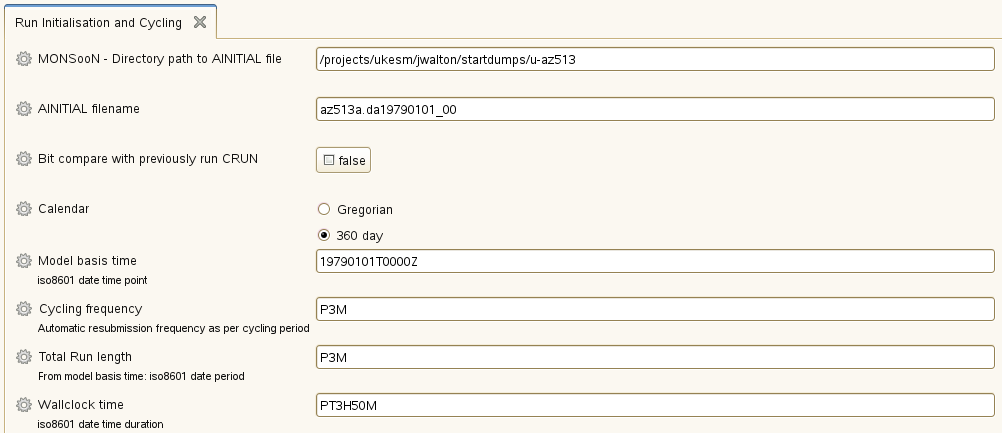
We can then enable DrHook using the instructions below:
fcm_make_um
Under the **fcm_make_um title we have an `env** andbasic compilation` tabs.
- Within this, we can find a
drhookoption which we can change to “on” - Similarly, we want to delete the contents of the
prebuildoption above it.
um
Similarly under the um tab we also have an env and Dr Hook Settings panel.
- Here we also set this as “on”
- and select the relevant profiling outputs as required.
Profile Output
In general the drhook.prof* files are found with the model output in the cylc folder, followed by the run name. After this we navigate the work up until we reach the atmos directory. For the UKCA tutorial the full path was:
~/cylc-run/u-bx564/work/1/atmosHere we can see a number of drhook.prof files.
ATMOSCNTL drhook.prof.12 drhook.prof.24 drhook.prof.36IDEALISE drhook.prof.13 drhook.prof.25 drhook.prof.4IOSCNTL drhook.prof.14 drhook.prof.26 drhook.prof.5RECONA drhook.prof.15 drhook.prof.27 drhook.prof.6SHARED drhook.prof.16 drhook.prof.28 drhook.prof.7SIZES drhook.prof.17 drhook.prof.29 drhook.prof.8STASHC drhook.prof.18 drhook.prof.3 drhook.prof.9atmos.stash drhook.prof.19 drhook.prof.30 history_archiveatmos.xhist drhook.prof.2 drhook.prof.31 pe_outputatmosa.pa19810901_00 drhook.prof.20 drhook.prof.32 rose-app-run.confdrhook.prof.1 drhook.prof.21 drhook.prof.33 seedfilesdrhook.prof.10 drhook.prof.22 drhook.prof.34 windmax.datdrhook.prof.11 drhook.prof.23 drhook.prof.35We wish to copies these for processing we can use…
NOTE as tunnelling and SCP does not seem to work for me at the time of writing, I used a curl push to google drive for the log files :
Missing Profiles
You may find files which have the dr hook handle added to a module, but not the subroutines within it. Here each section needs its own zhook_handle and the code will crash without it.
REAL(KIND=jprb) :: zhook_handleThe diagnostic is to search for the word “hook” in the error logs. As with most debugging it is likely that the last routine run is the culprit — although not necessarily.
If you find one of these errors, it's likely that someone else has already created a branch to fix it. Hence, it's worth going to the trunk and see if the code has been changed - and if so look at the log history to determine which branch made the change. You should then add this branch to your code. (see documentation from Mark Stringer below)
DrHook Visualisation tool
— under development —
Useful Links
[embed]
[embed]
메타데이터
- post_id
- 40f227e54888
- slug
- drhook-the-um-ukca-profiling-tool-40f227e54888
- url
- https://medium.com/cemac/drhook-the-um-ukca-profiling-tool-40f227e54888
- canonical_url
- https://medium.com/cemac/drhook-the-um-ukca-profiling-tool-40f227e54888
- author_url
- https://medium.com/@daniel-ellis
- status
- ok
- fetched_at
- 2026-06-09 21:21:26