Splunk’s BOTSv3 — Topology
I loaded up the data in a Splunk instance I installed myself, then answered the questions. I picked BOTSv3 because it had more logs that I…
Splunk’s BOTSv3 — Topology
I loaded up the data in a Splunk instance I installed myself, then answered the questions. I picked BOTSv3 because it had more logs that I haven’t used, like AWS, Symantec…
After completing the MYDFIR Forge’s Splunk 101 course, I decided to pick BOTSv3 as my final SOC project instead of simulating attacks in my own environment. I wanted the challenge of not being familiar with the data, rather than running attacks, generating limited logs, and investigating them.
I wanted to recreate the topology, to better understand what I was looking at.
The lab is complicated if you go in blind and you don’t try to list all the machines and their roles/services. In a real company you’d have all that information because they should document everything from the topology, to the inventory, the users, the roles… Everything should be accounted for and constantly updated to make the SOC and the IT dept’s jobs easier.
I first listed all the hosts with their sourcetypes before I started answering the questions. Some questions also revealed the roles of certain machines so I completed the topology as I was doing the exercises.
I first listed all of the hosts:
index="botsv3"| stats values(host)ABUNGST-L
BGIST-L
BSTOLL-L
BTUN-L
FROTHLY-FW1
FYODOR-L
JWORTOS-L
MKRAEUS-L
OD-FM-NA-i-0ad2d665d4bdace22.amazonaws.com
PCERF-L
SEPM
console.us.code42.com:443
gacrux.i-06fea586f3d3c8ce8
gacrux.i-0920036c8ca91e501
gacrux.i-09cbc261e84259b54
gacrux.i-0cc93bade2b3cba63
hoth
ip-172-16-0-109.ec2.internal
ip-172-16-0-127
ip-172-16-0-13
ip-172-16-0-145
ip-172-16-0-178
ip-172-31-12-76
ip-172-31-36-235
mars.i-08e52f8b5a034012d
matar
ntesla
serverless
splunk.froth.ly
splunkhwf.froth.lyHere’s my query to see the sourcetypes linked to each host:
index="botsv3" | stats values(sourcetype) by hostHere’s an example of the output:
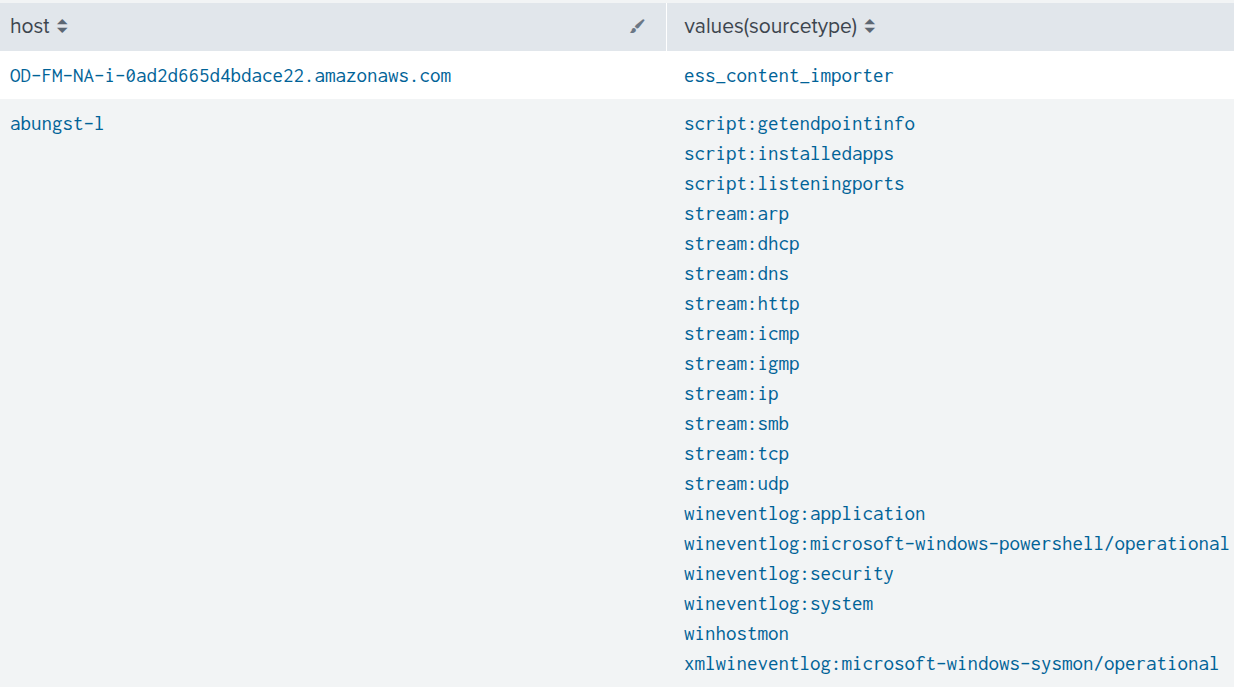
You can guess by the names and sourcetypes what some of these machines do.
Workstations (on-prem): abungst-l, bstoll-l, bgist-l, fyodor-l, jwortos-l, mkraeus-l, pcerf-l
Web servers (AWS): gacrux.i-06fea586f3d3c8ce8, gacrux.i-0920036c8ca91e501, gacrux.i-09cbc261e84259b54, gacrux.i-0cc93bade2b3cba63
EC2 instances (AWS): ip-172–16–0–109.ec2.internal, ip-172–16–0–127, ip-172–16–0–13, ip-172–16–0–145, ip-172–16–0–178, ip-172–31–12–76, ip-172–31–36–235
Firewall (on-prem): frothly-fw1
Symantec Endpoint Protection Manager (on-prem): SEPM
Insider Risk Management (IRM) + Data Loss Prevention (DLP) (cloud based): console.us.code42.com:443
Splunk-related: splunk.froth.ly (SaaS ingestion, on cloud), splunkhwf.froth.ly (Heavy Forwarder, on-prem)
Linux server (AWS): mars.i-08e52f8b5a034012d
Maybe imported logs(?), from APIs, Apps, etc.: serverless
Linux monitoring/telemetry aggregation server (host, system, hardware and network data) (on-prem): hoth
Linux server, network monitoring sensor (on-prem): matar
EC2 instance (AWS): OD-FM-NA-i-0ad2d665d4bdace22.amazonaws.com
Possible shadow IT device, IoT (Cloud VPC): ntesla
Here’s a simple diagram I made with draw.io:

Here’s the data flow which I didn’t add on this diagram to keep it simple and easy to read:
- Endpoint telemetry :
Internal network (windows endpoints) → SEPM → splunkhwf.froth.ly → splunk.froth.ly
- Linux server logs :
hoth,matar → splunkhwf.froth.ly → splunk.froth.ly
- Firewall telemetry :
frothly‑fw1 → splunkhwf.froth.ly → splunk.froth.ly
- Cloud workload logs:
AWS EC2 instances → splunk.froth.ly
- External SaaS traffic :
Windows endpoints → frothly‑fw1 → Internet → code42
Now it’s easier to understand the traffic expected from each machine and spot anomalies. I believe as a soc analyst you always need context before an investigation otherwise you won’t have a good overview. Knowing your network, the assets, the users is necessary otherwise you are operating blind.
메타데이터
- post_id
- 415c5c71b23d
- slug
- splunks-botsv3-topology-415c5c71b23d
- url
- https://medium.com/@itszensden/splunks-botsv3-topology-415c5c71b23d
- canonical_url
- https://medium.com/@itszensden/splunks-botsv3-topology-415c5c71b23d
- author_url
- https://medium.com/@itszensden
- status
- ok
- fetched_at
- 2026-07-14 09:24:11




